
This document will continue to evolve as existing sections change and new information is added. All updates appear in the following table:
| Date | Feature | Notes |
|---|---|---|
| 24 AUG 2018 | Connect Improvements | Updated document. Revised feature description. |
| 24 AUG 2018 | New Device Data | Updated document. Revised feature description. |
| 08 AUG 2018 | Created initial document. |
This guide outlines the information you need to know about new or improved functionality in the Oracle Responsys 18C Update. All Oracle Responsys updates are conducted without disruption to service, meaning no downtime. Refer to the Oracle Responsys Update Resource Center in the Responsys Insiders customer community for additional details about release dates.
Each section includes a brief description of the feature, the steps you need to take to enable or begin using the feature, any tips or considerations that you should keep in mind, and the resources available to help you.
GIVE US FEEDBACK
We welcome your comments and suggestions to improve the content. Please send us your feedback at omcdocumentation_ca@oracle.com.
This section gives you information to help you plan and use the features included in this release. We frequently update this document, so don’t forget to check back and get the latest information.
- Oracle Responsys Update Resource Center
- 18C Fixes and Known Issues
- Responsys Insiders (Customer Community)
- Oracle Responsys product documentation
| Action Required to Enable Feature |
||||
|---|---|---|---|---|
| Feature |
Automatically Available |
End User Action Required |
Administrator Action Required |
Oracle Service Request Required |
 |
||||
|
||||
|
||||
|
||||
Disable "Send to All" in App Channel List Option in Mobile App Channel Campaign Audiences |
|
|||
|
||||
|
||||
|
||||
|
||||
|
||||
CED Feed Enhancements for Interactive Notification Engagement Event |
|
|||
Set Expiration Dates for Supplemental Tables and Profile Extension Tables (PETs) |
|
|||
|
||||
|
||||
|
||||
|
||||
|
||||
|
||||
|
||||
|
||||
|
||||
|
||||
|
||||
|
||||
REST AFTM API: Support for retrieveListMember
Responsys now supports the retrieveListMember method in the REST AFTM API. To use this feature, your account must be enabled for Automatic Failover for Transactional Messaging (AFTM). Contact your Customer Success Manager for more information about AFTM.
Steps to Enable
No steps are required to enable this feature.
Key Resources
AFTM documentation is available on the Responsys Insiders community pages on Topliners. To view this page, you must have a Responsys Insiders login.
Enhancements to VMTA Settings Section
The VMTA settings page under Account > Campaign management has been updated so that, when new promotional or transactional IP addresses are added to the account, the administrator has the option to add decimal values in a percentage field to distribute small amounts of email volume through the newly added IP addresses until they are warmed up.

Configure Email Address to VMTA Mapping
The total percentages of Promotional Mappings must equal 100% and the total percentages of Transactional Mappings must equal 100%. Percentages can have up to 4 decimal values. By default, 100% of the traffic is sent to the default VMTA.
Steps to Enable
No steps are required to enable this feature.
SPAN Deliverability Scoring and Monthly Fee Details
You can now view monthly fee details and deliverability scores for the SMS Public Aggregator Network. SMS Aggregators participating in SPAN can now include two more additional details in the price and performance files that they upload: monthly fee details and the declared deliverability for the given plan. The Responsys platform runs a weekly job to compute the Oracle-derived deliverability for every plan based on the usage data available in Responsys. When you choose an aggregator, the computed derived deliverability data is displayed to you as a deliverability score for better decision making. If the computed metric is not available due to insufficient data, then the interface shows the aggregator-declared deliverability score, if provided.
Steps to Enable
This feature only applies if your account is enabled to use the SMS Partner Aggregator Network (SPAN). To have SPAN enabled for your account, log in to My Oracle Support and create a service request.
Key Resources
Visit our Help Center to learn more.
SPAN Delivery Receipt File View and Processing
SMS Aggregators participating in SPAN can now view a detailed description of every column in the Delivery Receipt file that they are expected to upload. For the selected aggregator, you can view each DR code and its categorization in SPAN, and you can also download the DR codes file. DR status code processing in Responsys will obey the categorization provided by the aggregator.
Steps to Enable
This feature only applies if your account is enabled to use the SMS Partner Aggregator Network (SPAN). To have SPAN enabled for your account, log in to My Oracle Support and create a service request.
Key Resources
Visit our Help Center to learn more.
Disable "Send to All" in App Channel List Option in Mobile App Channel Campaign Audiences
Customers will now have the option of disabling the "Everyone in the App Channel List" Audience selection option in Push and In-app Campaign Workbooks. When they do so, the Audience panel of Push and In-app Campaign Workbooks will not have the "Everyone in the App Channel List" option. The benefit to Marketers is that by disabling the "Everyone in the App Channel List" option, they can avoid accidental launches to all members of the App Channel List.
Steps to Enable
To disable this feature, please log in to My Oracle Support and create a service request.
Key Resources
Visit our Help Center to learn more.
Additional Standard Interactive Notifications
If Interactive Notifications is enabled for your account, 17 new Standard Interactive Notifications have been added to the original six, for a total of 23:
- Accept OR Decline (Decline Opens URL)
- Yes OR No (No Opens URL)
- Opt In OR Opt Out
- Opt In OR Opt Out (Opt Out Opens URL)
- Buy Now OR More Like This
- Buy Now OR Share
- Add to Wishlist OR More Like This
- Add to Wishlist OR Share
- Add to Cart
- Add to Cart OR Add to Wishlist
- Add to Cart OR More Like This
- Add to Cart OR Share
- More Like This
- Share
- Follow
- Go To Storefront
- Go To Storefront OR Follow
Steps to Enable
Your mobile app must be compiled with the 6.38 Oracle Responsys Mobile App Platform Cloud Service SDK to use the 17 new Standard Interactive Notifications.
Key Resources
Visit our Help Center to learn more.
PEM Expiration Notifications have been enhanced in order to provide you with more information. Additionally, Mobile App Developers can now send a test Push from the Mobile App Console to up to 10 Test Devices. This will enable Mobile App Developers to test their SDK integration against multiple test devices in a single test launch.
Steps to Enable
No steps are required to enable this feature.
Tips And Considerations
This feature only applies if Oracle Responsys Mobile App Platform Cloud Service is enabled for your account.
Key Resources
For more information, see the Oracle Responsys Mobile App Platform Cloud Service Developer's Guide.
Multi-Select of Filters in Express Campaigns
Users with the Express Email Campaign Manager role can now select multiple filters at once via the Select Audience express app.
Steps to Enable
No steps are required to enable this feature.
Key Resources
Visit our Help Center to learn more.
A few enhancements have been made to the My Tasks page:
- Express App Users can now filter tasks on the My Tasks page by organization and/or task type.
- Express Email Campaign Managers now see the organizational unit's timezone when they configure a Schedule under My Tasks.
- With content and campaign approval, you'll now see in Completed Tasks a field displaying the date the content or campaign was submitted for approval, and a field displaying who submitted it for approval.
Steps to Enable
No steps are required to enable this feature.
Key Resources
Visit our Help Center to learn more.
This feature provides the flexibility and power to obfuscate sensitive data in desired attributes which you specify during the set up of the feature. For example, you could designate email address, phone number, or street address in specific profile lists, profile extension tables, or supplemental tables for obfuscation in various parts of the Responsys application where sensitive data could be displayed in the user interface. Responsys does not redact any attributes by default, and you will have to explicitly specify all attributes containing sensitive data that must be redacted.
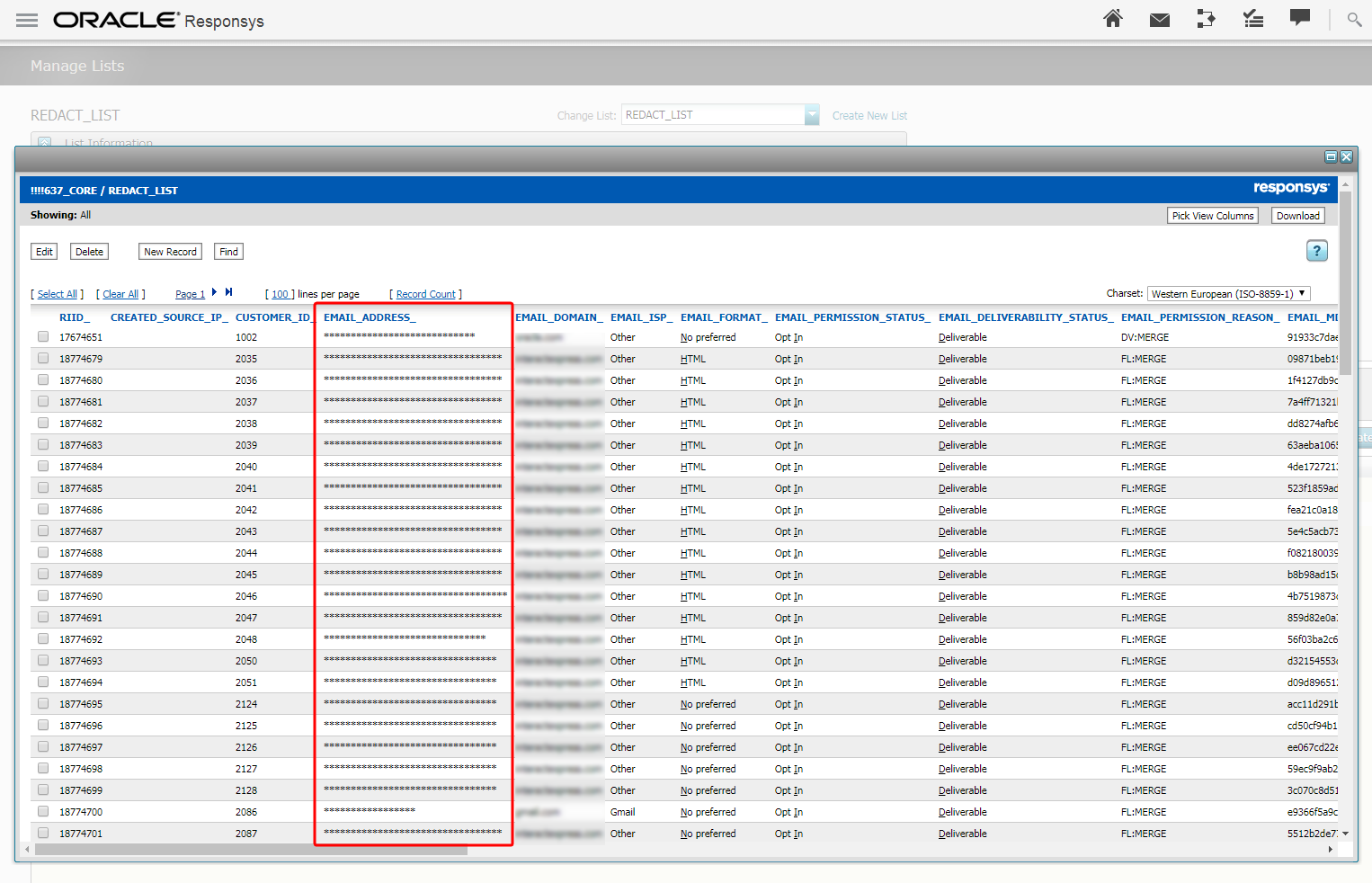
Data Redaction
Steps to Enable
The data redaction feature is currently released under our Controlled Availability program. To request access to this feature, please log in to My Oracle Support and create a service request.
Key Resources
Visit our Help Center to learn more.
CED Feed Enhancements for Interactive Notification Engagement Event
When Marketers launch Push Campaigns that use Interactive Notification buttons, the responses of their mobile app users are captured in Responsys as "Push Button Clicked" Events. Marketers can now choose to export "Contact Interaction Events for PUSH" of type "Button Clicked" using the "Export Feed Data" Connect Job Type. Once Marketers have exported this Event data, they can import the data into their systems and conduct detailed, custom analysis on app user responses to Interactive Notification buttons.
Steps to Enable
Your account must have the Interactive Notifications feature enabled to access this feature.
Key Resources
Visit our Help Center to learn more about how to create an export event data job and the type of event data that you can export. The document Exporting Contact Event Data Guide, available from the Guides section of the Help Center, provides more details about the data provided in the export file.
Set Expiration Dates for Supplemental Tables and Profile Extension Tables (PETs)
You can now set expiration dates for Supplemental Tables and Profile Extension Tables (PETs), and the table will be deleted on the expiration date. By default, both Supplemental Tables and PETs are set to "Never expires". If you choose an expiration date for the data source, the default setting is a date that is 90 days from the creation date, but you can choose a different expiration date.
Steps to Enable
No steps are required to enable this feature.
Key Resources
Visit our Help Center to learn more.
Responsys is moving to a new data framework that will allow us to detect a large number of devices and their attributes with improved accuracy. The new device data framework will enable Responsys to detect new devices quickly as they are introduced to the market. This will result in a reduction of devices that were not detectable in past. See the New Device Data FAQ here.
IMPORTANT: As a result of moving to a new device data framework, values of various device attributes such as operating system, browser, device type, browser type, and operating system vendor will be different from legacy device attribute values. New device attribute values will be displayed in reports and classic filters. The Device dashboard will also now reflect the new device data values. After 18C, administrators will not be able to add or remove legacy device attributes from the contact event data.
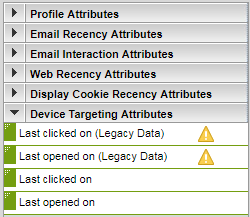
Legacy and New Device Data in the Classic Filter Designer
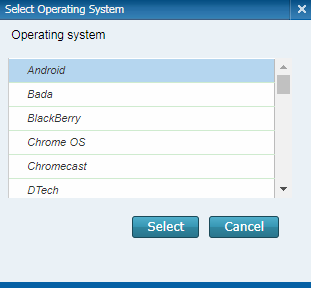
New Device Data in Classic Filters
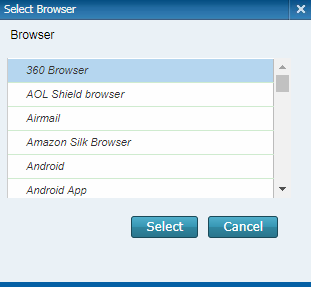
New Device Data in Classic Filters
Steps to Enable
In the 18C Update, new device data will be enabled in targeting and reporting for all the accounts except for those accounts that are currently receiving device data in CED feeds. New device data will be made available in CED exports in a future Update.
Analyze Audience Performance Improvement
Responsys now prevents you from running an Audience right after publishing it. Users now must wait a minimum of five (5) minutes after publishing before analyzing an Audience. This change will provide more reliable performance for customers who are analyzing an Audience. This impacts only customers whose accounts have Audience Designer enabled.
Steps to Enable
No steps are required to enable this feature.
Key Resources
Visit our Help Center to learn more.
In Program Design, you can now click the new Program Summary View button to see the configurations of each stage in your Program in one place. A stage's configurations can be edited directly from inside the Program Summary View, and you can toggle the view between the Draft and Published version of your Program.

Program Summary View
Steps to Enable
No steps are required to enable this feature.
Key Resources
Visit our Help Center to learn more.
A new role, Email Marketing Producer, can now be assigned to users. This role has the same permissions as Email Marketing Manager, except for the Edit Content permission that allows users to edit and save Content Library content. For example, the Email Marketing Producer cannot edit the campaign's main document, even within the Email Message Designer; however, campaign-specific rule resolution content may be edited and saved. This role is also restricted to editing content within a predefined Content Region in a campaign within the Email Message Designer.
In the Email Message Designer, a new Create Dynamic Content Region icon appears when you click on a region candidate. Clicking this icon will transform the region candidate into an empty dynamic content region and will open the Dynamic Content Editor. This new icon is only visible to users with Marketing Manager and Marketing Director roles.
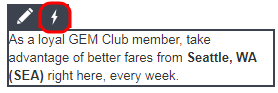
Create Dynamic Content Region Icon
Steps to Enable
No steps are required to enable this feature.
Key Resources
Visit our Help Center to learn more about the new Email Marketing Producer role and Create Dynamic Content Region icon.
Improved Dynamic Content Rule Condition Wording
When configuring conditions for Dynamic Content Rules, the wording for "Is less than or equal to" has been changed to "Is before or equal to," and the wording for "Is greater than or equal to" has been change to "Is after or equal to." The new wording more clearly reflects how these conditions work.
Steps to Enable
Your account must have the Email Message Designer enabled to see this change.
Key Resources
Visit our Help Center to learn more.
Object Relationship Navigator is an interactive feature that allows you to visualize how different objects such as Campaigns, Filters, Profile List, SQL and Join views, etc. are related to each other. This feature will strengthen your campaign troubleshooting skills by enabling you to find out what other objects are referenced in a Campaign. For instance, the Object Relationship Navigator will help you understand how the effect of updating a Filter rolls up to the different Campaigns that are utilizing it. You can view the relationship of an object from the Search results page and from the Manage Campaigns page.
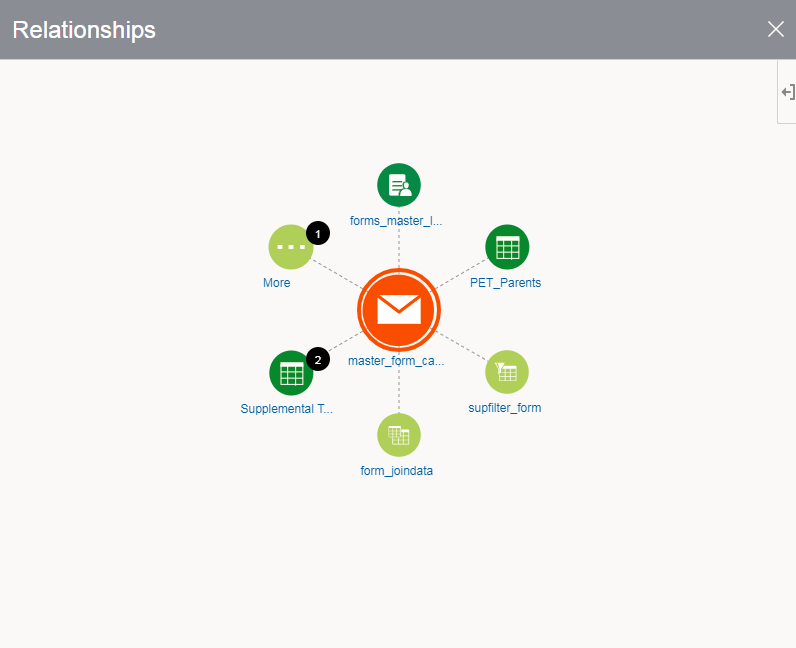
Object Relationship Navigator
IMPORTANT: The Object Relationship Navigator feature is currently under measured deployment and will be rolled out over time.
Steps to Enable
No steps are required to enable this feature.
Key Resources
Visit our Help Center to learn more.
The help link in the Responsys Mobile Web App has been updated to direct you to the correct Responsys Help Center link: https://docs.oracle.com/cloud/latest/marketingcs_gs/OMCEF/OracleResponsys_MobileCampaignMonitor_UserGuide.htm
Steps to Enable
No steps are required to enable this feature.
Account administration under Account has been updated to a more user-centric design that focuses on usability aspects such as search, hierarchical menus, and the option to discard changes. Note that parts of the menu have been reorganized and relabeled.
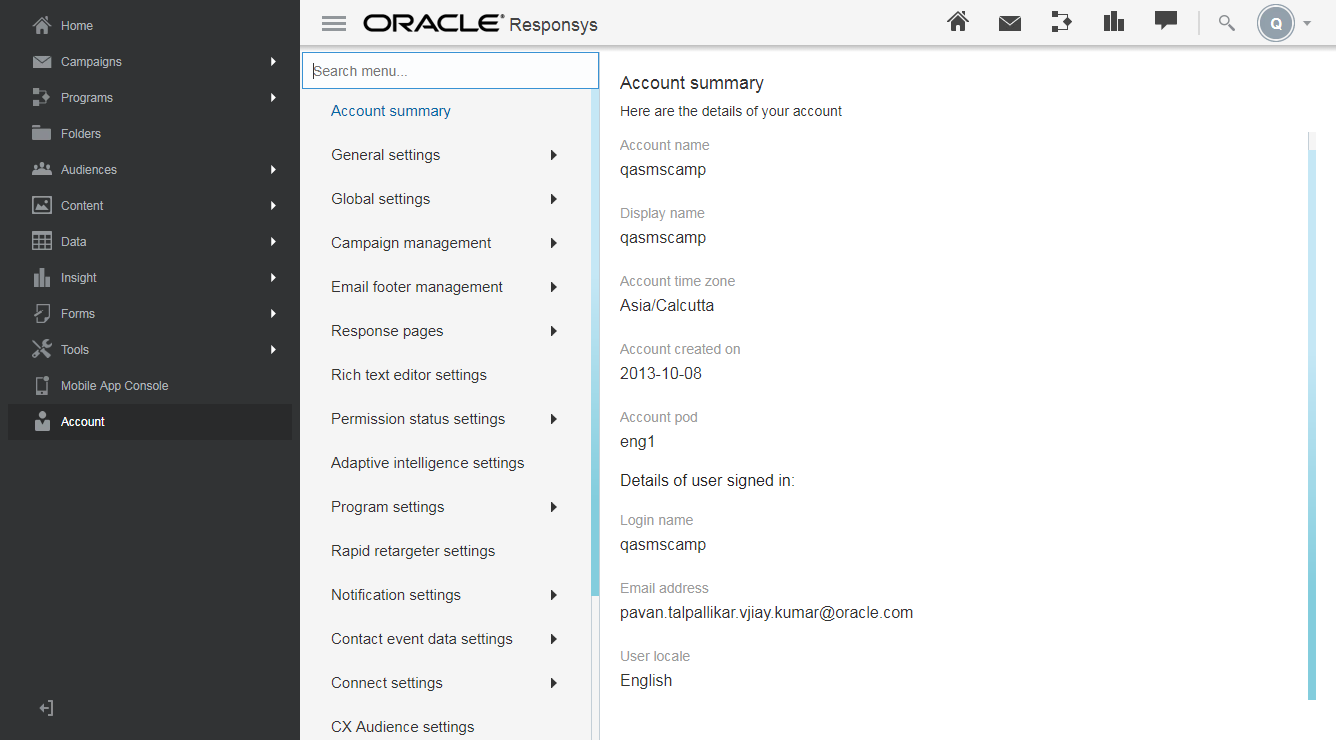
New Account Admin UI
Steps to Enable
No steps are required to enable this feature.
Key Resources
Visit our Help Center to learn more.
Responsys has new navigation for accessing Classic Email Templates functionality. Campaigns > Create from Template has been updated to Campaigns > Create from Classic Template. In Account, Define campaign templates has been updated to Define Classic Templates for Campaigns.
Steps to Enable
No steps are required to enable this feature.
Key Resources
Visit our Help Center to learn more.
Content Library User Interface Improvements
The Content Library's appearance has been redesigned with a new look and feel.

Content Library
Steps to Enable
No steps are required to enable this feature.
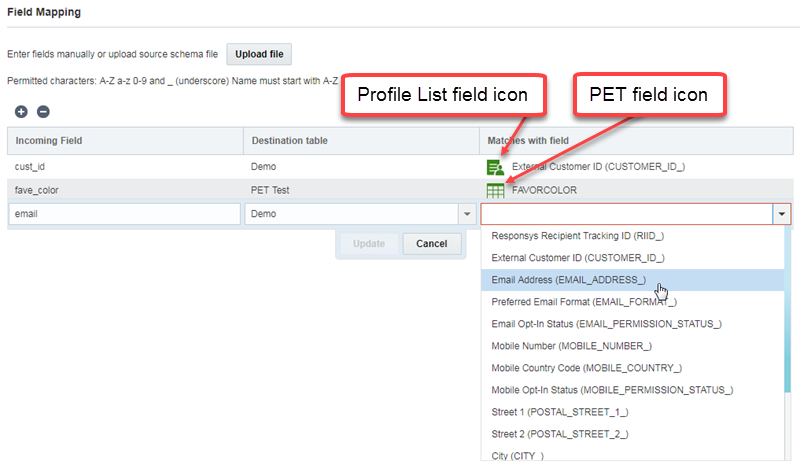
In Connect, you can now:
- Select multiple Connect jobs and delete them all with one button click.
- With the new icons, visually differentiate between Profile Extension Table (PET) and Profile List fields.
- On the Field Mapping page of Connect, select a target table and view all the fields that can be mapped.
Additionally, while exporting data using Connect, the Only export records inserted or updated since the time of the last job run option will now only be available for List (but for no other object).
Connect Improvements
Steps to Enable
No steps are required to enable this feature.
Key Resources
Visit our Help Center to learn more about selecting a target table on the Field Mapping page and about deleting multiple Connect jobs at once.
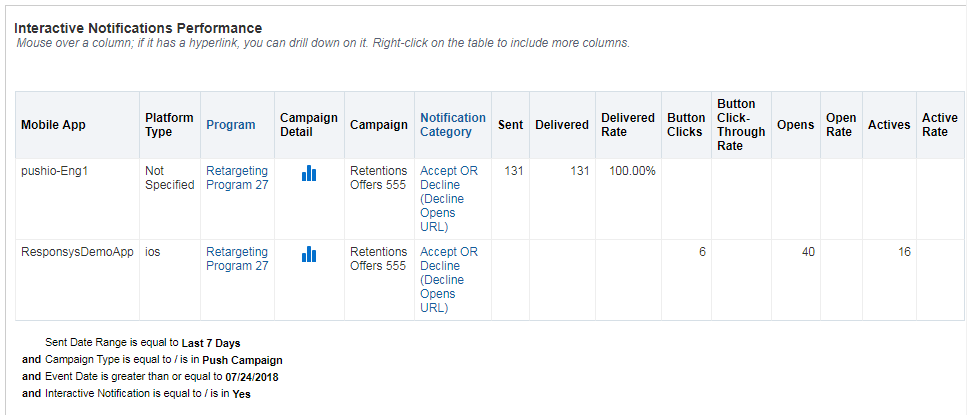
Reporting for Interactive Notifications
The new dashboard for Interactive Notifications allows you to evaluate the engagement on Push Campaigns that include Interactive Notification buttons.
Interactive Notifications Dashboard
Steps to Enable
You must have Interactive Notifications enabled for your account to see this feature.
---

Copyright © 2018, Oracle and/or its affiliates. All rights reserved.
This document is provided for information purposes only, and the contents hereof are subject to change without notice.This document is not warranted to be error-free, nor subject to any other warranties or conditions, whether expressed orally or implied in law, including implied warranties and conditions of merchantability or fitness for a particular purpose. We specifically disclaim any liability with respect to this document, and no contractual obligations are formed either directly or indirectly by this document. This document may not be reproduced or transmitted in any form or by any means, electronic or mechanical, for any purpose, without our prior written permission.
Oracle and Java are registered trademarks of Oracle and/or its affiliates. Other names may be trademarks of their respective owners.
Intel and Intel Xeon are trademarks or registered trademarks of Intel Corporation.All SPARC trademarks are used under license and are trademarks or registered trademarks of SPARC International, Inc. AMD, Opteron, the AMD logo, and the AMD Opteron logo are trademarks or registered trademarks of Advanced Micro Devices. UNIX is a registered trademark of The Open Group.
