
This document will continue to evolve as existing sections change and new information is added. All updates appear in the following table:
| Date | Feature | Notes |
|---|---|---|
| 14 FEB 2019 | New Device Data in Feeds | Updated document. Revised feature information. |
| 10 OCT 2018 | STO MVT Support | Updated document. Feature delivered in update 18D. |
| 10 OCT 2018 | New Device Data in Feeds | Updated document. Revised feature information. |
| 10 OCT 2018 | Visual Template Designer | Updated document. Revised feature information. |
| 14 SEP 2018 | Data Platform Enhancements | Updated document. Revised feature information. |
| 10 SEP 2018 | Created initial document. |
This guide outlines the information you need to know about new or improved functionality in the 18D update. All Oracle Responsys updates are conducted without disruption to service, meaning no downtime. Refer to the Oracle Responsys Update Resource Center for additional details about release dates.
DISCLAIMER
The information contained in this document may include statements about Oracle’s product development plans. Many factors can materially affect Oracle’s product development plans and the nature and timing of future product releases. Accordingly, this Information is provided to you solely for information only, is not a commitment to deliver any material, code, or functionality, and should not be relied upon in making purchasing decisions. The development, release, and timing of any features or functionality described remains at the sole discretion of Oracle.
This information may not be incorporated into any contractual agreement with Oracle or its subsidiaries or affiliates. Oracle specifically disclaims any liability with respect to this information. Refer to the Legal Notices and Terms of Use for further information.
Web Services REST API Enhancements
New REST APIs are available for performing the following functions:
- Get all fields or only primary key fields of a supplemental table.
- Retrieve multiple Profile List records with one API request.
- Delete multiple Profile List records with one API request.
- Delete multiple Profile Extension Table records with one API request.
Inline Help Text Added to Campaign Workbook and EMD
Info icons have now been integrated throughout the Campaign Workbook to provide key information and clarity while you are setting your campaign's configurations.
Workbook and EMD: UI Enhancements
The word Audience has been modified to Targeting in the following areas of Responsys:
- SMS Campaigns
- Push Campaigns
- In-App Campaigns
- Email Campaign Workbook
- Collaboration Process
- My Tasks
- Message Center
The appearance of the Folders landing page has been redesigned with a new look and feel. Additionally, holding down the Ctrl or Cmd key as you click on folders allows you to select more than one.
The following enhancements were made to the Manage Connect interface:
- To streamline the Manage Connect page, the Create Job and Create Group buttons were combined into a single control. Click the button to create a job, or select Create Group from the drop-down list.
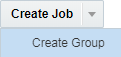
Combined Create Job and Create Group Control
- You can now distinguish the import and export jobs more clearly, because the icons will now be slightly different.
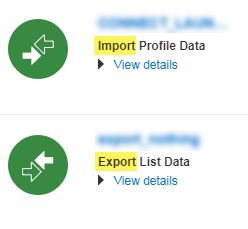
New Icons for Import and Export Jobs on the Manage Connect Page
Relationship Mapping Between Programs and Campaigns
With the Object Relationship Navigator, Responsys now captures the relationship between Programs, Profile Lists, and Campaigns. Get an overview of which Campaigns and Programs are using a specific Profile List, which Campaigns are being used in a specific Program, and in how many Programs a specific Campaign is used.
IMPORTANT: The Object Relationship Navigator feature is currently under measured deployment and will be rolled out over time. If you are interested in this feature, please contact Oracle Support. You will be able to view the relationship of Programs and Campaigns for a newly created Program or if a Program is edited. For other existing Programs, the relationship map will be updated as measured deployment takes place.
Users can now launch the Visual Template Designer to create email message templates without coding their own HTML. Instead, they can use the Visual Template Designer's drag-and-drop interface to design their templates and then create campaigns with them in the Email Message Designer. This feature is not accessible to users with the Email Marketing Producer role.
The Visual Template Designer feature is currently under measured deployment and will be rolled out over time. If you are interested in this feature, please contact Oracle Support.
CEC Asset Repository Integration
Users can now create and match a publishing channel in the Content and Experience Cloud (CEC) to either a mobile channel or an email channel in Responsys. This means that only assets that are published to a specific channel in CEC will be accessible from the matching channel in Responsys. For example, if you create a publishing channel in CEC called "Corporate" and match it to your email channel in Responsys, the only CEC assets that you will see in the Email Message Designer will be from the "Corporate" channel.
IMPORTANT: This feature is currently released under our Controlled Availability program. To request access to this feature, please log in to My Oracle Support and create a service request.
In Responsys, users can now create one-way broadcast Long Messaging Service (LMS) campaigns within the current SMS framework. To have this feature enabled, log in to My Oracle Support and create a service request.
Mobile App Marketers will now have access to a new Mobile App Campaigns format, Message Center. The Message Center Campaign Designer will enable Marketers to send messages directly to their mobile app users’ in-app Message Centers, without requiring an accompanying Push notification. This enables Marketers to launch Message Center campaigns to mobile app users, even if users have opted-out of receiving Push notifications.
IMPORTANT: This feature is being released under controlled availability. To request access to this feature, please log in to My Oracle Support and create a service request. You also must update your mobile app to the 18C / 6.37.0 Responsys SDK or later for this feature.
Audiences from CX Audience as First-Class Objects in Campaigns
Audiences in CX Audience can now be imported to Responsys, and users will be able to access and use these audiences in Campaigns.
IMPORTANT: Access to CX Audience is required to use this feature.
Link Tracking and External Tracking for Push, In-App Campaigns
The Link Tracking user interface has been enhanced for the Push and In-app Message Designers. Instead of having to perform manual steps to create, upload, and select the link tracking file, Marketers can click the Link Tracking button and choose to generate the link table. If they generate the link table, links present in the creative content are added to the Link Tracking table.
Whether the link table is selected or generated, Marketers will now also be able to use External Tracking for their Destination URLs that are included in the Link Table. This change brings the External Tracking support in Push and In-app Message Designers on par with that of the Email Message Designer. The feature is also present in the Message Center Designer.
Contribute Content Express-App - Preview
Users with the Express Email Campaign Manager role can now preview a campaign when in a Submit Content task.
The Collaboration Canvas and My Tasks page now include Send Proof. With this event, local marketers can proof launch, review proof e-mails, and take further action as needed.
Pre-Seed Process with Send Proof Step
You can now find a draft Collaboration Process in Responsys to use as a reference when creating your own Process. This draft Process includes the new Send Proof event.
SPAN One Way Bulk Route: Mandatory Sender Name
The following modifications to SPAN One Way Bulk have been made:
- The Sender name is now mandatory when clicking Order in a Customer ON account or when clicking Complete Order for an Aggregator ON account.
- Hyphens are now supported for the Sender name column.
IMPORTANT: This feature only applies if your account is enabled to use the SMS Partner Aggregator Network (SPAN). To have SPAN enabled for your account, log in to My Oracle Support and create a service request.
Recording Push Notification Permission Status for Android App Users in Responsys
The Android SDK now captures Push Notification Permission Status for mobile app users and communicates it to Responsys. This ensures that for each app installation on an Android device, the latest Push Notification Permission Status is reflected in the CHANNEL_PERMISSION_STATUS_ column of the App Channel List.
IMPORTANT: You must update your mobile app to the 18D / 6.39.0 Responsys SDK for this feature.
The back-end infrastructure for In-app Campaigns has been redesigned to make In-app Campaigns more effective for Marketers. Customers that are enabled for this feature can realize the following benefits:
- Size of the Rich HTML creative content used in In-app Campaigns is no longer limited to 3.5 KB.
- In-app messages will be delivered to mobile apps on iOS devices, even if the mobile app has been "Force Quit” by the mobile app user.
IMPORTANT: This feature is being released under our Controlled Availability program. To request access to this feature, please log in to My Oracle Support and create a service request. To enable this feature, you also must update your mobile app to use the 18D/6.39.0 Responsys SDK.
SMS - Setting & Options in Send SMS Activity
In Program, the Send SMS Campaign element's dialog now allows you to configure progress and failure notifications and to enable the Apply launch throttling as defined in the campaign option.
STO Event Flow 30-Day Lookback
For new Send Time Optimization (STO) clients, the algorithm will consider all available event data dating back as far as 30 days for its initial calculation.
Program Summary View with Diff
In the Program Summary View, you can now use a new view called Diff that provides a side by side comparison of your Draft and Published version of your Program.
Audiences from CX Audience as First-Class Objects in Program
Audiences in CX Audience can now be imported to Responsys, and users will be able to access and use these audiences in Program.
IMPORTANT: Access to CX Audience is required to use this feature.
Send Time Optimization (STO) will now support the ability to connect to a Multivariate Testing (MVT) stage in Program.
IMPORTANT: This feature is being released under controlled availability. To request access to this feature, please log in to My Oracle Support and create a service request.
Push Behavioral Filters Enhancements for Interactive Notification Engagement Event
A new Push Recency Attribute has been added to Responsys filters: Last Push Button click date.
The following improvements have been made for Data Applications:
- For the Export Data and Export Feed Data jobs, users can now select multiple public keys when selecting Compress and encrypt files with PGP/GPG option.
- The number of Supplemental Tables per account now has a default limit of 250. This is restricted both when importing folders and when creating Supplemental Tables using the Responsys user interface.
The following improvements have been made for Data Platforms:
- Passing of emoji characters in a subject line to Omniture was failing; accounts can request to have emoji characters skipped during export.
- Responsys now supports empty count files in Connect.
- For the Saleforce integration, the member status table is now updating for sent, skipped, bounced, and open events.
Populate CUSTOMER_ID in All Opted Out Events in CED Feeds
All Opted out events provided in the CED feeds now will have CUSTOMER_ID populated if a value is defined for CUSTOMER_ID_ in the Profile List at the time that the event is fired.
In 18C, Responsys moved to a new data framework that allowed us to detect a large number of devices and their attributes with improved accuracy. This new data framework has now been applied to CED Feeds for 18D. The new device data framework enables Responsys to detect new devices quickly as they are introduced to the market. This results in a reduction of devices that were not detectable in past.
As a result of moving to a new device data framework, values of various device attributes such as operating system, browser, device type, browser type, and operating system vendor will be different from legacy device attribute values.
See the New Device Data FAQ here.
IMPORTANT: The New Device Data in CED Feeds feature is currently released under our Controlled Availability program. To request access to this feature, please log in to My Oracle Support and create a service request.
---

Copyright © 2018, 2019, Oracle and/or its affiliates. All rights reserved.
This document is provided for information purposes only, and the contents hereof are subject to change without notice.This document is not warranted to be error-free, nor subject to any other warranties or conditions, whether expressed orally or implied in law, including implied warranties and conditions of merchantability or fitness for a particular purpose. We specifically disclaim any liability with respect to this document, and no contractual obligations are formed either directly or indirectly by this document. This document may not be reproduced or transmitted in any form or by any means, electronic or mechanical, for any purpose, without our prior written permission.
Oracle and Java are registered trademarks of Oracle and/or its affiliates. Other names may be trademarks of their respective owners.
Intel and Intel Xeon are trademarks or registered trademarks of Intel Corporation.All SPARC trademarks are used under license and are trademarks or registered trademarks of SPARC International, Inc. AMD, Opteron, the AMD logo, and the AMD Opteron logo are trademarks or registered trademarks of Advanced Micro Devices. UNIX is a registered trademark of The Open Group.
