
This document will continue to evolve as existing sections change and new information is added. All updates are logged below, with the most recent updates at the top.
| Date |
What's Changed |
Notes |
|---|---|---|
| 29 MAR 2017 |
Initial Document Creation |
This guide outlines the information you need to know about new or improved functionality in Oracle Responsys’ 6.32 April 2017 Release and describes any tasks you might need to perform for the update. Each section includes a brief description of the feature, the steps you need to take to enable or begin using the feature, any tips or considerations that you should keep in mind, and the resources available to help you.
This section gives you information to help you plan and use the features included in this release. We frequently update this document so don’t forget to check back and get the latest information.
- Oracle Responsys 6.32 April 2017 Release Fixes and Known Issues
- Responsys Insiders (Customer Community)
- 6.32 Release Feature Availability
Some of the new features are automatically available to users after the upgrade and some require action from the user, the company administrator, or Oracle.
The table below offers a quick view of the actions required to enable each of the features.
| Action Required to Enable Feature |
||||
|---|---|---|---|---|
| Feature |
Automatically Available |
End User Action Required |
Administrator Action Required |
Oracle Service Request Required |
| Mobile |
||||
|
|
|
|||
| Program |
||||
|
|
||||

Media Attachments in IOS 10 Push Notifications
iOS 10 provides a rich multimedia interface to notifications by enabling display of image, audio, and video in the expanded notifications view. This new iOS 10 feature is similar to the existing Big Picture Notifications format in Android, with the added support for audio and video files.
Media Attachments in iOS notifications provide several benefits:
- User Engagement
You can include a relevant image, audio, or video along with the notification text to better engage users outside of the app.
- Preview of In-app experience
Users can preview what is to follow within the App if they open the notification.
To launch Push campaigns with iOS Media Attachments, we enhanced the Push Message Designer to allow you to specify and preview the iOS Media Attachment URL. The Media Attachment URL must be an https URL.
App developers must integrate their app with Push.IO SDK Version 6.32.0 or higher.
For details about integrating with the PushIO SDK, please see https://docs.oracle.com/cloud/latest/marketingcs_gs/OMCFB
Supported File Types and Sizes
Media Attachments support the following file types and file sizes.
| Media Type |
Supported File Types |
Official iOS Size Limits |
Observed Size Limits |
| Image |
jpg, jpeg, gif, png |
10 MB |
2 MB |
| Audio |
mp3, m4a |
5 MB |
500 KB |
| Video |
mpg,mpeg,m75,m15,mp4 |
50 MB |
2 MB |
While Apple has specified official size limits for media attachments, testing shows that successful download of the media on a user’s device depends on the quality of the device’s data network. The Observed Size Limits column shows the size limit observed during testing.
Steps to Enable
- To specify a file, enter its URL in the Settings dialog.

- To preview the URL, click
 , then select the platform you want in the Message Preview dialog.
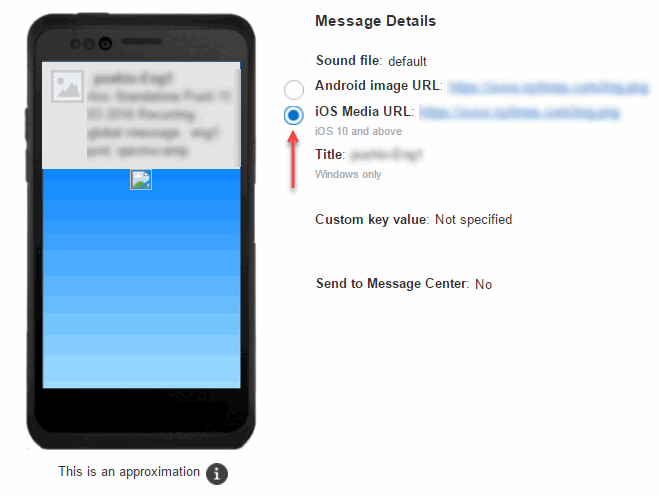
Push Notification Preview in the Push Campaign Designer
The Push Notification Preview in the Push Campaign Designer now displays all Push notification and Message Center message settings, as well as custom key/value pairs.

Hourly Multivariate Testing (MVT)
With this release, you can schedule MVT with hourly durations. This allows running a Multivariate Test for the duration of 1-23 hours.
Note that hourly tests are limited to one test a day per campaign within a program stage. This means that although all scheduled tests will run, results will be accurate only for the first test. However, you can test several campaigns within a program, and you can test the same campaign in multiple programs.
Steps to Enable
- In the Multivariate testing section of the Send email campaign activity dialog, specify the duration in hours.

---

Copyright © 2017, Oracle and/or its affiliates. All rights reserved.
This document is provided for information purposes only, and the contents hereof are subject to change without notice. This document is not warranted to be error-free, nor subject to any other warranties or conditions, whether expressed orally or implied in law, including implied warranties and conditions of merchantability or fitness for a particular purpose. We specifically disclaim any liability with respect to this document, and no contractual obligations are formed either directly or indirectly by this document. This document may not be reproduced or transmitted in any form or by any means, electronic or mechanical, for any purpose, without our prior written permission.
Oracle and Java are registered trademarks of Oracle and/or its affiliates. Other names may be trademarks of their respective owners.
Intel and Intel Xeon are trademarks or registered trademarks of Intel Corporation. All SPARC trademarks are used under license and are trademarks or registered trademarks of SPARC International, Inc. AMD, Opteron, the AMD logo, and the AMD Opteron logo are trademarks or registered trademarks of Advanced Micro Devices. UNIX is a registered trademark of The Open Group.
