| |
 |
SEPTEMBER 2018
|
|
|
| |
| |
Your Monthly PaaS Updates |
|
| |
|
| |
Oracle PaaS Partner Community Newsletter
September 2018
|
|
|
 |
|
| |
| |
 |
Table of Contents |
|
Announcements & Community Section |
| > |
PaaS Partner Community Reception at Oracle OpenWorld 2018 |
| > |
Innovate, Extend and Integrate SaaS Overview and Pricing - PaaS Partner Community Webcast – September 18th 2018 |
| > |
PaaS Partner YouTube Update September 2018 |
| > |
PaaS Summer Camp 2018 training material |
| > |
Innovate & Integrate and Extend SaaS Bootcamps |
| > |
Oracle Developer Meetups in Utrecht, Brussels, London, Lisbon, Madrid, Cologne and Oslo |
| > |
PaaS free trial accounts ICS, SOA CS, API CS, PCS, IoT and PaaS for SaaS |
|
Integration Section |
| > |
API Gateway SSL configuration in Production |
| > |
Now available: Cloud Integration & API Management for Dummies, 2nd Edition |
| > |
Download and Run Connectivity Agent Oracle Integration Cloud (OIC) |
| > |
How to use Litmus to create OIC Integration unit tests automatically and run them to catch regressions |
| > |
Scaling Autonomous Oracle Integration Cloud |
| > |
OIC Integration 101 Part V - Social adapters - Facebook and Twitter |
| > |
How to enable and use Tracing in less than 5 min |
| > |
Migrate Integration Cloud Service (ICS) Integrations to Integration Cloud (OIC) |
| > |
OIC integration with Fusion HCM & the efficacy of BI reports & HCM REST APIs |
| > |
Leverage Microsoft Email Adapter to send email using Oracle Integration Cloud (OIC) (Part-1) |
| > |
Lift and Shift SOA 11G to Oracle SOA Cloud Service |
| > |
Road to Oracle Cloud |
| > |
UiPath leverages Oracle Cloud Platform for Robotic Process Automation |
| > |
SOA Suite on containerized platform - Docker |
|
Business Process Management Section |
| > |
Evolution of Business Process Modeling |
| > |
OIC Process & VB CS Part 3 - Starting a Process and Workspace |
| > |
Building your First VBCS Application |
|
Architecture & User Experience & Innovation Section |
| > |
Introducing Oracle Autonomous Blockchain Cloud Service on-demand webcast |
| > |
Call for papers OUGN Spring Conference 2019 |
|
Additional new material PaaS Community |
| > |
Top tweets PaaS Partner Community – September 2018 |
| > |
Training Calendar PaaS Partner Community |
| > |
My private Corner a week full of hands-on training and networking |
|
|
|
| |

| |
Announcements & Community Section |
|
|
|
|
| |

You are invited to join our traditional PaaS Partner Community Reception at OpenWorld. The Reception will be held on Monday October 22nd 2018 in San Francisco! Don't miss this unique opportunity to:
- Network and exchange information with fellow Oracle Middleware & PaaS Partners
- Meet with members of the Global Oracle Middleware & PaaS Product Management team and Oracle EMEA Alliances and Solutions Partner Programs team
- Learn more about Oracle OpenWorld activities
Schedule: Monday October 22nd 2018 18:30 (California time)
For details please visit the registration page here.
Back to top |
|
|
|
| |
| |

Attend our September edition of the PaaS Partner Community Webcast live on September 18th 2018 at 16:30 CET.
Innovate, Extend and Integrate SaaS pricing
You are working on Oracle SaaS implementations and want to integrate and extend them? In this webcast you will get an update on the latest PaaS pricing for SaaS customers.
Presenter:
Jon Huang
Senior Director Product Management
Visit the registration page here.
Call ID: 5566478 and Passcode: 258495
UK: +44 (0) 208 118 1001 &
United States: 140 877 440 73
More Local Numbers |
 |
Schedule:
Tuesday September 18th 16:30 - 17:30 CET
Visit the registration page here.
Missed our PaaS Partner Community Webcast? – watch the on-demand versions:
For the latest information please visit Community Updates Wiki page (SOA Community membership required).
Back to top |
|
|
|
| |
| |
|
|
| |
| |
|
|
| |
| |
|
|
| |
| |
Want to learn more about developing Enterprise-grade Cloud Native applications on the Oracle Cloud Platform, covering topics like Microservices Architecture, developing in Node, Python and PHP, using Low Code development tools to build Mobile apps, and much more? Join the Oracle Developer Meetup groups if you want to follow Oracle’s solutions in this area, or participate in the events and hands-on labs we organize:

Please let us know in case you want to run an event at one of this location or you want to start your local meetup. We are looking forward to support you and sponsor the event with pizza and beer!
Back to top |
|
|
|
| |
| |
|
|
| |
|
|
| |
Introduction
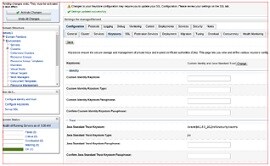
This blog provides steps to configure SSL certificate in Oracle API Gateway node’s trust store. It becomes necessary when API gateway in installed in “production” mode. Without SSL certificate you won’t able to deploy an API to gateway node, because in production mode gateway must communicate with APIP management tier over SSL. Another use-case is when backend service is SSL enabled.
- We will discuss both the scenarios in this blog.
- Configure certificate in gateway node for SSL based communication with APIP management tier
- Configure certificate in gateway node when API is consuming SSL enabled backend service.
Scenario#1 : When gateway is installed in Production mode (gatewayExecutionMode=”Production”), it communicates with APIP management tier over SSL.
There are certain configurations need to be done in gateway for successful SSL Handshake with management tier. Before we jump into the gateway configuration, let’s see types of certificates configured in management tier.
Mostly there are 2 types of Digital certificates configured in management tier.
(i) WebLogic Self-signed certificate (Provided by default as WebLogic “demo” certificate. Not recommended for Production environment)
(ii) Custom CA Signed certificate (It is recommended that you should replace WebLogic demo cert with CA signed cert for production usage) (To learn how to configure CA singed certificate you can refer A-team blog – http://www.ateam-oracle.com/api-platform-custom-host-name-and-certificate/)
Now, Let’s see kind of problems you may face in absence of certificate.
PROBLEM-1
- Once GW is installed & registered successfully to management tier, If you try to deploy an API on gateway it won’t get deployed and will remain in “waiting” state. If you check apics.log file in gateway node you are likely to see SSLHandshakeException as shown in snippet below. (apics.log file location –
/domain/gateway1/apics/logs). Read the complete article here.
Back to top |
|
|
|
| |
| |
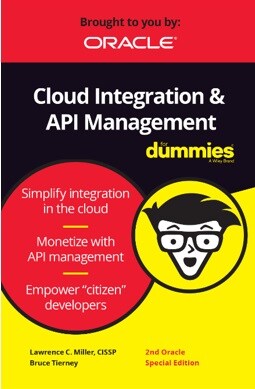
Your Cloud Integration and API Management just got easier with the 2nd Edition of Oracle’s Cloud Integration & API Management for Dummies.
Jumpstart your path to digital transformation with simplified cloud integration and API management. Check out the 2nd edition which includes the latest on blockchain integration, autonomous integration, self-service integration, and a look at the differences between app and data integration.
Read this guide and you will discover how to:
Back to top |
|
|
|
| |
| |
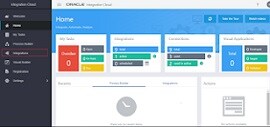
The Oracle On-Premises Agent i.e Connectivity Agent is required for Oracle Integration Cloud to communicate to on-premise applications. In ICS the connectivity agent was very heavy and agent installer was approximately 1.7 GB, however, OIC agent installer is very light weigh agent and it is approximately 142 MB. Below is the system requirement to install the connectivity agent.
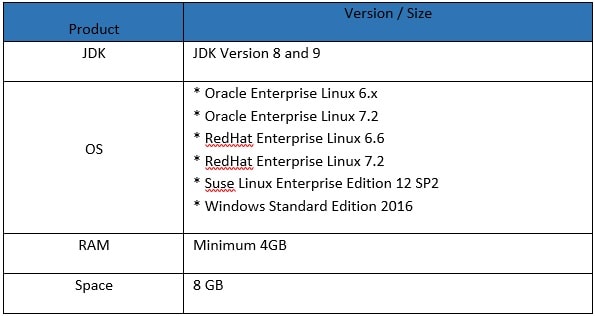
Above system requirement as per the Oracle Documentation. I myself tried to install the connectivity agent on Windows 10 64 bit and it's running perfectly. Below are high-level steps to download and run connectivity agent:
- Create Agent Group in Oracle Integration Cloud
- Download Connectivity Agent
- Install Connectivity Agent
- Verify Connectivity Agent
Create Agent Group in Oracle Integration Cloud
- Login into Oracle Integration Cloud instance
- Click on Integrationstab
Back to top |
|
|
|
| |
| |
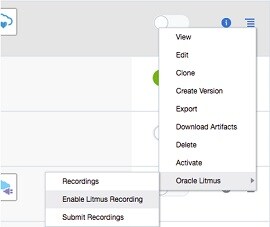
In this blog, I'd like to show you how easy it is to use Oracle Litmus, a new feature added to Oracle Integration Cloud for creating unit tests automatically with a few clicks and run those tests to catch regressions. Litmus supports the following use cases:
- Enable Integration Cloud users to create unit tests automatically and play them back to catch regressions when they modify their integrations (typically when they enhance an already created integration before making it production).
- Enable Integration Cloud QA to catch product regressions as part of a new release of Integration Cloud.
- Send Oracle a recorded instance so that Oracle can play back the instance to reproduce an issue or a bug. This is difficult without Litmus because all the dependent endpoints and third party adapters might not be available in-house to reproduce the issue. With Litmus, the endpoints are simulated and hence not needed to reproduce the issue.
Enabling Litmus
Let's assume that you have built an integration which runs as per your requirements and you have completed all your manual testing. Now you are ready to go production. At this point, you might want to create a Litmus Test and want to check that into your source repository. This is so that when you want to change that integration later, you can rely on the Litmus test to catch regressions. Regression in this case is an assertion failing because the response you're sending to the client has changed due to a bug that was introduced in a mapping as an example.
Enable the Litmus with below steps:
- A feature flag has to be enabled in OIC to enable Oracle Litmus. To turn on the feature flag, open a Service Request with Oracle support.
- Once the feature flag is enabled, login as a developer.
- From the list of integrations displayed in the integrations page, click the inline menu for the integration and click Oracle Litmus -> Enable Litmus Recording
- You can also enable Litmus as part of the Activation as well. Read the complete article here.
Back to top |
|
|
|
| |
| |
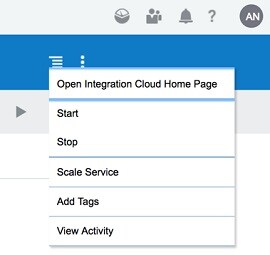
Latest release of Autonomous Oracle Integration Cloud includes the ability to scale in and scale out the number of message packs, allowing the service to be scaled up for peak times and then scaled back for quieter periods. This is useful for companies with very variable production loads, such as retailers.
Below I outline the steps to find these new features.
- Navigate to Autonomous Integration Cloud from Cloud Console Dashboard
- Open the Service Console
- If you don’t see the instance you want then hit the view link below the summary.
- You can access the scale options from the menu to the left of your instance name
- You can also drill down into your instance and access the scale options from the menu near the top right. Read the complete article here.
Back to top |
|
|
|
| |
| |
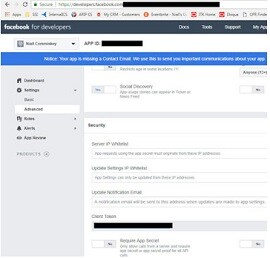
Just a quick introduction to some of our Social adapters. Facebook - social media for over 50s
You will need a Facebook account to do this lab. Essentially, you will create a new page under your Facebook account. Then you will leverage the OIC Facebook adapter to retrieve Page details and then retrieve Page posts. So let's begin -
developers.facebook.com setup
You will need an account at developers.facebook.com
Simply go in and create one.
Essentially what you do is create an App.
The work that we do via the FB adapter will be in the context of this app.
Note the App ID and App Secret they will be needed for creating the OIC connection to Facebook. You also need to set the callback url for OIC. Read the complete article here.
|
Back to top |
|
|
|
|
| |
|
|
| |
| |
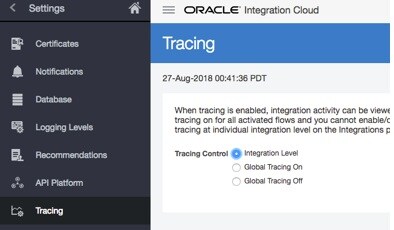
In this short blog, I'd like to show you how easy it is to enable tracing in OIC Integration and start tracing your integration flows. When Tracing is enabled, OIC Integration prints detailed info before and after each action that is executed (optionally the payload if needed). Hence care should be taken to make sure that it is enabled only for debugging purposes and turned off before going production.
Global Tracing
Let's assume that you have a requirement where you would like to enable or disable tracing for every integration you have created. You can use the global tracing for accomplishing the same. Enable the Global tracing with below steps:
- Login as an administrator.
- Click Settings on the left side.
- Click Trace on the left side.
- Select Global Tracing On and Click Save on the top right.
- Optionally you can select Include Payload which will additionally write the payload.
Integration Level Tracing
If your requirement is to enable the tracing for one or more integrations and disable tracing for the rest of the integrations, you can use Integration Level tracing. Enable the Integration tracing with below steps: Read the complete article here.
Back to top |
|
|
|
| |
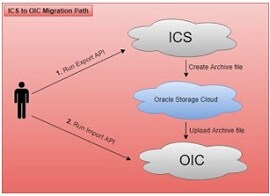
This article is written to show how to migrate ICS artifacts including Integrations, Connections, Lookups, packages, libraries etc. to OIC. Since, ICS /OIC provides the export and import feature but this is limited to single integration at a time. What about, if there are 100's of integration which are there in the ICS and wanted to migrate all integrations once.
To do so, there is Clone utility which is provided for bulk export all the integrations, connections, packages, libraries and other artifacts from ICS to OIC. This clone utility is the set of REST APIs in ICS / OIC. ICS provides REST APIs to bulk export ICS artifacts and OIC provides REST APIs to import these exported artifacts.
Prerequisites:
- Oracle Cloud Storage Container with create / update permissions
- Existing ICS service with Admin role access to the service
- OIC service with Admin role access to the service
- A feature flag has to be enabled on OIC to enable clone utility. To turn on the feature flag, open a Service Request with Oracle support
Artifacts, which can be exported using the Clone Utility:
- Integrations
- Connections including credentials
- Lookups
- Libararies
- Certificates
- Packages
Note: Agent groups can not be exported, this need to be created manually
Below is the pictorial representation, which will give a high level, thought on how migration works
Let me explain the diagram in more detail
- Execute the export API to export ICS artifacts
- The first steps will create the archive file automatically and save into Oracle Storage Cloud container. Read the complete article here.
Back to top |
|
|
|
| |
I am not a HCM expert, but playing around with the Oracle HCM adapter did force me to dig a bit deeper into how HCM works. It all began with a relatively simple file based integration that "imported" a worker into HCM. The integration had a REST trigger and leveraged the Oracle HCM adapter as well as the technical SOAP adapter.
I ran a test from Postman, with, what a colleague told me was, a valid REST payload, one of the attributes being BusinessUnitID.
{ "PersonNumber":"77012", "StartDate":"2014/01/01", "DateOfBirth":"1988/05/23", "LegislationCode":"US", "FirstName":"FirstName0112", "LastName":"LastName0112", "LegalEmployerName":"US1 Legal Entity", "BusinessUnitId":"458", "JobId":"300100003260508" }
I tested the integration and then went into Fusion HCM to validate what I had done. From an OIC perspective, the integration flow had executed successfully. So off I ventured into HCM. Read the complete article here.
Back to top |
|
|
|
| |
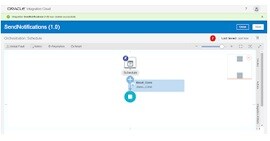
Though Oracle Integration Cloud provides Notification Activity which is used to send an Email notification to any number of recipients at a time. However, there is such a situation where the Notification activity doesn't full fill the purpose. For example: If there is a requirement where the email notification is required along with attachment then in that case, Notification activity will not full fill the purpose. In such scenarios, the MS email adapter will help to send an email along with Attachments.
We are splitting the article into two parts:
In the first part, we'll show how to send email notification using the MS email adapter
In second part, we'll show how to send email notification along with attachment using MS email adapter. In the first part, we'll create scheduler integration which will send a notification to the single recipient.
Below are the high-level activities which need to perform to achieve the use case
- Configure MS Email adapter in Oracle Integration Cloud
- Create Scheduled Integration
Important Blogs to learn more about Oracle ICS / OIC. Read the complete article here.
Back to top |
|
|
|
| |
|
|
| |
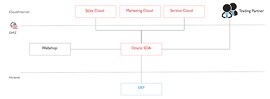
In this blogpost, I want to share my experience of migrating an Oracle SOA solution from on-premise to the cloud. But why was it necessary to think about this possibility? More than two years ago, our customer launched a comprehensive program to to make sales fit for the future. A huge area also covered IT support and automation of sales business processes. The solution introduced the use of different cloud system that have to be integrated. The integration part was achieved with the Oracle SOA platform. The SOA platform connects internal IT systems with external business partners and customers. The SOA platform is operated on-premise in the customer’s DMZ zone.
Now that several systems have already been operated in the cloud and due to limited resources available to operate the SOA platform, the customer considered to move the platform into the cloud. The primary goal of a cloud deployment was to relieve the operations team. This allows the operations team to focus on functional monitoring. Furthermore, the following objectives were important:
- The manufacturer ensures the best support for the operation of the platform, e.g. load balancing and clustering.
- Installation of patches or new versions performed by the software provider.
- HA capabilities are already firmly integrated in the cloud service and the system is continuously protected by backups against failure.
- Additional resources can be easily requested or returned on demand. Read the complete article here.
Back to top |
|
|
|
| |
UiPath is a leading provider of Robotic Process Automation (RPA) solutions to efficiently automate business processes. UiPath allows organizations to be more productive and achieve better business outcomes through workflow and business process automation leveraging RPA, artificial intelligence and machine learning.
UiPath was looking for a robust integration solution with end-to-end process design capability for automating business processes. UiPath chose Oracle Integration Cloud and Oracle Process Cloud for addressing their hybrid cloud integration and workflow automation requirements. This also allowed them to add artificial intelligence into their automations to drive additional workflow efficiencies.
Listen to Bobby Patrick, Chief Marketing Officer at UiPath, talk about how with Oracle Cloud Platform they have been able to dramatically improve job satisfaction of their employees while helping their clients achieve improved business outcomes. Read the complete article here.
Back to top |
|
|
|
| |
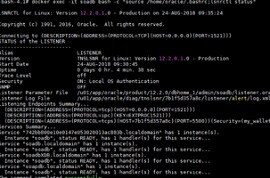
In this post I am exploring the sense of configuring and running an Oracle SOA Suite 12.2 domain on docker and managed by Kubernetes, to discover if SOA is a good candidate to run on Docker.
The server where I will install it is running Oracle Linux 6.8; unfortunately Kubernetes now is supported on Linux 7, so my next post will handle that subject.
First of all here are my install bits and experiences.
Setting up Docker
Before installing I had to add some YUM repo to get the right docker package:
- export DOCKERURL="https://yum.dockerproject.org/repo/main/oraclelinux/6"
- rm /etc/yum.repos.d/docker*.repo
- yum-config-manager --add-repo "$DOCKERURL/oraclelinux/docker-ce.repo"
- yum-config-manager --enable docker-ce-stable-17.05
- Read the complete article here.
Back to top |
|
|
|
|
|
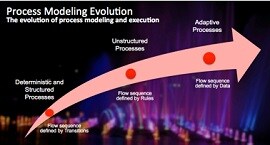
It has been a while since I wrote about the different process types, and why there is not a single silver bullet process modeling styles. If you want to read more about my first write up, you can follow this link to read more: Not all processes are created the same.
Structured Business Processes
In the early days of our business process automation space, the incumbent process modeling experience was mostly using flow diagrams. These flow models layed out a well defined set of business process steps (aka: activities) whose primary purpose was the capture best practices and standard procedures. These procedures needed to be followed in the organization that adopted them. When these structured business process models were implemented in a BPMS (Business Process Management Systems) solution, the implementing organization got a means to digitize these standard procedures and how they wanted to run their business processes and enforce execution all across. Not only business processes followed a very strict recipe, but in highly regulated industries, it offered the a way to check the audit trail records for each business process transaction, helping reduce risk and enforce compliance to policies and regulations. As structured flow diagrams became more mainstream and multiple products offered their own flavor of notation (also with their own notation interpretation), the BPMN (Business Process Modeling Notation) standard offered a common and agreed way to document business processes. This important standardization step also brought some order in the space, and helped BPMS vendors to focus efforts in supporting this business process modeling de-facto standard (or a good subset of it really!). Examples of these business process type include onboarding new customers (this is an across the board use case but very common in finance and insurance), managing approvals across different domains like order discounts and performing the multiple necessary validation steps before some coverage can be granted. Bottom line, examples exists in every industry and with varied complexities.
Unstructured Business Processes
But not all processes are the same! While structured flow-based business processes are indeed a great tool in the toolbox, this notation does not serve well other types of business processes that are completely unstructured or follow a more relaxed set of dependencies. The sequence and order in which process steps or activities are executed is determined every time there is an event in the process and this really goes against the structured and deterministic model we talked on the first section. In this unstructured modeling style, business process steps or activities are not connected via arrows or transitions. Each activity has an activation and termination expression or rule. These rules can refer to other activities or also make reference to the specific data defined for this business process (for example service type, place of origination, specific SLAs, etc). This new way of defining dependencies really allow a BPMS engine to execute following an event drive mode since each time something happens to the process (for example another step is executed), the BPMS engine needs to determine which activities need to be activated (and also likely terminated). As certain events occur for a process instance, the process has the ability to reconfigure itself and determine a new path. Read the complete article here.
Back to top |
|
|
|
|
|
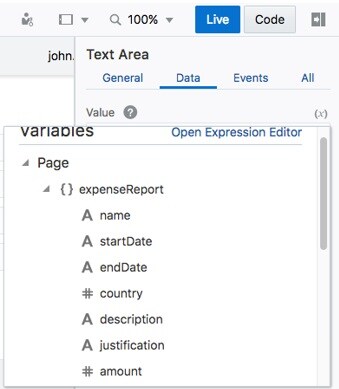
In this lesson, look at building our first app, the simple Expense Report app. We'll spend a fair amount of time reviewing the artifacts that are created and how we can customize them.
Setting Up the Project
Throughout this series we will be working mostly on one project, Expense Reports. We will start small and eventually incorporate everything from complex server-side rules to Process Cloud Service flows. To start with, we will just import a project that contains the Business Objects and an empty web application.
Importing the Project
- Download this ZIP to your computer.
- Click Import > Import from File
- Drag the ExpenseReportStarting.zip file into the dialog
- Give the file any name you want, I suggest ExpenseReport YourName
- Click Import.
Adding the List
- Click the project to open it.
- In the left panel, click the Web Applications node. Then expand flows -> main and click main-start. The page opens in the Page Designer.
- Drop a List View onto the page.
- Read the complete article here.
Back to top |
|
|
|
Architecture & User Experience & Innovation |
Back to top |
|
|
|
Enterprises are looking to securely extend their enterprise network and to accelerate transactions across their partner ecosystem using blockchain. However, most offerings in the market are either limited in their capabilities or too complex to build compelling solutions with. Oracle offers an easier way to adopt blockchain and transform your enterprise with the industry’s most comprehensive, autonomous, and enterprise-grade managed blockchain cloud service.
Begin Innovating with Blockchain Now
- Get a high-level overview of the Oracle Autonomous Blockchain Cloud Service
- Learn about the benefits of developing solutions with Oracle’s Blockchain
- Watch a demonstration of Oracle’s service in action
- Learn how global organizations are using Oracle’s Blockchain Service to innovate
- Watch the on-demand webcast here.
Back to top |
|
|
|
| |
|
|
Additional new content PaaS Partner Community |

- Design Blockchains with Data Privacy in Mind The European Union’s General Data Protection Regulation (GDPR) puts new rules and restrictions on companies’ collecting and storing of personal information. How can companies comply? Oracle senior researcher Patrick McLaughlin describes software functionality that automatically recognizes and highlights certain data points as “personal” and then generates a key for encrypting the data before it’s stored.
- Making the Case for Industry 4.0 The recent global tariffs are just one example of how, in this global economy, manufacturing opportunities shift dynamically. For manufacturers to seize opportunities, they need speed and flexibility—which requires a new mindset. It means embracing the blueprint known as Industry 4.0, driven by technology such as cloud computing, ubiquitous connectivity, the Internet of Things, additive (3D) manufacturing, machine learning, and blockchain distributed ledgers. Manufacturers aren’t known for flexibility or fast tech adoption. Here’s how they can embrace both.
- Podcast: Developer Evolution: What's rockin’ roles in IT? The number of software developer jobs will grow 24% through 2026, the US Bureau of Labor Statistics predicts. What’s driving this growth? Innovation. “More than ever,” says Oracle Developer Champion Rolando Carrasco, “institutions, organizations, and governments are keen to generate a new crop of developers that can help them create something new.”
- Is Blockchain Right for You? Oracle’s framework helps companies evaluate this hot technology using six criteria.
- Oracle Blockchain Service for Financial Services Oracle Blockchain Cloud Service is part of a PaaS portfolio delivered by a scalable, distributed transaction processing platform that accelerates revenue, creates new revenue streams, and reduces risk. Watch
- Four Ways Blockchain Can Improve Productivity Developers working on blockchain projects can experience orders of magnitude of productivity gains with an enterprise-grade, cloud-based blockchain platform, as compared with assembling their own. Benefits include performance at scale, plus reliability and availability. And enterprise-grade doesn’t necessarily mean higher cost.
- Four AI Use Cases That Don’t Require a Data Scientist Business and tech leaders worry that their company is missing out on the coming AI revolution because they don’t have the deep tech skills to put it to use. “I tell them that getting real value from AI, and from its related discipline of machine learning, doesn’t have to be that hard,” writes Oracle Cloud Platform’s Siddhartha Agarwal. Learn about AI-driven analytics and three other important use cases that don’t require PhD-level data science.
- Vibrant and Growing: The Current State of API Management. The authors of "Implementing Oracle API Platform Cloud Service” discuss the current state of API management, including architectural implications, API design, and how working in SOA may have left you with some bad habits. Hear the podcast
- Maximizing the Value of Municipal Open Data APIs with Low Code Development Tools. Get a look at a few of the over 750 public data sets provided by the City of New York and learn how anyone can use Cloud-based Low Code tools to easily build powerful data analysis tools. Watch the video
Back to top |
|
|
|
|
|
|
|

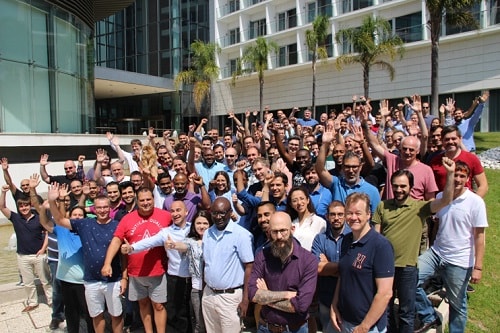
The PaaS Summer Camp took place the 8th time in Lisbon Portugal from August 27th to 31st 2018. It was a busy week full of hands-on training. I participated myself in the Innovation track. Thanks to Chris and Jens we can build now Blockchain solutions, robotic process automation and a full process application with integrates data from several sources based on Oracle integration cloud service. It was great to see many familiar faces as well as new attendees. The week was busy to catchup and support our partner attendees. A highlight was the social networking event to share and celebrate with the community – thanks for spending the week with us in Lisbon! In case you could not attend training material is available via the community workspace (membership required)
Back to top |
|
|
|
|