In this article, I’ll explain how I implemented version based traffic routing between Fn Functions using Istio service mesh.
I’ll start by explaining the basics of Istio routing and the way Fn gets deployed and runs on Kubernetes. In the end, I’ll explain how I was able to leverage Istio service mesh and its routing rules to route traffic between two different Fn functions.
Be aware that the explanations that follow are very basic and simple — my intent was not to explain the in-depth working of Istio or Fn, instead I wanted to explain enough, so you could understand how to make routing work yourself.
Istio routing 101
Let’s spend a little time to explain how Istio routing works. Istio uses a sidecar container (istio-proxy) that you inject into your deployments. The injected proxy then hijacks all network traffic going in or out of that pod. The collection of all these proxies in your deployments communicate with other parts of the Istio system to determine how and where to route the traffic (and bunch of other cool things like traffic mirroring, fault injection and circuit breaking).
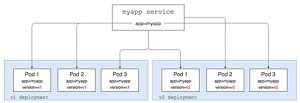
To explain how this works, we are going to start with a single Kubernetes service (myapp) and two deployments of the app that are version specific (v1 and v2). Read the complete article here.
Back to top |
|