OEDQ is supplied with an internal FTP server to allow remote access to the configuration file area and landing area files. The FTP server can be accessed via a third-party FTP client using any valid OEDQ username and password and connecting to the port specified by the ftpserver.port in the director.properties file. (In a default Windows installation, this will be port 9007).
The following directories are available via the FTP server:
|
config |
This corresponds to the config directory in your OEDQ installation. |
|
landingarea |
This corresponds to the landingarea directory in your OEDQ installation. |
|
projectlandingarea |
This corresponds to the project specific landing areas in your OEDQ installation. |
|
commands |
This corresponds to the commandarea directory in you OEDQ installation. |
In order to upload files using the FTP server, the user must belong to a group that has been granted the 'System: Upload files via FTP' permission (See User Administration for more information on assigning permissions to users and groups).
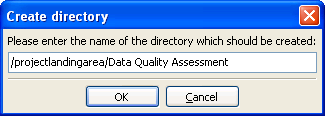
The internal FTP server can be used to create a project-specific landing area. To do this, use your FTP client to navigate to the projectlandingarea directory and create a new subdirectory within it.
The subdirectory should be named the same as the project:
Note that project names that contain forward-slash (/) or backslash (\) characters will not work with the above syntax as these characters are assumed to mean a directory level. You should therefore not use project names with these characters in them if you wish to use this functionality.
|
Note: As described in project-specific landing areas, the actual subdirectories for the project-specific landing areas are named using the internal IDs of the relevant projects. The FTP server can translate this into the appropriate project names for project-specific landing areas. |
Oracle ® Enterprise Data Quality Help version 9.0
Copyright ©
2006,2012, Oracle and/or its affiliates. All rights reserved.