
To configure the options for the report, click the Configure button in the toolbar:
Or select Analysis -> Configuration from the menu:
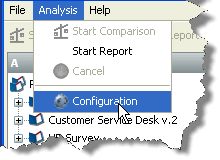
Either of these actions will launch the configuration dialog, which appears as follows:
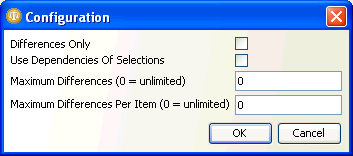
The options offered in the dialog are explained below:
|
Differences Only |
This option has no effect on a configuration report. |
|
Use Dependencies of Selections |
If this option is checked, the report will include the components upstream of the selected component in the dependency tree, as well as the selected components themselves. |
|
Maximum Differences |
This option has no effect on a configuration report. |
|
Maximum Differences Per Item |
This option has no effect on a configuration report. |
Oracle ® Enterprise Data Quality Help version 9.0
Copyright ©
2006,2011 Oracle and/or its affiliates. All rights reserved.