Open topic with navigation
You are here: Getting Started > Adding a project note
Adding a Note
To add a Note
to a project, for example to attach a project plan, or to share some key
information amongst project users:
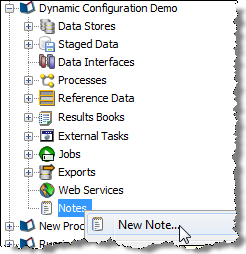
- Right-click on Notes in the Project Browser, and
select New Note:
- Give the note a Title
- Add detail to the note (or leave blank if all
you need is a Title, and one or more attachments)
- Browse your file system to add a file attachment
to the note (or drag and drop files onto the indicated area)
- Click Save
The note is created and visible in the Project Browser.
Oracle ® Enterprise Data Quality Help version 9.0
Copyright ©
2006,2011 Oracle and/or its affiliates. All rights reserved.