Data Type Check |
The Data Type Check processor checks that the values in a String attribute conform to a consistent data type, and categorizes as invalid any records with values that are not of the expected data type.
Note that Number and Date attributes are by definition 100% consistent with regard to their data type, and so cannot be checked.
The Data Type Check is a useful way of quickly finding values that have been entered into the wrong fields in a user application - typically numbers or dates that have been entered into fields that expect text values only.
Note that it is possible to 'expect' dates or numbers in a String attribute, and categorize as invalid any values that are not of the expected type. This is provided because dates and numbers are not always held in attributes with a controlled data type that can be read from the schema of the data source.
A single String attribute that you want to check for data type consistency.
|
Option |
Type |
Purpose |
Default Value |
|
Expected Data Type |
Selection (Text/Number/Date) |
Specifies the expected (valid) data type for the input data. Any data found that is not of the expected type is categorized as invalid. |
None |
|
Yes/No |
Drives whether or not to interpret Null values as valid in the check |
Yes |
|
|
Recognizes dates in a variety of different formats |
*Date Formats (See Note below) |
The Date Formats Reference Data used by the Data Type Check must conform to the standard Java 1.5.0 or Java 1.6.0 SimpleDateFormat API.
To understand how to add Reference Data entries for the correct recognition of dates, see the online Java documentation here.
None
|
Flag attribute |
Purpose |
Possible Values |
|
DataTypeValid |
Indicates which data passes the Data Type Check |
Y/N |
A Data Type Check's results may be published to the Dashboard. The following interpretation of results is used by default
|
Result |
|
|
Valid data type |
Pass |
|
Invalid data type |
Alert |
|
Execution Mode |
Supported |
|
Batch |
Yes |
|
Real time Monitoring |
Yes |
|
Real time Response |
Yes |
The Data Type Check produces a summary view of its results, showing the following statistics:
|
Statistic |
Meaning |
|
Valid |
Records with data of the expected data type in the input attribute |
|
Invalid |
Records with data not of the expected data type in the input attribute |
Clicking on the Additional Information button will show the above statistics as percentages of the total number of records analyzed.
The Data Type Check produces the following output filters:
In this example, the Data Type Check is used to check that all values for a NAME attribute are in textual format.
In this case, null values are treated as invalid.
Summary View
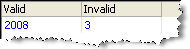
Drilldown on Invalid values
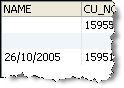
In this case, a date value that was entered into the wrong field, and two Null Name values were found.
Oracle ® Enterprise Data Quality Help version 9.0
Copyright ©
2006,2011 Oracle and/or its affiliates. All rights reserved.
