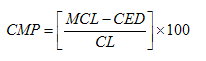
The Character Match Percentage comparison determines how closely two values match each other by calculating the Character Edit Distance between two String values, and also taking into account the length of the longer or shorter of the two values, by character count.
In mathematical terms, the Character Match Percentage comparison uses the following formula to calculate its results:
where:
CMP = Character Match Percentage
MCL = Maximum Character Length of the two values being compared, in characters
CED = the Character Edit Distance between two String values, and
CL = either the Maximum or Minimum Character Length, depending on the setting of the Relate to shorter input option. If Relate to shorter input is set to No (as by default), the Maximum Character Length is used. If Relate to shorter input is set to Yes, the Minimum Character Length is used (that is, the number of characters in the shorter of the two values by character count).
So, for the pair of values "ABC" and "ABCD":
CED (Character Edit Distance) = 1
MCL (Maximum Character Length = 4, and
mCL (Minimum Character Length) = 3
So, if the Relate to shorter input option is set to No, the Character Match Percentage (CMP) is calculated as follows:
MCL (4) - CED (1) = 3, divided by MCL (4) = 0.75, multiplied by 100 = 75%.
If Relate to shorter input is set to Yes, the calculation is different:
MCL (4) - CED (1) = 3, divided by mCL (3) = 1, multiplied by 100 = 100%.
Use the Character Match Percentage comparison to find matches where values are of varying lengths (such as names), and there might be spelling mistakes in the original values. For example, when matching company names, the values "ABC" and "BBC" have a Character Edit Distance of 1, and might be deemed a close match by other comparisons. However, their Character Match Percentage is only 66%, whereas the Character Match Percentage of "Oracle" and "Oracles", which also have a Character Edit Distance of 1, is 90%, indicating a stronger match.
This comparison supports the use of result bands.
|
Option |
Type |
Purpose |
Default Value |
|
Match No Data pairs? |
Yes/No |
This option determines the result of a comparison when it compares two No Data (Null, or containing only whitespace characters) values for an identifier. If set to No, the comparison will give a 'no data' result when comparing a No Data value against another No Data value. If set to Yes, the comparison will give a full match (a Character Match Percentage of 100%) when comparing a No Data value against another No Data value. A 'no data' result will only be returned if a No Data value is compared against a populated value. |
No |
|
Ignore case? |
Yes/No |
Sets whether or not to ignore case when comparing values. For example, if case is ignored, "Oracle Corporation" will match "ORACLE CORPORATION" with a Character Match Percentage of 100%. |
Yes |
|
Relate to shorter input? |
Yes/No |
This option drives the calculation made by the Character Match Percentage comparison. If set to Yes, the result is calculated as the percentage of characters from the shorter of the two inputs (by character count) that match the longer input. If set to No, the result is calculated as the percentage of characters from the longer of the two inputs (by character count) that match the shorter input. |
No |
This comparison calculates a percentage value indicating the level of similarity between two string values, expressed as percentage similarity.
This comparison supports the use of result bands.
Example configuration
In this example, the Character Match Percentage comparison is used to match company names. The following options are specified:
Match No Data pairs? = No
Ignore case? = Yes
Relate to shorter input? = No
The following transformations are added:
Example results
The following table illustrates some example comparison results using the above configuration:
|
Value A |
Value B |
Comparison result (Character Match Percentage) |
|
ABC ltd |
ABC limited |
100% |
|
ABC ltd |
BBC |
66% |
|
Fast track systems |
Fastrack systems |
93% |
|
BT |
BTAT |
50% |
|
Gemini Partners |
Gemmini Partners |
93% |
Oracle ® Enterprise Data Quality Help version 9.0
Copyright ©
2006,2011 Oracle and/or its affiliates. All rights reserved.