The Date Difference comparison determines the distance between two Date values. The difference may be expressed in different ways according to option settings; that is, it may be expressed as whole years, whole months, whole weeks, or whole days.
Use the Date Difference comparison to find dates that are close to each other, even if they are typographically different, and therefore would not match strongly using Date Edit Distance - for example to match 31/12/1999 as a close match to 01/01/2000.
This comparison supports the use of result bands.
|
Option |
Type |
Purpose |
Default Value |
|
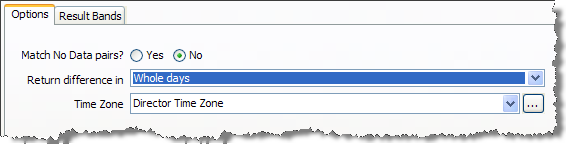
Match No Data pairs? |
Yes/No |
This option determines the result of a comparison when it compares two No Data (Null, or containing only whitespace characters) values for an identifier. If set to No, the comparison will give a 'no data' result when comparing a No Data value against another No Data value. If set to Yes, the comparison will give a full match (a Date Edit Distance of 0) when comparing a No Data value against another No Data value. A 'no data' result will only be returned if a No Data value is compared against a populated value. |
No |
|
Return difference in |
Selection (Whole years/Whole months/Whole weeks/Whole days) |
Determines the units in which the difference between two date values is returned. |
Whole days |
|
Time zone |
Time Zone |
Sets the time zone to use when comparing the two date/time values. |
Director Time Zone |
Example configuration
In this example, the Date Difference comparison is used on time series data to match all records that are within 30 days of each other (inclusive).
The options are therefore set as follows:
with the following Result Bands, so that matches with a date difference of between 0 and 30 days (inclusive) can be found in a match rule:

Example results
The following table illustrates some example comparison results using the above configuration:
|
Value A |
Value B |
Comparison result (Date Difference) |
|
11/01/2009 |
11/01/2009 |
0 |
|
11/01/2009 |
12/01/2009 |
1 |
|
11/01/2009 |
10/01/2009 |
1 |
|
01/06/2009 |
16/06/2009 |
15 |
|
15/07/2009 |
15/08/2009 |
31 |
|
15/09/2009 |
15/10/2009 |
30 |
|
12/02/2007 |
12/02/2008 |
365 |
Oracle ® Enterprise Data Quality Help version 9.0
Copyright ©
2006,2011 Oracle and/or its affiliates. All rights reserved.