
|
|
Max/Min Profiler |
The Max/Min Profiler examines the extremes of the data in each attribute, and returns:
Use the Max/Min Profiler to gain an initial understanding of your data. The Max/Min Profiler gives you a quick overview of whether or not your data conforms to its length and valid value restrictions, and allows you to find 'outliers'; that is, values that are clearly out of range, such as number amounts that are larger or smaller than expected, date values that are earlier or later than expected, or text values that consist only of invalid characters such as '#', or of data cheats such as 'aaa' or 'zzz'.
Any attributes in which you wish to find Data Maxima and Minima.
None
None
None
|
Execution Mode |
Supported |
|
Batch |
Yes |
|
Real time Monitoring |
Yes |
|
Real time Response |
No |
The Max/Min Profiler requires a batch of records to produce useful statistics. It must therefore run to completion before its results are available, and is not suitable for a process that requires a real time response.
When executed against a batch of transactions from a real time data source, it will finish its processing when the commit point (transaction or time limit) configured on the Read Processor is reached.
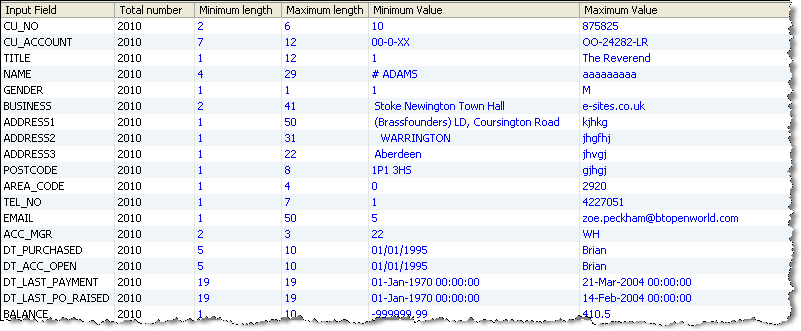
The Max/Min Profiler produces a summary view of its results, showing the following statistics for each attribute:
|
Statistic |
Meaning |
|
The number of characters of the shortest value in the attribute, in number of characters. |
|
|
The number of characters of the longest value in the attribute, in number of characters. |
|
|
The 'lowest' value in the attribute. For Number attributes, this is the lowest numeric value. For Date attributes, this is the earliest date. For Text attributes, this is the first value alphabetically. Note that Null values are ignored in this analysis, but other types of No Data (for example, values consisting only of spaces) are not. |
|
|
The 'highest' value in the attribute. For Number attributes, this is the highest numeric value. For Date attributes, this is the latest date. For Text attributes, this is the last value alphabetically. Note that Null values are ignored in this analysis, but other types of No Data (for example, values consisting only of spaces) are not. |
Clicking on the Additional Information button shows the number and percentage of records with the minimum length, maximum length, minimum value and maximum value, alongside the above statistics.
In this example, the Max/Min Profiler examines all attributes in a table of Customer records:
Oracle ® Enterprise Data Quality Help version 9.0
Copyright ©
2006,2011 Oracle and/or its affiliates. All rights reserved.