Convert Date to String |
The Convert Date to String transformer takes any number of DATE attributes and converts them to a String type.
Use Convert Date to String where you want to treat a date as text for processing purposes. For example, in order to extract the day, month and year parts of a date to separate attributes for matching, you may wish to convert the date to a String type, and then use Trim Characters to extract the different parts.
Note that the Date is converted to a String value with a standard international format for dates (dd-MMM-yyyy, for example, 25-Apr-2006).
Any number of Date attributes that you wish to convert to a String type.
|
Option |
Type |
Purpose |
Default Value |
|
|
Entry of a date format |
The format of the date used to create the new String value |
dd-MMM-yyyy HH:mm:ss (See Note below) |
||
|
Time zone |
Time Zone |
The time zone to use for the output string value. The string will be produced by converting the supplied date to this time zone.
|
Director Time Zone |
|
Note:The output format expressed must conform to the standard Java 1.5 or Java 1.6 SimpleDateFormat API. To understand how to specify a format for the correct output of dates, see the online Java documentation here. |
For each attribute input, a new attribute is created in the following format:
|
Data attribute |
Type |
Purpose |
Value |
|
[Attribute Name].DateToString |
Derived |
Stores the result of the DATE to String conversion |
The original attribute value, converted to a String type |
None
|
Execution Mode |
Supported |
|
Batch |
Yes |
|
Real time Monitoring |
Yes |
|
Real time Response |
Yes |
The Convert Date to String transformer presents no summary statistics on its processing.
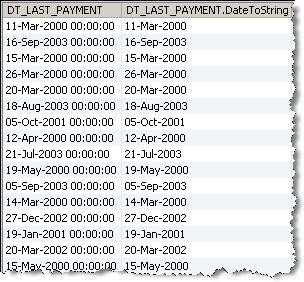
In the Data view, each input attribute is shown with its new derived String type attribute to the right.
None
In this example, Convert Date to String is used to convert a DT_LAST_PAYMENT attribute to a String type. Note that in this case, the user strips the time element during the date conversion by deleting the time element (HH:mm:ss) from the Output Format.
Oracle ® Enterprise Data Quality Help version 9.0
Copyright ©
2006,2011 Oracle and/or its affiliates. All rights reserved.
