Convert Number to String |
The Convert Number to String transformer takes any number of Number attributes and converts them to a String type.
Use Convert Number to String where you want to treat a number as text for processing purposes, or because you are migrating data to a target system with a different data type, for example where telephone numbers are stored as text fields rather than numbers.
Any number of Number attributes that you wish to convert to a String type.
None
For each attribute input, a new attribute is created in the following format:
|
Data attribute |
Type |
Purpose |
Value |
|
[Attribute Name].NumberToString |
Derived |
Stores the result of the Number -> String conversion |
The original attribute value, converted to a String type |
None
|
Execution Mode |
Supported |
|
Batch |
Yes |
|
Real time Monitoring |
Yes |
|
Real time Response |
Yes |
The Convert Number to String transformer presents no summary statistics on its processing.
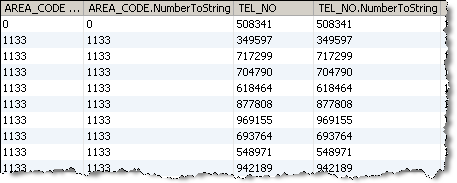
In the Data view, each input attribute is shown with its new derived String type attribute to the right.
None
In this example, Convert Number to String is used to convert AREA_CODE and TEL_NO attributes to a String format in preparation for migration to a single text-based HOME_TEL field in the target system:
Oracle ® Enterprise Data Quality Help version 9.0
Copyright ©
2006,2011 Oracle and/or its affiliates. All rights reserved.
