You are here: Processor Library > Transformation > Make Array from String

Make Array from String

The Make Array from String processor splits up the data in an attribute into an array, using delimiter characters. Elements in the array can then be extracted into separate attributes using Select Array Element, for further processing.

Use

Use Make Array from String as a simple way to break up the data in an attribute.

Configuration

Inputs

A single String attribute that you wish to split into an array.

Options

Option

Type

Purpose

Default Value

Delimiters Reference Data

Reference Data

Provides a way of specifying a standard, reusable set of delimiter characters for breaking up data, and allows you to use control characters as delimiters.

Note that only single characters (not strings of characters) can be used as delimiters. Multi-character delimiters will be ignored.

*Delimiters

Delimiters

Free text entry

Allows you to specify delimiters to use without having to create reference data for simple delimiters such as space or comma.

Note that if these are used in addition to a reference list, all delimiters from both options will be used to break up the data.

Space

Create empty elements for empty values?

Yes/No

Determines whether or not to create an empty element in the array when the original attribute has many delimiters in sequence. This is useful where there is a defined structure in the original String which should be reflected in the array - for example, to ensure that the same element in the array will represent the Town when converting strings such as '10 Acacia Drive, South Kensington, Cambridge' and '12 Acacia Drive,,Cambridge'.

No

Outputs

Data attributes

Data attribute

Type

Purpose

Value

[Attribute Name].ArrayFromString

Added

Stores the array of split values

The original attribute value, split into an array using the specified delimiters

Flags

None

Execution

Execution Mode

Supported

Batch

Yes

Real time Monitoring

Yes

Real time Response

Yes

Results Browsing

The Make Array from String transformer presents no summary statistics on its processing.

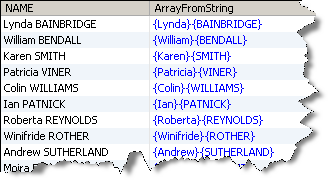
In the Data view, the input attribute is shown with the new added array attribute to its right.

Output Filters

None. All records input are output.

Example

In this case, Make Array from String has been used to split up a single NAME attribute into an array. The different elements in the array can then be extracted and validated:
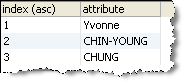
Drill-down on the array attribute to see the full data in the array, for example:
Oracle ® Enterprise Data Quality Help version 9.0
Copyright © 2006,2011 Oracle and/or its affiliates. All rights reserved.