Oracle BI Publisher Tip

Dynamic Queries using Data Templates

Author

Rainer Willems

Version

10.1.3.4

Date

17.09.2008


This article describes how you can get a dynamic query to your database using Data Templates and a Database Package. The language SQL offers much functionality for queries, but with growing dynamic even the complexity growths. The following describes a simple example from which it's easy to transfer for more complex requirements.

Goal is a Master-Detail-Report (departments with employees) with some multi-selection parameters:
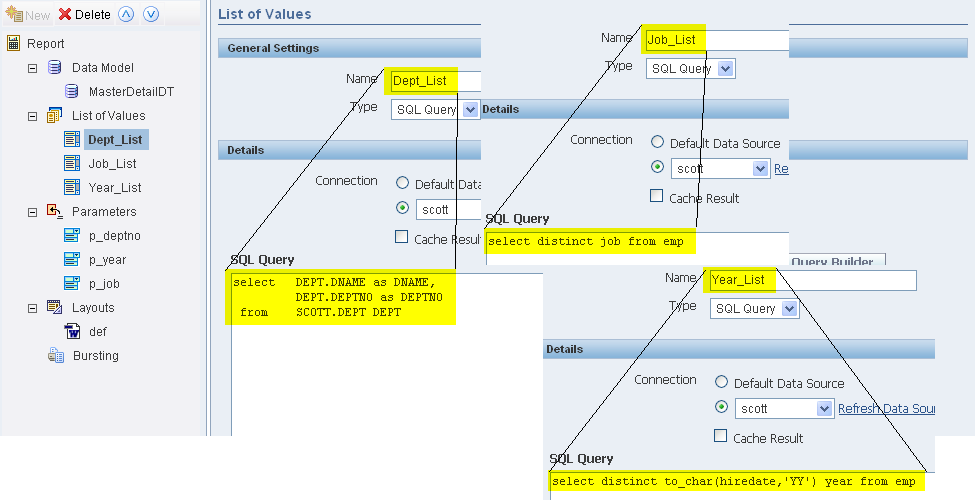
The List of Values are defined as follows:


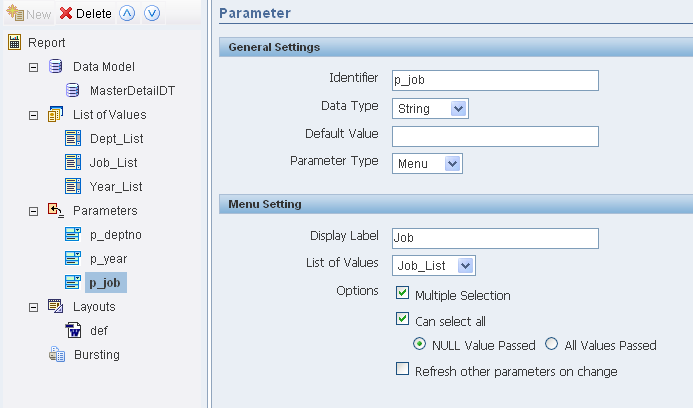
The corresponding parameters are defined as Multiple Selection and Can select all (using Null as Value for Select All)


Now we build the queries with lexical parameters in the Data Template. Lexical parameters (here empwhereclause and deptwhereclause) can replace parts of the query, so we can build the query later dynamic in our database package.

<dataTemplate name="DynamicQuery" description="Test" defaultPackage="BIP_DynamicQuery">
   <parameters>
      <parameter name="p_deptno" datatype="char"/>
      <parameter name="p_year" datatype="char"/>
      <parameter name="p_job" datatype="char"/>
   </parameters>
   <dataQuery>
      <sqlStatement name="QueryDept">
         SELECT DEPTNO AS MASTERDEPTNO,DNAME,LOC
         FROM DEPT
         &amp;deptwhereclause
         ORDER BY DNAME
      </sqlStatement>
      <sqlStatement name="QueryEmp">
            SELECT EMPNO,ENAME,JOB,HIREDATE
            FROM EMP
            WHERE DEPTNO = :MASTERDEPTNO &amp;empwhereclause
            ORDER BY ENAME
      </sqlStatement>
   </dataQuery>
   <dataTrigger name="beforeReport" source="BIP_DynamicQuery.BeforeReport"/>
   <dataStructure>
      <group name="G_DEPT" source="QueryDept">
         <element name="DEPTNO" value="MASTERDEPTNO"/>
         <element name="DNAME" value="DNAME"/>
         <element name="LOC" value="LOC"/>
         <group name="G_EMP" source="QueryEmp">
            <element name="EMPNO" value="EMPNO"/>
            <element name="ENAME" value="ENAME"/>
            <element name="JOB" value="JOB"/>
            <element name="HIREDATE" value="HIREDATE"/>
         </group>
      </group>
   </dataStructure>
</dataTemplate>
Download Data-Template

We fill both lexical parameters in a function of a database package. In the header of the Data Templates you had to define the name of this package (here BIP_DynamicQuery). We call this function in a trigger before running the queries. This function has return-type Boolean (and stops the execution of the report when returning false).
The used package is this:
//-- Package Spezification
//-- lexical Parameter
//-- Report Parameter

create or replace package BIP_DynamicQuery as

   deptwhereclause varchar2(1000) := ' ';
   empwhereclause varchar2(1000) := ' ';
   p_deptno varchar2(400);
   p_year varchar2(400);
   p_job varchar2(400);

   function BeforeReport return boolean;

end BIP_DynamicQuery;

//-- Package Body

create or replace package body BIP_DynamicQuery as

   function BeforeReport return boolean is
   begin
      if p_deptno is not null then
         deptwhereclause := 'WHERE DEPTNO IN ('||p_deptno||')';
      end if;
      if p_year is not null then
         empwhereclause := 'AND TO_CHAR(HIREDATE,''YY'') in ('||p_year||')';
      end if;
      if p_job is not null then
         if instr(p_job,',')>0 then
            empwhereclause := empwhereclause || ' AND JOB in ('||p_job||')';
         else
            empwhereclause := empwhereclause || ' AND JOB = '''||p_job||'''';
         end if;
      end if;
      return true;
   end;

end BIP_DynamicQuery;

Download Package

Depending on the 3 Reports-parameters we fill the lexical Parameters. If  p_deptno is null (we want all departments), we don't need a where-condition. Otherwise we add an IN-Operation.

This coding only works for  p_deptno because it's numerical. If p_deptno is set with a single value, the parameter contains exactly this value, so the generated condition is WHERE DEPTNO IN (10)(using implicit type conversion). If the parameter contains more than one value (we remember, it's a multi selection parameter), they are separated by comma and uses apostrophes (p_deptno then is like '10,'20'). Therefore the condition then is WHERE DEPTNO IN ('10','20').

This is the reason, why in the code for the alphanumeric parameter p_job there's a check, if it contains one (p_job is SALESMAN) or more values (p_job is  'SALESMAN','MANAGER') to choose the correct coe (= or IN).

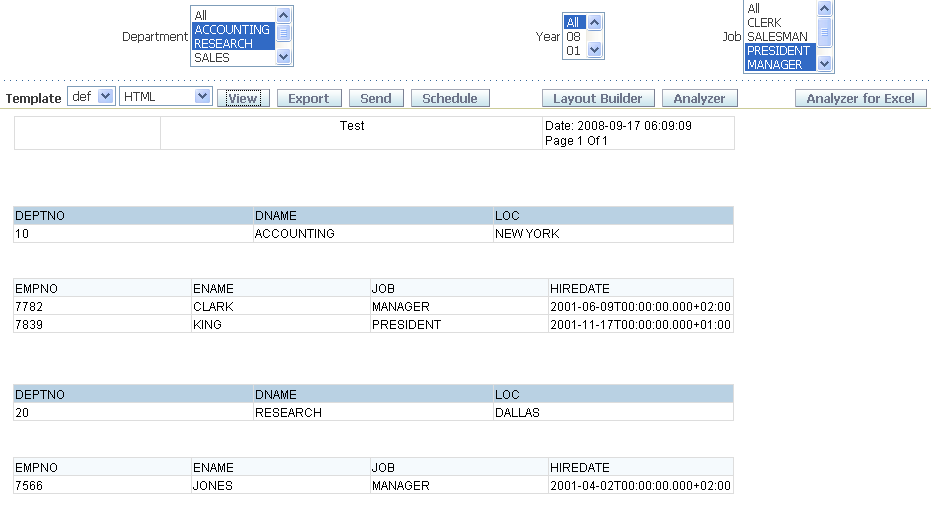
With this Data Template and the database package using the auto-generated RTF-Template it looks as follows:


With this technique it's not only possible to influence the where-condition. It's possible to influence every part of the query, so for example it's possible to use defferent tables as datasource depending the parameters..