Before You Begin
Purpose
This Oracle By Example (OBE) shows you how to perform the following actions with regard to JD Edwards EnterpriseOne UX One:
- Plan and implement the recommended JD Edwards EnterpriseOne architecture to support UX One
- Enable the JD Edwards EnterpriseOne architecture AIS server component AIS caching feature for UX One
- Configure the Java JVM heap size and enable garbage collection (GC) functionality for enhanced troubleshooting
Time to Complete
Approximately one hour
Background
JD Edwards EnterpriseOne UX One enables you to visualize data and improves your decision-making ability, providing a more efficient use of the JD Edwards EnterpriseOne software. UX One is available with JD Edwards EnterpriseOne Applications Release 9.2 and Tools Release 9.2.1.1.
When using UX One within the JD Edwards EnterpriseOne software, a few architecture changes and configurations are required for proper performance of the JD Edwards EnterpriseOne applications. This OBE provides details of the necessary changes to the JD Edwards EnterpriseOne architecture for this feature to perform as designed.
This OBE assumes that JD Edwards EnterpriseOne server components are partially or fully configured and available for use. This includes the allocation and requisition of one or more JAS servers and an AIS server where the functionality of these JD Edwards EnterpriseOne components is ready to receive requests.
Note: In this OBE, the term JAS Server is synonymous with the term HTML Server, where the latter is more commonly used in other JD Edwards user-facing documentation. Likewise, the term AIS Server refers to the Application Interface Services (AIS) Server.
AIS and JAS Components
This section describes these components of the AIS and JAS Servers within the JD Edwards EnterpriseOne architecture:
- JAS1 JVM-managed Instance
- JD Edwards EnterpriseOne AIS Server
- JAS2 JVM-managed Instance
JAS1 JVM-managed Instance
- Processing of all HTML requests from the client browser.
- UX One actions are instantiated on this primary JAS-managed instance by through the UX One user job role.
The diagram below illustrates this configuration:
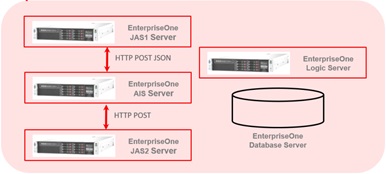
JD Edwards EnterpriseOne AIS Server
This server is responsible for processing JSON requests over the REST interface. This includes:
- Calls UX One applications created with the AIS Client API (that is, Springboard applications).
- Initiating components created using the Java Extension Toolkit (JET).
Note: The JD Edwards EnterpriseOne AIS Server does not make any logic or database requests; it acts more like a JSON process traffic director for UX One.
JAS2 JVM-managed Instance
This instance is responsible for the following UX One functions:
- Processing directed data service and form requests from the JD Edwards EnterpriseOne AIS Server.
- Performs remote calls to the EnterpriseOne Logic and Database servers for the chart and form requests.
Performance Goal
The key to planning and implementing JD Edwards EnterpriseOne architecture to support UX One is to size the JD Edwards EnterpriseOne servers with sufficient amounts of CPU and memory resources to support the customer-required load on the application.
As a general rule, in order to avoid a performance bottleneck due to CPU or memory contention on the AIS and JAS JVM-managed instance servers, follow the below guidelines:
- The JD Edwards EnterpriseOne AIS Server acts as a JSON traffic director, so the amount of Java JVM heap size can be as little as 512 MB.
- For the AIS Server and JAS Server, size the CPU by configuring a CPU for each Java JVM process and at least one CPU for the operating system. There should be sufficient memory on each AIS or JAS Server to support the Java heap size configuration and enough memory to support the operating system.
- The recommended starting Java JVM heap size is 1024 MB for JAS1. However, a Java JVM heap size of 2048 MB and 4096 MB are also standard configurations for the JAS1-managed instances depending on the total number of concurrent users of the JD Edwards EnterpriseOne UX One application.
- The JAS Java JVM-managed instance requires less JVM heap size: as little as 512 MB or even 1024 MB is sufficient to handle most UX One requests.
Enable AIS Caching for UX One
UX One performance is enhanced when AIS caching is enabled. This section describes the following steps to enable AIS caching from the EnterpriseOne Server Manager Console and to configure the ‘Keep-Alive’ tuning setting appropriately for UX One:
- Enable the AIS Cache on the JD Edwards EnterpriseOne AIS Server
- Configure the JAS2 Instance in the EnterpriseOne AIS Server Configuration
- Configuring the AIS Server on the JAS1 Server
This OBE covers both enabling AIS caching and configuring the AIS, JAS1, and JAS2 settings for the JD Edwards EnterpriseOne architecture for UX One. The JD Edwards EnterpriseOne Server Manager Console is the interface used for all of these configuration changes.
Enable the AIS Cache on the JD Edwards EnterpriseOne AIS Server
- On the Server Manager Console, navigate to:
Management Dashboard > AIS_Server >
AIS_Instance > Configuration > Advanced > Cache where AIS_Server is the name of the JD Edwards EnterpriseOne AIS Server, and
where AIS_Instance is is the name of the Server Manager Console of the JAS instance that supports AIS
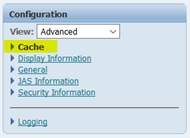
Server Manager Console -- Configuration > Advanced > Cache - In the Cache section of the Server Manager
Console for the AIS server, select the Enable
Caching by Default option.
Note: The default Read Cache Time to Live is 60 seconds.
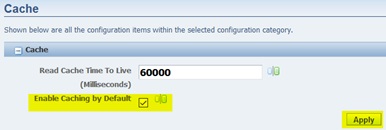
Server Manager Console -- Cache Settings - Click the Apply button to modify the AIS server configuration.
Configure the JAS2 Instance in the JD Edwards EnterpriseOne AIS Server Configuration
- On the Server Manager Console, navigate to:
Management Dashboard > AIS_Server >
AIS_Instance > Configuration > Advanced > JAS Information
where JAS1_Server is the name of the JD Edwards EnterpriseOne JAS1 Server, and
where AIS_Instance is is the name of the Server Manager Console of the JAS instance that supports AIS
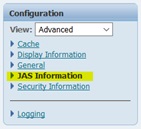
Server Manager Console -- Configuration > Advanced > JAS Information - In the JAS Information section of the Server
Manager Console for the AIS server, complete
the following fields:
- HTML Server End Point Host Name
Enter the name of your JAS2 Instance.
- HTML Server End Point Port
Enter the port for your JAS2. This is a user-defined value on which the Java JVM services will communicate.
- Default Environment
Enter the name of your default environment.
Ensure the check box for Keep JAS Session Open is selected.
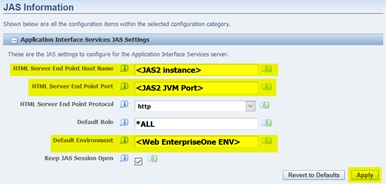
Server Manager Console -- Configuration > Advanced > JAS Information - HTML Server End Point Host Name
- Click the Apply button.
- Restart the AIS services in Server Manager for this change to take effect.
Configuring the AIS Server on the JAS1 Server
- On the Server Manager Console, navigate to:
Management Dashboard > JAS1_Server >
AIS_Instance > Configuration > Advanced > Web Runtime
where JAS1_Server is the name of the JD Edwards EnterpriseOne AIS Server, and
where AIS_Instance is is the name of the Server Manager Console of the JAS instance that supports AIS
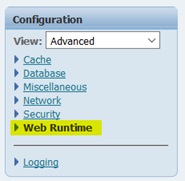
Server Manager Console -- Configuration > Advanced > Web Runtime - In the Web Runtime section of the Server
Manager Console for JAS1 JAS server, complete
these fields:
- AIS Host
Enter the name of the JD Edwards EnterpriseOne AIS Server.
- AIS Port
Enter the port on which the AIS Server and JAS Server communicate with using JVM services. Typically this port value is 8090.
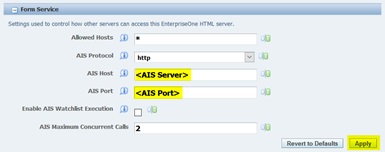
Server Manager Console -- Form Service Settings - AIS Host
- Click the Apply button to save the changes to the JAS1 Server Manager Console instance.
- Restart the JAS1 services in Server Manager for this change to take effect.
- Repeat the steps in this section for the JAS2 server.
Configuring the Java JVM Heap Size and Enabling Garbage Collection (GC) for Enhanced Troubleshooting
Perform the following steps to configure the Java JVM heap size and enable Garbage Collection (GC) on the JD Edwards EnterpriseOne AIS and JAS1/JAS2 Servers.
For an overview of the concepts of Garbage Collection, refer to Java Garbage Collection Basics.
For this example, a JAS Server running on a WebLogic Application Server is used and the changes are made using the WebLogic Server Administrative Console. Refer to the appropriate documentation for JAS Servers running on other Application Servers.
- Log in to the WebLogic Server Administrative
Console.
- The default WebLogic Administrative console port is 7001.
- The default username is weblogic.
- Navigate to the HTML Server-managed instance
configuration:
Environment > Servers > WebLogic_Managed_Instance
- Click the Server Start tab.
- Click the Lock & Edit
button.
- Scroll down to the Arguments:
configuration. In the example figure below,
the Java JVM heap size (minimum and maximum
settings) is highlighted. In this example, the
heap size is 4 GB. Setting the minimum and
maximum heap size to the same value is a
common practice for Java JVM settings.
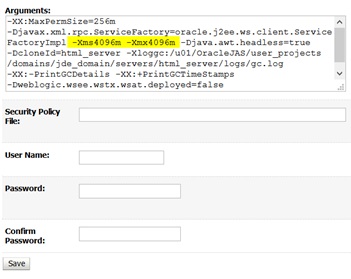
Java JVM Heap Size Configuration - Enable Java garbage collection by adding the
following line:
-Xloggc:/u01/OracleJAS/user_projects/domains/jde_domain/servers/html_server/logs/gc.log –XX:-PrintGCDetails –XX:+PrintGCTimeStamps
where
/u01/OracleJAS/user_projects/domains/jde_domain/servers is the WebLogic path to the server configuration under the <jde_domain> WebLogic domain
html_server is the name of the WebLogic server instance
gc.log is the name of the garbage collection log.
Note: The overhead of enabling garbage collection is less than 1% so many customers enable it, even in their production environments.
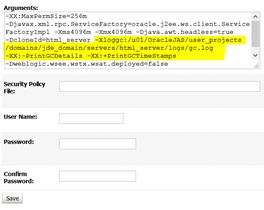
Garbage Collection Setting - Click the Save button.
- Click the Activate Changes button to accept the above changes to the JAS JVM instance.
Viewing the Garbage Collection Log
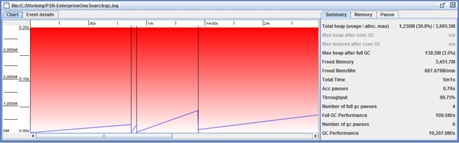
The free utility, GC Viewer, is used to load the garbage collection log files. In the example below, the name of the log file is gc.log.
Want to Learn More?
Refer to these document for information on configuring the JD Edwards EnterpriseOne architecture for UX One:
- MOS document: AIS Server with UX One and Performance (Doc ID 2256374.1)
- Oracle documentation: JD Edwards EnterpriseOne Application Interface Services Server Reference Guide
Both of the above referenced documents describe the JD Edwards EnterpriseOne architecture of the AIS server and the configuration of JAS1 and JAS2 Java-based and JVM-managed instances.