
 Deploy an Application from GitHub by Using the REST API
 Before You Begin
This 10-minute tutorial shows you how to create a Node.js application in Oracle Application Container Cloud Service from a Git repository by using the REST API.
Background
With Oracle Application Container Cloud Service GitHub integration, you can deploy your applications directly from a Git repository.
The GitHub integration has the following limitations:
- Builds are supported only from the master branch.
- Only Java Platform, Standard Edition (Java SE) and Node.js applications are supported.
- Java application builds are based on Maven. You must put your
pom.xmlfile in the root directory of your master branch. - Node.js applications must have a
package.jsonfile in the root directory. - You must deploy applications by using the command-line interface or the REST API.
- The
manifestparameter is required in cURL and command-line interface commands.
What Do You Need?
- An Oracle Cloud account with access to an instance of Oracle Application Container Cloud Service
- A GitHub account
- Git (Git CMD shell to execute cURL commands)
- The employee-app.zip project file
 Create a Git Repository
- Go to https://github.com/ and log in.
- Click + and then select New repository.
- In the Repository name field, enter
myNodeApp,select Public, and then click Create repository. - Extract the contents of the
employee-app.zipfile. - Open a Git Bash window and go to the
employee-appdirectory. - Initialize your repository.
git init
git add .
git commit -m "Starting Node project"
git remote add origin https://github.com/YourGitProject/myNodeApp.git
git push -u origin master
 Deploy Your Application to Oracle Application Container Cloud Service
- To assist you with the cURL commands, enter the following data so that you can cut and paste the commands to your Git Bash window:
Identity domain:
Cloud account user name and password:
REST Endpoint:
Git repository:
- To deploy your application, copy and paste the following command in the Git Bash window:
curl -X POST -u : \ /paas/service/apaas/api/v1.1/apps/ \ -H "X-ID-TENANT-NAME:" \ -H "Cache-Control: no-cache" \ -H "content-type: multipart/form-data;" \ -F "name=MyNodeApp" \ -F "runtime=node" \ -F "subscription=MONTHLY" \ -F "manifest=@manifest.json"\ -F "gitRepoUrl=" - Verify the status of your application, copy and paste the following command in the Git Bash window until
"status:":"RUNNING"is displayed, and then copy the value of theappURLparameter response.curl -i -X GET -u : \ -H "X-ID-TENANT-NAME:" \ /paas/service/apaas/api/v1.1/apps//MyNodeApp - To test your application, enter the application’s URL in a web browser and verify that the output shows 10 employees in a JavaScript Object Notation (JSON) format.
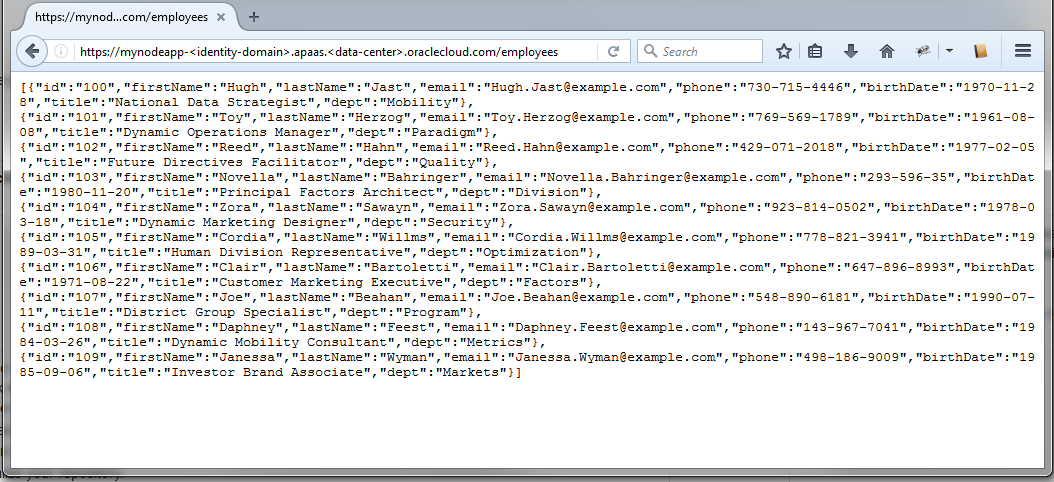
Description of the illustration app-response.png
 Want to Learn More?