Before You Begin
Purpose
In this tutorial you learn how to create a simple REST service in Python, and how to generate the application archive to deploy your application to Oracle Application Container Cloud Service.
Time to Complete
Approximately 15 minutes
Background
Oracle Application Container Cloud expands the functionality of the Oracle Cloud Platform by enabling customers to easily and rapidly deploy Java SE, Node.js, PHP, and Python applications along with any required libraries or frameworks available for each programming language.
What Do You Need?
- An active Oracle Cloud account
Creating the REST Service
Create the app.py file and add the
following code:
#!/usr/bin/python
import os
from http.server import BaseHTTPRequestHandler, HTTPServer
PORT_NUMBER = int(os.environ.get('PORT', 8084))

# HTTPRequestHandler class
class testHTTPServer_RequestHandler(BaseHTTPRequestHandler):

  # GET
  def do_HEAD(self):
        # Send response status code
        self.send_response(200)
        self.send_header('Content-type', 'text/html')
        self.end_headers()
        return
  # GET
  def do_GET(self):
        # Send response status code
        self.send_response(200)

        # Send headers
        self.send_header('Content-type','text/html')
        self.end_headers()

        # Send message back to client
        message = "Hello world!"
        # Write content as utf-8 data
        self.wfile.write(bytes(message, "utf8"))
        return

def run():
  print('starting server...')

  # Server settings
  # Choose port 8080, for port 80, which is normally used for a http server, you need root access
  server_address = ('0.0.0.0', PORT_NUMBER)
  httpd = HTTPServer(server_address, testHTTPServer_RequestHandler)
  print('running server...')
  httpd.serve_forever()

run()
Preparing the Application for Cloud Deployment
-
Create the
manifest.jsonfile and add the following content:{ "runtime": { "majorVersion": "3.6.0" }, "command": "python app.py", }, "notes": "Simple REST Service" } -
Compress the
manifest.jsonfile and theapp.pyfile together in a.zipfile.
Deploying the Application to Oracle Application Container Cloud Service
In this section, you learn how to deploy your application to Oracle Container Cloud service using the service console.
-
Log in to Oracle Cloud at http://cloud.oracle.com/. Enter the identity domain, user name, and password for your account.
-
To open the Oracle Application Container Cloud Service console, click Instances in the Dashboard.
-
In the Applications list view, click Create Application.
-
Click Python.
-
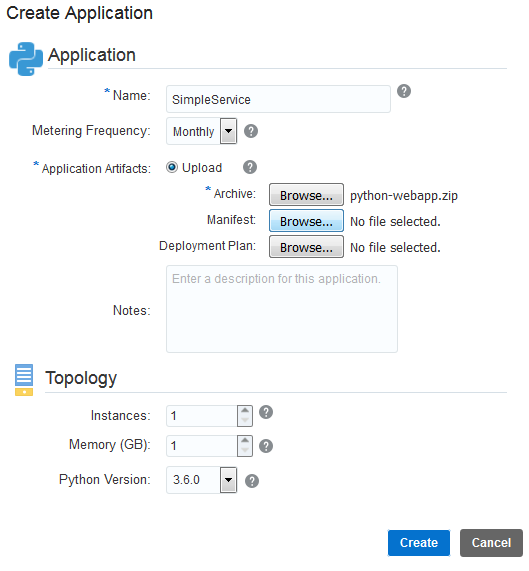
In the Application section, enter a name for your application and click Browse next to Archive.
-
In the File Upload window, select the zip file of your application, and click Open.
-
In the Instances section, configure the number of instances and the Gigabytes (GB) of memory for your application. Click Create.
Description of this image -
In the confirmation dialog box click OK.
-
Wait until the application is completely created and click the URL value.
Your application could take a few minutes to complete the process.

Description of this image 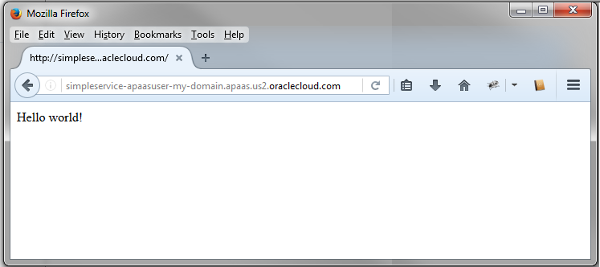
Description of this image
What to Learn More?
- Oracle Application Container Cloud Service in the Oracle Help Center