
 Running a Docker Container with Oracle Container Cloud Service in Three Easy Steps
 Before You Begin
This tutorial shows you how to run a simple helloworld example application as a Docker container using Oracle Container Cloud Service. This tutorial takes approximately 5 minutes to complete.
Background
The helloworld example application is simply a web page containing a welcome message and a page view counter. The application is stored as a Docker image in the public Docker Hub Registry This tutorial shows you how to use Oracle Container Cloud Service to deploy and run the helloworld example application as a Docker container, and how to confirm the application is working correctly.
During this tutorial you will:
- Log in to the Oracle Container Cloud Service Container Console.
- Deploy and run the helloworld example application as a Docker container.
- Use the helloworld application within the running Docker container.
What Do You Need?
- Web browser - A web browser is required for working with Oracle Cloud services. These are the minimum requirements:
- Microsoft Internet Explorer 11 or later.
- Google Chrome 29 and later
- Mozilla Firefox 24 and later
- Apple Safari 9 and later
- Subscription to Oracle Container Cloud Service - Before you can use Oracle Container Cloud Service:
- You, or someone else in your organization, must have ordered and activated an Oracle Container Cloud Service subscription
- You, or someone else in your organization, must have created an Oracle Container Cloud Service service instance using the Oracle Container Cloud Service Service Console
- You must know the url and credentials with which to log into the Oracle Container Cloud Service Container Console
For more information, see Using Oracle Container Cloud Service in the Oracle Help Center.
 Log In to the Container Console
- Log in to the Oracle Container Cloud Service Container Console `at the URL and using the credentials you’ve received from your administrator.

Description of this image
 Deploy and Run the helloworld Example Application as a Docker Container
- On the Dashboard page, click Services to display the Services page.
- On the Services page, click the Deploy button beside the helloworld service.
- the deployment's name
- the pool of hosts on which to run the deployment
- the number of containers to deploy, and how to choose the hosts on which to deploy them
- In the Deploy dialog, click Deploy to accept the default values and deploy and start the service.

The Services page shows the example applications provided with Oracle Container Cloud Service.

The Deploy dialog appears, containing default values for:

The Deployments page appears, showing progress details of the deployment you just created.
To begin with, the Deployments page shows the helloworld image being pulled from Docker Hub Registry.

After the image has been downloaded, it's started as a Docker container. The Deployments page shows the status of the Docker container as "Running".

 Use the helloworld Application Within the Running Docker Container
- On the Deployments page, click on the name of the host in the Hostname column.
- On the Host page, copy the value in the public_ip field.
- Open a new browser window and enter the url to
access the helloworld application running inside
the container, in the form
http://<public_ip>:9000where: -
<public_ip>is the value you copied from the public_ip field on the Host page (for example,192.0.2.254) - 9000 is the host port (9000 is specified as part of the example application's service definition)
- Reload the page in the browser window (for example, by clicking Refresh or Reload).

The Host page appears, showing details of the host running the container.

For example, the full url might look like http://192.0.2.254:9000
When your browser loads the page, the page shows a message like:
Hello
Is it me you're looking for?

At the bottom of the page, a page view counter shows the number of times the page has been visited, and initially displays '1'.
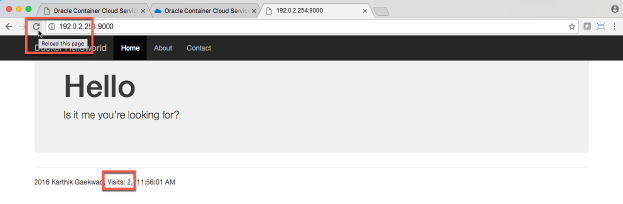
The counter at the bottom of the page now displays '2'.
 Want to Learn More?
- Get Started with Oracle Container Cloud Service in the Oracle Help Center
- Using Oracle Container Cloud Service in the Oracle Help Center
- Information about building Oracle Container Cloud Service stacks on GitHub
- Oracle Container Cloud Service video