
 Adding Build VMs in Oracle Developer Cloud Service
 Before You Begin
This 5-minute tutorial shows how to add Build VMs in Oracle Developer Cloud Service.
Background
You can use Oracle Infrastructure Compute Classic Service VMs to run builds of your organization's projects. These VMs are called as Build VMs in Oracle Developer Cloud.
In this tutorial, you add a Build VM that uses a Node.js Build VM template and runs builds of Node.js applications.
What Do You Need?
- A web browser
- An Oracle Cloud account with an active Oracle Developer Cloud
- Your Oracle Cloud account credentials
- Oracle Cloud Infrastructure Compute Classic of your identity domain linked with Oracle Developer Cloud. See the Linking Oracle Cloud Infrastructure Compute Classic Service with Oracle Developer Cloud Service OBE.
- A Build VM Template with the Node.js software. See the Creating Build VM Templates in Oracle Developer Cloud Service OBE.
- The Developer Service Administrator (
DEVELOPER_ADMINISTRATOR) identity domain role assigned to you
 Add a Build VM
In this section, you learn how to allocate Oracle Cloud Infrastructure Compute Classic VMs as Build VMs.
- Log on to Oracle Developer Cloud.
- In the Oracle Developer Cloud user interface, click the user name in the top-right corner and select Organization.
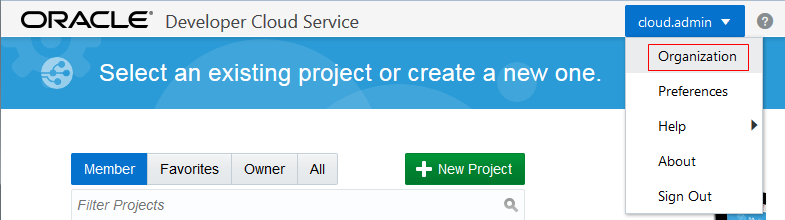
Description of the illustration devcs_user_menu.png - In the Organization Administration page, click Virtual Machines.

Description of the illustration devcs_org.png - In the Build VMs tab of the Virtual Machines page, click New VM.
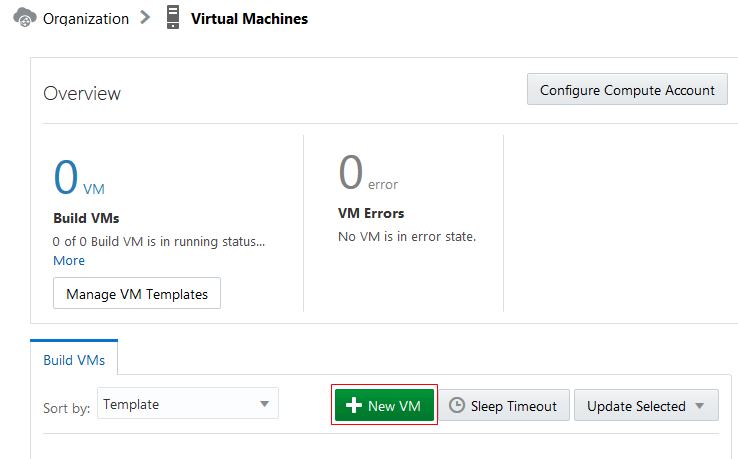
Description of the illustration devcs_vm_buildvm.png - In the Add Build VM dialog box, enter the following details and click Add.
- Quantity: 2
- VM Template: Node.js Build VM Template

Description of the illustration devcs_vm_addbuildvm_dialog.png
After the verifying the available quota, two VMs on the linked Oracle Infrastructure Compute Classic are allocated as Build VMs. Jjobs using the Node.js Build VM Template template will now run builds on any of the two Build VMs.
 Want to Learn More?
- Viewing and Managing Virtual Machines in Using Oracle Developer Cloud Service
- Oracle Developer Cloud Service product page
- Oracle Developer Cloud Service documentation page in the Oracle Help Center