
 Planning Process Overview
 Before You Begin
This 25-minute tutorial introduces you to:
- A typical planning process using Planning in Oracle EPM Cloud Service
- Planning, budgeting, and forecasting workflow concepts and tools
- The benefits of planning using multiple scenarios
- The budget submission process
Background
Planning effectively is the key to achieving a successful implementation. With Oracle Planning, you can design budgets that:
- Align the organization to its strategies by planning and forecasting using key drivers and assumptions
- Allow you to analyze and measure results, and make plan adjustments accordingly
- Provides timely and accurate information for improved and lower-risked budget planning and decision making
A typical planning and budgeting process includes the following general steps:
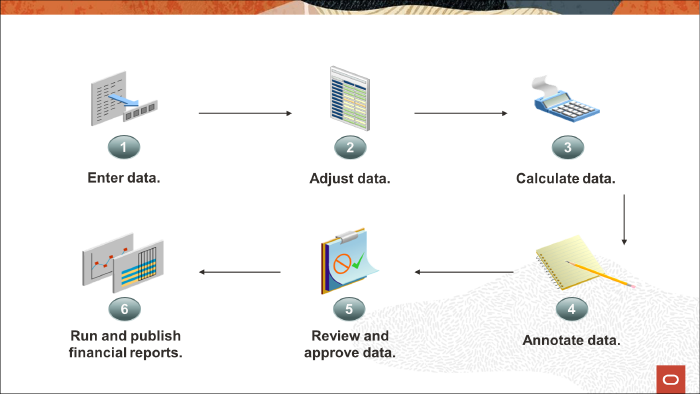
- Enter data - you enter data directly into Planning through forms or Smart View grids or you can import data through Planning or Data Integration.
- Adjust data - you adjust Planning data in forms manually or through the provided adjustment tools, Mass Allocate and Grid Spread, which enable users to simultaneously spread data values across multiple dimensions.
- Calculate data - you calculate Planning data by using the provided business rules or by creating and using custom business rules in Calculation Manager.
- Annotate data - users enter annotations to justify and document details for data values. Annotations can include cell-level text, document attachments, and supporting detail.
- Review and approve budgets - you can set up the approval process based on your organization structure so that you can review and approve data in Planning. You can include validation rules in forms to identify exceptions before the approval process begins.
- Run and publish reports - after entering, calculating, adjusting, and reviewing Planning data, you use Reporting to depict the results in static or dynamic reports.
To complete the planning and budgeting cycle with successful results using the general steps mentioned above, you must first collect the requirements for producing a plan and forecast. Determine which approach best identifies the gap between your organization's budget and targets.
 About the Workflow
Planning, Budgeting, and Forecasting
Planning is the process of determining an organization's financial direction and vision. Most organizations develop an annual plan, which is part of a larger strategic plan that covers three to five years. Planning is typically comprised of strategic plans, long-range plans, and annual plans.
Budgeting is the preparation and approval of financial and operational plans with a short-term but detailed view. Budgets present the "what is expected" while focusing on the accountability within a detailed cost structure.
Forecasting typically takes past or actual data, usually based from a revenue perspective, to project future outcomes.
An effective planning, budgeting, and forecasting process provides an efficient system of checks and balances on expected and possible outcomes, for both immediate and long-term. Run multiple what-if cases, called Scenarios, to gain insight on viable projections and outcomes.
Workflow Tools
When preparing your plan, budget, or forecast, you enter data in forms. Forms are designed to integrate with the dashboards and reports that dynamically reflect your data, plans, and forecasts. To manage the process, you can control the workflow using a combination of Planning features.
Navigation Flows
Navigation Flows are comprised of clusters, cards, and tabs that allow a user to complete planning tasks within dashboards, task lists, forms, rules, approvals, and reports. You can create navigation flows that control how roles, or groups, interact in Planning.
For example, you can change the names of the cards and clusters that display on the Home page and the order in which they are displayed. You can hide cards, create new cards, and group cards into clusters. You can also customize the vertical and horizontal tabs that display on a card.
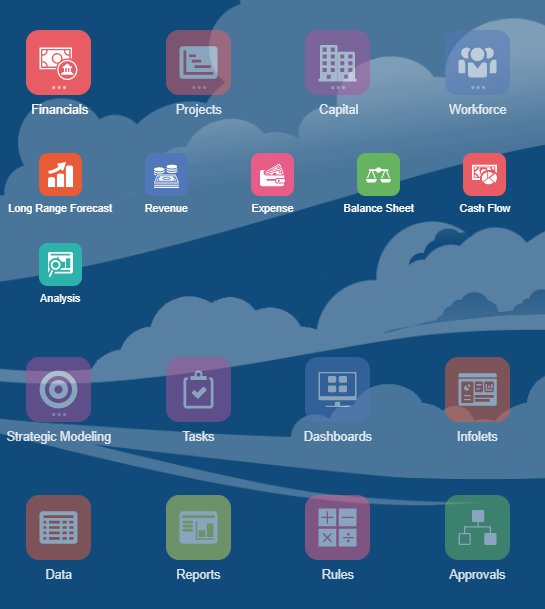
You can use navigation flows to guide planners throughout the budgeting process.
Dashboards
Design dashboards that benefit the workflow of your budgeting process.
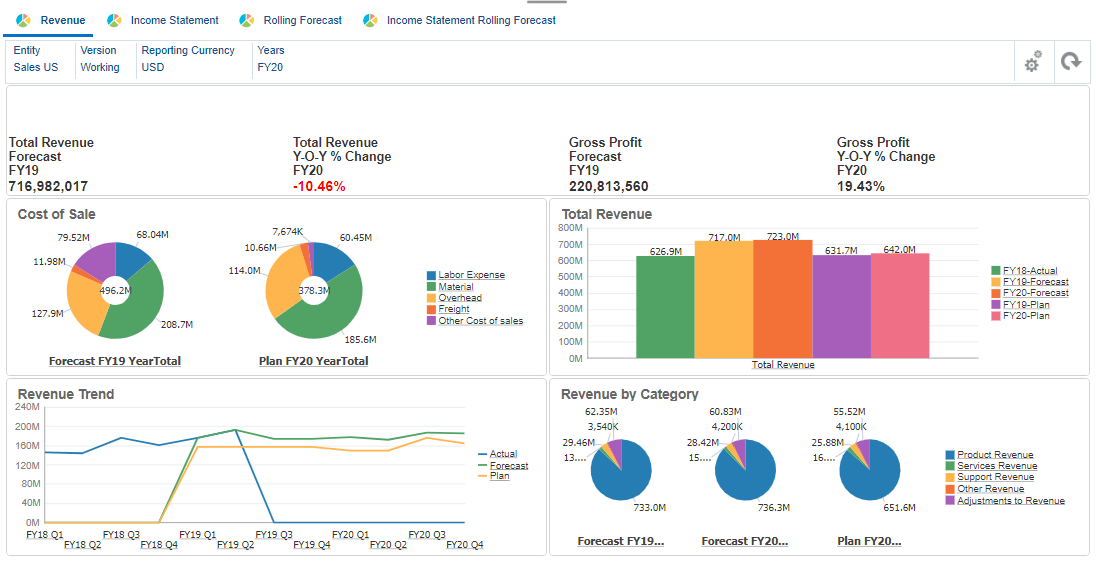
With dashboards, you can:
- Provide an overview to planners at the beginning of the planning and forecasting process by showing summary data.
- Enable planners to chart, evaluate, highlight, comment on, and change key business data. Display a combination of data entry forms that update charts and other forms whenever data is changed.
- Enable users to drill down into underlying detail and select which members to work with, as based on the form design.
- Enable planners to add commentary that includes explanations of data.
Infolets
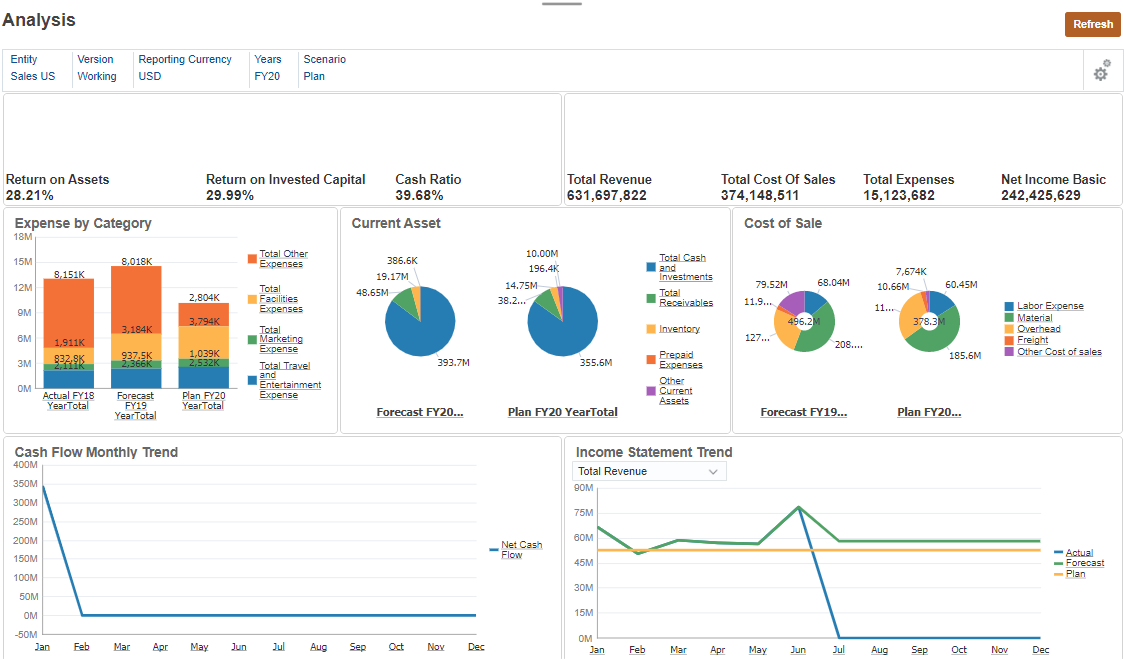
With infolets, you can view and interact with high-level, essential information generated from different sources so that they can quickly assess where to direct their attention.
Service Administrators create, redesign, delete, and assign permissions to infolets.
Infolets are "box-shaped" interactive containers used to display information using text and charts. Infolets use progressive disclosure to display high-level, aggregated, essential information. Infolets can be flipped and resized to display up to three charts or sets of values.
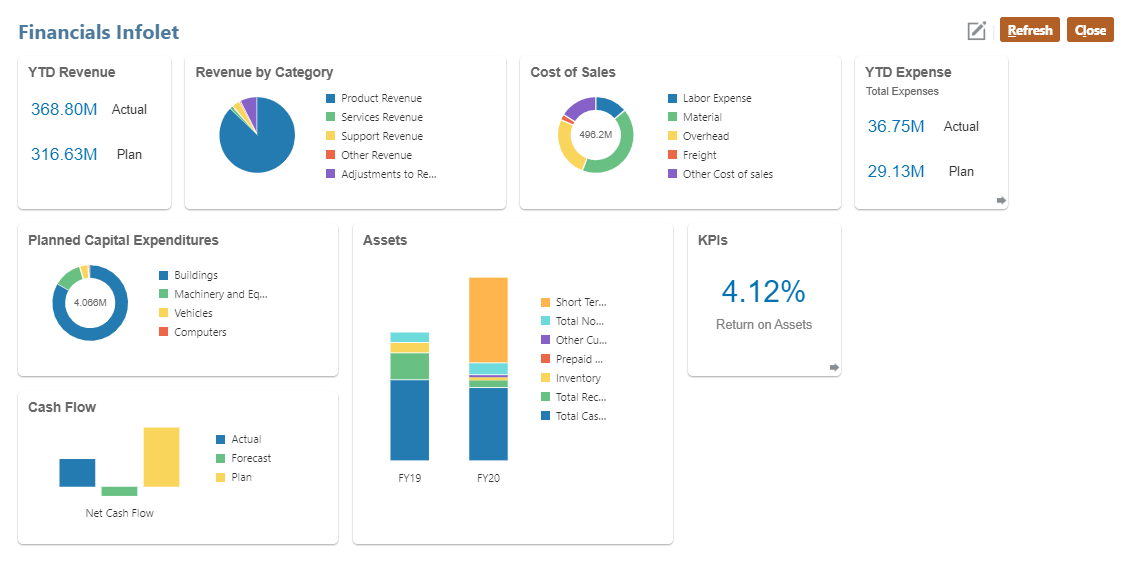
An infolets page contains one or more infolets.
Use infolets to:
- Promote essential, easily consumable information
- Provide answers to your most critical questions:
- What is new or what has changed?
- What is the most important information that supports my work?
- Group key information by user role in a way that helps users quickly assess and prioritize their work
- Progressively display essential details and actions
Display these additional details in the various infolet views accessed by flipping or expanding an infolet. However, a single infolet view is acceptable.
- Provide a visually rich means of displaying essential or summary information
Do not use infolets to feature highly complex information, such as reporting functions, or to present detailed visuals.
Task Lists
Task lists guide users through the planning process by listing tasks, instructions, and end dates. Service Administrators and Power Users can create and manage tasks and task lists.
Task lists help you organize, track, and prioritize your workload.
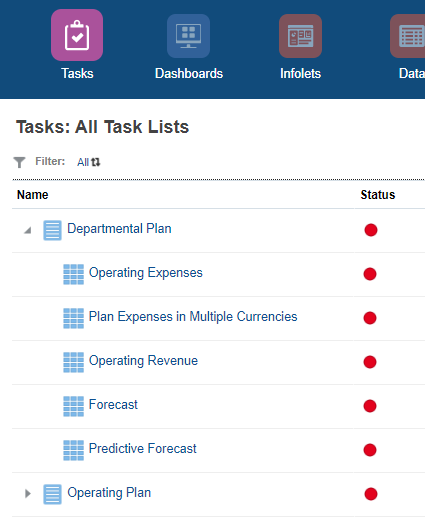
For example, a task might help you complete forms, launch business rules, or promote approval units. They can also launch a website or internal company page.
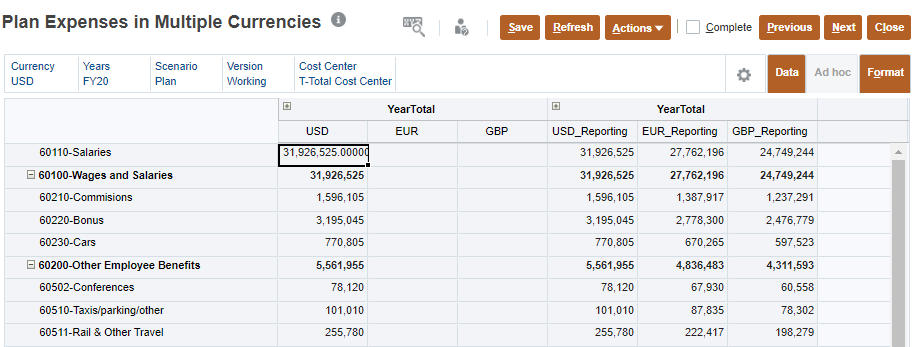
 Planning with Multiple Scenarios
The budgeting process is typically a combination of data analysis and forecasting. You use previous performance results, learn from past experiences, and set reasonable goals.
You can build, compare, and validate multiple plans, and then see the differences and effects in each scenario.
When you plan using multiple scenarios, you can:
- Analyze possible outcomes based on related challenges, drivers, and opportunities that can impact how your organization can achieve its targets based on your budget.
- Gain new insight by analyzing past, current, and future events, and then model possible outcomes from these events.
- Identify and remove uncertainty from your budget while considering the possibility of unforeseen opportunities.
- Review assumptions that fall short on the key drivers your organization's targets depend on.
You plan scenarios that impact your organizational targets the most.
Considerations:
- Review drivers and trends that affect your organization's goals.
- Evaluate, then prioritize drivers and trends, first qualitatively, then quantitatively.
- Plan using scenarios with most likely outcomes.
- Plan scenarios around critical uncertainties.
- Plan with scenarios that cover a full range of possibilities.
- Review the effects of each scenario and develop alternatives for each.
- Keep a close eye on drivers you used in alternative scenarios.
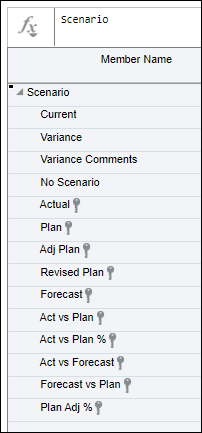
Typically, a budget includes these scenarios: Actual, Plan, and Forecast. Plan additional scenarios that may represent other key situations. Here are a few examples:
 Submitting Budgets
Approvals structure the workflow and formalize authority levels as you prepare budget data.
Plans are tracked and managed through approval units. An approval unit is the basic unit for preparing, annotating, reviewing, and approving plan data. Using Approvals, you submit your plan data for a particular scenario, version, and entity (or part of an entity).
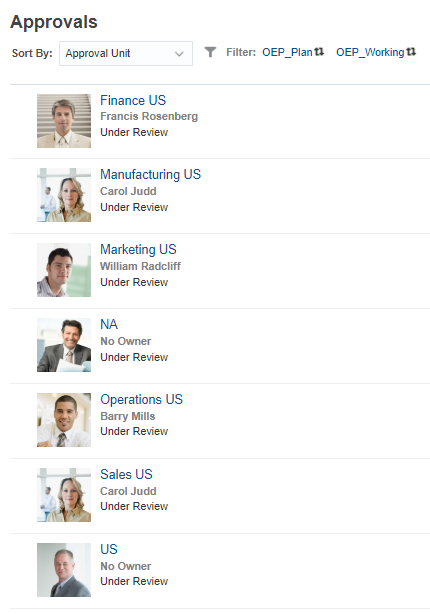
To prepare the budget process, Service Administrators define:
- Approval unit hierarchies
- Owners and reviewers of the approval unit hierarchies
- Validation rules for evaluating submitted data
When a user submits budget data, the data is subjected to validation rules. If the data passes the validations, the budget is promoted to the next owner, and the original user can't edit the data unless ownership is granted again. The submission process locks the data from being edited by anyone except the current owner.
Learn more about Approvals and the Review process in the Managing Approvals tutorial.
 Want to Learn More?