
Before you begin
This 15-minute hands-on tutorial shows you how to set up funding options in Strategic Modeling, a solution provided by Oracle EPM Enterprise Planning. The sections build on each other and should be completed sequentially.
Background
For forecast periods in Strategic Modeling, you can specify how a model will behave when balancing the balance sheet by setting up funding options. You can set up funding options to use excess cash to pay down high interest debt or buy back shares of stock. Items used to balance the model are called Funds. With a surplus of funds, the system finds available uses of funds to balance; with a deficit of funds, the system finds available sources of funds to balance.
To guarantee a balanced model, you must provide at least one source and one use of funds that have no maximum values; that is, you must provide as large of a funding source or as large of a funding use as is required to balance the model.
What do you need?
An EPM Cloud Service instance allows you to deploy and use one of the supported business processes. To deploy another business process, you must request another EPM Enterprise Cloud Service instance or remove the current business process.
- Have Service Administrator access to EPM Enterprise Cloud Service. The instance should not have a business process created.
- If you haven't already, register for a free Oracle Cloud Customer Connect account so you can access the required files. Upload and import this snapshot into your Planning instance.
For more information on uploading and importing migration snapshots, refer to the Administering Migration for Oracle Enterprise Performance Management Cloud documentation.
Viewing funding options
In this section, you check out a model and view the current funding options.
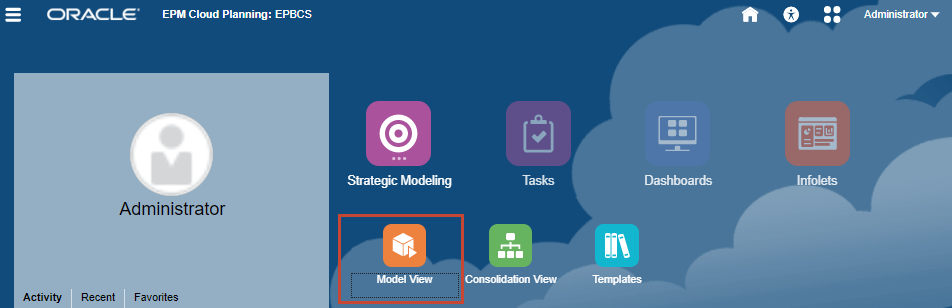
- From the Planning home page, click Strategic Modeling, then click Model View.
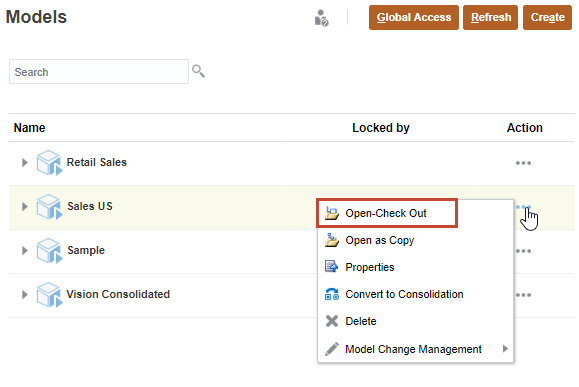
- In the Actions menu for the Sales US model, select Open-Check Out to open the model.
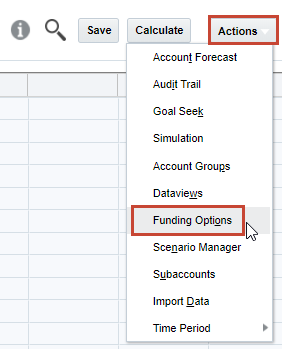
- Click Actions, then select Funding Options.
- Click (
 ) Open Settings to review fund settings. Each fund has a type classification such as Asset or Term Debt. In this example, zero-based funds include Excess Marketable Securities and Long-Term Debt: Excess.
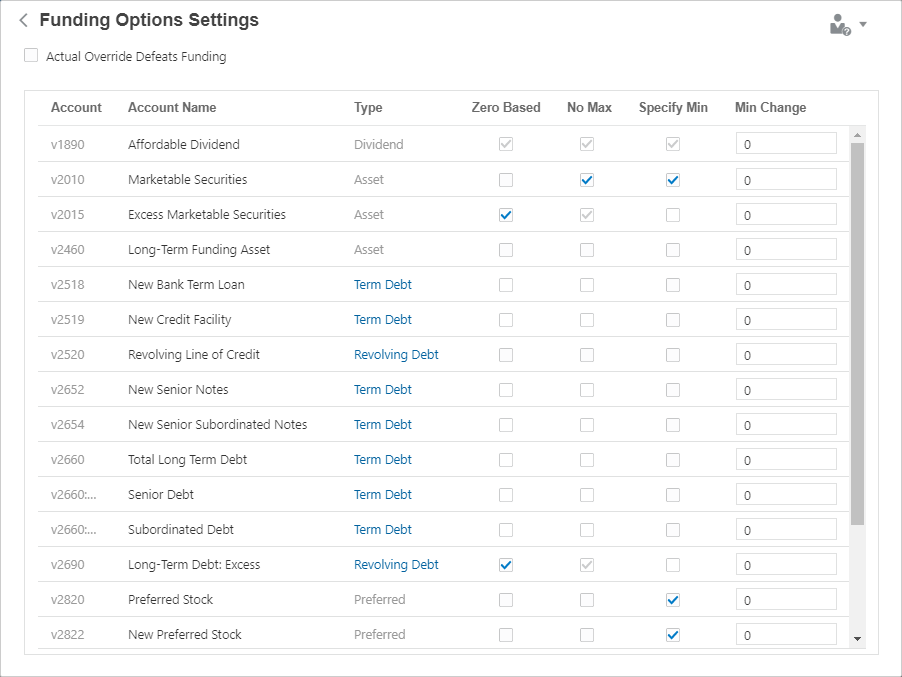
You can configure funds to have no maximum. By default, minimum account values are zero, but you can specify whether users can set a minimum value used for the fund. You can also indicate whether a minimum change amount is required before an account can be used as a source or use of funds. While you can adjust these options at any time, they are typically set only once.
- Click (
 ) Add Account to return to Funding Options, then click Cancel to return to the model view.
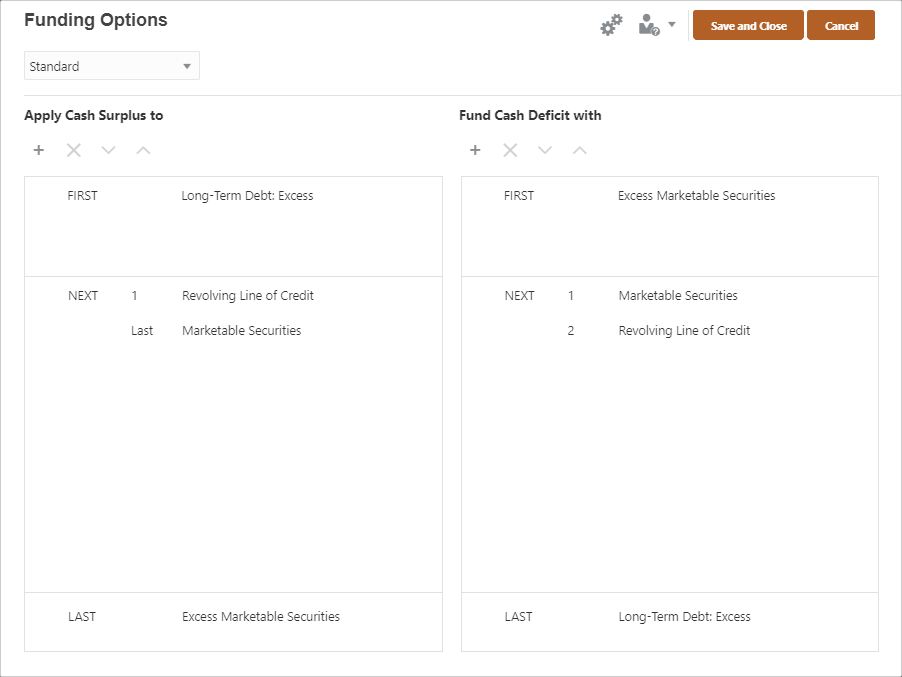
In Funding Options, you can review and edit the funds that receive cash surpluses and fund cash deficits. In the top (FIRST) section, zero-based accounts are listed. The bottom (LAST) section is for the excess account, which has no maximum. The middle (NEXT) section lists the accounts used to either apply surpluses or fund deficits. You can add or reorder funds in this section.
Setting funding options
In this section, you review the current funding routine, and you change a funding routine.
Understanding the current funding routine
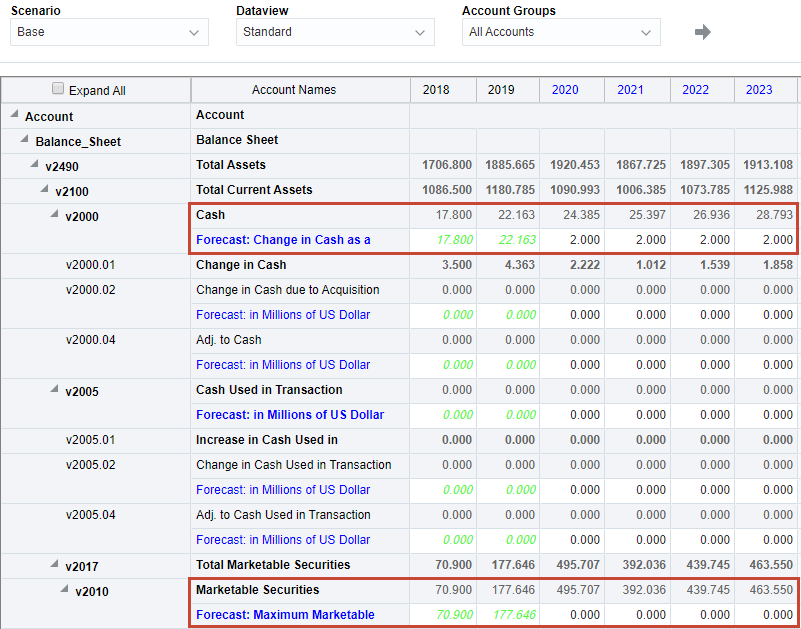
- First, review the forecast for cash and securities. In the Account Groups drop-down, select All Accounts, and then click
 (Refresh).
- Notice that the Cash balance is forecast to increase over time, as is the balance for Marketable Securities.
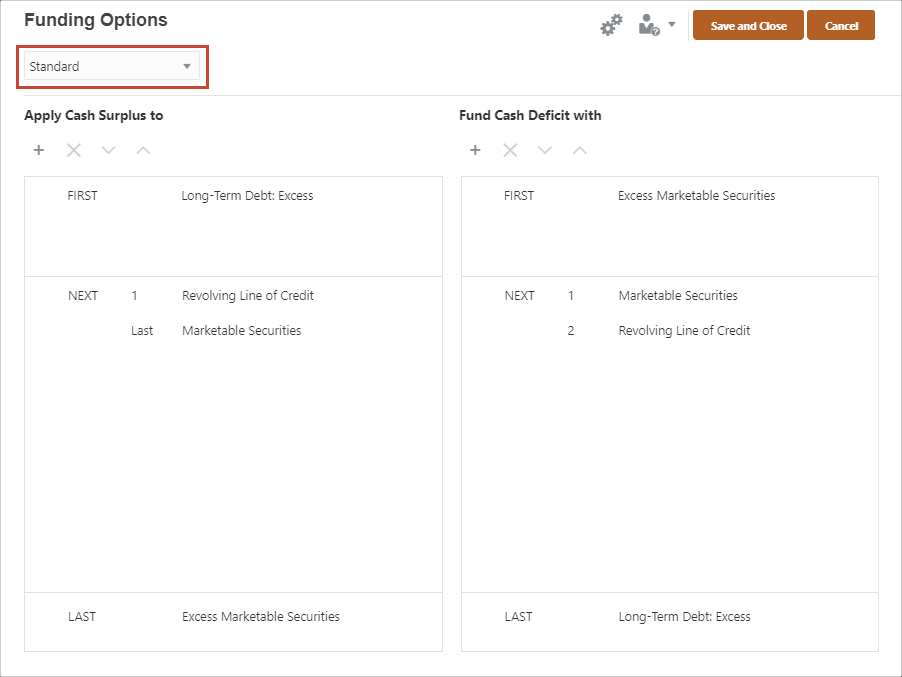
- Open Funding Options again. We're using a Standard method, which focuses on balancing the total sources of funds with the total uses of funds. Currently, excess cash is used to pay down Revolving Line of Credit and then accumulates in Excess Marketable Securities. Cash deficits are funded by selling Marketable Securities and issuing Long-Term Debt: Excess.
Modifying the funding routine
In this section, you change the funding routine to use excess cash to pay down high interest debt.
- Under Apply Cash Surplus to, click
 (Add Account).
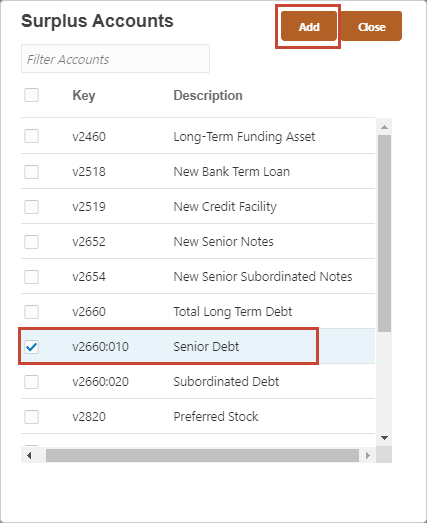
- Select Senior Debt, then click Add.
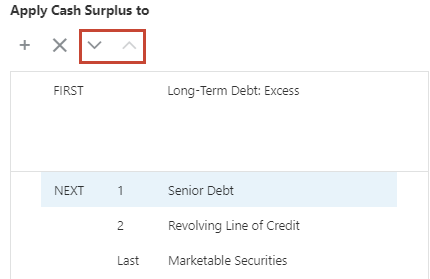
- Use the Move arrows to change the order of the funding routine for surplus:
- 1. Senior Debt
- 2. Revolving Line of Credit
- Last: Marketable Securities
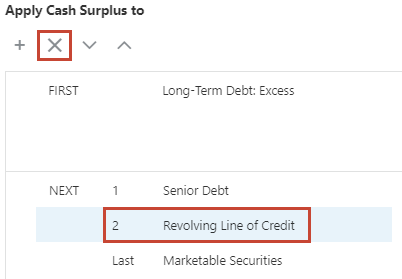
- You can remove fund accounts too. In the Surplus section, select the Revolving Line of Credit account and click
 (Delete Account).
- Delete the Marketable Securities account from the Surplus section too, so excess cash is applied only to Senior Debt.
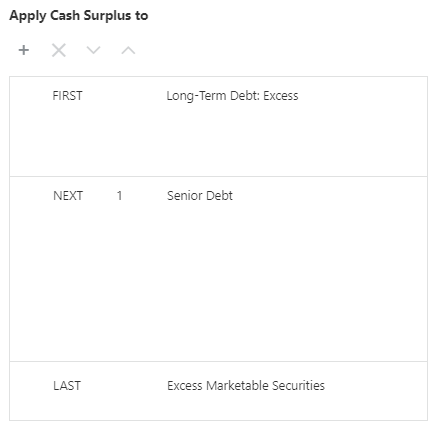
- Click Save and Close to finalize the new funding routine.
Verifying the new funding routine
In this section, you update data and view the forecast results of the new funding routine.
Checking current values for Senior Debt and Marketable Securities
- Click
 (Find Account) and enter v2660:010. Select the row for Senior Debt in the search results and then click Select.
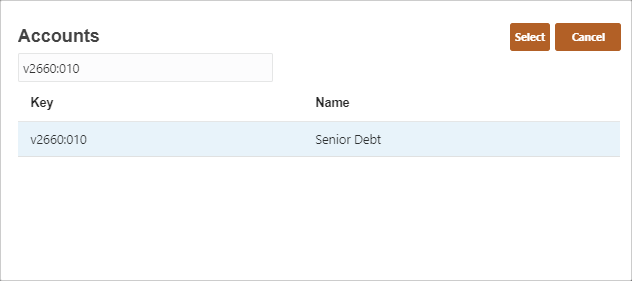
- Senior Debt is highlighted in the Account View. Note the current values for Senior Debt.
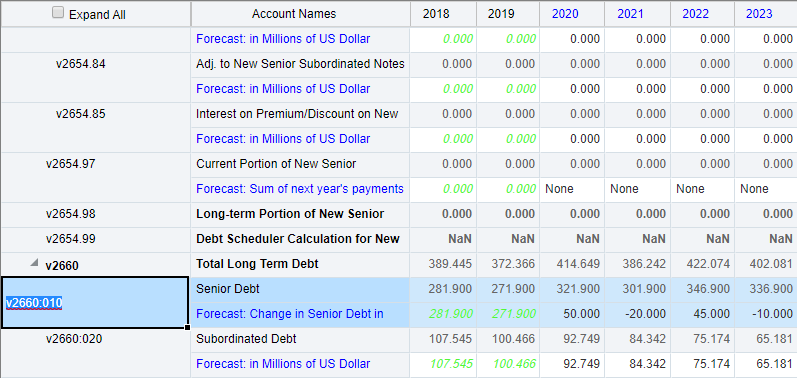
- Click (Find Account) and enter v2015. Select the row for Excess Marketable Securities in the search results and then click Select.
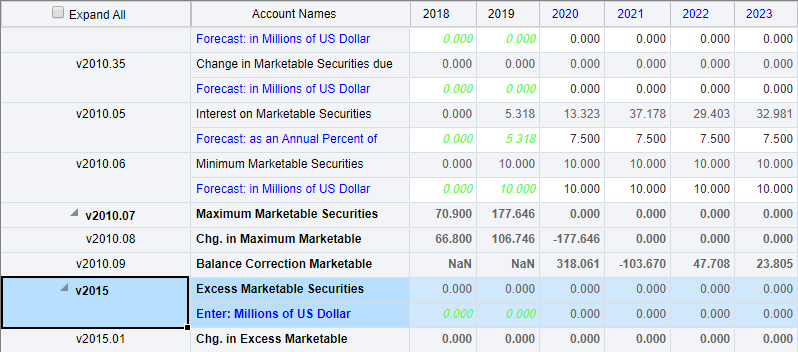
Note the current values for Excess Marketable Securities.
Increasing the available cash forecast
To test the funding routine, reduce the forecast for cost of goods sold, which increases operating revenue and available cash. Increasing the available cash will reduce Senior Debt and increase Excess Marketable Securities.
- Click (Find Account) and enter v1040. Select the row for Cost of Goods Sold in the search results and then click Select.
- In the Forecast: as a Percent of Sales row for Cost of Goods Sold, enter values for the following years:
- 2022: 55
- 2023: 53
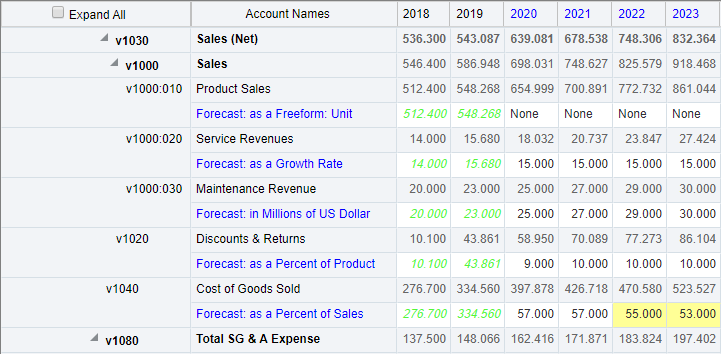
- Click Save.
- Click Calculate, then select Current Scenario. The values for Cost of Goods Sold are reduced.
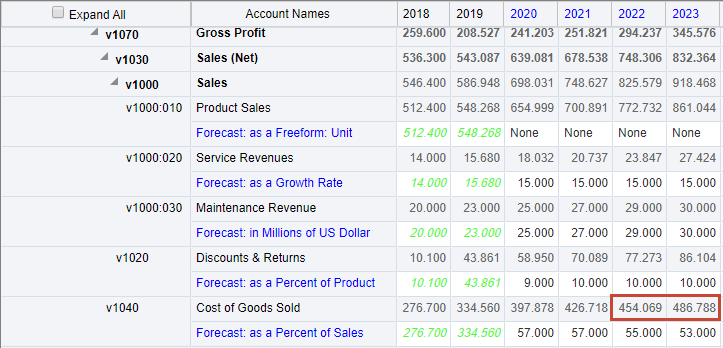
- Check the new values for Senior Debt. Click (Find Account) and enter v2660:010. Select the row for Senior Debt in the search results and then click Select.
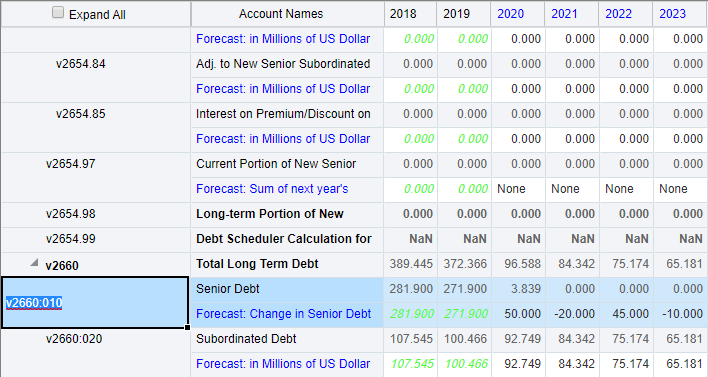
Notice that the values for Senior Debt were reduced when the excess cash was applied by the surplus funding routine.
- Next, check the values for Excess Marketable Securities. Click (Find Account) and enter v2015. Select the row for Excess Marketable Securities in the search results and then click Select.
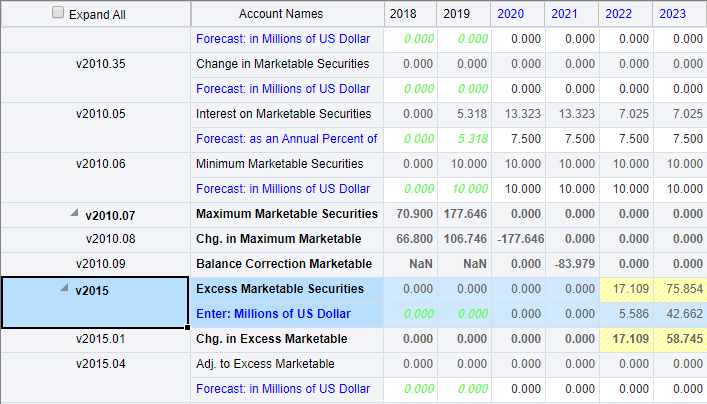
Notice that excess marketable securities have been increased by the cash surplus.
- Click Save to save the calculated data.
Decreasing the available cash forecast
To further test the funding routine, increase the forecast for cost of goods sold, which decreases operating revenue and available cash. Decreasing the available cash will reduce Excess Marketable Securities.
- Click (Find Account) and enter v1040. Select the row for Cost of Goods Sold in the search results and then click Select
- In the Forecast: as a Percent of Sales row for Cost of Goods Sold, enter values for the following years:
- 2022: 60
- 2023: 63
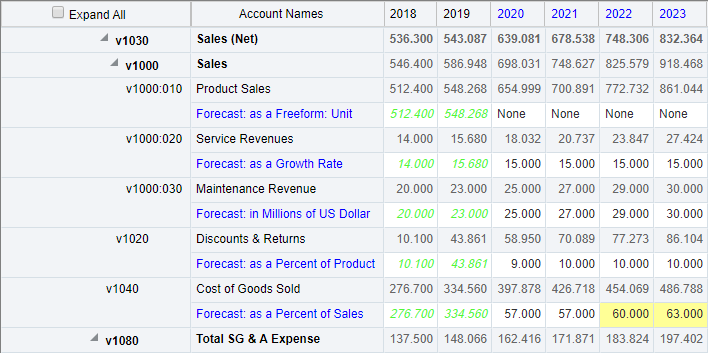
- Click Save.
- Click Calculate, then select Current Scenario. The values for Cost of Goods Sold are increased.
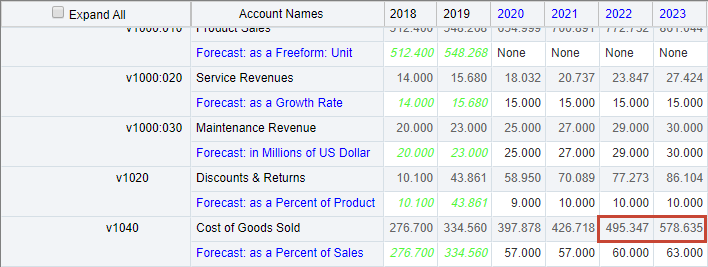
- Check the values for Excess Marketable Securities. Click (Find Account) and enter v2015. Select the row for Excess Marketable Securities in the search results and then click Select.
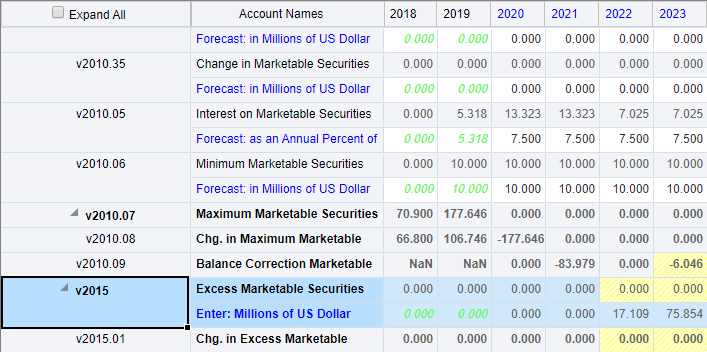
Notice that excess marketable securities were reduced to account for the shortage.
- Click Save to save the calculated data.