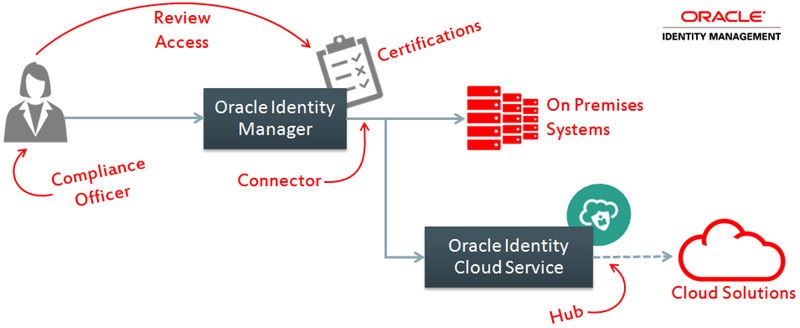
The Hybrid series contains tutorials covering how to combine the best capabilities of Oracle Identity Manager (OIM) and Oracle Identity Cloud Service to meet identity governance requirements for systems on premises and in the cloud without creating redundant processes.
In this tutorial, you learn how to apply OIM's certification processes with closed loop remediation for accounts and groups existent in Oracle Identity Cloud Service.
This integration provides a single certification process for all systems (cloud and on premises) and improves the governance posture in cloud solutions without slowing down the cloud system integration.
Time to Complete
30 minutes.
Background
Oracle Identity Manager (OIM) is:
An enterprise-level identity governance solution that provides user management, certification, segregation of duties, and reporting services for heterogeneous systems.
Built to address complex integration, customization, and governance scenarios such as support all kinds of systems (including mainframes, proprietary, and custom apps) and companies with strong regulatory requirements (highly regulated industry or global presence).
To support these complex scenarios while maintaining flexibility, OIM integrations require more configuration and planning.
Oracle Identity Cloud Service is:
An identity as a service (IDaaS) solution that provides cloud standards-based single sign-on and identity management functionality in the cloud.
Built to integrate fast with standards-based (SAML, OAuth, Open ID, SCIM) solutions in the cloud, which speeds up drastically the cloud uptake and reduces shadow IT in the cloud.
To preserve the integration speed required in the cloud, Oracle Identity Cloud Services does not implement the same level of governance and customization features supported by OIM.
You can combine the best features from OIM (governance, customization, heterogeneous support) and Identity Cloud Service (cloud agility) to meet complex scenarios in the cloud.
In this tutorial, you leverage the OIM certification feature in Oracle Identity Cloud Service.
Verify your selections in the Summary step and click Create. In the Certification Job dialog, click Yes.
OIM displays a confirmation message and creates certifications to review users provisioned to the Identity Cloud Services application Instance and its entitlements.
Click Self Service and then click Certifications.
Confirm that OIM displays the Cloud Access Review [System Administrator] pending certification:
This confirms that the Cloud Access Review assigned a certification object for XELSYSADM. In the next section, you complete this certification.
Perform the Access Certification
Complete the Cloud Access Review
Click the Cloud Access Review [System Administrator] certification.
Click the Identity Cloud Service Application Instance entry.
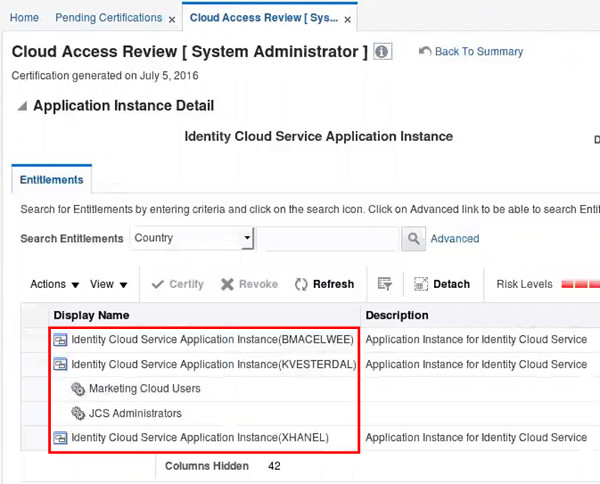
Expand the Display Name column. The certification page displays the user accounts that must be certified or revoked as part of the cloud access review.
Description of this image
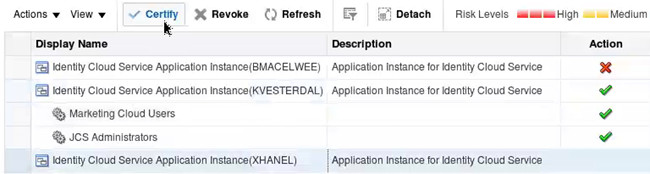
Select BMACELWEE and click Revoke, enter Bettina is not working with our cloud systems as comment and click OK.
In the Sign-off box, enter the xelsysadm password and click OK.
OIM displays a confirmation message and starts the closed loop remediation (revocation request) for BMACELWEE.
Approve the Closed Loop Remediation
Log out of Identity Self Service as XELSYSADM.
Access Identity Self Service as BMACELWEE.
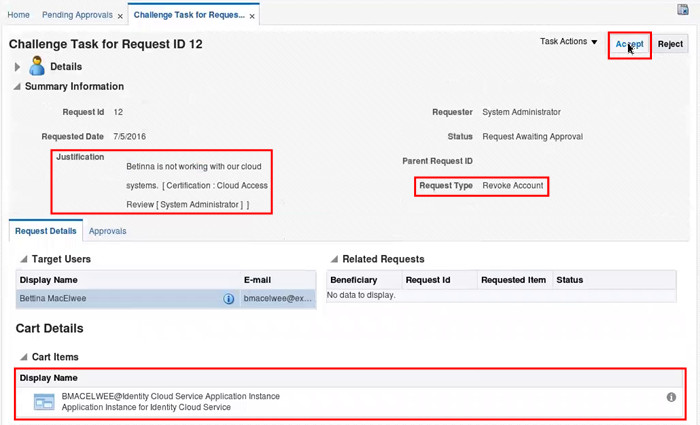
Click Pending Approvals, and then click the Challenge Task request.
In the request details page, confirm that the justification, the request type, and the Cart Items display relevant information about the revocation, and then click Accept.
Description of this image
Close the pending approvals window.
Verify the Certification Results
Check the Closed Loop Remediation Result
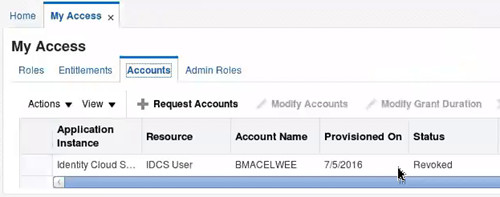
In Identity Self Service console as BMACELWEE, click My Access and then click Accounts.
Confirm that the Identity Cloud Service application Instance account status is Revoked.
Description of this image
This indicates that the closed loop remediation worked.
Log out of the Identity Self Service console.
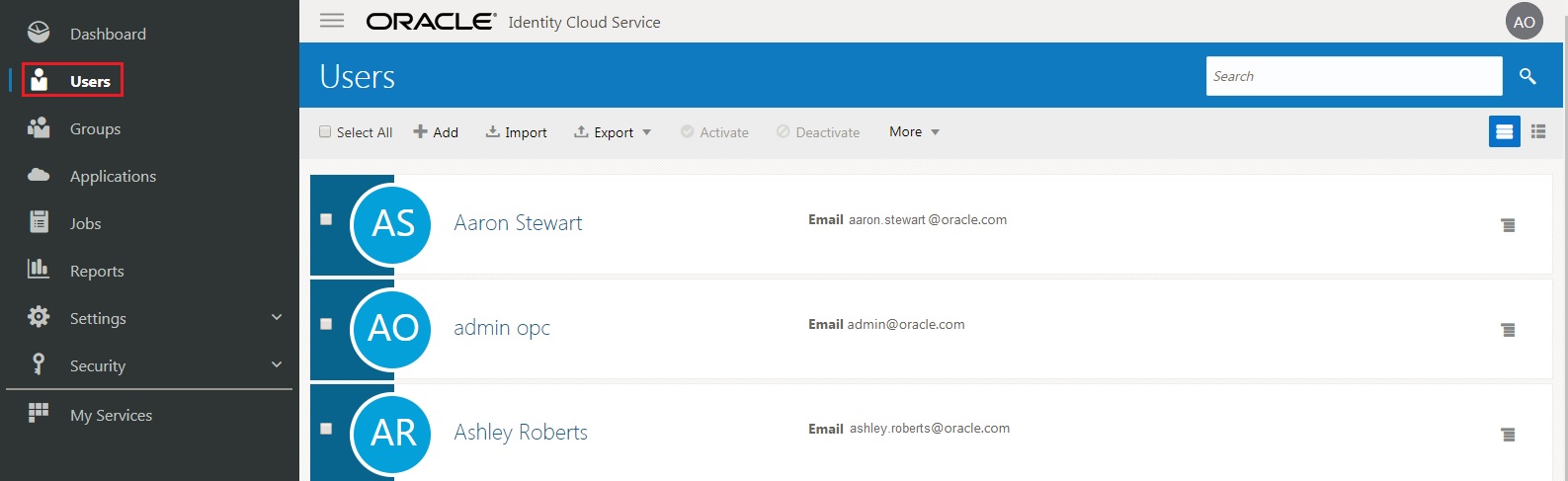
Optionally access the Oracle Identity Cloud Service console, expand the Navigation Drawer , click Users, and confirm that Bettina MacElwee's account no longer exists.
Description of this image
Review the Certification Dashboard
Access the OIM Identity Self Service console as xelsysadm.
Click Compliance.
Click Identity Certification > Dashboard.
In the Show field, select Completed. OIM will display the completed certifications.
Click Cloud Access Review [System Administrator].
Click the Identity Cloud Service Application Instance entry.
Expand the comments column and check the comment associated with BMACELWEE's revocation
Optionally, select the BMACELWEE row and explore the certification dashboard tabs.
The detailed information section provides insights about the certification that includes the risk summary, certification and account history, and associated audit violations.
In this section, you learn more about additional certification features that you can implement for OIM with Oracle Identity Cloud Service.
Hybrid User-centric Certification with Closed Loop Remediation
In this tutorial, you configured an application-instance based certification. This type of certification is used when the access is reviewed from the application instance perspective (to review who has access to Identity Cloud Service).
The OIM certification also supports user certifications. In this type of certification, the user manager (or another administrator) reviews all the access that a given user has. This includes accounts and entitlements from Identity Cloud Service and other connectors. The user-centric certification can provide functionalities such as:
Centralized and automatic access certification campaigns compatible with regulatory requirements, such as the Sarbanes-Oxley Act (SoX) and the Health Insurance Portability and Accountability Act (HIPAA) across cloud and on premises systems.
Automatic closed loop remediation across cloud and on premises systems.
General steps to configure the user-centric hybrid certification:
In OIM Identity Self Service console, create a certification definition with:
Certification Type: User
Perform closed loop remediation: selected
Primary Reviewer: User Manager
Tip: In the certification scope, start with a single user or organization for testing purposes. Expand the certification scope as your company gets used to work with certifications.
To automate the certification execution, visit the OIM scheduler and edit the scheduled job related to your certification name (Cert_Certification Name) with:
Schedule Type: Periodic
Run every: 180 days (for SoX reviews)
Tip: For best results, it's recommended that you test the certification scheduler with a reduced period in a certification definition with a limited scope (single user or organization) for testing purposes. Expand the certification scope and schedule as your company gets used to work with certifications.
Hybrid Event-listener Based Certification with Closed Loop Remediation
Event listeners provide a way to trigger OIM certifications after changes in the user profile instead of time based certifications. The event-listener based certification can provide functionalities such as:
Access reviews when an important change happened to a user, such as when he changes his position or manager
Centralized access certification campaigns across cloud and on premises systems with closed loop remediation
The general steps to configure the user-centric hybrid certification are:
In OIM Identity Self Service console, create a certification event listener associated with the certification definition of your choice.
Visit the OIM scheduler and edit the Certification Event Trigger Job scheduled job. Enter your event listener in the Event Listener Name List.
The Certification Event Trigger Job, by default, runs every day to detect changes based on your event listener rules.

 , click Users, and confirm that Bettina MacElwee's account no longer exists.