The Hybrid series contains tutorials covering how to combine the best capabilities of Oracle Identity Manager (OIM) and Oracle Identity Cloud Service to meet
identity governance requirements for systems on premises and in the cloud without creating redundant processes.
In this tutorial, you learn about how to apply OIM's Identity Audit policies, a feature that addresses Segregation of Duties (SoD) violations with
closed loop remediation for accounts and groups existent in Oracle Identity Cloud Service.
This integration can capture reactively and proactively toxic combination of accesses (SoD violations) including even violations across on premises and cloud systems
(for example, when a user cannot be system administrator on premises and have access to SaaS systems in the cloud).
Time to Complete
30 minutes.
Background
Oracle Identity Manager (OIM) is:
An enterprise-level identity governance solution that provides user management, certification, segregation of duties, and reporting services for heterogeneous systems.
Built to address complex integration, customization, and governance scenarios such as support all kinds of systems (including mainframes, proprietary, and custom applications) and companies with strong regulatory requirements (highly regulated industry or global presence).
To support these complex scenarios while maintaining flexibility, OIM integrations require more configuration and planning.
Oracle Identity Cloud Service is:
An identity as a service (IDaaS) solution that provides cloud standards-based single sign-on and identity management functionality in the cloud.
Built to integrate fast with standards-based (SAML, OAuth, Open ID, SCIM) solutions in the cloud, which speeds up drastically the cloud uptake and reduces shadow IT in the cloud.
To preserve the integration speed required in the cloud, Oracle Identity Cloud Services does not implement the same level of governance and customization features supported by OIM.
You can combine the best features from OIM (governance, customization, heterogeneous support) and Identity Cloud Service (cloud agility) to meet complex scenarios in the cloud.
In this tutorial, you leverage the OIM Identity Audit feature to deliver Segregation of Duties (SoD) controls for the Oracle Identity Cloud Service.
Have the Identity Audit and the Certification features enabled in OIM.
Have a few OIM users and departments, plus OIM users provisioned to Identity Cloud Service accounts and groups. In this tutorial:
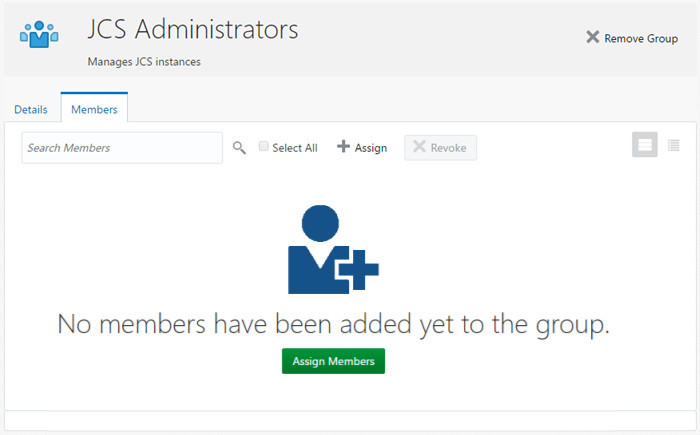
Kenny Vesterdal (KVESTERDAL) is member of the Finance department in OIM and is provisioned to the Identity Cloud Service account, the JCS Administrator group, and the Marketing Cloud Users group.
The IT department exists in OIM.
Configure Segregation of Duties
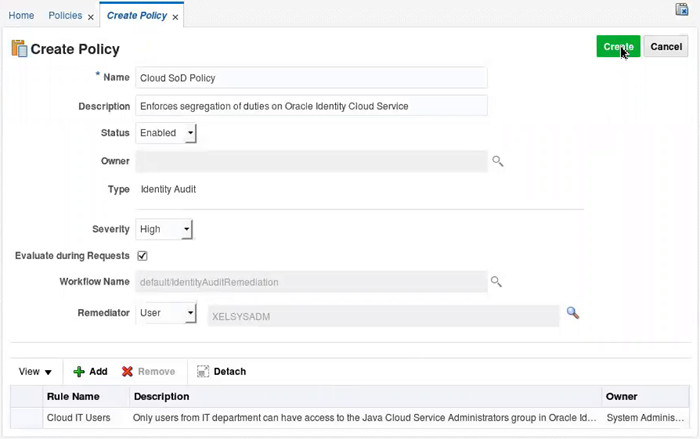
Create Identity Audit Rule
Access the Identity Self Service console as xelsysadm and click Compliance.
Click Identity Audit > Rules.
Click Create.
In the Create Rule page, enter the following:
OIM - Cloud IT Users rule properties
Attribute
Value
Name
Cloud IT Users
Description
                                  Only users from IT department can have access to the Java Cloud Service Administrators
                                  group in Oracle Identity Cloud Service. Otherwise, this is a segregation of duties violation
Scroll down to Condition Builder click the left-most Condition Builder icon.
Click Application > IDCS User > appInstance > IdentityCloudService
> account > * (Any) > IDCS User Group Membership Table > * (Any).
Select Group Value and click OK.
Select Equal from the drop-down menu to the right of the left-most Condition Builder icon.
Click the right-most Condition Builder icon.
Click Value.
Select Identity Cloud Services~JCS Administrator and click OK.
Click Add Condition.
In the second condition row, click the left-most Condition Builder icon.
Click User.
Search and select Organization Name, and click OK.
Select Not Equal from the drop-down menu to the right of the left-most Condition Builder icon.
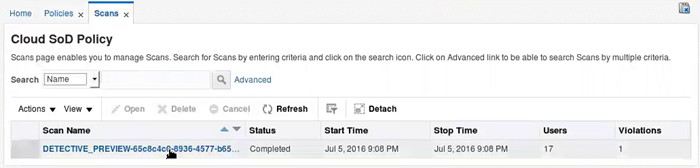
Select Cloud SoD Policy and click View Scans.
OIM will display a detective preview for the Cloud SoD Policy. Click on the preview name.
Description of this image
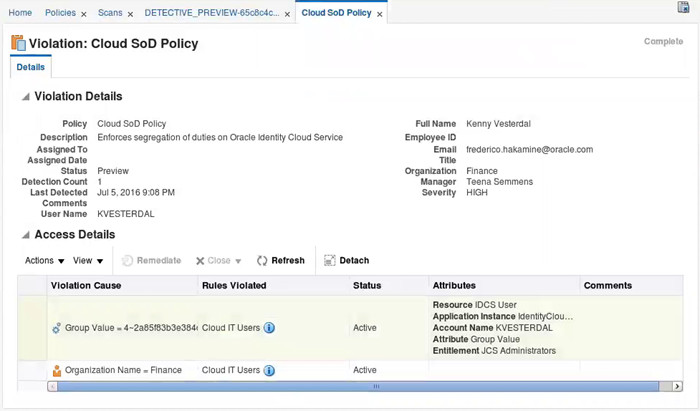
In the Policy Violations page, click the Cloud SoD Policy violation associated with Kenny Vesterdal.
Review the violation details.
Description of this imageTip: In this tutorial, Kenny Vesterdal is a user from the Finance department (not from the IT department).
According to the policy and rule previously configured, this user cannot have access to the Java Cloud Service Administrator group in the cloud.
This indicates that the preview worked as expected.
Create a Scan Definition
Click Home.
Click Identity Audit > Scan Definitions.
Click Create.
Create the Cloud Users Scan with the following attributes:
OIM - Cloud Users Scan definition properties
Step
Attribute
Value
Attributes
Name
Cloud Users Scan
Description
Scan SoD violations for Oracle Identity Cloud Service
Policies
Selection Strategy
Selected Policies
Selected Policies
Cloud SoD Policy
Base Selection
Base Selection
All Users
Configuration
Keep default options
In summary, verify the options and click Finish.
OIM will display a confirmation message.
Detect and Remediate SoD Violations
Run the Scan Definition
In the scan definitions page, select Cloud User Scan and click Run Now.
A confirmation message will appear.
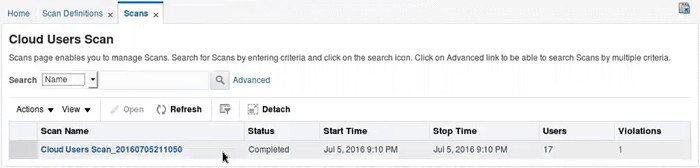
To confirm that the scan ran, wait for few seconds, select Cloud User Scan, and then click View Scans.
Confirm that the scan finished with the status Completed.
Optionally, click the scan name to confirm that one violation for Kenny Vesterdal is reported.
Remediate the SoD Violation
Click Self Service.
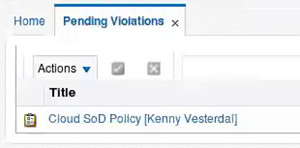
Click Pending Violations.
The pending violations page displays the Cloud SoD Policy [Kenny Vesterdal] violation.
Description of this imageTip: In this tutorial, Kenny Vesterdal is a user from the Finance department (not from the IT department).
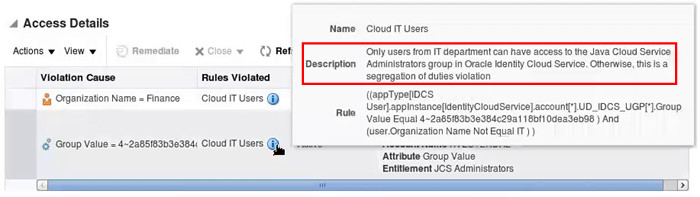
According to the Cloud SoD Policy and the Cloud IT Users rule (previously configured), users outside the IT department with access to the JCS Administrator group are considered a SoD violation.
Click Cloud SoD Policy [Kenny Vesterdal].
Review the policy violation details page. Hover your mouse over the information icon next to Cloud IT Users to check the SoD rule description.
Description of this image
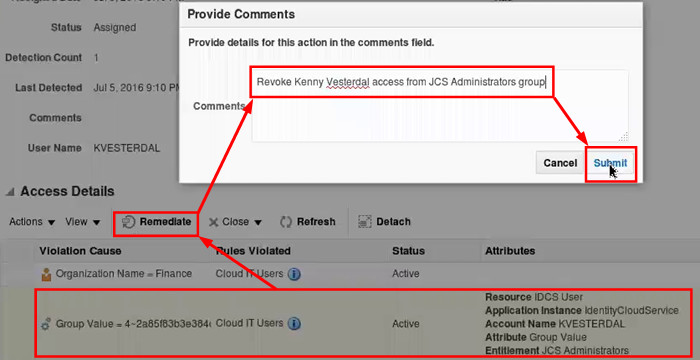
To fix this violation, select the row where the Attributes column contains
the JCS Administrators entitlement and click Remediate.
Enter Revoke Kenny Vesterdal access from JCS Administrators group as comment and click Submit.
Description of this image
Click Complete.
OIM returns to the Pending Violations page which means that the pending violation is remediated.
Verify the Closed Loop Remediation
In the Identity Self Service console, click Manage and then click Users.
Search and click the KVESTERDAL user.
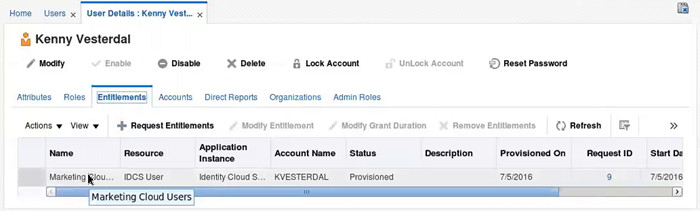
Click Entitlements.
The entitlements table does not display the JCS Administrators entitlement, which means that the closed loop remediation successfully completed.
Description of this image
Log out of the Identity Self Service console
Optionally, access the Oracle Identity Cloud Service UI and open the JCS Administrators group to confirm that Kenny Vesterdal is not associated with this group.
Description of this image
Test the Proactive SoD Control
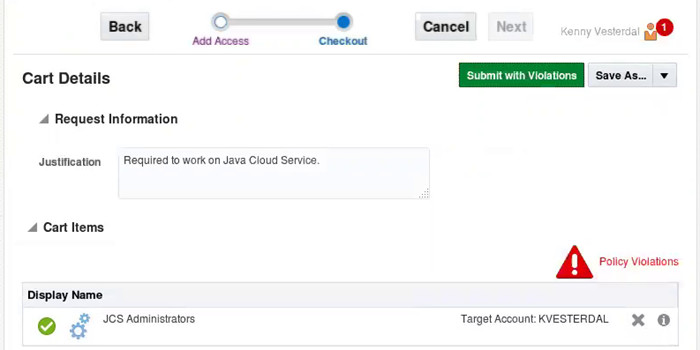
Access the Identity Self Service console as KVESTERDAL and click Request Access > Request for Self.
Add the JCS Administrators group to the cart and click Next.
Provide a Justification and click Submit
OIM displays the message Policy Violations.
Description of this image
This indicates that the proactive SoD detection is working.
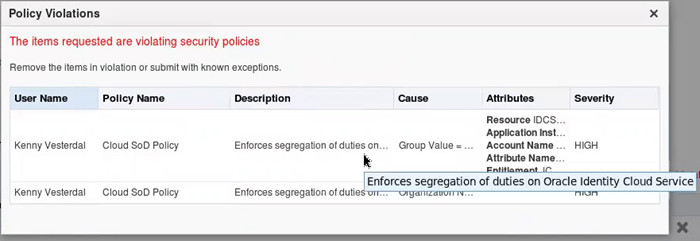
Optionally, click Policy Violations to check what policy and rule triggered the violation
Description of this imageTip: At this point, the end user can cancel the request or submit the access request with violations.
Requests containing violations will generate a policy violations warning for the approver.
In case the approval is provided, future SoD scans will detect the user violation.
In this section, you learn more about additional SoD features that you can implement for OIM with Oracle Identity Cloud Service.
Hybrid SoD Policies with Closed Loop Remediation
In this tutorial, you configured a SoD policy to detect a SoD violation caused by a combination of user department with an Identity Cloud Service privilege (users outside the IT department cannot be members of the JCS Administrators group).
You can create other SoD rules to detect other patterns including:
Combination of privileges between systems on premises and in the cloud to achieve that users with access to sensitive servers cannot have access to Oracle Identity Cloud Service.
Combination of user locality attributes and cloud privileges to achieve that users from Europe cannot have access to Oracle Identity Cloud Service.
You can also use different scan definition filters to apply policies just for specific users. Limiting the scan definition is also a good way to gradually implement SoD in your company.
To implement new rules and scan definitions, repeat the steps provided with this tutorial, using different conditions and filters.