Before You Begin
Purpose
The Hybrid series contains tutorials covering how to combine the best capabilities of Oracle Identity Manager (OIM) and Oracle Identity Cloud Service to meet
identity governance requirements for systems on premises and in the cloud without creating redundant processes.
In this tutorial, you learn how to leverage OIM reporting capabilities for accounts and groups existent in Oracle Identity Cloud Service.
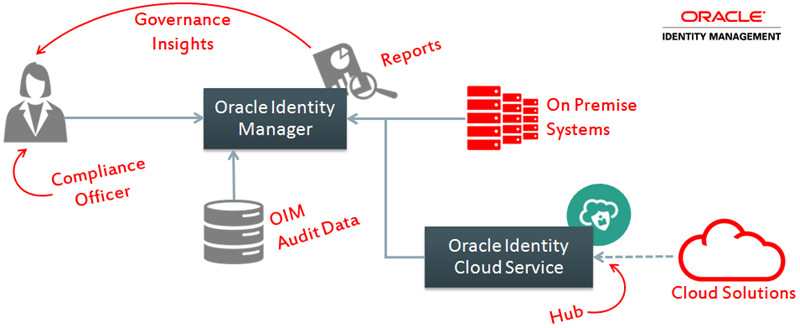
Use this integration to obtain consolidated audit information about users and the identity system both on premises and in the cloud.
Time to Complete
15 minutes.
Background
Oracle Identity Manager (OIM) is:
- An enterprise-level identity governance solution that provides user management, certification, segregation of duties, and reporting services for heterogeneous systems.
- Built to address complex integration, customization, and governance scenarios such as support all kinds of systems (including mainframes, proprietary, and custom applications) and companies with strong regulatory requirements (highly regulated industry or global presence).
To support these complex scenarios while maintaining flexibility, OIM integrations require more configuration and planning.
Oracle Identity Cloud Service is:
- An identity as a service (IDaaS) solution that provides cloud standards-based single sign-on and identity management functionality in the cloud.
- Built to integrate fast with standards-based (SAML, OAuth, Open ID, SCIM) solutions in the cloud, which drastically speeds up the cloud uptake and reduces shadow IT in the cloud.
To preserve the integration speed required in the cloud, Oracle Identity Cloud Service does not implement the same level of governance and customization features supported by OIM.
You can combine the best features from OIM (governance, customization, heterogeneous support) and Identity Cloud Service (cloud agility) to meet complex scenarios in the cloud.
In this tutorial, you leverage the OIM reporting feature to obtain reports about Oracle Identity Cloud Service.
What Do You Need?
- Complete the Oracle Identity Cloud Service: Integrating with Oracle Identity Manager (OIM) tutorial:
- To be able to generate certification and segregation of duties (SoD) reports, complete the following tutorials:
Samples
Reports that you'll generate in this tutorial:
- Account Activity in Resource
- User Resource Access
- Complete Certification Report
- Policy Violations Report (for segregation of duties violations)
Access Account and Entitlement Reports
Access the Account Activity in Resource Report
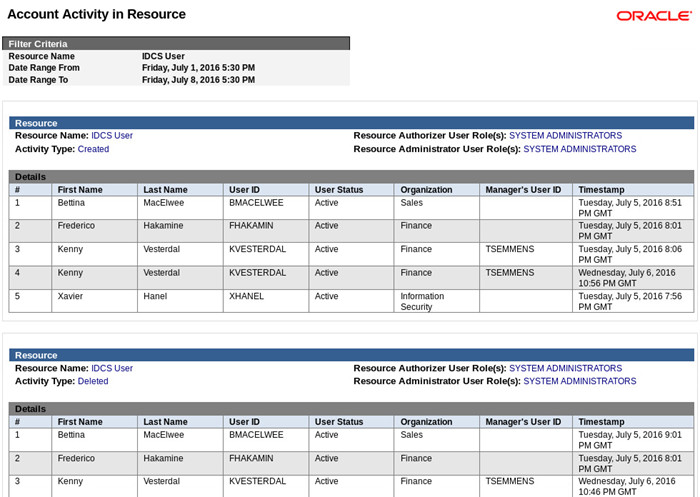
The Account Activity in Resource report shows all the changes (user provisioning, modification, and revocation) performed on OIM users to Identity Cloud Service in a given period.
This report provides historical information about the Identity Cloud Service from the OIM standpoint and is comparable to the Identity Cloud Service user report.
Accessing this report from OIM allows you to customize the report look and feel, add new fields, or implement report automation.
- Access the BI Publisher embedded with OIM (
http://oim.example.com:9704/xmlpserver) and login as administrator (xelsysadm). - Click Catalog.
- Click Shared Folders > Oracle Identity Manager > Resource and Entitlement Reports.
- Click Account Activity in Resource.
- Select IDCS User as Resource Name, select a date for the Date Range From and Date Range To fields, and then click Apply.
- Verify the report contents.

Access the User Resource Access Report
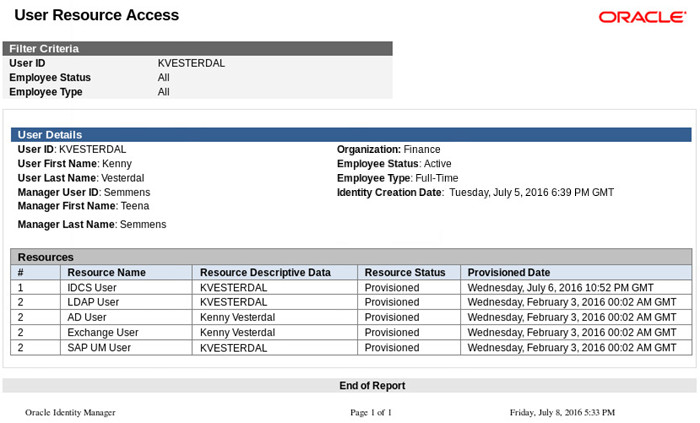
The User Resource Access report together with the User Resource Entitlement report show the access that a user has in OIM and Oracle Identity Cloud Service.
This report provides a snapshot of the user access from the OIM standpoint to on premises systems as well as to the cloud .
This reporting is essential for auditors and security engineers when they are validating the consolidated user access. The reports are complemented by the
User Resource Access History and the User Resource Entitlement History report that provide the same type of information filtered by a date range.
This way you can figure out what consolidated access a user had during a period of time (for example, last week).
- Click Catalog and then click User Resource Access.
- Provide a User ID (for example,
KVESTERDAL) and click Apply. - Verify the report contents.
Access Identity Governance Reports
In this task you get reports about the certification and segregation of duties (SoD) processes executed in OIM for Oracle Identity Cloud Service accounts.
Note: In this tutorial, the reports are retrieving information about certification and SoD processes described in the following tutorials:
Access Certification Reports
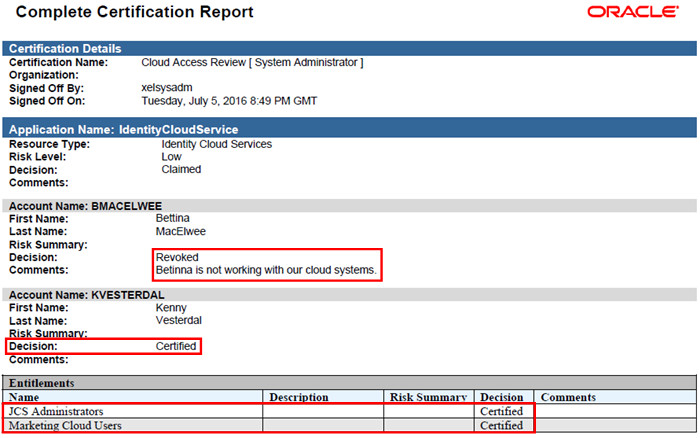
The certification reports provide historical information for the certification campaigns executed in OIM. The campaigns consolidate
accounts and privileges from Oracle Identity Cloud Service and other systems.
Note: For more information, visit the Implementing Hybrid Certification tutorial.
- Access the OIM Identity Self Service console (
https://oim.example.com:14000/identity) as administrator (xelsysadm). - Click Compliance.
- Click Identity Certification > Certification Configuration.
- Confirm that the option Enable Certification Reports is selected (if not, select it and click Save).
- Return to the Compliance page and click Identity Certification > Dashboard.
- Click Search Certifications (magnified icon).
-
In the Show field, select Completed. OIM will display the completed Certifications.
This includes certifications for accounts and privileges provisioned to on premises systems and to Oracle Identity Cloud Service
Tip: If you completed the Implementing Hybrid Certification tutorial, you will see the Cloud Access Review Certification.
Description of this image - Click Reports and then click Generate Report.
- Download and open the certification report. The report contains the complete information about the certification, including the Oracle Identity Cloud Service accounts and entitlements.
Access SoD Reports
The SoD reports provide historical information about the SoD violations detected and remediated in OIM. This includes toxic combinations
of accounts and privileges from Oracle Identity Cloud Service and other systems.
Note: For more information, visit the Implementing Hybrid Segregation of Duties (SoD) tutorial.
- In the OIM Identity Self Service console, click Compliance.
- Click Reports.
- Select the following options and click Generate.
OIM - Segregation of Duties report options Attribute Value Report Type Remediation Completed Policy Violations ReportReport Format PDF -
Open and verify the report content.
Tip: If you completed the Implementing Hybrid Segregation of Duties (SoD) tutorial, you will see reports about SoD remediation for Identity Cloud Service accounts and privileges.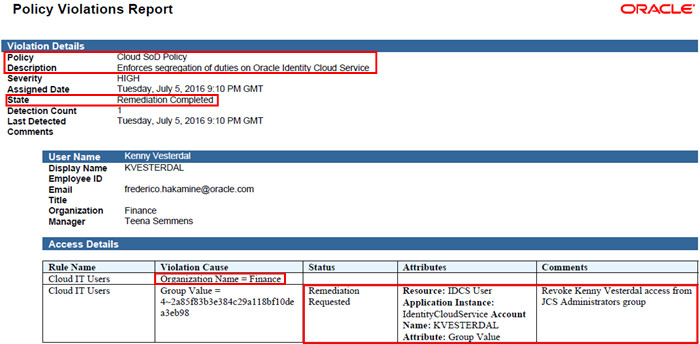
Description of this image).
What's Next? Explore Report Automation and Additional Customization Scenarios
In this section, you learn more about additional report features that you can implement for OIM with Oracle Identity Cloud Service.
Report Automation
- Continuous reporting generation and delivery through email to key areas such as security and compliance.
- Continuous and tailored reporting delivery for managers, such as lists of users and their respective access per department
- Continuous report generation and archiving using FTP, a content server, a common UNIX printing system (CUPS) server, or HTTP (for connecting with object storage)
- In BI Publisher, configure a delivery server and a report job.
- In the report job page, you define the report parameters, delivery format, destination, and frequency.
- After configuration, the report jobs are executed in BI Publisher. You can monitor the execution in BI Publisher, under Home > Report Jobs.
Report Customization
- A custom look and feel as well as consistent formatting
- Tailor-made information about users in OIM and in Oracle Identity Cloud Service
- In BI Publisher, create a data model and a report.
- Edit the data model to define what data to be pulled from the OIM database.
- Edit the report to implement a custom template and to define how to present the data.
Want to Learn More?
Credits
- Developer(s): Frederico Hakamine.