
 Backing Up a MySQL Database to Oracle Cloud Storage Service
 Before You Begin
This tutorial shows you how to back up an on-premises MySQL database to Oracle Cloud Storage Service. The tutorial takes approximately 10 minutes to complete.
Background
- You can use MySQL Enterprise Backup to back up on-premises MySQL databases to Oracle Cloud Storage Service.
- The
mysqlbackuptool includes a number of options specific to cloud backups. - Oracle Cloud Storage Service supports only single-file backups.
- The
- Oracle Storage Cloud Service uses OpenStack Swift for object storage. It authenticates users with Swift's TempAuth system.
What Do You Need?
- MySQL Enterprise Backup, version 4.1 or later
- An on-premises MySQL database server
- An Oracle Public Cloud account with the Oracle Storage Cloud Service activated, together with the following associated information:
- Data center
- Identity domain
- Credentials (username and password) for your account, which you might need to request from your account administrator.
 Creating an Oracle Cloud Storage Service Container
A container is a storage compartment that provides a way to organize the data stored in Oracle Storage Cloud Service. If you do not have an existing container you want to use for the backup operation, create one by performing the following steps.
- Log in to your Oracle Public Cloud account.
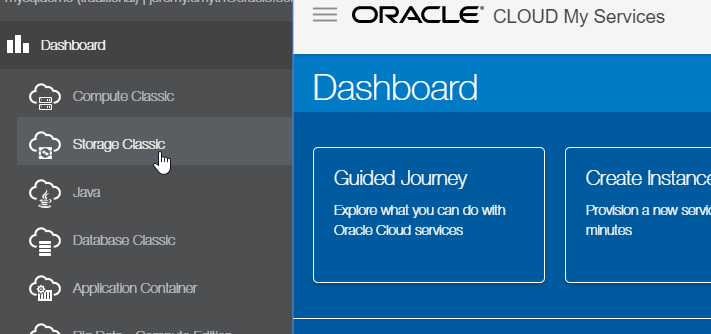
- From the Dashboard menu, select Storage Classic.
- In the Container List, click the Create Container button.
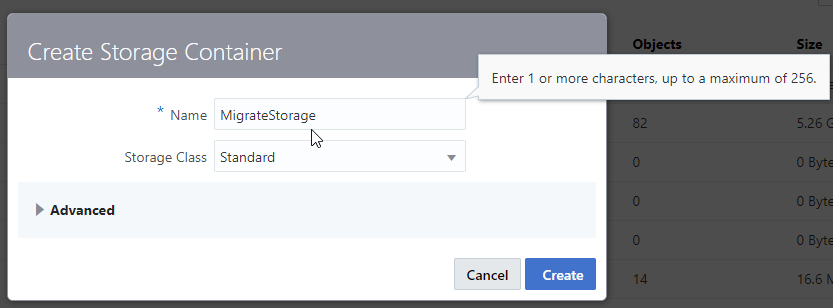
- In the Create Storage Container dialog, enter a unique name for the new container and click Create.
- The new container appears in the Container List.

 Determining the Correct Options for MySQL Enterprise Backup
MySQL Enterprise Backup includes a number of options (cloud-*) specific to cloud backups. In this section, you determine the required options and their values.
-
--cloud-service. You must set this toopenstackfor Oracle Cloud Storage Service. -
--cloud-container. Specify the name of the container you want to use for the backup in this option. -
--cloud-user-idand--cloud-user-password. Supply the user credentials for the Oracle Cloud Storage Service. -
--cloud-tempauth-url. The Oracle Cloud Storage Service REST endpoint that validates the user credentials using OpenStack Swift's TempAuth system. For example:https://example.storage.oraclecloud.com. -
--cloud-object. The name of the Oracle Cloud Storage Service object for the backup image. This must be unique. -
--cloud-ca-info. Absolute path to the CA bundle file that authenticates SSL connections to the host. Oracle cloud services use a certicate signed by Verisign, so you must have the Verisign certificate on your local machine for the process to trust the Oracle Cloud server. The CA bundle on RHEL/Oracle Linux 7 systems is available in theca-certificatespackage and, when installed, is available at the following location:/etc/pki/ca-trust/extracted/openssl/ca-bundle.trust.crt. This location might be different for other Linux distributions and operating systems.Note: There are two types of certificate authorities (CAs): root CAs and intermediate CAs. The CA must be included in the trusted store of the connecting client for the SSL certificate to be trusted by that client. If the certificate is not issued by a trusted CA, the client then checks to see if the certificate of the issuing CA was issued by a trusted CA and will continue these checks until a trusted CA is found, at which point a secure connection is established. If no trusted CA is found, the operation results in an error. A CA bundle is a file that contains these root and intermediate certificates and typically includes the Verisign certficate.
- Optionally, set
--cloud-trace=1to view trace output during the backup operation.
 Executing the Backup
-
Using the arguments you determined in the previous section, execute the
mysqlbackupcommand. For example:# mysqlbackup --include-tables=sakila.* \ > --backup-dir=mybackupdir --backup-image=- backup-to-image -uroot -p \ > --cloud-service=openstack --cloud-container=MigrateStorage \ > --cloud-user-id=Storage-example:xxxxx.yyyy@example.com \ > --cloud-password=xxxxxxxxxx \ > --cloud-tempauth-url=https://example.storage.oraclecloud.com \ > --cloud-trace=1 --cloud-object=BackupTutorial.mbi \ > --cloud-ca-info=/etc/pki/ca-trust/extracted/openssl/ca-bundle.trust.crt sakilais the name of the database to back up.MigrateStorageis the name of the container in Oracle Storage Cloud Service that will store the backup.mybackupdiris the name of a directory that is created during the backup process, and must not exist prior to the backup.-
The backup can take a while to complete. Factors affecting the duration include the speed of your network connection and the size of the database. When the backup operation has finished, you will see the following message in your terminal window:
mysqlbackup completed OK!
In the example command shown, sakila, mybackupdir, and MigrateStorage are identifiers:
 Viewing the Backup in Oracle Cloud Storage Service
- Log in to your Oracle Public Cloud account.
- View the Oracle Cloud Storage Service container that you specified in the
--cloud-containeroption. If the backup completed successfully, you will be able to view the resulting.mbifile:
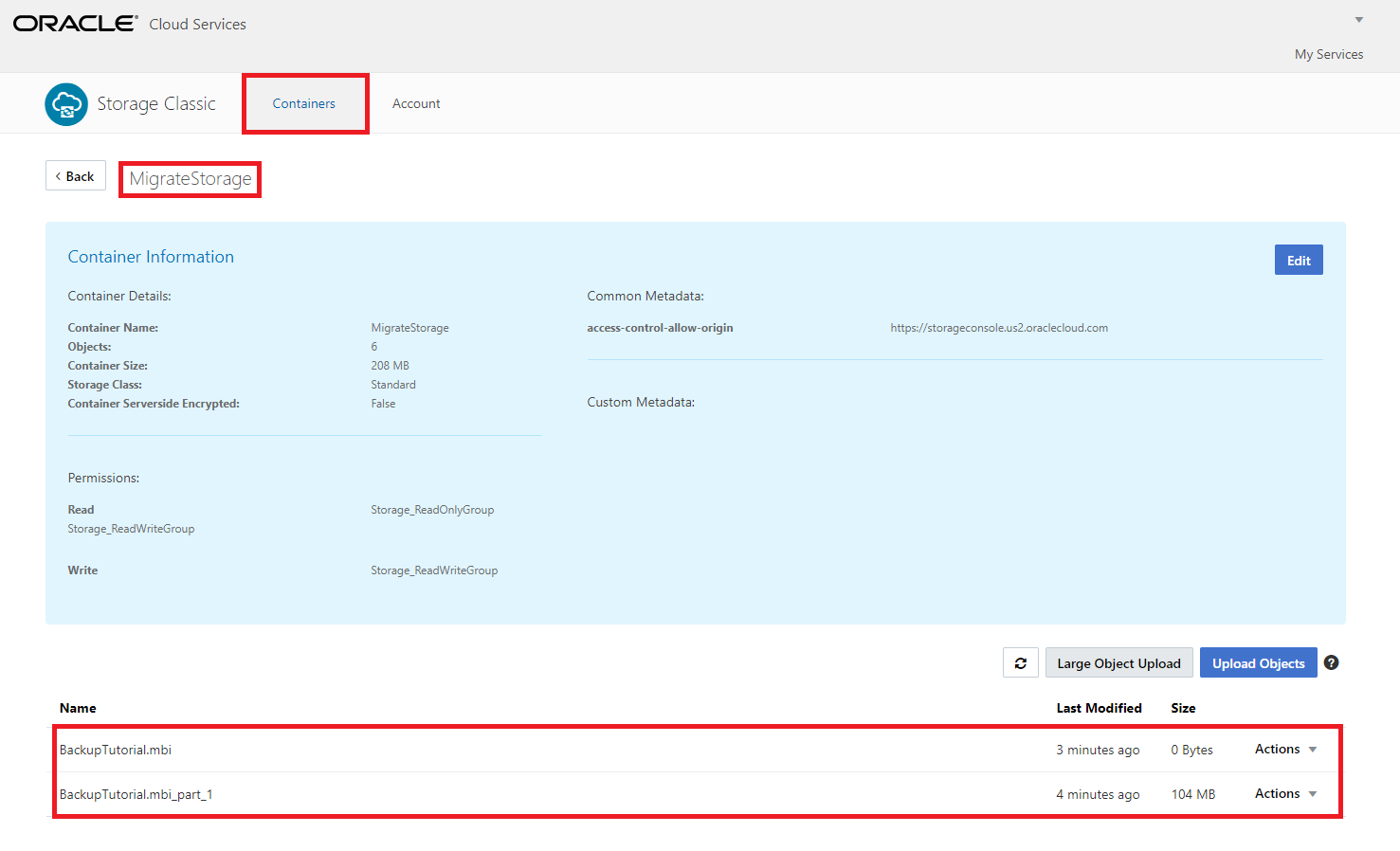
Note: MySQL Enterprise Backup stores the backup as a segmented large object, and might consist of multiple data files together with a manifest file. In this example, there is a single data file (with the extension .mbi_part_1).
 Want to Learn More?
- Using MySQL Enterprise Backup to backup to cloud storage
- MySQL Enterprise Backup cloud options
- OpenStack Swift
- The Swift TempAuth system
- How clients establish secure connections to Oracle Public Cloud
- REST API for Standard Storage in Oracle Cloud Infrastructure Object Storage Classic