
 Creating a Container in Oracle Cloud Infrastructure Object Storage
Classic
Creating a Container in Oracle Cloud Infrastructure Object Storage
Classic Before You Begin
This tutorial shows you how to create containers in Oracle Cloud Infrastructure Object Storage Classic using the Web console. This tutorial takes approximately 10 minutes to complete.
Background
Oracle Cloud Infrastructure Object Storage Classic enables businesses to store and manage digital content in the cloud. Stored objects can be retrieved directly by external clients or by applications running within Oracle Cloud.
A container is a storage compartment that provides a way to organize the data stored in Oracle Cloud Infrastructure Object Storage Classic. Containers are similar to directories, but with a key distinction; unlike directories, containers cannot be nested.
Any user with the Service Administrator role can create containers.
You can access Oracle Cloud Infrastructure Object Storage Classic using different Oracle-provided interfaces. This tutorial shows you how to create containers using the Web console.
What Do You Need?
Software Requirements
To access Oracle Cloud Infrastructure Object Storage Classic
using the web console, click Storage in the Oracle
Cloud My Services Dashboard page. Select Open
Service Console from the Actions  menu.
menu.
Prerequisites
Before starting this tutorial, you should:
- Have a trial or paid subscription to Oracle Cloud Infrastructure Object Storage Classic.
- Know your Oracle Cloud user name, password, and identity
domain.
You can find out these details from the New Account Information email that you received from Oracle Cloud when your user account was set up.
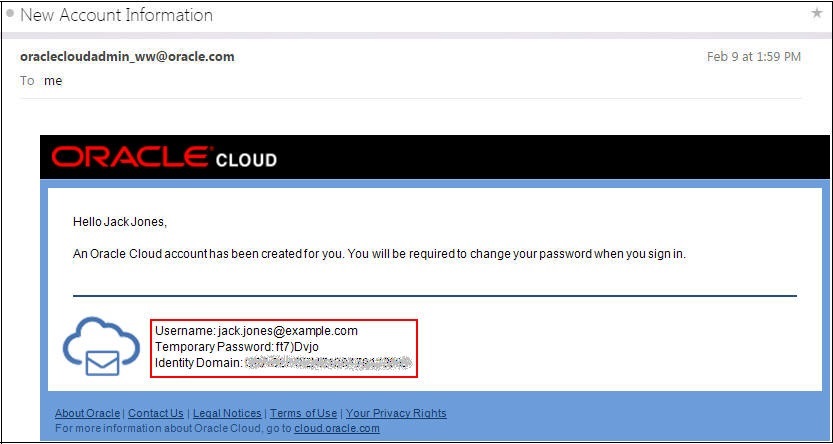
Description of the illustration new_account_information_email-2017 If you don't have your New Account Information email, contact your account administrator for your Oracle Cloud user name, password, and identity domain.
- Set the replication policy for your service instance.
- Have the Service Administrator role.
If you aren't sure if the Service Administrator role is defined for your account, contact your account administrator.
 Create
a Container Using the Web Console
Create
a Container Using the Web Console
- Sign in to the Oracle Cloud Infrastructure Object Storage Classic console.
- Click Create Container.
The Create Container dialog box is displayed.
- Enter a name for the container. For example:
myFirstContainer
- To create a standard container, select Standard
in the Storage Class drop-down list.
To create an archive container, select Archive in the Storage Class drop-down list.
- Click Create.
The container is created and displayed in the console.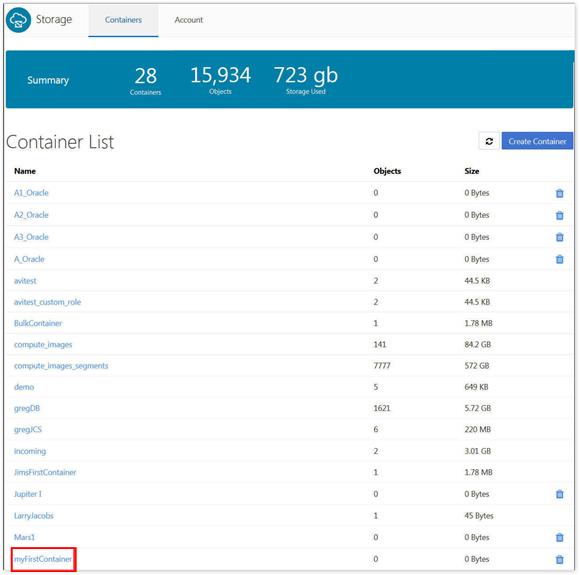
Description of the illustration view-container.png
 Want
to Learn More?
Want
to Learn More?
- Using Oracle Cloud Infrastructure Object Storage Classic
- Interfaces to Oracle Cloud Infrastructure Object Storage Classic
- Selecting a Replication Policy for for Your
Service Instance