Big Data Lite Movieplex Demo - SQL Pattern Matching for Sessionization Analytics
Overview
- Logically partition and order the data that is used in the MATCH_RECOGNIZE clause with its PARTITION BY and ORDER BY clauses.
- Define patterns of rows to seek using the PATTERN clause of the MATCH_RECOGNIZE clause. These patterns use regular expressions syntax, a powerful and expressive feature, applied to the pattern variables you define.
- Specify the logical conditions required to map a row to a row pattern variable in the DEFINE clause.
- Define output measures, which are expressions usable in the MEASURES clause of the SQL query.
- Control the output (summary vs. detailed) from the pattern matching process
- Reading the log file
- Cleaning the data
- Enhacing the data
- Sessionization
Purpose
This tutorial covers SQL for Pattern Matching. Row pattern matching in native SQL improves developer productivity and query efficiency for row-sequence analysis in big data projects.
Time to Complete
Approximately one hour
Introduction
Recognizing patterns in a sequence of rows has been a capability that was widely desired, but not possible with SQL until now. There were many workarounds, but these were difficult to write, hard to understand, and inefficient to execute. With Oracle Database 12c Release 1 (12.1), you can use the MATCH_RECOGNIZE clause to perform pattern matching in SQL to do the following:
Scenario
This workshop uses the Big Data Lite virtual machine and the Database 12c schemas PMUSER and MOVIEDEMO.The Big Data Lite environment contains a Movieplex web application which records all customer click events and interactions to a log file. This log has a similar format to Apache log files and the objective of this workshop is to create a sessionization resul set over the data sourced from our application log. This workshop breaks down the process of capturing the data, transforming and processing it into series of simple steps:
Part 1 - Getting started
Big Data Lite Virtual Machine
Oracle Big Data Lite Virtual Machine provides an integrated environment to help you get started with the Oracle Big Data platform. Many Oracle Big Data platform components have been pre-installed and configured so that you can begin using this environment right away. You can download it from our OTN page by clicking here.

Big Data Movieplex Sample Application
Oracle MoviePlex is a fictitious on-line movie streaming company. Customers log into Oracle MoviePlex where they are presented with a targeted list of movies based on their past viewing behavior. Because of this personalized experience and reliable and fast performance, customers spend a lot of money with the company and it has become extremely profitable.
All the activity from our application is captured in a log file and we are going to analyze the data captured in that file by using SQL pattern matching to create a sessionization result set for our business users and data scientists to explore and analyze. The following sections will step you through the process of creating our sessionization result set using the Database 12c pattern matching features.
Starting the environment
Please note that when you run the virtual machine, by default neither the Database listerner or the Database instance (orcl) are started. Please start both before continuing with this workshop.
For the purposes of this workshop we are using SQL Developer and connecting to our database instance as the user PMUSER. The password for this user is PMUSER
Part 2 - Overview of SQL Pattern Matching
- Financial applications seeking patterns of pricing, trading volume, and other behavior
- Security applications where unusual behavior must be detected
- Fraud detection applications
- Sensor data analysis (sometimes called complex event processing) where pattern matching is a powerful aid
In this section, you will learn about the benefits of using pattern matching and some of the tasks and keywords you can use.
Why Use Pattern Matching?
The ability to recognize patterns found across multiple rows is not limited to sessionization use cases. It is important for many types of applications and examples include all kinds of business processes driven by sequences of events, such as:
Tasks and Keywords in Pattern Matching
Let us go over some of the tasks and keywords used in pattern matching.
| Task | Keyword | Description |
|---|---|---|
| 1. Organize the data | PARTITION BY | Logically divide the rows into groups at a high level |
| ORDER BY | Logically order the rows within a partition | |
| 2. Define the pattern | PATTERN | Defines which pattern variables must be matched, the sequence in which they must be matched, and the number of rows which must be matched |
| DEFINE | Specifies the conditions that define a pattern variable | |
| AFTER MATCH | Determines where to restart the matching process after a match is found | |
| 3. Define the output measures | MEASURES | Defines row pattern measure columns |
| MATCH_NUMBER | Finds which pattern variable applies to which rows | |
| CLASSIFIER | Identifies which component of a pattern applies to a specific row | 4. Control the output | ONE ROW PER MATCH | Returns one summary row of output for each match |
| ALL ROWS PER MATCH | Returns one detail row of output for each row of each match |
Task 1: Organizing your data
PARTITION BY: Typically, you want to divide your input data into logical groups for analysis. In the sessionization example used in this exercise, you want to divide the dataset into partitions based on the customer id. You do that with PARTITION BY which specifies that the rows of the input table are to be partitioned by one or more columns. Matches are found within partitions and do not cross partition boundaries. If there is no PARTITION BY clause then all rows of the input table constitute a single row pattern partition.Task 2: Define the pattern
ORDER BY: Used to specify the order of rows within a row pattern partition. If the order of two rows in a row pattern partition is not determined by the ORDER BY, then the result of MATCH_RECOGNIZE is non-deterministic: it may not give consistent results each time the query is run.
Task 3: Define the output measuresPATTERN: Specifies the pattern to be recognized in the ordered sequence of rows within a partition. Each variable name in a pattern corresponds to a Boolean condition, which is specified later using the DEFINE component of the syntax. The PATTERN clause is used to specify a regular expression. The regular expression is enclosed in parentheses.
DEFINE: Because the PATTERN clause depends on pattern variables, you must have a clause to define these variables. These are specified in the DEFINE clause (required), and are used to specify the conditions that define a pattern variable.
Task 4: Control the outputMEASURES: The MEASURES clause defines a list of columns for the pattern output table. Each pattern measure column is defined with a column name whose value is specified by a corresponding pattern measure expression. The MATCH_RECOGNIZE clause includes a number of built-in measures, as listed below. In this example for sessionization analysis we are going to use the built-in MATCH_NUMBER() feature to uniquely identify each session.
MATCH_NUMBER: You might have a large number of matches for your pattern inside a given row partition. How do you tell all these matches apart? This is done with the MATCH_NUMBER function. Matches within a row pattern partition are numbered sequentially starting with 1 in the order they are found. Note that match numbering starts over again at 1 in each row pattern partition, because there is no inherent ordering between row pattern partitions.
CLASSIFIER: Along with knowing which MATCH_NUMBER you are seeing, you may want to know which component of a pattern applies to a specific row. This is done using the CLASSIFIER function. The classifier of a row is the pattern variable that the row is mapped to by a row pattern match and the function returns a character string whose value is the classifier of a row. The classifier of a row that is not mapped by a row pattern match is null.
AFTER MATCH: Once the query finds a match, it is vital that it begins looking for the next match at exactly the right point. Do you want to find matches where the end of the earlier match overlaps the start of the next match? Or do you want some other variation? Pattern matching provides great flexibility in specifying the restart point.
[ONE ROW | ALL ROWS] PER MATCH]: Sometimes you may need summary data about the matches while other times, you may need details. You can do that as follows: ONE ROW PER MATCH gives you one row of output for each match. ALL ROWS PER MATCH gives you one row of output for each row of each match. This is the default.
Part 3 - Reading Log File
- Customer ID
- Movie ID
- Genre ID
- Session Date
- Recommended ID
- Activity ID
- Rating ID
Creating the DIRECTORY object
All the user interactions with our Movieplex app are written to an application log file. We need to make the contents of this log file visible inside our database.
Therefore, to access the log file from within database we need to creare an external table. This requires a DIRECTORY object which will allow us to point to the folder containing the application log file movieapp_30months.log.
Open a SQLPlus session as the user SYSTEM. The password for this account is oracle
CREATE DIRECTORY session_file_dir AS '/home/oracle/applog';
GRANT READ, WRITE ON DIRECTORY session_file_dir TO pmuser;
This directory is going to be used in our external table statement. To make things easy we are not going to enforce any deep data cleansing processing as part of the external table processing, although this is possible using the rich features of the external table framework.
To view the movie application log file, open a Terminal window and type the following commands:
cd /home/oracle/applog
more movieapp_30months.log
The output of the preceding code is displayed:
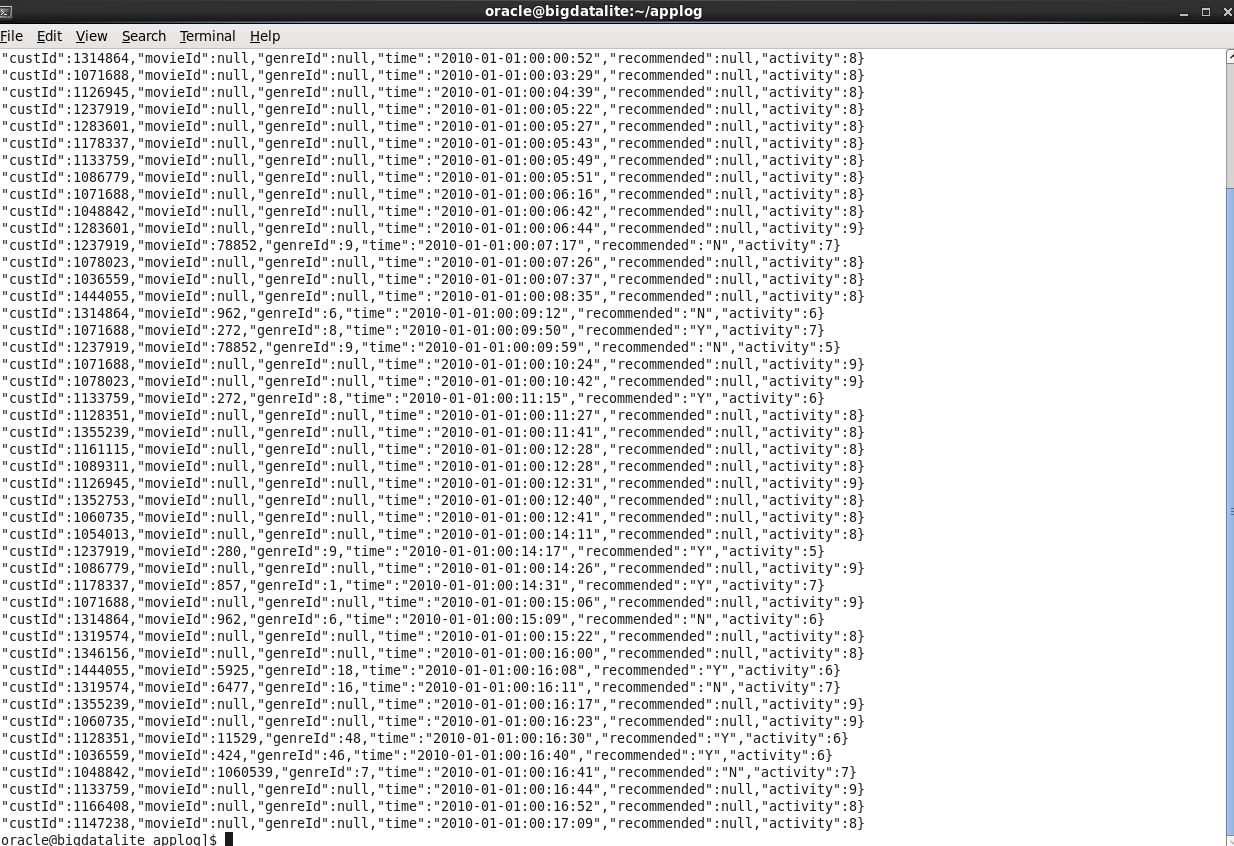
If we look at out source log file we can see that it will be possible to use the comma to indicate the end of each field, therefore, will load the following columns of data:
Creating the EXTERNAL TABLE
Now let’s create the external table to access our the movie log file using the directory object that we created earlier
CREATE TABLE RAW_SESSION_DATA
(
cust_id VARCHAR2(20)
movie_id VARCHAR2(20)
genre_id VARCHAR2(20)
session_date VARCHAR2(50)
recommended_id VARCHAR2(20)
activity_id VARCHAR2(20)
rating_id VARCHAR2(20)
)
ORGANIZATION EXTERNAL
(
TYPE ORACLE_LOADER
DEFAULT DIRECTORY SESSION_FILE_DIR
ACCESS PARAMETERS
(RECORDS DELIMITED BY NEWLINE
NOBADFILE
NODISCARDFILE
NOLOGFILE
FIELDS TERMINATED BY ','
OPTIONALLY ENCLOSED BY "'"
MISSING FIELD VALUES ARE NULL)
LOCATION (SESSION_FILE_DIR: 'movieapp_30months.log')
)
REJECT LIMIT 1;
Accessing the data
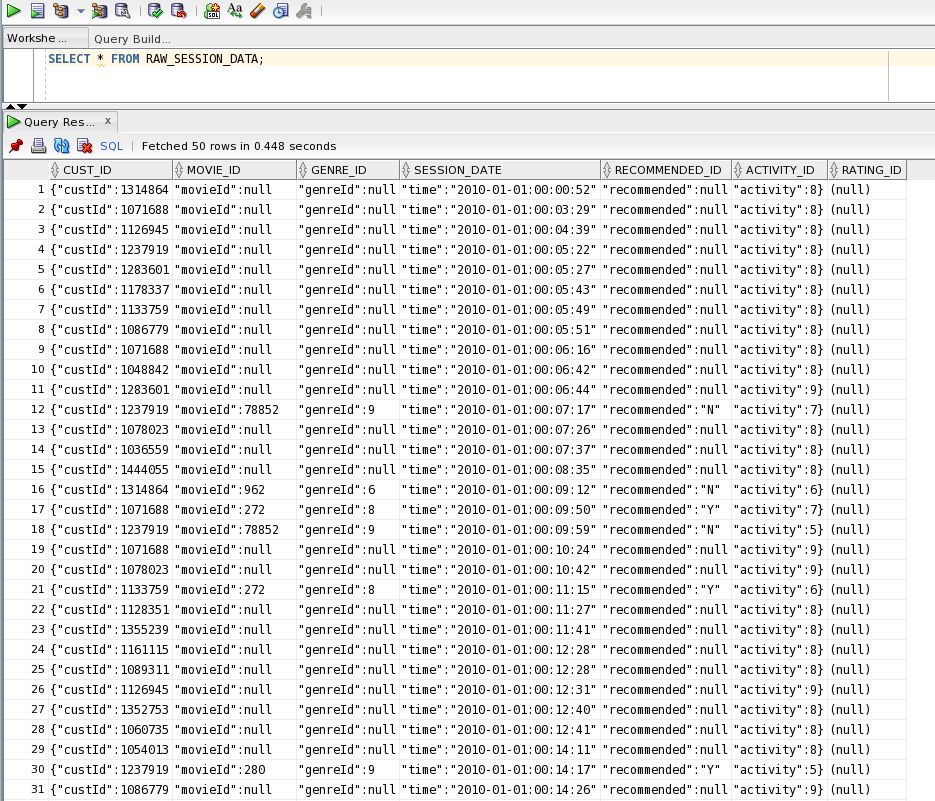
Let’s see if our external table works:
SELECT * FROM RAW_SESSION_DATA;the output should look like this:
Part 4 - Cleaning the log data
In this section, we will look at how to use some simpl SQL functions to clean our data set that is being pulled directly from our log file. We need to remove the field identifiers and the various extra characters so lets try using the SUBSTR function to scrub our log file data.
Cleaning the data
Enter the following query to parse and clean our raw data set
SELECT
SUBSTR(cust_id,11) AS cust_id
, SUBSTR(movie_id,11) AS movie_id
, SUBSTR(genre_id,11) AS genre_id
, SUBSTR(session_date, 9,10) AS sess_date
, SUBSTR(session_date, 20,8) AS sess_time
, SUBSTR(recommended_id,15) AS rec_id
, (CASE SUBSTR(activity_id,12,2)
WHEN '1' THEN '1'
WHEN '2}' THEN '2'
WHEN '3}' THEN '3'
WHEN '4}' THEN '4'
WHEN '5}' THEN '5'
WHEN '6}' THEN '6'
WHEN '7}' THEN '5'
WHEN '8}' THEN '8'
WHEN '9}' THEN '9'
WHEN '10' THEN '10'
WHEN '11' THEN '11'
ELSE null
END) AS activity_id
, SUBSTR(rating_id,9) AS rating_id
FROM raw_session_data;
What does this query do?
This removes all the extra character codes that are present in the source data and resolves some of the formatting issues in the ACTIVITY_ID column. The output from this query should look like this:

Loading the data
In some cases you may want to load the clickstream data set, or session data, into a new table rather than read the source log file every time via the external table. Of course it is possible to skip this step and just continue to use the external table and simply create a view over the external data to run the data scrubbing. If, for example, you have the file on a DBFS mount point then you will probably find that performance is really good – which means you can leave the data where it is. In this example we are going to load the data into a table.
Creating a new table
CREATE TABLE session_data AS
SELECT
SUBSTR(cust_id,11) AS cust_id
, SUBSTR(movie_id,11) AS movie_id
, SUBSTR(genre_id,11) AS genre_id
, SUBSTR(session_date, 9,10) AS sess_date
, SUBSTR(session_date, 20,8) AS sess_time
, SUBSTR(recommended_id,15) AS rec_id
, (CASE SUBSTR(activity_id,12,2)
WHEN '1' THEN '1'
WHEN '2}' THEN '2'
WHEN '3}' THEN '3'
WHEN '4}' THEN '4'
WHEN '5}' THEN '5'
WHEN '6}' THEN '6'
WHEN '7}' THEN '5'
WHEN '8}' THEN '8'
WHEN '9}' THEN '9'
WHEN '10' THEN '10'
WHEN '11' THEN '11'
ELSE null
END) AS activity_id
, SUBSTR(rating_id,9) AS rating_id
FROM raw_session_data;
Part 5 - Enhancing the data
As part of the data cleaning exercise we are going to transform, or more precisely pivot, the activity column so we can have a separate column for each type of activity marked with a Boolean Yes or No. This is very useful once you move on to building data mining models because attributes such as type of activity typically need to be broken out into separate columns. Therefore, this step will be really helpful for our business analysts and data scientists.
Pivoting the data
Adding the pivot code to our existing code:
DROP TABLE SESSION_DATA;
CREATE TABLE SESSION_DATA AS
SELECT
SUBSTR(cust_id,11) AS cust_id
, SUBSTR(movie_id,11) AS movie_id
, SUBSTR(genre_id,11) AS genre_id
, SUBSTR(session_date, 9,10) AS sess_date
, SUBSTR(session_date, 20,8) AS sess_time
, SUBSTR(recommended_id,15) AS rec_id
, (CASE SUBSTR(activity_id,12,2)
WHEN '1' THEN '1'
WHEN '2}' THEN '2'
WHEN '3}' THEN '3'
WHEN '4}' THEN '4'
WHEN '5}' THEN '5'
WHEN '6}' THEN '6'
WHEN '7}' THEN '5'
WHEN '8}' THEN '8'
WHEN '9}' THEN '9'
WHEN '10' THEN '10'
WHEN '11' THEN '11'
ELSE null
END) AS activity_id
, CASE SUBSTR(rating_id,9) WHEN 'null' THEN null ELSE SUBSTR(rating_id,10,1) END as rating_id
, case SUBSTR(activity_id,12,1) WHEN '1' THEN 'Y' END as act_rate
, case SUBSTR(activity_id,12,1) WHEN '2' THEN 'Y' END as act_complete
, case SUBSTR(activity_id,12,1) WHEN '3' THEN 'Y' END as act_pause
, case SUBSTR(activity_id,12,1) WHEN '4' THEN 'Y' END as act_start
, case SUBSTR(activity_id,12,1) WHEN '5' THEN 'Y' END as act_browse
, case SUBSTR(activity_id,12,1) WHEN '6' THEN 'Y' END as act_list
, case SUBSTR(activity_id,12,1) WHEN '7' THEN 'Y' END as act_search
, case SUBSTR(activity_id,12,1) WHEN '8' THEN 'Y' END as act_login
, case SUBSTR(activity_id,12,1) WHEN '9' THEN 'Y' END as act_logout
, case SUBSTR(activity_id,12,2) WHEN '10' THEN 'Y' END as act_incomplete
, case SUBSTR(activity_id,12,2) WHEN '11' THEN 'Y' END as act_purchase
FROM RAW_SESSION_DATA;
Checking the results.
SELECT * FROM SESSION_DATA;
The output from this query should look like this:

Part 6 - Sessionization
In this section, we will use the new Databae 12c pattern matching feature, the MATCH_RECONGINIZE clause, to parse our click data and identify the unique sessions within our stram of click events.
Simple sessionization
Defining the pattern
For this scenario we are going to assume that a series of events or clicks are part of the same session if the date-time between events is less than two minutes. To do this we can use the built-in time functionality as part of our pattern definition clause:
PATTERN (strt s*)
DEFINE
s as (ROUND(TO_NUMBER(sess_date - PREV(sess_date))*1440) <= 2)
Using built-in functions
Once we have identified a series of records as belonging to a unqiue session we need to uniquely identify each session within our resulset. To do this we can use the built-in measure MATCH_NUMBER() to apply a sequential number to each of our unqiue sessions. At the same time we will use the COUNT() function to calculate the number of events within each session as shown here:
MEASURES match_number() session_id,
count(*) no_of_events,
Calculating other measures
In addition to identifying each unique session we also want to return the start date and time, the end date and time and the overall diration of each session, as shown here:
MEASURES match_number() session_id,
COUNT(*) no_of_events,
FIRST(sess_date) start_date,
TO_CHAR(FIRST(sess_date), 'hh24:mi:ss') start_time,
LAST(sess_date) end_date,
TO_CHAR(LAST(sess_date), 'hh24:mi:ss') end_time,
TO_CHAR(ROUND(TO_NUMBER(LAST(sess_date) - FIRST(sess_date)) * 1440), '999,999') duration
Returning the sessionization result set
In this code we are dividing up the source data by customer id and then sorting by session date. We are computing a series of measures such as the session_id (which will be an incremental number within each partition – in this case within each customer id), the start date and time for each session, the end date and time for each session and finally the duration of each session (which is a calculation based on end time minus start time and we will display the duration in seconds). Note that our SELECT statement will return all the measures (or columns) from our MATCH_RECOGNIZE clause (later will review how to return only specific columns):
SELECT *
FROM SESSION_DATA
MATCH_RECOGNIZE
(PARTITION BY cust_id ORDER BY sess_date
MEASURES MATCH_NUMBER() session_id,
COUNT(*) no_of_events,
FIRST(sess_date) start_date,
TO_CHAR(first(sess_date), 'hh24:mi:ss') start_time,
LAST(sess_date) end_date,
TO_CHAR(last(sess_date), 'hh24:mi:ss') end_time,
TO_CHAR(ROUND(TO_NUMBER(LAST(sess_date) - FIRST(sess_date)) * 1440), '999,999') duration
ONE ROW PER MATCH
PATTERN (strt s*)
DEFINE
s as (ROUND(TO_NUMBER(sess_date - PREV(sess_date))*1440) <= 2)
) MR;
the output from this MATCH_RECOGNIZE statement should look like this:

Extended sessionization
Returning the expanded sessionization result set
When we were cleaning our input data we pivoted the entries in the activity column to create additional data points so now lets calculate the counts for each type of activity within each session. Here is our complete select statement – and in this example we are going to list out the columns that we want to return from the MATCH-RECOGNIZE clause rather than just relying on the “SELECT * FROM” syntax. We are prefixing each column name with the identifier MR. which is assigned as the last part of the MATCH_RECOGNIZE clause:
SELECT
mr.cust_id
, mr.session_id
, mr.no_of_events
, mr.start_date
, mr.start_time
, mr.end_date
, mr.end_time
, mr.duration
, mr.act_id
, mr.last_act_id
, mr.act_rate
, mr.act_complete
, mr.act_pause
, mr.act_start
, mr.act_browse
, mr.act_list
, mr.act_search
, mr.act_login
, mr.act_logout
, mr.act_incomplete
, mr.act_purchase
FROM SESSION_DATA
MATCH_RECOGNIZE
(PARTITION BY cust_id ORDER BY sess_date
MEASURES MATCH_NUMBER() session_id,
COUNT(*) no_of_events,
FIRST(sess_date) start_date,
TO_CHAR(first(sess_date), 'hh24:mi:ss') start_time,
LAST(sess_date) end_date,
TO_CHAR(last(sess_date), 'hh24:mi:ss') end_time,
TO_CHAR(ROUND(TO_NUMBER(LAST(sess_date) - FIRST(sess_date)) * 1440), '999,999') duration,
MIN(activity_id) act_id,
MAX(activity_id) last_act_id,
COUNT(act_rate) act_rate,
COUNT(act_complete) act_complete,
COUNT(act_pause) act_pause,
COUNT(act_start) act_start,
COUNT(act_browse) act_browse,
COUNT(act_list) act_list,
COUNT(act_search) act_search,
COUNT(act_login) act_login,
COUNT(act_logout) act_logout,
COUNT(act_incomplete) act_incomplete,
COUNT(act_purchase) act_purchase
ONE ROW PER MATCH
PATTERN (strt s*)
DEFINE
s as (ROUND(TO_NUMBER(sess_date - PREV(sess_date))*1440) <= 2)
) MR;
the output from this extended MATCH_RECOGNIZE statement should look like this:

Sessionization based on activity
Now let’s make the identification of each specific session a little more sophisticated by looking at the activity id. Extending the pattern to search for instances where the start event has occurred (i.e. the user has started to watch a film) and the complete event has occurred ' (i.e. the user has finished to watching a film). However, this is likely to create a conflict with our time calculation. If you start watching a film then it could be a considerable period of time before you click again to “complete” the film so if we want the start and complete events to appear in the same session then will have to extend the time interval that were testing for to something more appropriate, say 150 minutes. Therefore, here is our more sophisticated pattern matching clause that is now searching for sessions where customers have started and the finished watching a film within the same session:
SELECT
mr.cust_id
, mr.session_id
, mr.no_of_events
, mr.start_date
, mr.start_time
, mr.end_date
, mr.end_time
, mr.duration
, mr.act_id
, mr.last_act_id
, mr.act_rate
, mr.act_complete
, mr.act_pause
, mr.act_start
, mr.act_browse
, mr.act_list
, mr.act_search
, mr.act_login
, mr.act_logout
, mr.act_incomplete
, mr.act_purchase
FROM SESSION_DATA
MATCH_RECOGNIZE
(PARTITION BY cust_id ORDER BY sess_date
MEASURES MATCH_NUMBER() session_id,
COUNT(*) no_of_events,
FIRST(sess_date) start_date,
TO_CHAR(first(sess_date), 'hh24:mi:ss') start_time,
LAST(sess_date) end_date,
TO_CHAR(last(sess_date), 'hh24:mi:ss') end_time,
TO_CHAR(ROUND(TO_NUMBER(LAST(sess_date) - FIRST(sess_date)) * 1440), '999,999') duration,
MIN(activity_id) act_id,
MAX(activity_id) last_act_id,
COUNT(act_rate) act_rate,
COUNT(act_complete) act_complete,
COUNT(act_pause) act_pause,
COUNT(act_start) act_start,
COUNT(act_browse) act_browse,
COUNT(act_list) act_list,
COUNT(act_search) act_search,
COUNT(act_login) act_login,
COUNT(act_logout) act_logout,
COUNT(act_incomplete) act_incomplete,
COUNT(act_purchase) act_purchase
ONE ROW PER MATCH
PATTERN (strt f+ c+ s*)
DEFINE
f as act_start = 'Y',
c as act_complete = 'Y',
s as (ROUND(TO_NUMBER(sess_date - PREV(sess_date))*1440) <= 150)
) MR;
the output from this more sophisticated MATCH_RECOGNIZE statement should look like this:

Obviously this does not take into account situations where customers start to watch a film, pause it and then begin watching again at a later date. To search for this pattern of activity we simply need to change the pattern definition to include the pause activity. In fact we could even count the number of pause events as an additional metric for our data scientists to analyze.
Movie analytics
Analyzing data for movies
As you can see the key benefit of SQL is the incredible flexibility that it provides to prototype new ideas and the speed at which these changes can be made. For example, if we want to completely change the focal point of our analysis from customers sessions to movies then it is relatively easy to change the partition key from customer_id to movie_id and then we can count the number of events aligned to each movie. This gives us an overview of the various activities (maybe the popularity?) associated with each movie.
The code to achieve this is as follows:
SELECT
mr.cust_id
, mr.session_id
, mr.no_of_events
, mr.start_date
, mr.start_time
, mr.end_date
, mr.end_time
, mr.duration
, mr.act_id
, mr.last_act_id
, mr.act_rate
, mr.act_complete
, mr.act_pause
, mr.act_start
, mr.act_browse
, mr.act_list
, mr.act_search
, mr.act_login
, mr.act_logout
, mr.act_incomplete
, mr.act_purchase
FROM SESSION_DATA
MATCH_RECOGNIZE
(PARTITION BY movie_id ORDER BY sess_date
MEASURES COUNT(*) no_of_events,
FIRST(sess_date) start_date,
TO_CHAR(first(sess_date), 'hh24:mi:ss') start_time,
LAST(sess_date) end_date,
TO_CHAR(last(sess_date), 'hh24:mi:ss') end_time,
TO_CHAR(round(TO_NUMBER(LAST(sess_date) - FIRST(sess_date)) * 1440), '999,999') duration,
MIN(activity_id) act_id,
MAX(activity_id) last_act_id,
COUNT(act_rate) act_rate,
COUNT(act_complete) act_complete,
COUNT(act_pause) act_pause,
COUNT(act_start) act_start,
COUNT(act_browse) act_browse,
COUNT(act_list) act_list,
COUNT(act_search) act_search,
COUNT(act_login) act_login,
COUNT(act_logout) act_logout,
COUNT(act_incomplete) act_incomplete,
COUNT(act_purchase) act_purchase
ONE ROW PER MATCH
PATTERN (strts*)
DEFINE
s as (ROUND(TO_NUMBER(sess_date - PREV(sess_date))*1440) <= 150)
) MR;
Part 7 - Summary
- Use the access the big data movie app log file
- Use SQL pattern matching for simple sessionization
- Explored the built-in measure MATCH_NUMBER
- Use more sophisticated techqniues to enrich the result set
- Quickly changed the focus of the analysis
- Lead Curriculum Developer: Lauran K. Serhal
- Other Contributors: Keith Laker
There we have it - we have taken our clickstream log file, cleaned and enhanced the data to make it more interesting and generated our sessionization result set. In the last step we switched the focus of our analysis from customers to movies by simply changing the partitioning key.
This highlights the real beauty of SQL – it is a rich, sophisticated and agile language for big data projects that allows power users and data scientists to quickly evolve their analysis. Oracle’s match-recognize clause for pattern matching builds on existing SQL principals so it is relatively simple to learn how to use it. If you have used other analytical SQL features then the syntax will be immediately recognizable.
In this tutorial, you have learned how to:
Resources
For more information (whitepapers, multi-media Apple iBooks, tutorials etc) about SQL pattern matching and analytical SQL please refer to our home page on OTN: http://www.oracle.com/technetwork/database/bi-datawarehousing/sql-analytics-index-1984365.html.
For detailed information on pattern matching, see the Pattern Matching chapter in the Oracle Database 12c Release 1 (12.1) Data Warehousing Guide reference guide.
Credits
To help navigate this Oracle by Example, note the following:
- Hiding Header Buttons:
- Click the Title to hide the buttons in the header. To show the buttons again, simply click the Title again.
- Topic List Button:
- A list of all the topics. Click one of the topics to navigate to that section.
- Expand/Collapse All Topics:
- To show/hide all the detail for all the sections. By default, all topics are collapsed
- Show/Hide All Images:
- To show/hide all the screenshots. By default, all images are displayed.
- Print:
- To print the content. The content currently displayed or hidden will be printed.