Oracle GoldenGate on iSeries: Unidirectional Replication from DB/400 to DB/400
Overview
- Manager:
- Starts and stops the other processes on both the source and target hosts.
- Initial Load:
- Optional. Used to populate the target tables one time. It can read either from the source tables directly or from logs. This OBE will not use an Initial Load.
- Extract:
- Runs on the source to capture transaction data to trail files.
- Data Pump:
- Optional, but highly recommended. Sends trail files from the source to the target over an IP network. Technically it is a secondary Extract.
- Replicat:
- Delivers data to the target database. Normally the Replicat runs on the target, but with the iSeries it runs on an intermediate host.
- Two iSeries hosts: one source and one target. It is possible to have the source and target be on the same host, but that is conceptually harder to see what is happening. If you do have only one host, it may be helpful to change the /etc/hosts file to make aliases for hosta.example.com and hostc.example.com.
- One Linux host. The example uses Oracle Enterprise Linux OEL 5.7, 64-bit.
- Oracle GoldenGate on iSeries ( Oracle Software Delivery Cloud ), version 11.2.1.0.2, part number V34025-1.
- Oracle GoldenGate on iSeries for Linux-64, version 11.2.1.0.2, part number V34007-01.
- ODBC for UNIX ( The unixODBC Project home page ). You may already have a yum or rpm repository pointing to unixODBC-bin.
- iSeries for Linux (click the right arrow > next to Installation )
- Have root access to the Linux software (write access to /etc)
- Have userIDs and Libraries created on the iSeries
- Have web access to download the software and documentation.
- Some_Command
- You type this as a command or a value. Example:
Enter ./ggsci to start the command line interpreter.
- Some_Prompt
- The system responds with this as a prompt or reply. Example:
After the welcome splash banner, you can enter commands at the GGSCI (hostA) 1> prompt.
- Some_Button
- Click this on-screen button. Example:
After selecting the version you want, click Continue to start the download.
- Some_Variable
- A variable that you substitute with a real value. Example:
Enter your userid/password at the prompt.
- Some_Filename
- A filename, path, or folder/directory. Example:
Edit the hosts file in the /etc directory.
- Some_Code
- A keyword or code element. Example:
Change the parameter HandleCollisions to NoHandleCollisions after the initial load.
- p=process=
- e(xtract), p(ump), r(eplicat), i(nitial), d(efgen), s(tartup).
- nn=number=
- 01, 02, 03, all files related to a common project nn.
- hh=host-to-host=
- AC, CA, AB, BC, as indicated by source, intermediate, and target host names.
- ext=extension=
- prm=parameter (stored in dirprm/), dsc=discard, rpt=report (stored in dirrpt/), def=definition (stored in dirdef/), oby=obey (stored in installation directory), sql=SQL (stored in dirsql/).
Purpose
This Oracle-By-Example (OBE) tutorial covers installing, configuring, and managing Oracle GoldenGate version 11.2.1.0.2 on a pair of iSeries DB/400 databases.
Time to Complete
Approximately 3 hours
Introduction
Oracle GoldenGate provides very fast replication of heterogeneous databases by reading transaction logs (called "journals" on the iSeries) and writing the changes to one or more target databases. There are five processes involved in a typical environment:
Scenario
There are two iSeries hosts running DB/400: HostA (red) and HostC (green). HostA has a user/schema ogguserA with a password of pswda, and HostC has a user/schema ogguserc with a password of pswdc. There are tables on HostA (tcustmer and tcustord) that need to be replicated to HostC. Oracle GoldenGate cannot do this directly, so an intermediate Windows or Linux host must be present as well. HostB (yellow) is running 64-bit Linux with a user of ogguserb and a password of pswdb. Pay attention to the color of the screen banners to know which commands are going to which host. Also note whether you are entering GGSCI commands, SQL commands, or OS commands (the prompt will guide you).
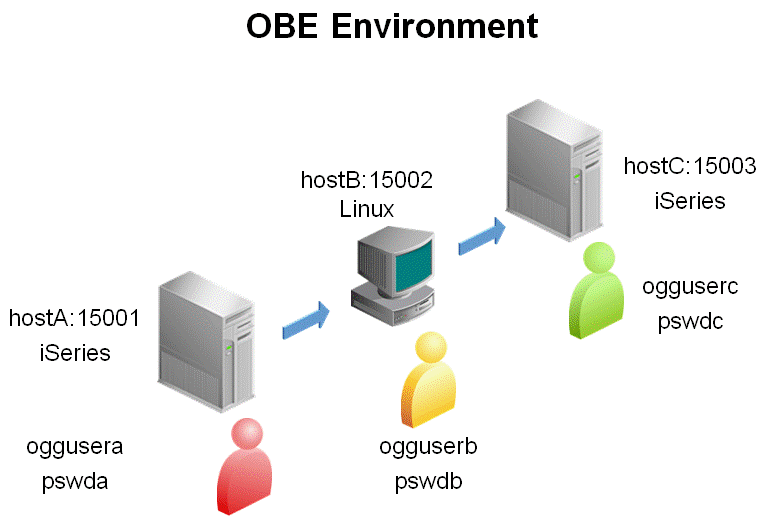
In summary, the environment is:
| Host Name | Color | OS | User | Password | Port | Install Directory |
|---|---|---|---|---|---|---|
| hostA | Red | iSeries | oggusera | pswda | 15001 | ˜/ogg_i_400_A |
| hostB | Yellow | Linux | ogguserb | pswdb | 15002 | ˜/ogg_linux_400_BC |
| hostC | Green | iSeries | ogguserc | pswdc | 15003 | ˜/ogg_i_400_C |
Hardware and Software Requirements
The following is a list of hardware and software requirements:
Hardware
Software
Notice that there is no database on hostB, and there is no Oracle GoldenGate software on the target. That means that for the unidirectional part of the OBE, there is no software needed on hostC from Oracle.
Prerequisites
Before starting this tutorial, you should:
Bear in mind that there are three hosts: hostA, hostB, and hostC; and that each host has three environment prompts: OS, GGSCI, and SQL. That makes nine different places in which you could be typing! Try to be extra careful about which command you enter in which location. The wrong command in the wrong context is the most common error.
Typographic Conventions
Text color and font in the directions and in the screens should be interpreted as follows:
File and Process Naming Conventions
File and process naming conventions can be whatever works for you or your company. Here are the sample conventions used in this OBE:
pnnhh.ext
where:
1. Installing the Software
The installation of the software is simply fetching the zip files from the web and unzipping them. To install the Oracle GoldenGate software, perform the following steps:
1.1 Installing Oracle GoldenGate on iSeries
Access the documentation library.
Using a web browser, go to http://www.oracle.com/technetwork/middleware/goldengate/documentation/index.html. You have the option to either read the documents online, or to download the library to your local workstation as either PDF or HTML format.
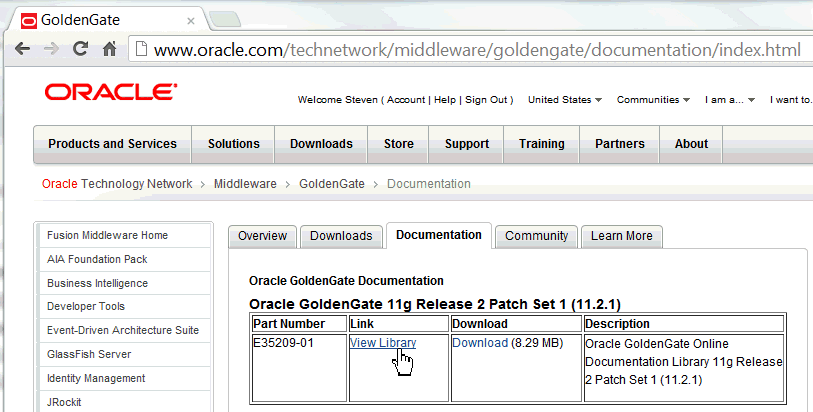
Click View Library.
Read the Installation Guide for DB2 for i.

Copy the software from Oracle Software Delivery Cloud.
Using a web browser, go to https://edelivery.oracle.com and click Sign In. On the Terms and Conditions page, select Yes for both agreements, and click Continue.
On the Media Pack Search page, select Product Pack = Oracle Fusion Middleware, and Platform = IBM i on POWER Systems.
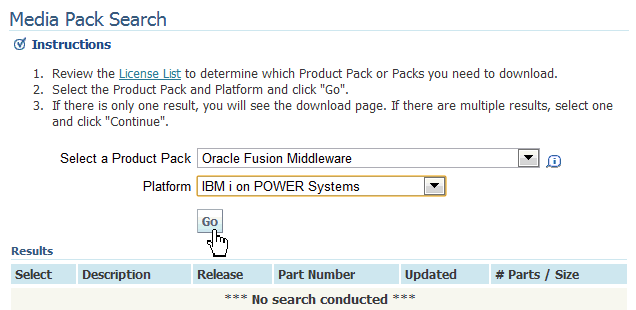
Click Go.
Select Oracle GoldenGate for Non Oracle Database v11.2.1 Media Pack for IBM i on Power Systems.
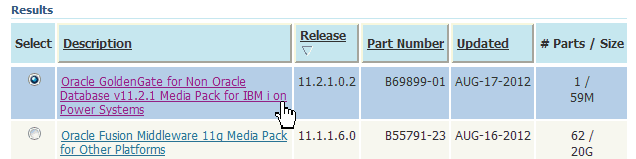
Click Continue.
Make sure you are looking at part number V34025-01.
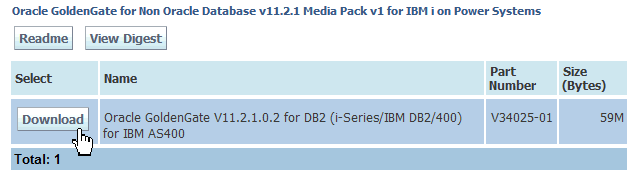
Click Download.
Unpack the software in its directory on the source hostA (red).
Create the installation directory to receive the Oracle GoldenGate software.
| HostA - iSeries |
[/] cd ~ [/home/oggusera] mkdir ogg_i_400_A [/home/oggusera] cd ogg_i_400_A [/home/oggusera/ogg_i_400_A] |
Copy the downloaded zip from from wherever you downloaded it to ogg_i_400_A/. Unzip it and untar (extract) it. Make sure you have the trailing dot in the copy command as the target.
| HostA - iSeries |
[/home/oggusera/ogg_i_400_A] cp ~/Downloads/V34025-01.zip . [/home/oggusera/ogg_i_400_A] unzip V34025-01.zip Archive: V34025-01.zip inflating: ggs_OS400_ppc_DB2400_64bit.tar inflating: Oracle_GoldenGate_11.2.1.0.2_README.doc inflating: Oracle_GoldenGate_11.2.1.0.2_README.txt inflating: OGG_WinUnix_Rel_Notes_11.2.1.0.2.pdf [/home/oggusera/ogg_i_400_A] tar -xvpf ggs_OS400_ppc_DB2400_64bit.tar x . x ./mgr, 4373077 bytes, 8542 tape blocks ... many lines omitted for clarity ... x ./ggos400install, 3191 bytes, 7 tape blocks x ./rundb2.sh, 1646 bytes, 4 tape blocks [/home/oggusera/ogg_i_400_A] |
Start the GoldenGate Software Command Interface (GGSCI). Create the default empty subdirectories.
| HostA - iSeries |
[/home/oggusera/ogg_i_400_A] ./ggsci Oracle GoldenGate Command Interpreter for DB2 for i Version 11.2.1.0.2 OGGCORE_11.2.1.0.3_PLATFORMS_120724.2205 IBM i, ppc, 64bit (optimized), IBM DB2 for i on Jul 26 2012 00:43:51 Copyright (C) 1995, 2012, Oracle and/or its affiliates. All rights reserved. GGSCI (hostA) 1> Create SubDirs Creating subdirectories under current directory /QOpenSys/home/oggusera/ogg_i_40 0_A Parameter files /QOpenSys/home/oggusera/ogg_i_400_A/dirprm: already e xists Report files /QOpenSys/home/oggusera/ogg_i_400_A/dirrpt: created Checkpoint files /QOpenSys/home/oggusera/ogg_i_400_A/dirchk: created Process status files /QOpenSys/home/oggusera/ogg_i_400_A/dirpcs: created SQL script files /QOpenSys/home/oggusera/ogg_i_400_A/dirsql: created Database definitions files /QOpenSys/home/oggusera/ogg_i_400_A/dirdef: created Extract data files /QOpenSys/home/oggusera/ogg_i_400_A/dirdat: created Temporary files /QOpenSys/home/oggusera/ogg_i_400_A/dirtmp: created Stdout files /QOpenSys/home/oggusera/ogg_i_400_A/dirout: created GGSCI (hostA) 2> Exit [/home/oggusera/ogg_i_400_A] |
If any of the directories exist, it leaves the contents alone.
Run the ggos400install utility.
| HostA - iSeries |
[/home/oggusera/ogg_i_400_A] ls -l ggo* -r--r--r-- 1 oggusera 0 3191 Jun 28 16:41 ggos400install [/home/oggusera/ogg_i_400_A] chmod +x ggos400install [/home/oggusera/ogg_i_400_A] ls -l ggo* -r-xr-xr-x 1 oggusera 0 3191 Jun 28 16:41 ggos400install [/home/oggusera/ogg_i_400_A] ./ggos400install Installation library for the native object is: OGGUSERA ------------------------------------------------ The native object has been restored to library OGGUSERA. ------------------------------------------------ [/home/oggusera/ogg_i_400_A] |
It creates a symbolic link to the native journal reader object that is used by the Extract and GGSCI programs to determine where to locate the native object OGGPRCJRN.
Repeat steps 3 through 5 for the target hostC (green).
Unpack the software in its directory on the target hostC.
Create the installation directory to receive the Oracle GoldenGate software.
| HostC - iSeries |
[/] cd ~ [/home/ogguserc] mkdir ogg_i_400_C [/home/ogguserc] cd ogg_i_400_C [/home/ogguserc/ogg_i_400_C] |
Copy the downloaded zip from wherever you downloaded it to ogg_i_400_C/. Unzip it and untar (extract) it. Make sure you have the trailing dot in the copy command as the target.
| HostC - iSeries |
[/home/ogguserc/ogg_i_400_C] cp ~/Downloads/V34025-01.zip . [/home/ogguserc/ogg_i_400_C] unzip V34025-01.zip Archive: V34025-01.zip inflating: ggs_OS400_ppc_DB2400_64bit.tar inflating: Oracle_GoldenGate_11.2.1.0.2_README.doc inflating: Oracle_GoldenGate_11.2.1.0.2_README.txt inflating: OGG_WinUnix_Rel_Notes_11.2.1.0.2.pdf [/home/ogguserc/ogg_i_400_C] tar -xvpf ggs_OS400_ppc_DB2400_64bit.tar x . x ./mgr, 4373077 bytes, 8542 tape blocks ... many lines omitted for clarity ... x ./ggos400install, 3191 bytes, 7 tape blocks x ./rundb2.sh, 1646 bytes, 4 tape blocks [/home/ogguserc/ogg_i_400_C] |
Start the GoldenGate Software Command Interface (GGSCI). Create the default empty subdirectories.
| HostC - iSeries |
[/home/ogguserc/ogg_i_400_C] ./ggsci Oracle GoldenGate Command Interpreter for DB2 for i Version 11.2.1.0.2 OGGCORE_11.2.1.0.3_PLATFORMS_120724.2205 IBM i, ppc, 64bit (optimized), IBM DB2 for i on Jul 26 2012 00:43:51 Copyright (C) 1995, 2012, Oracle and/or its affiliates. All rights reserved. GGSCI (hostA) 1> Create SubDirs Creating subdirectories under current directory /QOpenSys/home/ogguserc/ogg_i_40 0_C Parameter files /QOpenSys/home/ogguserc/ogg_i_400_C/dirprm: already e xists Report files /QOpenSys/home/ogguserc/ogg_i_400_C/dirrpt: created Checkpoint files /QOpenSys/home/ogguserc/ogg_i_400_C/dirchk: created Process status files /QOpenSys/home/ogguserc/ogg_i_400_C/dirpcs: created SQL script files /QOpenSys/home/ogguserc/ogg_i_400_C/dirsql: created Database definitions files /QOpenSys/home/ogguserc/ogg_i_400_C/dirdef: created Extract data files /QOpenSys/home/ogguserc/ogg_i_400_C/dirdat: created Temporary files /QOpenSys/home/ogguserc/ogg_i_400_C/dirtmp: created Stdout files /QOpenSys/home/ogguserc/ogg_i_400_C/dirout: created GGSCI (hostA) 2> Exit [/home/ogguserc/ogg_i_400_C] |
If any of the directories exist, it leaves the contents alone.
Run the ggos400install utility.
| HostC - iSeries |
[/home/ogguserc/ogg_i_400_C] ls -l ggo* -r--r--r-- 1 ogguserc 0 3191 Jun 28 16:41 ggos400install [/home/ogguserc/ogg_i_400_C] chmod +x ggos400install [/home/ogguserc/ogg_i_400_C] ls -l ggo* -r-xr-xr-x 1 ogguserc 0 3191 Jun 28 16:41 ggos400install [/home/ogguserc/ogg_i_400_C] ./ggos400install Installation library for the native object is: OGGUSERC ------------------------------------------------ The native object has been restored to library OGGUSERC. ------------------------------------------------ [/home/ogguserc/ogg_i_400_C] |
It creates a symbolic link to the native journal reader object that is used by the Extract and GGSCI programs to determine where to locate the native object OGGPRCJRN.
You have successfully installed Oracle GoldenGate on iSeries, both the source hostA and the target hostC.
1.2 Installing ODBC on Linux
Obtain and install the ODBC rpms using a package manager such as yum.
Installation of rpms must be done as root user. You can either download the rpms from the web or access them from a yum or rpm repository. They may already be installed, so check first.
In the following example, the ODBC rpms are already installed, so nothing needs to be done.
| HostB - Linux |
[ogguserb@hostB /]$ su - root Password: ******** [root@hostB /]# yum list unixodbc Loaded plugins: rhnplugin, security This system is not registered with ULN. ULN support will be disabled. Installed Packages unixODBC.i386 2.2.11-7.1 installed unixODBC.x86_64 2.2.11-7.1 installed [root@hostB /]# |
In the following example, the ODBC rpms are not installed (indicated by "Available Packages"), and will be installed from a pre-defined repository.
| HostB - Linux |
[root@hostB /]# yum list unixODBC Loaded plugins: rhnplugin, security This system is not registered with ULN. ULN support will be disabled. Available Packages unixODBC.i386 2.2.11-7.1 ol5_u7_base unixODBC.x86_64 2.2.11-7.1 ol5_u7_base [root@hostB /]# yum install unixODBC Loaded plugins: rhnplugin, security This system is not registered with ULN. ULN support will be disabled. Setting up Install Process Resolving Dependencies --> Running transaction check ---> Package unixODBC.i386 0:2.2.11-7.1 set to be updated ---> Package unixODBC.x86_64 0:2.2.11-7.1 set to be updated --> Finished Dependency Resolution Dependencies Resolved ================================================================================ Package Arch Version Repository Size ================================================================================ Installing: unixODBC i386 2.2.11-7.1 ol5_u7_base 830 k unixODBC x86_64 2.2.11-7.1 ol5_u7_base 835 k Transaction Summary ================================================================================ Install 2 Package(s) Upgrade 0 Package(s) Total download size: 1.6 M Is this ok [y/N]: y Downloading Packages: (1/2): unixODBC-2.2.11-7.1.i386.rpm | 830 kB 00:00 (2/2): unixODBC-2.2.11-7.1.x86_64.rpm | 835 kB 00:00 ------------------------------------------------------------------------------- Total 2.5 MB/s | 1.6 MB 00:00 Running rpm_check_debug Running Transaction Test Finished Transaction Test Transaction Test Succeeded Running Transaction Installing : unixODBC 1/2 Installing : unixODBC 2/2 Installed: unixODBC.i386 0:2.2.11-7.1 unixODBC.x86_64 0:2.2.11-7.1 Complete! [root@hostB /]# |
Obtain the iSeries Access rpms.
This may require you registering with IBM to create a user account with which to download the software. Part of the iSeries Access download (the 5250 emulator) is licensed by IBM.
Using a web browser, go to http://www-03.ibm.com/systems/power/software/i/access/linux/guide.html#install and click Installation.
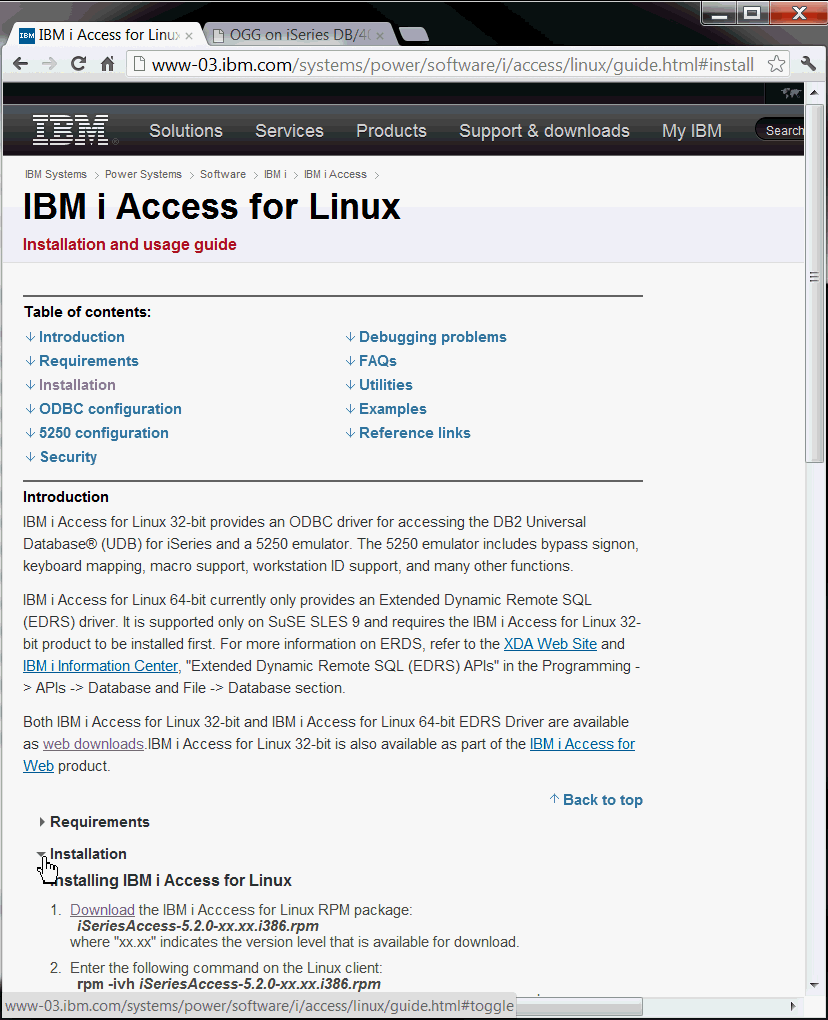
You may have trouble getting the Download link to work. If so, go to http://www-03.ibm.com/systems/power/software/i/access/linux_resources.html.
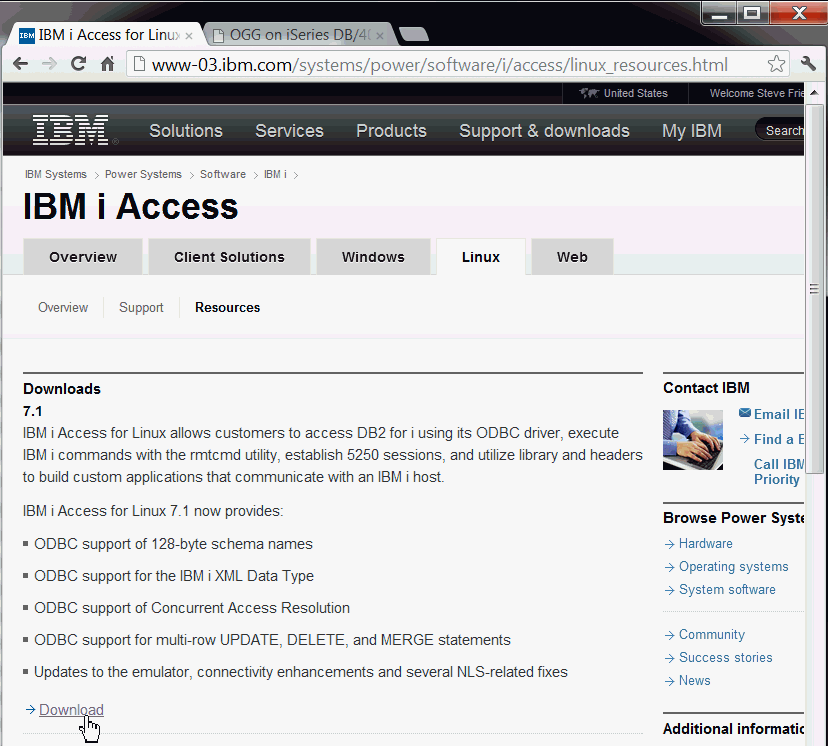
Select the latest download (for example 7.1), and click Download.
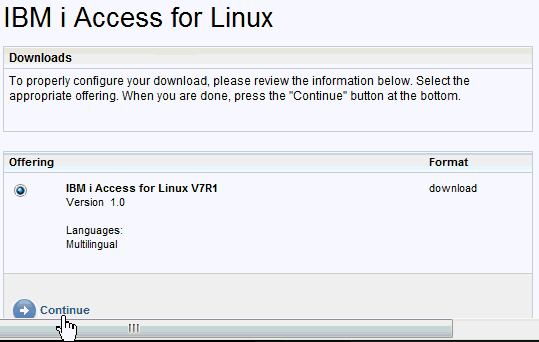
Select the latest download (for example V7R1), and click Continue.
Adjust the Privacy settings to your liking, in the License section select I agree, and click I confirm.
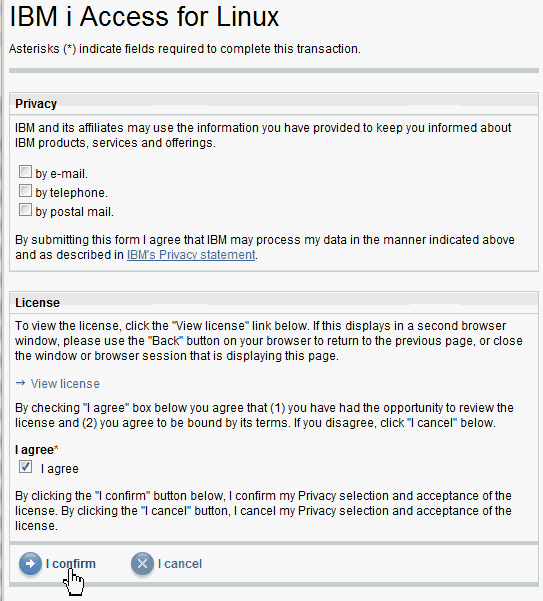
If you do not have the IBM Download Director, click the Download using http tab. You want the "no 5250 emulator" version for your Linux environment (unless you have already purchased the 5250 emulator license). If you click Download now, your browser may have .rpm associated with a type of music, so it won't download. If that is the case, notice the actual filename is displayed in the status line at the bottom of the browser. Right-click Download now and you should have the option to Save as or whatever your browser provides as the option to save rather than open the link's contents.

You should now have the iSeriesAccess-xxxxx.rpm file saved to your download location.
Install the iSeries Access rpm.
On the Linux hostB, sign on as root. Change to your download location (as defined by your browser). Run the localinstall of the iSeries rpm.
| HostB - Linux |
[ogguserb@hostB /]$ su - root Password: ******** [root@hostB /]# cd Downloads [root@hostB Downloads]# ls -l iSeriesAccess* -rw-r--r-- 1 oracle all 1906385 Aug 24 15:42 iSeriesAccess-7.1.0-1.0.x86_64.rpm [root@hostB Downloads]# yum localinstall iSeriesAccess* --nogpgcheck Loaded plugins: rhnplugin, security This system is not registered with ULN. ULN support will be disabled. Setting up Local Package Process Examining iSeriesAccess-7.1.0-1.0.x86_64.rpm: iSeriesAccess-7.1.0-1.0.x86_64 Marking iSeriesAccess-7.1.0-1.0.x86_64.rpm to be installed Resolving Dependencies --> Running transaction check ---> Package iSeriesAccess.x86_64 0:7.1.0-1.0 set to be updated --> Finished Dependency Resolution Dependencies Resolved ================================================================================ Package Arch Version Repository Size ================================================================================ Installing: iSeriesAccess x86_64 7.1.0-1.0 /iSeriesAccess-7.1.0-1.0.x86_64 8.8 M Transaction Summary ================================================================================ Install 1 Package(s) Upgrade 0 Package(s) Total size: 8.8 M Is this ok [y/N]: y Downloading Packages: Running rpm_check_debug Running Transaction Test Finished Transaction Test Transaction Test Succeeded Running Transaction Installing : iSeriesAccess 1/1 post install processing for iSeriesAccess 1.0...1 iSeries Access ODBC Driver has been deleted (if it existed at all) because its usage count became zero odbcinst: Driver installed. Usage count increased to 1. Target directory is /etc odbcinst: Driver installed. Usage count increased to 1. Target directory is /etc Installed: iSeriesAccess.x86_64 0:7.1.0-1.0 Complete! [root@hostB Downloads]# |
If you leave off the --nogpgcheck, you may get an error, Package iSeriesAccess-7.1.0-1.0.x86_64.rpm is not signed. Note that iSeries was installed to /etc.
Verify that it was installed properly.
| HostB - Linux |
[root@hostB Downloads]# yum list iSeriesAccess
Loaded plugins: rhnplugin, security
This system is not registered with ULN.
ULN support will be disabled.
Installed Packages
iSeriesAccess.x86_64            7.1.0-1.0                              installed
[root@hostB Downloads]#
|
There is nothing to start nor stop for ODBC, it is already available.
Configure the ODBC files in /etc.
Backup the ODBC files in /etc. Examine the contents of the files. You are interested in the last stanza labeled [64-bit].
| HostB - Linux |
[root@hostB /]# cd /etc [root@hostB etc]# ls -l odbc* -rw-r--r-- 1 root root 0 Jun 7 2007 odbc.ini -rw-r--r-- 1 root root 907 Aug 31 16:38 odbcinst.ini [root@hostB etc]# cp odbcinst.ini odbcinst.ini.ORIG [root@hostB etc]# more odbcinst.ini [PostgreSQL] Description = ODBC for PostgreSQL Driver = /usr/lib/libodbcpsql.so Setup = /usr/lib/libodbcpsqlS.so FileUsage = 1 [iSeries Access ODBC Driver] Description = iSeries Access for Linux ODBC Driver Driver = /opt/ibm/iSeriesAccess/lib64/libcwbodbc.so Setup = /opt/ibm/iSeriesAccess/lib64/libcwbodbcs.so NOTE1 = If using unixODBC 2.2.11 or later and you want the 32 and 64-b it ODBC drivers to share DSN's, the NOTE2 = following Driver64/Setup64 keywords will provide that support. Driver64 = /opt/ibm/iSeriesAccess/lib64/libcwbodbc.so Setup64 = /opt/ibm/iSeriesAccess/lib64/libcwbodbcs.so Threading = 2 DontDLClose = 1 UsageCount = 1 [iSeries Access ODBC Driver 64-bit] Description = iSeries Access for Linux 64-bit ODBC Driver Driver = /opt/ibm/iSeriesAccess/lib64/libcwbodbc.so Setup = /opt/ibm/iSeriesAccess/lib64/libcwbodbcs.so Threading = 2 DontDLClose = 1 UsageCount = 1 [root@hostB etc]# |
Edit the odbcinst.ini text file using vi or gedit or equivalent, Copy the last stanza [64-bit] twice to add HOSTA and HOSTC. Change the bracketed names, add System = hostx.example.com and DefaultPkgLibrary = QGPL lines to the stanza. Your host addresses may be different. It should now look similar to this:
| HostB - Linux |
[root@hostB etc]# gedit odbcinst.ini [root@hostB etc]# more odbcinst.ini [PostgreSQL] Description = ODBC for PostgreSQL Driver = /usr/lib/libodbcpsql.so Setup = /usr/lib/libodbcpsqlS.so FileUsage = 1 [iSeries Access ODBC Driver] Description = iSeries Access for Linux ODBC Driver Driver = /opt/ibm/iSeriesAccess/lib64/libcwbodbc.so Setup = /opt/ibm/iSeriesAccess/lib64/libcwbodbcs.so NOTE1 = If using unixODBC 2.2.11 or later and you want the 32 and 64-b it ODBC drivers to share DSN's, the NOTE2 = following Driver64/Setup64 keywords will provide that support. Driver64 = /opt/ibm/iSeriesAccess/lib64/libcwbodbc.so Setup64 = /opt/ibm/iSeriesAccess/lib64/libcwbodbcs.so Threading = 2 DontDLClose = 1 UsageCount = 1 [iSeries Access ODBC Driver 64-bit] Description = iSeries Access for Linux 64-bit ODBC Driver Driver = /opt/ibm/iSeriesAccess/lib64/libcwbodbc.so Setup = /opt/ibm/iSeriesAccess/lib64/libcwbodbcs.so Threading = 2 DontDLClose = 1 UsageCount = 1 [HOSTA] Description = iSeries Access for Linux 64-bit ODBC Driver added by me Driver = /opt/ibm/iSeriesAccess/lib64/libcwbodbc.so Setup = /opt/ibm/iSeriesAccess/lib64/libcwbodbcs.so Threading = 2 DontDLClose = 1 UsageCount = 1 System = hosta.example.com DefaultPkgLibrary = QGPL [HOSTC] Description = iSeries Access for Linux 64-bit ODBC Driver added by me Driver = /opt/ibm/iSeriesAccess/lib64/libcwbodbc.so Setup = /opt/ibm/iSeriesAccess/lib64/libcwbodbcs.so Threading = 2 DontDLClose = 1 UsageCount = 1 System = hostc.example.com DefaultPkgLibrary = QGPL [root@hostB etc]# |
You added the last two stanzas as copies of [64-bit], and the last two lines of those stanzas have the hostnames to match the [brackets], and the default package library.
Exit out of user root, sign on as user ogguserb.
Configure the ODBC files in your home directory.
Create the .odbc.ini file (notice the leading dot) using odbcinst.
| HostB - Linux |
[ogguserb@hostB /]$ cd ~ [ogguserb@hostB ~]$ whoami ogguserb [ogguserb@hostB ~]$ ls -l .odbc* ls: .odbc*: No such file or directory [ogguserb@hostB ~]$ odbcinst -i -s -f /etc/odbcinst.ini [ogguserb@hostB ~]$ ls -l .odbc* -rw-r--r-- 1 ogguserb oinstall 1469 Aug 31 18:26 .odbc.ini [ogguserb@hostB ~]$ tail -20 .odbc.ini [HOSTA] Description = iSeries Access for Linux 64-bit ODBC Driver Driver = /opt/ibm/iSeriesAccess/lib64/libcwbodbc.so Setup = /opt/ibm/iSeriesAccess/lib64/libcwbodbcs.so Threading = 2 DontDLClose = 1 UsageCount = 1 System = hosta.example.com DefaultPkgLibrary = QGPL [HOSTC] Description = iSeries Access for Linux 64-bit ODBC Driver Driver = /opt/ibm/iSeriesAccess/lib64/libcwbodbc.so Setup = /opt/ibm/iSeriesAccess/lib64/libcwbodbcs.so Threading = 2 DontDLClose = 1 UsageCount = 1 System = hostc.example.com DefaultPkgLibrary = QGPL [ogguserb@hostB ~]$ |
If you had optional ODBCConfig installed, that gives you a graphical way of doing the same thing.
Test the ODBC connection to HOSTA and HOSTC with isql.
You will need to create a junk table to query on hostA and hostC. If you already have sample tables on hostA and hostC, you can skip the next two steps and continue with the testing of ODBC.
| HostA - iSeries |
[/home/oggusera/ogg_i_400_A] rundb2.sh DB2> create table myjunka (this integer, that varchar(40)) **** CLI ERROR ***** SQLSTATE: 01567 NATIVE ERROR CODE: 7905 Table MYJUNKA in OGGUSERA created but was not journaled. DB2> insert into myjunka values (10, 'Sample row on A') DB20000I THE SQL COMMAND COMPLETED SUCCESSFULLY. DB2> select * from myjunka THIS THAT ----------- ---------------------------------------- 10 Sample row on A 1 RECORD(S) SELECTED. DB2> |
Ignore NATIVE ERROR CODE: 7905, that will be corrected later when you run Add TranData.
Do the same thing for hostC. (If you have not installed Oracle GoldenGate software on hostC yet, you may not have the rundb2.sh utility. You can use any DB2 tool to create the sample table, or you can skip this step.)
| HostC - iSeries |
[/home/ogguserc/ogg_i_400_C] rundb2.sh DB2> create table myjunkc (foobar integer, whizbang varchar(40)) **** CLI ERROR ***** SQLSTATE: 01567 NATIVE ERROR CODE: 7905 Table MYJUNKC in OGGUSERC created but was not journaled. DB2> insert into myjunkc values (20, 'Sample row on C') DB20000I THE SQL COMMAND COMPLETED SUCCESSFULLY. DB2> select * from myjunkc FOOBAR WHIZBANG ----------- ---------------------------------------- 20 Sample row on C 1 RECORD(S) SELECTED. DB2> |
Ignore NATIVE ERROR CODE: 7905, that will be corrected later when you run Add TranData.
On Linux hostB, verify that ODBC is working by itself.
| HostB - Linux |
[ogguserb@hostB ~]$ odbcinst --version unixODBC 2.2.11 [ogguserb@hostB ~]$ which isql /usr/bin/isql [ogguserb@hostB ~]$ |
Query your new tables from hostA and hostC. (You can query any tables on those hosts.)
| HostB - Linux |
[oracle@hostB ~]$ isql hosta oggusera pswda +---------------------------------------+ | Connected! | | | | sql-statement | | help [tablename] | | quit | | | +---------------------------------------+ SQL> select * from myjunka +------------+-----------------------------------------+ | THIS | THAT | +------------+-----------------------------------------+ | 10 | Sample row on A | +------------+-----------------------------------------+ SQLRowCount returns -1 1 rows fetched SQL> quit [oracle@hostB ~]$ isql hostc ogguserc pswdc +---------------------------------------+ | Connected! | | | | sql-statement | | help [tablename] | | quit | | | +---------------------------------------+ SQL> select * from myjunkc +------------+-----------------------------------------+ | FOOBAR | WHIZBANG | +------------+-----------------------------------------+ | 20 | Sample row on C | +------------+-----------------------------------------+ SQLRowCount returns -1 1 rows fetched SQL> quit [ogguserb@hostB ~] |
The hostname is not case-sensitive.
You have successfully installed and configured ODBC so that Linux hostB can communicate with both iSeries hosts: hostA and hostC.
1.3 Installing Oracle GoldenGate on Linux
Copy the software from Oracle Software Delivery Cloud.
Using a web browser, go to https://edelivery.oracle.com and click Sign In. On the Terms and Conditions page, select Yes for both agreements, and click Continue.
On the Media Pack Search page, select Product Pack = Oracle Fusion Middleware, and Platform = Linux x86-64. Note that you are selecting the intermediate platform, not the eventual target.
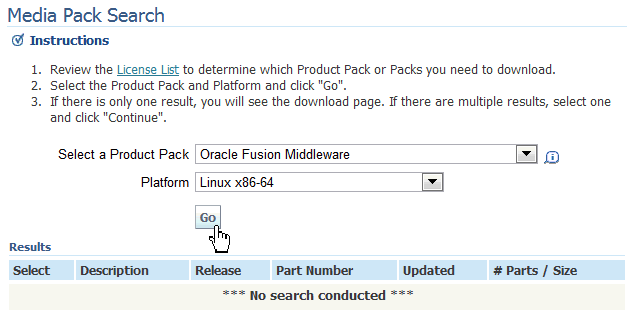
Click Go.
Select Oracle GoldenGate for Non Oracle Database v11.2.1 Media Pack for Linux x86-64.
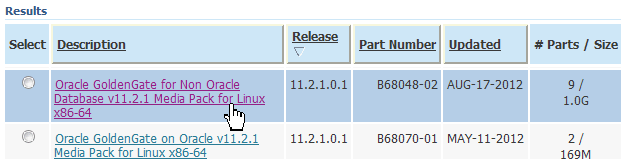
Click Continue.
Make sure you are looking at part number V34007-01 for "DB2/400 on Linux."
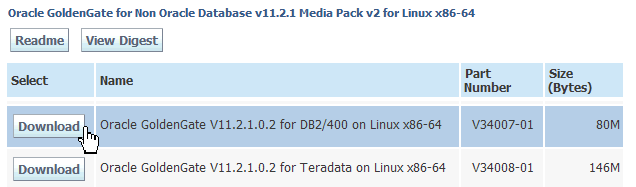
Click Download.
Unpack the software in its directory on the intermediate hostB (yellow).
Create the installation directory to receive the Oracle GoldenGate software.
| HostB - Linux |
[ogguserb@hostB /]$ cd ~ [ogguserb@hostB /home/ogguserb]$ mkdir ogg_linux_400_BC [ogguserb@hostB /home/ogguserb]$ cd ogg_linux_400_BC/ [ogguserb@hostB ogg_linux_400_BC]$ |
The reason that the directory has a suffix of _BC rather than just _B is that if you configure the bidirectional part, you will need another instance of the intermediate host, and in case you want to have it on the same machine, the one replicating to hostC will be suffixed _BC and the one replicating to hostA will be suffixed _BA.
Copy the downloaded zip from wherever you downloaded it to ogg_linux_400_BC. Note this zip is different that the one you downloaded for the iSeries itself. Unzip it and untar (extract) it. Make sure you have the trailing dot in the copy command as the target.
| HostB - Linux |
[ogguserb@hostB ogg_linux_400_BC]$ cp ~/Downloads/V34007-01.zip . [ogguserb@hostB ogg_linux_400_BC]$ unzip V34007-01.zip Archive: V34007-01.zip inflating: ggs_Linux_x64_DB2400_64bit.tar inflating: Oracle_GoldenGate_11.2.1.0.2_README.doc inflating: Oracle_GoldenGate_11.2.1.0.2_README.txt inflating: OGG_WinUnix_Rel_Notes_11.2.1.0.2.pdf [ogguserb@hostB ogg_linux_400_BC]$ tar -xvpf ggs_Linux_x64_DB2400_64bit.tar ./ ./server ... many lines omitted for clarity ... ./dirprm/jagent.prm ./demo_db2400_create.sql [ogguserb@hostB ogg_linux_400_BC]$ |
Start the GoldenGate Software Command Interface (GGSCI). Create the default empty subdirectories.
| HostB - Linux |
[ogguserb@hostB ogg_linux_400_BC]$ ./ggsci Oracle GoldenGate Command Interpreter for DB2 for i Version 11.2.1.0.2 OGGCORE_11.2.1.0.2T3_PLATFORMS_120724.2205 Linux, x64, 64bit (optimized), IBM DB2 for i Remote on Jul 25 2012 02:02:16 Copyright (C) 1995, 2012, Oracle and/or its affiliates. All rights reserved. GGSCI (hostB) 1> Create Subdirs Creating subdirectories under current directory /home/ogguserb/ogg_linux_400_BC Parameter files /home/ogguserb/ogg_linux_400_BC/dirprm: already exis ts Report files /home/ogguserb/ogg_linux_400_BC/dirrpt: created Checkpoint files /home/ogguserb/ogg_linux_400_BC/dirchk: created Process status files /home/ogguserb/ogg_linux_400_BC/dirpcs: created SQL script files /home/ogguserb/ogg_linux_400_BC/dirsql: created Database definitions files /home/ogguserb/ogg_linux_400_BC/dirdef: created Extract data files /home/ogguserb/ogg_linux_400_BC/dirdat: created Temporary files /home/ogguserb/ogg_linux_400_BC/dirtmp: created Stdout files /home/ogguserb/ogg_linux_400_BC/dirout: created GGSCI (hostB) 2> Exit [ogguserb@hostB ogg_linux_400_BC]$ |
Note in the platform description that this is for i Remote. If any of the directories exist, it leaves the contents alone.
You have successfully installed Oracle GoldenGate on Linux hostB.
2. Configuring the Environment
- DBLogin:
- Connects to the DB via ODBC using the userid/password specified. The ODBC name must be UPPERCASE, for example, HOSTA.
- Start Mgr:
- If it is already started, there is no harm in trying to start it again. This is persistent between sessions.
- Info Mgr:
- Reports if it started successfully, and if so, the port number being used.
- DefaultJournal:
- 99% of the time journaling is required. You can override this schema/filename and specify another journal on a per-table basis. The file oggjrn is supplied by Oracle, and is only to be used for testing or proof-of-concept (PoC), not for production.
- Info CheckpointTable:
- Reports if a checkpoint table (used by Replicat) was found.
- Use the native STRJRNPF command mentioned earlier for the three tables, and/or
- Make sure the Oracle GoldenGate code is installed on the target and run the same commands you ran on the source.
The configuration of the environment is done by editing ASCII files and running OS utilities. To configure the environment, perform the following steps:
2.1 Creating Startup Files and Managers
Create the GLOBALS file on hostA in the Oracle GoldenGate installation directory using your text editor of choice.
It is possible to create and/or edit the GLOBALS file from inside GGSCI by prepending the name with "./". For example:
GGSCI> Edit Param ./GLOBALS
except that for it to take effect, you have to leave and reenter GGSCI, so you might as well do the editing outside GGSCI before you start GGSCI the first time.
The GLOBALS file name must be all UPPERCASE, and it contains only one line (plus --comments) defining the checkpoint table schema and name. You can use any schema and any name.
| HostA - iSeries |
[/home/oggusera/ogg_i_400_A] vi GLOBALS
-- Created by Joe Admin 10/11/2012 on hostA
CheckpointTable oggusera.oggchkpt

[/home/oggusera/ogg_i_400_A]
|
Checkpoint tables are only used by the Replicat, so this will not be used until the bidirectional section. Having it present and unused does not hurt anything.
Create the GLOBALS file on hostB in the Oracle GoldenGate installation directory.
| HostB - Linux |
[ogguserb@hostB ogg_linux_400_BC]$ vi GLOBALS
-- Created by Joe Admin 10/11/2012 on hostC
CheckpointTable ogguserc.oggchkpt

[ogguserb@hostB ogg_linux_400_BC]$
|
Note that the GLOBALS file resides on intermediate hostB but references the schema on target hostC.
Create the optional startup.oby (Obey) file on hostA in the Oracle GoldenGate installation directory.
These are GGSCI commands that are done almost every time you start GGSCI, and they do not persist between sessions, so you will find yourself entering them many, many times, and therefore it is convenient to create a startup obey file.
If you have several different databases or schemas that you login to on a regular basis, you may want to make startup01.oby, startup02.oby, startup03.oby, and so on. This will be revisited later in the naming conventions of process files.
| HostA - iSeries |
[/home/oggusera/ogg_i_400_A] vi startup.oby
-- Created by Joe Admin 10/11/2012 on hostA
DBLogin SourceDB HOSTA, UserID oggusera, Password pswda
Start Mgr
Info Mgr
DefaultJournal oggusera/oggjrn
Info CheckpointTable

[/home/oggusera/ogg_i_400_A]
|
Create the optional startup.oby (Obey) file on hostB in the Oracle GoldenGate installation directory.
| HostB - Linux |
[ogguserb@hostB ogg_linux_400_BC]$ vi startup.oby
-- Created by Joe Admin 10/11/2012 on hostB
DBLogin SourceDB HOSTC, UserID ogguserc, Password pswdc
Start Mgr
Info Mgr
--DefaultJournal ogguserc/oggjrn
Info CheckpointTable
Set Editor gedit

[ogguserb@hostB ogg_linux_400_BC]$
|
The DefaultJournal command won't run on the Linux box, it needs to run on the target iSeries box. It is left in the file commented out as a reminder that it does need to run eventually. If you don't have Oracle GoldenGate installed on the target yet, the journaling may have to be done another way. This will be discussed later.
Create the optional startup.oby (Obey) file on hostC in the Oracle GoldenGate installation directory.
| HostC - iSeries |
[/home/ogguserc/ogg_i_400_C] vi startup.oby
-- Created by Joe Admin 10/11/2012 on hostC
DBLogin SourceDB HOSTC, UserID ogguserc, Password pswdc
-- Start Mgr
-- Info Mgr
DefaultJournal ogguserc/oggjrn
-- Info CheckpointTable

[/home/ogguserc/ogg_i_400_C]
|
The DefaultJournal option is enabled on hostC (and there is no gedit on the iSeries). There is no Manager nor checkpoint table enabled on hostC yet, though it never hurts to have them, and if you enable bidirectional replication the Manager is required. So as a reminder, leave in the commented lines pertaining to the Manager and checkpoint table.
Create the Manager parameter (mgr.prm) file on hostA in dirprm/.
Start GGSCI. Edit the file with no extension. Add the two lines (plus comments).
| HostA - iSeries |
[/home/oggusera/ogg_i_400_A] ./ggsci Oracle GoldenGate Command Interpreter for DB2 for i Version 11.2.1.0.2 OGGCORE_11.2.1.0.3_PLATFORMS_120724.2205 IBM i, ppc, 64bit (optimized), IBM DB2 for i on Jul 26 2012 00:43:51 Copyright (C) 1995, 2012, Oracle and/or its affiliates. All rights reserved. GGSCI (hostA) 1> Edit Param mgr -- Created by Joe Admin 10/11/2012 on hostA Port 15001 PurgeOldExtracts ./dirdat/*, UseCheckpoints GGSCI (hostA) 2> Info mgr Manager is DOWN! GGSCI (hostA) 3> |
Note: If you do it correctly, GGSCI automatically adds the .prm extension and stores the file in the dirprm directory. If you wrongly add the extension yourself, GGSCI converts the filename to UPPERCASE and stores it in the installation directory which renders the file practically unusable.
Create the Manager parameter (mgr.prm) file on hostB in dirprm/.
| HostB - Linux |
[ogguserb@hostB ogg_linux_400_BC]$ ./ggsci Oracle GoldenGate Command Interpreter for DB2 for i Version 11.2.1.0.2 OGGCORE_11.2.1.0.2T3_PLATFORMS_120724.2205 Linux, x64, 64bit (optimized), IBM DB2 for i Remote on Jul 25 2012 02:02:16 Copyright (C) 1995, 2012, Oracle and/or its affiliates. All rights reserved. GGSCI (hostB) 1> Edit Param mgr -- Created by Joe Admin 10/11/2012 on hostB Port 15002 PurgeOldExtracts ./dirdat/*, UseCheckpoints GGSCI (hostB) 2> Info mgr Manager is DOWN! GGSCI (hostB) 3> |
Notice that the port number is different from hostA to hostB to hostC.
Start the Manager on hostA using the Obey files. Alternatively, you could type each of the lines every time you start GGSCI.
| HostA - iSeries |
GGSCI (hostA) 3> Obey startup.oby

GGSCI (hostA) 4> DBLogin SourceDB HOSTA, UserID oggusera, Password pswda

2012-09-03 14:51:38  INFO    OGG-03036  Database character set identified as
UTF-8. Locale: en_US_POSIX.

2012-09-03 14:51:38  INFO    OGG-03037  Session character set identified as
UTF-8.
Successfully logged into database.

GGSCI (hostA) 5> Start mgr

Manager started.

GGSCI (hostA) 6> Info mgr

Manager is running (IP port hosta.example.com.15001).

GGSCI (hostA) 7> DefaultJournal oggusera/oggjrn

DEFAULTJOURNAL has been set to OGGUSERA/OGGJRN

GGSCI (hostA) 8> Info CheckpointTable

No checkpoint table specified, using GLOBALS specification (oggusera.oggchkpt).

Checkpoint table oggusera.oggchkpt does not exist.

GGSCI (hostA) 9>
|
You will create the checkpoint table in the next step.
Start the Manager on hostB using the Obey files.
| HostB - Linux |
GGSCI (hostB) 3> Obey startup.oby

GGSCI (hostB) 4> DBLogin SourceDB HOSTC, UserID ogguserc, Password pswdc

2012-09-04 16:03:04  INFO    OGG-03036  Database character set identified as
UTF-8. Locale: en_US.

2012-09-04 16:03:04  INFO    OGG-03037  Session character set identified as
UTF-8.
Successfully logged into database.

GGSCI (hostB) 5> start mgr

Manager started.

GGSCI (hostB) 6> info mgr

Manager is running (IP port hostb.example.com.15002).

GGSCI (hostB) 7> --DefaultJournal ogguserc/oggjrn

GGSCI (hostB) 8> Info CheckpointTable

No checkpoint table specified, using GLOBALS specification (ogguserc.oggchkpt).

Checkpoint table ogguserc.oggchkpt does not exist.

GGSCI (hostB) 9> Set Editor gedit

GGSCI (hostB) 10>
|
This also proves that your ODBC connections work. You will create the checkpoint table in the next step.
The global and startup files are all created, and the background Manager processes are started. You can verify which processes are running at any time by entering the command:
GGSCI (host) > Info All
2.2 Creating Tables
Create the checkpoint table on hostA.
| HostA - iSeries |
GGSCI (hostA) 9> Add CheckpointTable No checkpoint table specified, using GLOBALS specification (oggusera.oggchkpt). Successfully created checkpoint table oggusera.oggchkpt. GGSCI (hostA) 10> Exit [/home/oggusera/ogg_i_400_A] |
One table will suffice for the whole schema.
Create the checkpoint table on hostB.
| HostB - Linux |
GGSCI (hostB) 10> Add CheckpointTable No checkpoint table specified, using GLOBALS specification (ogguserc.oggchkpt). Successfully created checkpoint table ogguserc.oggchkpt. GGSCI (hostB) 11> Exit [ogguserb@hostB ogg_linux_400_BC]$ |
Actually the table will be created on hostC but the command is issued from hostB.
Create empty source sample tables on hostA in schema oggusera.
If you already have sample tables, you can use those. If not, Oracle GoldenGate software comes with a script demo_db2_create.sql to create two small sample tables tcustmer and tcustord. You can use any DB2 utility you like to run the script. If you have no preference, Oracle GoldenGate software comes with a very limited shell called rundb2.sh.
| HostA - iSeries |
[/home/oggusera/ogg_i_400_A] ./rundb2.sh demo_db2_create.sql

 ... many lines omitted for clarity ...

                                 * * * * *  E N D  O F  S O U R C E  * * * * *
5761SS1 V6R1M0 080215               Run SQL Statements             DEMO_DB2_C
       09/04/12 11:25:59   PAGE   003
Record  *...+... 1 ...+... 2 ...+... 3 ...+... 4 ...+... 5 ...+... 6 ...+... 7 .
MSG ID  SEV  RECORD  TEXT
SQL7953   0       1  Position 1 Drop of TCUSTMER in OGGUSERA complete.
SQL7960   0      21  Position 1 Commit completed.
SQ20367   0      30  Position 3 Clause DATA CAPTURE ignored.
SQL7905  20      23  Position 1 Table TCUSTMER in OGGUSERA created but was
                     not journaled.
SQL7960   0      32  Position 1 Commit completed.
SQL7953   0      34  Position 1 Drop of TCUSTORD in OGGUSERA complete.
SQL7960   0      36  Position 1 Commit completed.
SQ20367   0      48  Position 3 Clause DATA CAPTURE ignored.
SQL7905  20      38  Position 1 Table TCUSTORD in OGGUSERA created but was
                     not journaled.
SQL7960   0      50  Position 1 Commit completed.
SQL7960   0          Commit completed.
                    Message Summary
  Total     Info   Warning      Error   Severe  Terminal
     11        9         0          2        0         0
20 level severity errors found in source
                                * * * * *  E N D  O F  L I S T I N G  * * * * *
[/home/oggusera/ogg_i_400_A]
|
The severity 20 journaling "errors" are okay, you will address those in the next step.
Warning! If you run the script a second time, it will drop the table!
Create empty target sample tables on hostC in schema ogguserc. This must be run on the target directly, not the intermediate host.
| HostC - iSeries |
[/home/ogguserc/ogg_i_400_C] ./rundb2.sh demo_db2_create.sql

 ... many lines omitted for clarity ...

                                 * * * * *  E N D  O F  S O U R C E  * * * * *
5761SS1 V6R1M0 080215               Run SQL Statements             DEMO_DB2_C
       09/04/12 11:25:59   PAGE   003
Record  *...+... 1 ...+... 2 ...+... 3 ...+... 4 ...+... 5 ...+... 6 ...+... 7 .
MSG ID  SEV  RECORD  TEXT
SQL7953   0       1  Position 1 Drop of TCUSTMER in OGGUSERC complete.
SQL7960   0      21  Position 1 Commit completed.
SQ20367   0      30  Position 3 Clause DATA CAPTURE ignored.
SQL7905  20      23  Position 1 Table TCUSTMER in OGGUSERC created but was
                     not journaled.
SQL7960   0      32  Position 1 Commit completed.
SQL7953   0      34  Position 1 Drop of TCUSTORD in OGGUSERC complete.
SQL7960   0      36  Position 1 Commit completed.
SQ20367   0      48  Position 3 Clause DATA CAPTURE ignored.
SQL7905  20      38  Position 1 Table TCUSTORD in OGGUSERC created but was
                     not journaled.
SQL7960   0      50  Position 1 Commit completed.
SQL7960   0          Commit completed.
                    Message Summary
  Total     Info   Warning      Error   Severe  Terminal
     11        9         0          2        0         0
20 level severity errors found in source
                                * * * * *  E N D  O F  L I S T I N G  * * * * *
[/home/ogguserc/ogg_i_400_C]
|
Strictly speaking, you do not need any Oracle GoldenGate software on the target at this point in the exercise, except that it happens to provide the script to create the table and the rundb2.sh shell. If you already have sample tables, then the claim that no Oracle GoldenGate software on the target is true; if you don't have sample tables, then you do need the software installed to run this portion of the exercise. The target scripts to create the tables are included on the intermediate host, so you could ftp them to the target host.
Note that iSeries does not support replicating DDL such as CREATE TABLE, and therefore the empty tables must exist on the target before any DML replication begins.
You can check on the tables available at any time by entering the command:
GGSCI (host) > List Tables *
2.3 Enabling Journaling (Adding Transaction Data)
Restart GGSCI and run Add TranData for the whole schema.
Queries do not require any journaling to be enabled. However, in order for a Replicat to perform DML (INSERT, UPDATE, DELETE), you must specify where the journal files are located. Often applications such as Payroll or HR will include journaling as part of the application. If you create your own tables (such as you just did with the samples and the checkpoint table), then you must manually enable journaling. You can do this using the iSeries command line (CL) "Start Journal Physical File" (STRJRNPF). Alternatively, you can do it from inside of GGSCI using Add TranData and the DefaultJournal you specified in the startup.oby.
| HostA - iSeries |
[/home/oggusera/ogg_i_400_A] ./ggsci Oracle GoldenGate Command Interpreter for DB2 for i ... many lines omitted for clarity ... GGSCI (hostA) 1> Obey startup.oby ... many lines omitted for clarity ... but make sure everything started. GGSCI (hostA) > List Tables * OGGUSERA.MYJUNKA OGGUSERA.OGGCHKPT OGGUSERA.TCUSTMER OGGUSERA.TCUSTORD Found 3 tables matching list criteria. GGSCI (hostA) > Add TranData * DEFAULTJOURNAL has been set to OGGUSERA/OGGJRN Journaling for object OGGUSERA.MYJUNKA has been enabled to journal OGGUSERA/OGGJRN Journaling for object OGGUSERA.OGGCHKPT has been enabled to journal OGGUSERA/OGGJRN Journaling for object OGGUSERA.TCUSTMER has been enabled to journal OGGUSERA/OGGJRN Journaling for object OGGUSERA.TCUSTORD has been enabled to journal OGGUSERA/OGGJRN GGSCI (hostA) > Info TranData * Journaling for object OGGUSERA.MYJUNKA is enabled to journal OGGUSERA/OGGJRN. Journaling for object OGGUSERA.OGGCHKPT is enabled to journal OGGUSERA/OGGJRN. Journaling for object OGGUSERA.TCUSTMER is enabled to journal OGGUSERA/OGGJRN. Journaling for object OGGUSERA.TCUSTORD is enabled to journal OGGUSERA/OGGJRN. GGSCI (hostA) xx> |
Note that you must enable journaling for the checkpoint table as well as your sample tables.
Do the same thing on hostC.
Add TranData does not work on intermediate hosts, so you must run commands on hostC directly. You can either:
| HostC - iSeries |
[/home/ogguserc/ogg_i_400_C] ./ggsci Oracle GoldenGate Command Interpreter for DB2 for i ... many lines omitted for clarity ... GGSCI (hostC) 1> Obey startup.oby ... many lines omitted for clarity ... but make sure everything started. GGSCI (hostC) > List Tables * OGGUSERC.MYJUNKC OGGUSERC.OGGCHKPT OGGUSERC.TCUSTMER OGGUSERC.TCUSTORD Found 3 tables matching list criteria. GGSCI (hostC) > Add TranData * DEFAULTJOURNAL has been set to OGGUSERC/OGGJRN Journaling for object OGGUSERC.MYJUNKC has been enabled to journal OGGUSERC/OGGJRN Journaling for object OGGUSERC.OGGCHKPT has been enabled to journal OGGUSERC/OGGJRN Journaling for object OGGUSERC.TCUSTMER has been enabled to journal OGGUSERC/OGGJRN Journaling for object OGGUSERC.TCUSTORD has been enabled to journal OGGUSERC/OGGJRN GGSCI (hostC) > Info TranData * Journaling for object OGGUSERC.MYJUNKC is enabled to journal OGGUSERC/OGGJRN. Journaling for object OGGUSERC.OGGCHKPT is enabled to journal OGGUSERC/OGGJRN. Journaling for object OGGUSERC.TCUSTMER is enabled to journal OGGUSERC/OGGJRN. Journaling for object OGGUSERC.TCUSTORD is enabled to journal OGGUSERC/OGGJRN. GGSCI (hostC) xx> |
The collection of transaction data and journaling has been enabled for all user and system tables involved with Oracle GoldenGate.
2.4 Creating Column Definitions (defgen)
Create the column mapping from source to target tables using the OS utility.
This utility is required if the tables have a different (heterogeneous) structure, but is still highly recommended even if the tables have the same (homogeneous) structure. If they do have the same structure, you may be able to use the AssumeTargetDefs parameter instead of the SourceDefs parameter. This is covered later.
Please review the File and Process Naming Conventions in the Overview Topic.
| HostA - iSeries |
GGSCI (hostA) > Edit Param d01ab -- defgen column defs for tcust* from hostA to hostC -- Created by Joe Admin on 10/11/2012 DefsFile dirdef/d01ab.def, Purge SourceDB HOSTA, UserID oggusera, Password pswda Table oggusera.tcust*; GGSCI (hostA) > Shell ./defgen paramfile dirprm/d01ab.prm *********************************************************************** Oracle GoldenGate Table Definition Generator for DB2 for i ... many lines omitted for clarity ... Expanding wildcard oggusera.tcust*: Retrieving definition for OGGUSERA.TCUSTMER Retrieving definition for OGGUSERA.TCUSTORD Definitions generated for 2 tables in dirdef/d01ab.def GGSCI (hostA) > Exit [/home/oggusera/ogg_i_400_A] |
You can create definitions for a single table, multiple tables (using wildcards), an entire schema, or multiple schemas at a time. Having "excess" (unused by Oracle GoldenGate) definitions in the file is not a problem. You may want to examine the contents of dirdef/d01ab.def before sending it over to hostB.
Copy the files from source hostA to intermediate hostB.
Use whatever method you wish to copy the .def files to the target dirdef directory: cut-n-paste, scp, ftp, and so on. The example will use secure shell copy (scp). Do not break the command line after ogguserb/, the scp command is entered all on one line.
| HostA - iSeries |
[/home/oggusera/ogg_i_400_A] scp dirdef/d01ab.def ogguserb@hostb:/home/ogguserb/ ogg_linux_400_BC/dirdef The authenticity of host 'hostb (10.0.0.2)' can't be established. RSA key fingerprint is 8e:60:d0:a7:fc:55:6e:d9:81:bb:c9:90:19:f4:a8:11. Are you sure you want to continue connecting (yes/no)? yes Warning: Permanently added 'hostb' (RSA) to the list of known hosts. ogguserb@hostb's password: ******** d01ab.def 100% 1877 1.8KB/s 00:00 [/home/oggusera/ogg_i_400_A] |
Of course you replace the asterisks with your password, for example pswdb.
Make sure the files arrived intact on hostB in the proper place.
| HostB - Linux |
[ogguserb@hostB ogg_linux_400_BC]$ ls -l dirdef
total 4
-rw-r--r-- 1 ogguserb oinstall 1877 Aug 29 13:43 d01ab.def
[ogguserb@hostB ogg_linux_400_BC]$
|
The column definitions are created and copied. Of course if the table structure changes, you need to do this again.
3. Configuring Data Capture Using Extract
Data capture, also known as Extract, is done on the source side. A primary extract is required; a secondary extract, known as a Data Pump, is optional but highly recommended. To configure data capture, perform the following steps:
3.1 Configuring the Primary Extract
On source hostA, create the primary Extract parameter file.
Using the naming conventions discussed in the Overview, the path/filename.ext will be dirprm/e01ab.prm. The path and extension will be added automatically.
| HostA - iSeries |
[/home/oggusera/ogg_i_400_A] ./ggsci Oracle GoldenGate Command Interpreter for DB2 for i ... many lines omitted for clarity ... GGSCI (hostA) 1> Obey startup.oby ... many lines omitted for clarity ... but make sure everything started. GGSCI (hostA) > Edit Param e01ab -- Primary Extract from HostA thru HostB, then on to HostC -- Created by Joe Admin on 10/11/2012 Extract e01ab ExtTrail ./dirdat/ab SourceDB HOSTA, UserID oggusera, Password pswda TranLogOptions ExcludeUser ogguserc Table oggusera.tcust*; GGSCI (hostA) > |
It is possible to encrypt the passwords in the file, but that is beyond the scope of this exercise.
You can check your work by entering View Param e01ab any time.
Create the Extract group and the local Extract trail file.
| HostA - iSeries |
GGSCI (hostA) > Add Extract e01ab, TranLog, Begin Now EXTRACT added. GGSCI (hostA) > Add ExtTrail ./dirdat/ab, Extract e01ab, Megabytes 5 EXTTRAIL added. GGSCI (hostA) > |
The Megabytes 5 is optional. The default is 100 Megabytes.
The trail file that will be created will be named dirdat/ab000000, then when that one fills up the next will be dirdat/ab000001, then dirdat/ab000002, and so on.
The primary Extract has been created and configured, but not started. Leave GGSCI running for the next step.
3.2 Configuring the Data Pump
Create the secondary Extract (data pump) parameter file.
Using the naming conventions discussed in the Overview, the path/filename.ext will be dirprm/p01ab.prm. The path and extension will be added automatically.
| HostA - iSeries |
GGSCI (hostA) > Edit Param p01ab
-- Data pump (secondary Extract) from HostA thru HostB, then on to HostC
-- Created by Joe Admin on 10/11/2012
Extract p01ab
RmtHost hostb, MgrPort 15002, Compress
RmtTrail ./dirdat/bc
Passthru
Table oggusera.tcust*;

GGSCI (hostA) >
|
This Table schema is the source.
You can check your work by entering View Param p01ab any time.
Create the data pump group and the remote Extract trail file.
| HostA - iSeries |
GGSCI (hostA) > Add Extract p01ab, ExtTrailSource ./dirdat/ab EXTRACT added. GGSCI (hostA) > Add RmtTrail ./dirdat/bc, Extract p01ab, Megabytes 5 RMTTRAIL added. GGSCI (hostA) > |
The Megabytes 5 is optional. The default is 100 Megabytes.
The data pump reads from the local trail file ab and writes to the remote trail file bc. The remote trail file that will be created will be named dirdat/bc000000, then when that one fills up the next will be dirdat/bc000001, then dirdat/bc000002, and so on. Since the two sets of trail files are on different hosts (even though they are in directories with the same names), the files could be named the same thing (for example ab). The different file name is chosen just to illustrate that the parameter RmtTrail is creating a different trail file.
The secondary Extract has been created and configured, but not started. Leave GGSCI running for the next step.
3.3 Verify the Extract Processes (Optional)
Make sure the Extract processes were created and registered correctly.
| HostA - iSeries |
GGSCI (hostA) > Info All

Program     Status      Group       Lag at Chkpt  Time Since Chkpt

MANAGER     RUNNING
EXTRACT     STOPPED     E01AB       00:00:00      00:03:24
EXTRACT     STOPPED     P01AB       00:00:00      00:01:22

GGSCI (hostA) >
|
Since nothing other than the Manager is started yet, the Extract Status should say STOPPED.
Make sure the trail files were created and registered correctly.
| HostA - iSeries |
GGSCI (hostA) > Info ExtTrail *

       Extract Trail: ./dirdat/ab
             Extract: E01AB
               Seqno: 0
                 RBA: 0
           File Size: 5M

       Extract Trail: ./dirdat/bc
             Extract: P01AB
               Seqno: 0
                 RBA: 0
           File Size: 5M

GGSCI (hostA) >
|
Since nothing has started yet, the sequence numbers (Seqno) and relative byte addresses (RBA) should say 0.
Leave GGSCI running for the next step.
4. Configuring Data Delivery Using Replicat
Data delivery, also known as Replicat (the "e" is left off intentionally), is done at a combination of the intermediate hostB (for processes) and the target hostC (for tables and journals). To configure data delivery, perform the following steps:
4.1 Configuring the Replicat
On intermediate hostB, create the Replicat parameter file.
| HostB - Linux |
[ogguserb@hostB ogg_linux_400_BC]$ ./ggsci Oracle GoldenGate Command Interpreter for DB2 for i ... many lines omitted for clarity ... GGSCI (hostB) 1> Obey startup.oby ... many lines omitted for clarity ... but make sure everything started. GGSCI (hostB) > Edit Param r01bc -- Delivery from HostA thru HostB, on to HostC -- Created by Joe Admin on 10/11/2012 Replicat r01bc SourceDB HOSTC, UserID ogguserc, password pswdc -- Cannot use AssumeTargetDefs, must use SourceDefs (long story) -- AssumeTargetDefs SourceDefs dirdef/d01ab.def DiscardFile dirrpt/r01bc.dsc, Append Map oggusera.tcustmer, Target ogguserc.tcustmer; Map oggusera.*, Target ogguserc.*; GGSCI (hostB) > |
The Map statement can be simple (as shown here), or very complex, transforming columns and fields. For example, you could combine three source columns first_name, middle_init, last_name into a single target column full_name.
You might think that the Replicat would map all tables in the oggusera schema based on the wildcard, including the checkpoint table oggusera.oggchkpt. However, the Extract is only sending over tcust* tables, so the checkpoint table is not being replicated.
Create the Replicat process.
| HostB - Linux |
GGSCI (hostB) > Add Replicat r01bc, ExtTrail ./dirdat/bc
REPLICAT added.

GGSCI (hostB) >
|
You can check your work by entering View Param r01bc any time.
Make sure the Replicat process was created and registered correctly.
| HostB - Linux |
GGSCI (hostB) > Info All

Program     Status      Group       Lag at Chkpt  Time Since Chkpt

MANAGER     RUNNING
REPLICAT    STOPPED     R01BC       00:00:00      00:00:33

GGSCI (hostB) >
|
Since nothing other than the Manager is started yet, the Replicat Status should say STOPPED.
4.2 Starting All Processes
Start all Extract processes on the source.
| HostA - iSeries |
GGSCI (hostA) > Start Extract *

Sending START request to MANAGER ...
EXTRACT E01AB starting

Sending START request to MANAGER ...
EXTRACT P01AB starting

GGSCI (hostA) >
|
Alternatively, you could have entered, Start *, or Start e01* and Start p01*.
Start all Replicat processes on the target.
| HostB - Linux |
GGSCI (hostB) > Start Replicat *

Sending START request to MANAGER ...
REPLICAT R01BC starting

GGSCI (hostB) >
|
Alternatively, you could have entered, Start *, or Start r01*.
Display information about all processes on the target.
Display summary information.
| HostB - Linux |
GGSCI (hostB) > Info All

Program     Status      Group       Lag at Chkpt  Time Since Chkpt

MANAGER     RUNNING
REPLICAT    RUNNING     R01BC       00:00:00      00:00:03

GGSCI (hostB) >
|
If there is something wrong, then STATUS will say STOPPED or ABENDED. (It would have been useful if STATUS said, FAILED, but it doesn't, it usually just says, STOPPED with no indication that it tried and failed.) If that is the case, then type View Report r01bc or whatever process fails to start. Towards the bottom of the report, it will explain why it failed to start. Correct that error, and restart the processes.
Display more information.
| HostB - Linux |
GGSCI (hostB) > Info r01bc

REPLICAT   R01BC     Last Started 2012-09-06 15:01   Status RUNNING
Checkpoint Lag       00:00:00 (updated 00:00:04 ago)
Log Read Checkpoint  File ./dirdat/bc000001
                     2012-09-06 14:56:45.768684  RBA 1487

GGSCI (hostB) >
|
Display the most detailed information.
| HostB - Linux |
GGSCI (hostB) > Info r01bc, Detail

REPLICAT   R01BC     Last Started 2012-09-06 15:01   Status RUNNING
Checkpoint Lag       00:00:00 (updated 00:00:00 ago)
Log Read Checkpoint  File ./dirdat/bc000001
                     2012-09-06 14:56:45.768684  RBA 1487

  Extract Source                          Begin             End

  ./dirdat/bc000001                       * Initialized *   2012-09-06 14:56
  ./dirdat/bc000000                       * Initialized *   First Record


Current directory    /home/ogguserb/ogg_linux_400_BC

Report file          /home/ogguserb/ogg_linux_400_BC/dirrpt/R01BC.rpt
Parameter file       /home/ogguserb/ogg_linux_400_BC/dirprm/r01bc.prm
Checkpoint file      /home/ogguserb/ogg_linux_400_BC/dirchk/R01BC.cpr
Checkpoint table     ogguserc.oggchkpt
Process file         /home/ogguserb/ogg_linux_400_BC/dirpcs/R01BC.pcr
Stdout file          /home/ogguserb/ogg_linux_400_BC/dirout/R01BC.out
Error log            /home/ogguserb/ogg_linux_400_BC/ggserr.log

GGSCI (hostB) >
|
In all cases, the Status should be RUNNING, and the time since the last update or checkpoint should be under 10 seconds.
Display information about all processes on the source.
Display summary information.
| HostA - iSeries |
GGSCI (hostA) > Info All

Program     Status      Group       Lag at Chkpt  Time Since Chkpt

MANAGER     RUNNING
EXTRACT     RUNNING     E01AB       00:00:00      00:00:04
EXTRACT     RUNNING     P01AB       00:00:00      00:00:05

GGSCI (hostA) >
|
Display detailed information.
| HostA - iSeries |
GGSCI (hostA) > Info Extract * EXTRACT E01AB Last Started 2012-09-06 08:56 Status RUNNING Checkpoint Lag 00:00:00 (updated 00:00:04 ago) VAM Read Checkpoint 2012-09-06 08:43:42.642195 Journal Receiver Timestamp (UTC) Seq uence Number OGGUSERA/OGGJRN | |Sep 06 2012 14:43:42.642195 | EOF System Sequence Number: 00000000000000000000 EXTRACT P01AB Last Started 2012-09-06 08:56 Status RUNNING Checkpoint Lag 00:00:00 (updated 00:00:05 ago) Log Read Checkpoint File ./dirdat/ab000001 2012-09-06 08:56:45.753034 RBA 1315 GGSCI (hostA) > Exit [/home/oggusera/ogg_i_400_A] |
Similar to the Replicat, the Status should be RUNNING, and the time since the last update or checkpoint should be under 10 seconds.
Everything should show a status of RUNNING. The source tables are still empty. No data has flowed yet, nothing has replicated yet.
5. Generating Data
The Oracle GoldenGate software comes with SQL scripts to generate sample data traffic. There is a difference in how you replicate an existing table (more complicated) versus starting with a new empty table (simpler). To generate sample data against an empty set of tables, perform the following steps:
5.1 Generating INSERTs (Initial Load)
Run the DB2 script to INSERT rows.
On source hostA, at the OS prompt, run the demo_db2_insert.sql script in the rundb2.sh shell.
| HostA - iSeries |
[/home/oggusera/ogg_i_400_A] ./rundb2.sh demo_db2_insert.sql

 ... many lines omitted for clarity ...

MSG ID  SEV  RECORD  TEXT
SQL7956   0       1  Position 1 1 rows inserted in TCUSTMER in OGGUSERA.
SQL7956   0      29  Position 1 1 rows inserted in TCUSTMER in OGGUSERA.
SQL7956   0      38  Position 1 1 rows inserted in TCUSTORD in OGGUSERA.
SQL7956   0      50  Position 1 1 rows inserted in TCUSTORD in OGGUSERA.
SQL7960   0      62  Position 1 Commit completed.
SQL7960   0          Commit completed.
                    Message Summary
  Total     Info   Warning      Error   Severe  Terminal
      6        6         0          0        0         0
00 level severity errors found in source
                                * * * * *  E N D  O F  L I S T I N G  * * * * *
[/home/oggusera/ogg_i_400_A]
|
There should not be any errors.
Verify that the rows were inserted into the source tables.
| HostA - iSeries |
[/home/oggusera/ogg_i_400_A] ./rundb2.sh DB2> SELECT * FROM tcustmer CUST_CODE NAME CITY STATE ---------- ------------------------------ -------------------- ------ WILL BG SOFTWARE CO. SEATTLE WA JANE ROCKY FLYER INC. DENVER CO 2 RECORD(S) SELECTED. DB2> SELECT * FROM tcustord CUST_CODE ORDER_DATE PRODUCT_CODE ORDER_ID PRODUCT_PRICE P RODUCT_AMOUNT TRANSACTION_ID ---------- -------------------------- ------------- ----------- -------------- - -------------- ------------------------ WILL 1994-09-30-15.33.00.000000 CAR 144 17520.00 3 100 JANE 1995-11-11-13.52.00.000000 PLANE 256 133300.00 1 100 2 RECORD(S) SELECTED. DB2> exit [/home/oggusera/ogg_i_400_A] |
If you get SQL7008 errors, then you probably forgot to enable journaling.
Verify that the source GGSCI Extract processes are still running.
On source hostA, enter the following command:
| HostA - iSeries |
[/home/oggusera/ogg_i_400_A] ./ggsci GGSCI (hostA) 1> Info All Program Status Group Lag at Chkpt Time Since Chkpt MANAGER RUNNING EXTRACT RUNNING E01AB 00:00:00 00:00:00 EXTRACT RUNNING P01AB 00:00:00 00:00:06 GGSCI (hostA) 2> Exit [/home/oggusera/ogg_i_400_A] |
If the Status says ABENDED, then check the process reports (covered as a later topic) to see what the error was.
Verify that the intermediate GGSCI Replicat processes are still running.
On intermediate hostB, GGSCI should still be running. Enter the following command:
| HostB - Linux |
GGSCI (hostB) > Info All

Program     Status      Group       Lag at Chkpt  Time Since Chkpt

MANAGER     RUNNING
REPLICAT    RUNNING     R01BC       00:00:00      00:00:05

GGSCI (hostB) >
|
If the Status says ABENDED, then check the process reports (covered as a later topic) to see what the error was.
Verify that rows have been inserted into the target tables.
On target hostC, at the OS prompt, run the following DB2 queries:
| HostC - iSeries |
[/home/ogguserc/ogg_i_400_C] ./rundb2.sh DB2> SELECT * FROM tcustmer CUST_CODE NAME CITY STATE ---------- ------------------------------ -------------------- ------ WILL BG SOFTWARE CO. SEATTLE WA JANE ROCKY FLYER INC. DENVER CO 2 RECORD(S) SELECTED. DB2> SELECT * FROM tcustord CUST_CODE ORDER_DATE PRODUCT_CODE ORDER_ID PRODUCT_PRICE P RODUCT_AMOUNT TRANSACTION_ID ---------- -------------------------- ------------- ----------- -------------- - -------------- ------------------------ WILL 1994-09-30-15.33.00.000000 CAR 144 17520.00 3 100 JANE 1995-11-11-13.52.00.000000 PLANE 256 133300.00 1 100 2 RECORD(S) SELECTED. DB2> exit [/home/ogguserc/ogg_i_400_C] |
The source and target database tcust* tables should match.
There are alternative ways of doing the initial load on the target if the source already has rows in it, but this is the simplest way when both tables are initially empty.
5.2 Generating UPDATEs/DELETEs
Run the DB2 script to UPDATE and DELETE rows.
On source hostA, at the OS prompt, run the demo_db2_misc.sql script in the rundb2.sh shell.
| HostA - iSeries |
[/home/oggusera/ogg_i_400_A] ./rundb2.sh demo_db2_misc.sql

 ... many lines omitted for clarity ...

MSG ID  SEV  RECORD  TEXT
SQL7956   0       1  Position 1 1 rows inserted in TCUSTMER in OGGUSERA.
SQL7956   0      29  Position 1 1 rows inserted in TCUSTMER in OGGUSERA.
SQL7956   0      38  Position 1 1 rows inserted in TCUSTMER in OGGUSERA.
SQL7960   0      47  Position 1 Commit completed.
SQL7956   0      49  Position 1 1 rows inserted in TCUSTORD in OGGUSERA.
SQL7956   0      61  Position 1 1 rows inserted in TCUSTORD in OGGUSERA.
SQL7956   0      73  Position 1 1 rows inserted in TCUSTORD in OGGUSERA.
SQL7960   0      85  Position 1 Commit completed.
SQL7957   0      87  Position 1 1 rows updated in TCUSTORD in OGGUSERA.
SQL7957   0      94  Position 1 1 rows updated in TCUSTORD in OGGUSERA.
SQL7957   0     101  Position 1 1 rows updated in TCUSTORD in OGGUSERA.
SQL7957   0     108  Position 1 1 rows updated in TCUSTMER in OGGUSERA.
SQL7960   0     113  Position 1 Commit completed.
SQL7955   0     115  Position 1 1 rows deleted from TCUSTORD in OGGUSERA.
SQL7955   0     121  Position 1 1 rows deleted from TCUSTORD in OGGUSERA.
SQL7960   0     127  Position 1 Commit completed.
SQL0088   0     129  Position 1 DELETE applies to entire table.
SQL7955   0     129  Position 1 3 rows deleted from TCUSTORD in OGGUSERA.
SQL7961   0     131  Position 1 Rollback completed.
SQL7960   0          Commit completed.
                    Message Summary
  Total     Info   Warning      Error   Severe  Terminal
     20       20         0          0        0         0
00 level severity errors found in source
                                * * * * *  E N D  O F  L I S T I N G  * * * * *
[/home/oggusera/ogg_i_400_A]
|
There should not be any errors.
Verify that the rows were updated and deleted in the source tables.
| HostA - iSeries |
[/home/oggusera/ogg_i_400_A] ./rundb2.sh DB2> SELECT * FROM tcustmer CUST_CODE NAME CITY STATE ---------- ------------------------------ -------------------- ------ WILL BG SOFTWARE CO. SEATTLE WA JANE ROCKY FLYER INC. DENVER CO DAVE DAVE'S PLANES INC. TALLAHASSEE FL BILL BILL'S USED CARS DENVER CO ANN ANN'S BOATS NEW YORK NY 5 RECORD(S) SELECTED. DB2> SELECT * FROM tcustord CUST_CODE ORDER_DATE PRODUCT_CODE ORDER_ID PRODUCT_PRICE P RODUCT_AMOUNT TRANSACTION_ID ---------- -------------------------- ------------- ----------- -------------- - -------------- ------------------------ WILL 1994-09-30-15.33.00.000000 CAR 144 16520.00 3 100 BILL 1995-12-31-15.00.00.000000 CAR 765 14000.00 3 100 BILL 1996-01-01-00.00.00.000000 TRUCK 333 25000.00 15 100 3 RECORD(S) SELECTED. DB2> exit [/home/oggusera/ogg_i_400_A] |
Three rows inserted into tcustmer, three rows inserted into tcustord, four rows updated in tcustord, two rows deleted from tcustord.
Verify that the source GGSCI Extract processes are still running.
On source hostA, enter the following command:
| HostA - iSeries |
[/home/oggusera/ogg_i_400_A] ./ggsci GGSCI (hostA) 1> Info All Program Status Group Lag at Chkpt Time Since Chkpt MANAGER RUNNING EXTRACT RUNNING E01AB 00:00:00 00:00:09 EXTRACT RUNNING P01AB 00:00:00 00:00:01 GGSCI (hostA) 2> |
If the initial INSERTs worked, the odds are that the UPDATEs and DELETEs will work.
Verify that the intermediate GGSCI Replicat processes are still running.
On intermediate hostB, GGSCI should still be running. Enter the following command:
| HostB - Linux |
GGSCI (hostB) > Info All

Program     Status      Group       Lag at Chkpt  Time Since Chkpt

MANAGER     RUNNING
REPLICAT    RUNNING     R01BC       00:00:00      00:00:09

GGSCI (hostB) >
|
The Status should still be RUNNING.
Verify that rows have been updated and deleted in the target tables.
On target hostC, run the following DB2 queries:
| HostC - iSeries |
[/home/ogguserc/ogg_i_400_C] ./rundb2.sh DB2> SELECT * FROM tcustmer CUST_CODE NAME CITY STATE ---------- ------------------------------ -------------------- ------ WILL BG SOFTWARE CO. SEATTLE WA JANE ROCKY FLYER INC. DENVER CO DAVE DAVE'S PLANES INC. TALLAHASSEE FL BILL BILL'S USED CARS DENVER CO ANN ANN'S BOATS NEW YORK NY 5 RECORD(S) SELECTED. DB2> SELECT * FROM tcustord CUST_CODE ORDER_DATE PRODUCT_CODE ORDER_ID PRODUCT_PRICE P RODUCT_AMOUNT TRANSACTION_ID ---------- -------------------------- ------------- ----------- -------------- - -------------- ------------------------ WILL 1994-09-30-15.33.00.000000 CAR 144 16520.00 3 100 BILL 1995-12-31-15.00.00.000000 CAR 765 14000.00 3 100 BILL 1996-01-01-00.00.00.000000 TRUCK 333 25000.00 15 100 3 RECORD(S) SELECTED. DB2> exit [/home/ogguserc/ogg_i_400_C] |
This completes the configuration and operation of the basic unidirectional functionality of Oracle GoldenGate: Extract, Data Pump, and Replicat.
6. Managing the Oracle GoldenGate Environment
There are reports generated during and after the processes run. These reports contain information, warnings, and errors (if any) related to that run of the process. To view the reports, perform the following steps:
6.1 Viewing Reports
View the process reports on the source.
View the process report for the Extract.
| HostA - iSeries |
GGSCI (hostA) 2> Send Extract e01ab, Report Sending REPORT request to EXTRACT E01AB ... Request processed. GGSCI (hostA) 3> View Report e01ab *********************************************************************** Oracle GoldenGate Capture for DB2 for i Version 11.2.1.0.2 OGGCORE_11.2.1.0.3_PLATFORMS_120724.2205 IBM i, ppc, 64bit (optimized), IBM DB2 for i on Jul 26 2012 01:08:48 Copyright (C) 1995, 2012, Oracle and/or its affiliates. All rights reserved. Starting at 2012-09-06 08:56:43 *********************************************************************** Operating System Version: OS400 Version 6, Release 1 Node: HOSTA Machine: 0010000BD705 soft limit hard limit Address Space Size : unlimited unlimited Heap Size : unlimited unlimited File Size : unlimited unlimited CPU Time : unlimited unlimited Process id: 320447 Description: *********************************************************************** ** Running with the following parameters ** *********************************************************************** E01AB.rpt (25%) |
You can press [Enter] to move one line at a time, or press [Space] to move a page at a time. Go to the bottom of the report.
| HostA - iSeries |
***********************************************************************
*                   ** Run Time Statistics **                         *
***********************************************************************

Report at 2012-09-06 10:07:16 (activity since 2012-09-06 09:21:22)

Output to ./dirdat/ab:

From Table OGGUSERA.TCUSTMER:
       #                   inserts:         5
       #                   updates:         1
       #                   deletes:         0
       #                  discards:         0
From Table OGGUSERA.TCUSTORD:
       #                   inserts:         5
       #                   updates:         3
       #                   deletes:         2
       #                  discards:         0

***********************************************************************
**                     Run Time Warnings                             **
***********************************************************************

GGSCI (hostA) 4>
|
You can do the same thing to view the Data Pump p01ab report.
View the process reports for the target.
On the intermediate hostB, view the process reports for the Replicat.
| HostB - Linux |
GGSCI (hostB) > Send Replicat r01bc, Report Sending REPORT request to REPLICAT R01BC ... Request processed. GGSCI (hostB)> View Report r01bc *********************************************************************** Oracle GoldenGate Delivery for DB2 for i Version 11.2.1.0.2 OGGCORE_11.2.1.0.2T3_PLATFORMS_120724.2205 Linux, x64, 64bit (optimized), IBM DB2 for i Remote on Jul 25 2012 02:09:35 Copyright (C) 1995, 2012, Oracle and/or its affiliates. All rights reserved. Starting at 2012-09-06 15:36:07 *********************************************************************** Operating System Version: Linux Version #1 SMP Wed Jul 27 21:02:33 EDT 2011, Release 2.6.32-200.13.1.el5uek Node: hostb.example.com Machine: x86_64 soft limit hard limit Address Space Size : unlimited unlimited Heap Size : unlimited unlimited File Size : unlimited unlimited CPU Time : unlimited unlimited Process id: 1233 Description: *********************************************************************** ** Running with the following parameters ** *********************************************************************** --More--(25%) |
You can press [Enter] to move one line at a time, or press [Space] to move a page at a time. Go to the bottom of the report.
| HostB - Linux |
***********************************************************************
*                   ** Run Time Statistics **                         *
***********************************************************************

Last record for the last committed transaction is the following:
___________________________________________________________________
Trail name :  ./dirdat/bc000001
Hdr-Ind    :     E  (x45)     Partition  :     .  (x04)
UndoFlag   :     .  (x00)     BeforeAfter:     B  (x42)
RecLength  :    71 (x0047)    IO Time    : 2012-09-06 15:45:08.345869
IOType     :     3  (x03)     OrigNode   :   255  (xff)
TransInd   :     .  (x02)     FormatType :     R  (x52)
SyskeyLen  :     0  (x00)     Incomplete :     .  (x00)
AuditRBA   :          2       AuditPos   : 0
Continued  :     N  (x00)     RecCount   :     1  (x01)

2012-09-06 15:45:08.345869 Delete             Len    71 RBA 4089
Name: OGGUSERA.TCUSTORD
___________________________________________________________________

Reading ./dirdat/bc000001, current RBA 4228, 16 records

Report at 2012-09-06 16:27:02 (activity since 2012-09-06 15:36:09)

From Table OGGUSERA.TCUSTMER to OGGUSERC.TCUSTMER:
       #                   inserts:         5
       #                   updates:         1
       #                   deletes:         0
       #                  discards:         0
From Table OGGUSERA.TCUSTORD to OGGUSERC.TCUSTORD:
       #                   inserts:         5
       #                   updates:         3
       #                   deletes:         2
       #                  discards:         0

***********************************************************************
**                     Run Time Warnings                             **
***********************************************************************

GGSCI (hostB) >
|
The count of inserts/updates/deletes for the Replicat should match the number for the Extract. If there were any discards, they should be examined for the reason why they were discarded.
Reports are generated when you ask for a report to be sent (as you just did), or when a process stops. Reports are named/numbered processname.rpt for the most current one, and then processname0.rpt, processname1.rpt, processname2.rpt for the most recent, up to processname9.rpt for the oldest. As each new report is created, all the old reports "move down one" getting renamed/renumbered until the oldest is discarded. No more than 11 (the most recent with no number and the previous 0-9) are kept at a time.
6.2 Viewing Statistics
View statistics for the source Extract.
| HostA - iSeries |
GGSCI (hostA) > Send Extract e01ab, Stats

Sending STATS request to EXTRACT E01AB ...

Start of Statistics at 2012-09-06 12:19:09.

Output to ./dirdat/ab:

Extracting from OGGUSERA.TCUSTMER to OGGUSERA.TCUSTMER:

*** Total statistics since 2012-09-06 09:21:22 ***
        Total inserts                                      5.00
        Total updates                                      1.00
        Total deletes                                      0.00
        Total discards                                     0.00
        Total operations                                   6.00

*** Daily statistics since 2012-09-06 09:21:22 ***
        Total inserts                                      5.00
        Total updates                                      1.00
        Total deletes                                      0.00
        Total discards                                     0.00
        Total operations                                   6.00

*** Hourly statistics since 2012-09-06 12:00:00 ***

        No database operations have been performed.

*** Latest statistics since 2012-09-06 09:21:22 ***
        Total inserts                                      5.00
        Total updates                                      1.00
        Total deletes                                      0.00
        Total discards                                     0.00
        Total operations                                   6.00

Extracting from OGGUSERA.TCUSTORD to OGGUSERA.TCUSTORD:

*** Total statistics since 2012-09-06 09:21:22 ***
        Total inserts                                      5.00
        Total updates                                      3.00
        Total deletes                                      2.00
        Total discards                                     0.00
        Total operations                                  10.00

*** Daily statistics since 2012-09-06 09:21:22 ***
        Total inserts                                      5.00
        Total updates                                      3.00
        Total deletes                                      2.00
        Total discards                                     0.00
        Total operations                                  10.00

*** Hourly statistics since 2012-09-06 12:00:00 ***

        No database operations have been performed.

*** Latest statistics since 2012-09-06 09:21:22 ***
        Total inserts                                      5.00
        Total updates                                      3.00
        Total deletes                                      2.00
        Total discards                                     0.00
        Total operations                                  10.00

End of Statistics.

GGSCI (hostA) >
|
The command Stats e01ab does the same thing. If the process stops for any reason, all statistics are lost.
View statistics for the target Replicat.
| HostB - Linux |
GGSCI (hostB) > Send Replicat r01bc, Stats

Sending STATS request to REPLICAT R01BC ...

Start of Statistics at 2012-09-06 18:23:55.

Replicating from OGGUSERA.TCUSTMER to OGGUSERC.TCUSTMER:

*** Total statistics since 2012-09-06 15:36:09 ***
        Total inserts                                      5.00
        Total updates                                      1.00
        Total deletes                                      0.00
        Total discards                                     0.00
        Total operations                                   6.00

*** Daily statistics since 2012-09-06 15:36:09 ***
        Total inserts                                      5.00
        Total updates                                      1.00
        Total deletes                                      0.00
        Total discards                                     0.00
        Total operations                                   6.00

*** Hourly statistics since 2012-09-06 18:00:00 ***

        No database operations have been performed.

*** Latest statistics since 2012-09-06 15:36:09 ***
        Total inserts                                      5.00
        Total updates                                      1.00
        Total deletes                                      0.00
        Total discards                                     0.00
        Total operations                                   6.00

Replicating from OGGUSERA.TCUSTORD to OGGUSERC.TCUSTORD:

*** Total statistics since 2012-09-06 15:36:09 ***
        Total inserts                                      5.00
        Total updates                                      3.00
        Total deletes                                      2.00
        Total discards                                     0.00
        Total operations                                  10.00

*** Daily statistics since 2012-09-06 15:36:09 ***
        Total inserts                                      5.00
        Total updates                                      3.00
        Total deletes                                      2.00
        Total discards                                     0.00
        Total operations                                  10.00

*** Hourly statistics since 2012-09-06 18:00:00 ***

        No database operations have been performed.

*** Latest statistics since 2012-09-06 15:36:09 ***
        Total inserts                                      5.00
        Total updates                                      3.00
        Total deletes                                      2.00
        Total discards                                     0.00
        Total operations                                  10.00

End of Statistics.

GGSCI (hostB) >
|
Notice that previously the statistics for the primary Extract were from schema OGGUSERA to OGGUSERA since a Data Pump was involved. Here it is clearer that it is from schema OGGUSERA to OGGUSERC.
There are other kinds of statistics that are available as well.
6.3 Stopping and Deleting Processes
Do not do this yet, but if you ever needed to stop an individual process, you simply enter Stop Extract e01ab, or Stop * to stop all of them on a host. Obviously you would replace e01ab with the process name you wish to stop.
Do not do this yet, but if you ever needed to delete an individual process, you must first make sure you are connected to the database (DBLogin) and you enter Delete Extract e01ab, or Delete ER * to delete all of them on a host. GGSCI will prompt you, "Are you sure?" and you say, y.
Summary
- Install and configure the Oracle GoldenGate software
- Configure and start Extract, Data Pump, and Replicat processes
- Generate sample data and test the validity of the replication
- Manage the reports produced by the processes
- Oracle GoldenGate Product Documentation version 11.2.1 (E35209-01) and other older versions
- Courses from Oracle University
- External Web sites for related information
- To learn more about Oracle GoldenGate, refer to additional OBEs in the Oracle Learning Library
- Lead Curriculum Developer: Steve Friedberg
- Other Contributors: Richard Johnston, Hadi Koesnodihardjo, Simon Whitworth, Joe deBuzna
Oracle GoldenGate can do far more than was demonstrated in this simple exercise.
In this tutorial, you have learned how to:
Resources
Help topics relevant to the topic of this tutorial:
Credits
To help navigate this Oracle by Example, note the following:
- Hiding Header Buttons:
- Click the Title to hide the buttons in the header. To show the buttons again, simply click the Title again.
- Topic List Button:
- A list of all the topics. Click one of the topics to navigate to that section.
- Expand/Collapse All Topics:
- To show/hide all the detail for all the sections. By default, all topics are collapsed.
- Show/Hide All Images:
- To show/hide all the screenshots. By default, all images are displayed.
- Print:
- To print the content. The content currently displayed or hidden will be printed.
To navigate to a particular section in this tutorial, select the topic from the list.