Oracle GoldenGate NonStop SQL/MP to Oracle Database -- Initial Data Load
Overview
- Prepare your environment to configure the GoldenGate processes.
- Configure and execute the initial data load.
- Configure and start the change capture of database operations.
- Configure and start the data pump Extract process.
- Configure and start the change delivery of database operations.
- Manager:
- There is a Manager on the source host and a separate Manager on the target host. The Manager starts and stops the other processes on the source and target instances. The Manager is not required for passing traffic once the Extract or Replicat is running.
- Initial Load:
- Optional. Used to populate the target tables one time. It can read either from the source tables directly or from ASCII files. This OBE focuses on the Initial Load reading from source tables directly.
- Extract:
- Runs on the source to capture transaction data to trail files. There are two versions of Extract: Classic (this OBE) and Integrated.
- Data Pump:
- Optional, but highly recommended. The Data Pump sends trail files from the source instance to the target instance over an IP network. Technically the Data Pump is a secondary Extract. This OBE does not have a Data Pump.
- Replicat:
- Delivers data to the target database. Normally the Replicat runs on the target.
- Some_Command
- You type this as a command or a value. Example:
Enter ./ggsci to start the command line interpreter.
- Some_Prompt
- The system responds with this as a prompt or reply. Example:
After the welcome splash banner, you can enter commands at the GGSCI (host01) 1> prompt.
- Some_Button
- Click this on-screen button. Example:
After selecting the version you want, click Continue to start the download.
- Some_Variable
- A variable that you substitute with a real value. Example:
Enter your userid/password at the prompt.
- Some_Filename
- A filename, path, or folder/directory. Example:
Edit the hosts file in the /etc directory.
- Some_Code
- A keyword or code element. Example:
Change the parameter HandleCollisions to NoHandleCollisions after the initial load.
- p=process=
- e(xtract), p(ump), r(eplicat), i(nitial), d(efgen), s(tartup).
- xxxx=project=
- All files related to a common project xxxx, for example hr, sales, engr, test.
- hh=host-to-host=
- aa, ab, ba, bb, as indicated by source and target host names where a=host01, and b=host02. Later on you will see that you cannot use numbers as part of some file names, so better not to go there at all.
- ext=extension=
- prm=parameter (stored in dirprm/), dsc=discard, rpt=report (stored in dirrpt/), def=definition (stored in dirdef/), oby=obey (stored in installation directory), sql=SQL (stored in dirsql/).
Purpose
Upon completion of this Oracle-By-Example (OBE) tutorial, you will be able to keep two heterogeneous databases synchronized; in this case HP NonStop SQL/MP to Oracle 11g.
During this lesson, you will learn how to:
Time to Complete
Approximately 1 hour
Introduction
Using Oracle GoldenGate for Audited NonStop SQL/MP to Oracle Database Synchronization -- SQLLoader Initial Data Load and Data Pump for CDC
Oracle GoldenGate provides very fast replication of heterogeneous databases by reading transaction logs and writing the changes to one or more target databases. There are five processes involved in a typical environment:
Audited NonStop to Oracle data pump configuration
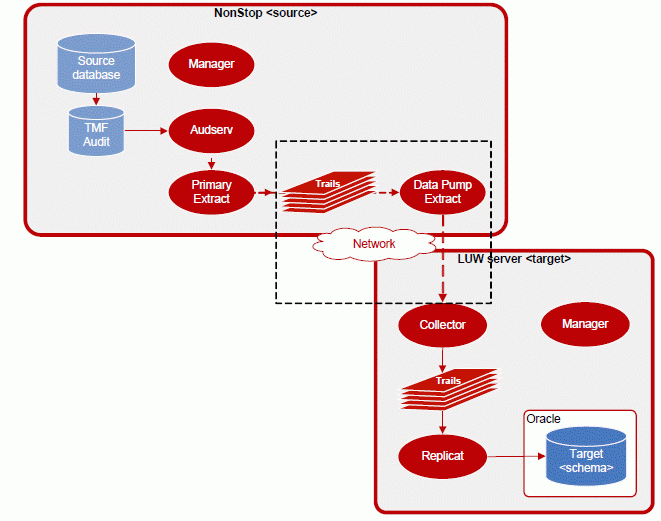
The diagram illustrates a configuration using a primary Extract process creating a local trail. This trail is read by a data pump Extract, which then creates a remote trail on the target. The Replicat process applies the changes from the remote trail to the target database.
In summary, the environment is:
| Host Name | Color | OS | Database | Source/Target |
|---|---|---|---|---|
| host01 | Green | HP | NonStop | Source |
| host02 | Red | Linux / UNIX / Windows | Oracle 11g | Target |
Prerequisites
The source is a SQL/MP database on the HP NonStop and the target is an Oracle 11g database on a Windows or UNIX platform.
Bear in mind that there are two hosts: host01 and host02; and that each host has three environment prompts: OS, GGSCI, and SQL. That makes six different places in which you could be typing! Try to be extra careful about which command you enter in which location. The wrong command in the wrong context is the most common error.
Overview of Tasks
Prepare the Environment
In order to execute this lesson, the GoldenGate application must be installed on both the source and target systems. The installation includes a sample database and scripts to generate initial data as well as subsequent update operations. The source and target tables are created and loaded with initial data. The GoldenGate Manager processes are also started so that other processes may be configured and started.
Initial Data Load
To initially load data between heterogeneous databases, use the GoldenGate application to perform your initial data load while the application remains active. The direct method uses Extract to pull data from the source files and send the data directly to Replicat on the target system.
This lesson uses Extract to create ASCII files that are sent to the target to be loaded by the SQL*Loader utility.

Configure Change Capture (Extract)
For audited tables, the Extract process is configured to capture change data directly from the TMF audit trails and store the changes in a data queue known as a GoldenGate local trail. A data pump Extract reads the local trail sending the data to a remote GoldenGate trail on the target.
Configure Change Delivery (Replicat)
Once the tables have been initially loaded with data and the Extract process is capturing all operations, the Replicat process is configured to deliver the captured operations to the target database.
Typographic Conventions
Text color and font in the directions and in the screens should be interpreted as follows:
File and Process Naming Conventions
File and process naming conventions can be whatever works for you or your company. Here are the sample conventions used in this OBE:
pxxxxhh.ext
where:
1. Prepare your Environment to Configure the GoldenGate Processes
- Configure and start the Manager processes.
- Prepare the source and target sample databases.
- Generate a data definition and copy it to the target system.
Objective
The goals of this exercise are to:
1.1 Prepare the Source NSK Environment
Configure a GLOBALS parameter file on the source.
Execute the following commands on the source system.
| Host01 - HP NonStop |
TACL> VOLUME <install_vol>.<install_subvol> TACL> TEDIT GLOBALS ADD DEFINE =GGS_PREFIX, CLASS MAP, FILE $<prefix> |
A GLOBALS parameter can be used to uniquely identify each GoldenGate instance when multiple environments exist on single NSK node. Use the two-character <prefix> that was defined in the Lab Preparation.
Configure the Manager process on the source system.
Execute the following commands on the source system.
| Host01 - HP NonStop |
TACL> VOLUME <install_vol>.<install_subvol> TACL> RUN GGSCI GGSCI> TEDIT PARAMS MGRPARM -- GoldenGate Manager Parameter file TCPIPPROCESSNAME <tcpip_process> PORT <port> GGSCI> START MANAGER, CPU 1, PRI 180 (Verify the results:) GGSCI> INFO MANAGER |
The Manager process is responsible for starting and monitoring all of the other GoldenGate processes. You will always have one manager process per GoldenGate instance.
Create and load source files.
Execute the following commands on the source system.
| Host01 - HP NonStop |
TACL> SQLCI >> VOLUME <install_vol>.GGSSOU; >> CREATE CATALOG; >> OBEY <install_vol>.<install_subvol>.DEMOSQL; >> OBEY <install_vol>.<install_subvol>.DEMOLDS (INITIAL); (Verify the results:) >> SELECT * FROM TCUSTMER; >> SELECT * FROM TCUSTORD; |
The installation includes scripts to create sample tables and generate initial data.
Note that your <prefix> may need to be substituted for the GG in subvolumes GGSSOU and GGSDEF used in this section.
Generate source definitions.
Execute the following commands on the source system.
| Host01 - HP NonStop |
TACL> VOLUME <install_vol>.<install_subvol> TACL> RUN DEFGEN (Within DEFGEN, the following prompts and replies are issued:) Enter definitions filename (or Exit): <install_vol>.GGSDEF.TCUSTDEF File/Table to create definition for (or Exit): <install_vol>.GGSSOU.TCUSTMER Definition retrieved. File/Table to create definition for (or Exit): <install_vol>.GGSSOU.TCUSTORD Definition retrieved. File/Table to create definition for (or Exit): EXIT |
The DEFGEN utility is an interactive program that generates a source definition file describing the layouts of the files/tables that are to be replicated.
Move the source definitions to the target.
| Host01 - HP NonStop |
[OS prompt] ftp ogg_user@target_host
put filename.def
|
After exiting, FTP the file <install_vol>.GGSDEF.TCUSTDEF in ASCII format to the target <install_location>/dirdef/source.def
Generate target database scripts based on your source layouts.
Execute the following commands on the source system.
| Host01 - HP NonStop |
TACL> VOLUME <install_vol>.<install_subvol> TACL> RUN DDLGEN (This initiates an interactive DDLGEN session with the following prompts and replies: Enter definitions filename (or Exit): <install_vol>.GGSDEF.TCUSTSQL DDL template file name (or Exit): TMPLORA File/Table to create definition for (or Exit): <install_vol>.GGSSOU.TCUSTORD Definition retrieved. File/Table to create definition for (or Exit): <install_vol>.GGSSOU.TCUSTMER Definition retrieved. File/Table to create definition for (or Exit): EXIT |
The DDLGEN utility is an interactive program that generates a script containing table create statements for your target database based on the layouts of your source files/tables.
Move the scripts.
| Host01 - HP NonStop |
[OS prompt] ftp ogg_user@target_host
put filename.sql
|
After exiting, FTP the file <install_vol>.GGSDEF.TCUSTSQL in ASCII format to the target file <install_location>/dirsql/tcust.sql.
This concludes Preparing the Source NSK Environment.
1.2 Prepare your Target Oracle Environment
Configure the Manager process on the target system.
Execute the following commands on the target system.
| Host02 - LUW Oracle 11g |
(Start the command interface:) Shell> cd <install_location> Shell> ./ggsci (Specify the port that the Manager should use:) GGSCI> EDIT PARAMS MGR -- GoldenGate Manager Parameter file PORT <port> (Start Manager:) GGSCI> START MANAGER (Verify the results:) GGSCI> INFO MANAGER |
The Manager should have a STATUS of RUNNING.
Create target Oracle tables.
Execute the following commands on the target system to run the script that creates the tables.
| Host02 - LUW Oracle 11g |
Shell> cd <install_location> Shell> sqlplus <login>/<password> SQL> @./dirsql/tcust.sql (Verify the results:) SQL> describe tcustmer; SQL> desc tcustord; SQL> exit |
The two sample TCUST* tables should exist, but be empty.
This concludes Preparing the Target Oracle Environment.
2. Configure and Execute the Initial Data Load Using SQL*Loader
- Configure and execute the initial Extract to create an ASCII delimited input file.
- Configure and execute the initial Replicat to generate SQL*Loader run and control files.
- Execute SQL*Loader to populate the target tables.
Objective
The goals of this exercise are to:
2.1 Initial Load Capture
Create the initial load parameter file.
Execute the following commands on the source system to configure an Extract named ELOD<unique_id>. *
| Host01 - HP NonStop |
GGSCI> TEDIT PARAMS ELOD<unique_id> -- -- Initial Data Synchronization parameter file -- for TCUSTMER and TCUSTORD -- SOURCEISFILE, FASTUNLOADSHARED FORMATASCII, SQLLOADER RMTHOST <target>, MGRPORT <port>, PARAMS "-d ./dirdef/source.def" RMTFILE ./dirdat/TCUSTMER.dat, PURGE TABLE <install_vol>.GGSSOU.TCUSTMER; RMTFILE ./dirdat/TCUSTORD.dat, PURGE TABLE <install_vol>.GGSSOU.TCUSTORD; GGSCI> EXIT |
* The process names used in lab exercises, for example EINIBD, are made up of
1) One character for the GoldenGate process (E for Extract, R for Replicat);
2) Three or four characters to describe the process type (INI for initial data load, ORA for capture from or delivery to an Oracle database, and so on) and
3) Two characters to create a unique identifier (usually your initials, never numbers).
Execute the initial load capture.
Execute the following commands on the source system.
| Host01 - HP NonStop |
TACL> RUN EXTRACT /IN GGSPARM.ELOD<unique_id>,
 OUT $S.#GG.ELOD<unique_id>/
|
Examine the results to verify it was successful.
This completes the Initial Load Capture.
2.2 Initial Load Delivery
Generate your SQL*Loader run and control scripts.
Execute the following commands on the target system.
| Host02 - LUW Oracle 11g |
Shell> cd /<install_location> Shell> ./ggsci GGSCI> EDIT PARAM GENLOAD GENLOADFILES USERID <login>, PASSWORD <password> SOURCEDEFS ./dirdef/source.def MAP <install_vol>.GGSSOU.TCUSTMER, TARGET <owner/schema>.TCUSTMER; MAP <install_vol>.GGSSOU.TCUSTORD, TARGET <owner/schema>.TCUSTORD; |
Note the semi-colon at the end of each MAP statement.
Execute the delivery to generate the run and control scripts.
Execute the following commands on the target system.
| Host02 - LUW Oracle 11g |
Shell> ./replicat paramfile dirprm/genload.prm
|
You can optionally send the report to a file.
This completes the Initial Load Delivery.
2.3 SQL*Loader
Load the flat files into the target tables using the SQL*Loader utility.
Execute the following commands on the target system.
| Host02 - LUW Oracle 11g |
Shell> TCUSTMER.run Shell> TCUSTORD.run Shell> cd <install_location> Shell> sqlplus <login>/<password> SQL> select * from tcustmer; SQL> select * from tcustord; SQL> exit |
Verify the results with SQL*Plus SELECT statements.
This completes the SQL*Loader.
3. Configure and Start the Change Capture of Database Operations Using Data Pump
- Configure and add the Extract process that will capture changes.
- Add the local trail that will store these changes.
- Configure and add a data pump Extract to read the local trail and create a remote trail on the target.
- Start the two Extract processes.
Objective
The goals of this exercise are to:
3.1 Configure the Primary Extract
Create the Extract parameter file.
Execute the following commands on the source system to define an Extract named ELOD<unique_id> to pull data from the TMF audit trails and route these changes to a GoldenGate instance.
| Host01 - HP NonStop |
GGSCI> EDIT PARAM ESQL<unique_id> -- -- Change Capture parameter file to capture -- TCUSTMER and TCUSTORD Changes -- EXTRACT ESQL<unique_id> EXTTRAIL <install_vol>.GGSDAT.<local_trail> TABLE <install_vol>.GGSSOU.TCUSTMER; TABLE <install_vol>.GGSSOU.TCUSTORD; |
Note: Record the two characters selected for your <local_trail>: ______. You will need this information to set up the data pump Extract that will define and create the remote trail to be read by Replicat.
Add the Extract group.
Execute the following commands on the source system.
| Host01 - HP NonStop |
GGSCI> ADD EXTRACT ESQL<unique_id>, BEGIN NOW, CPU 1, PRI 160 (Verify the results:) GGSCI> INFO EXTRACT ESQL<unique_id> |
The default CPU is the CPU in which the Manager runs.
Define the GoldenGate local trail.
Execute the following commands on the source system to add the trail declared in the ESQL<unique_id> Extract parameters. This will be located on the source system.
| Host01 - HP NonStop |
GGSCI> ADD EXTTRAIL <install_vol>.GGSDAT.<local_trail>,
       EXTRACT ESQL<unique_id>, MEGABYTES 5
|
This completes configuring the primary extract.
3.2 Configure the Data Pump
Create the data pump parameter file.
Execute the following commands on the source system to define a data pump Extract named EPMP<unique_id> to pull data from the local GoldenGate trail and route these changes to the remote GoldenGate on the target.
| Host01 - HP NonStop |
GGSCI> EDIT PARAM EPMP<unique_id> -- -- Data Pump parameter file to read the local -- trail of TCUSTMER and TCUSTORD Changes -- EXTRACT EPMP<unique_id> TCPIPPROCESSNAME <tcpip_process> PASSTHRU RMTHOST <target>, MGRPORT <port> RMTTRAIL ./dirdat/<remote_trail> TABLE <install_vol>.GGSSOU.TCUSTMER; TABLE <install_vol>.GGSSOU.TCUSTORD; |
Note: Record the two characters selected for your <remote_trail>: ______. You will need this information later when you define the remote trail that is read by Replicat.
Add the data pump Extract group.
Execute the following commands on the source system.
| Host01 - HP NonStop |
GGSCI> ADD EXTRACT EPMP<unique_id>, EXTTRAILSOURCE <install_vol>.GGSDAT.<local_trail> (Verify the results:) GGSCI> INFO EXTRACT EPMP<unique_id> |
Define the Oracle GoldenGate remote trail.
Execute the following commands on the source system to add the trail declared in the EPMP<unique_id> Extract parameters. This trail will be located on the target system.
| Host01 - HP NonStop |
GGSCI> ADD RMTTRAIL ./dirdat/<remote_trail>, EXTRACT EPMP<unique_id>,
       MEGABYTES 5
|
This completes configuring the data pump.
3.3 Start the Extract Processes
Start the primary Extract process.
Execute the following commands on the source system.
| Host01 - HP NonStop |
GGSCI> START EXTRACT ESQL<unique_id> (Verify the results:) GGSCI> INFO EXTRACT ESQL<unique_id> GGSCI> VIEW REPORT EXTRACT ESQL<unique_id> |
The process STATUS should be RUNNING.
Start the data pump Extract process.
Execute the following commands on the source system.
| Host01 - HP NonStop |
GGSCI> START EXTRACT EPMP<unique_id> (Verify the results:) GGSCI> INFO EXTRACT EPMP<unique_id> GGSCI> VIEW REPORT EXTRACT EPMP<unique_id> |
This completes starting the Extract processes.
3.4 Discussion Points (Optional)
Using PASSTHRU
What is the function of the PASSTHRU parameter?
Identifying the local extract trail
A data pump moves data between an Extract and a Replicat. How does it know to read the local extract trail instead of a transaction log?
Identifying a remote system
What parameters are used to identify the remote target system?
The advantage of a data pump
What is the advantage of using a data pump when updating a remote system?
4. Configure Change Delivery (Replicat)
- Set up the checkpoint table on the target system.
- Create a named group that includes the Replicat process and the checkpoint tables.
- Configure the Replicat group by adding parameters.
- Start the Replicat group.
Objective
The goals of this exercise are to:
4.1 Set up the Checkpoint Table
Create a GLOBALS file on the target system.
Execute the following commands on the target system.
Create and edit the GLOBALS parameter file to add the checkpoint table:
| Host02 - LUW Oracle 11g |
Shell> cd <install_location> Shell> ./ggsci GGSCI> EDIT PARAMS ./GLOBALS CHECKPOINTTABLE <owner/schema>.ggschkpt |
Record the checkpoint table owner and name, then save and close the file.
Table owner ____________________ name ___________________
Note: You could name the table anything you want, but for training purposes we are using ggschkpt.
Verify that the GLOBALS file was created in the root GoldenGate directory, and remove any file extension that was added.
Activate the GLOBALS parameters.
For the GLOBALS configuration to take effect, you must exit the session in which the changes were made. Execute the following command to exit GGSCI.
| Host02 - LUW Oracle 11g |
GGSCI> EXIT
|
Add a Replicat checkpoint table.
Execute the following commands on the target system.
| Host02 - LUW Oracle 11g |
Shell> cd <install_location> Shell> ./ggsci GGSCI> DBLOGIN USERID <login>, PASSWORD <password> GGSCI> ADD CHECKPOINTTABLE |
This completes setting up the checkpoint table.
4.2 Configure Change Delivery
Add the Replicat group.
Execute the following commands on the target system to add a delivery group named RORA<unique_id>.
| Host02 - LUW Oracle 11g |
GGSCI> ADD REPLICAT RORA<unique_id>, EXTTRAIL ./dirdat/<trail_id>
|
Note: Refer to your Extract set up for the correct two-character <trail_id>, referred to back then as <remote_trail>.
Create Replicat parameter file.
Execute the following commands on the target system to bring up the parameter file in the editor.
| Host02 - LUW Oracle 11g |
GGSCI> EDIT PARAM RORA<unique_id> (Type in the following parameters:) -- -- Change Delivery parameter file to apply -- TCUSTMER and TCUSTORD Changes -- REPLICAT RORA<unique_id> USERID <login>, PASSWORD <password> HANDLECOLLISIONS SOURCEDEFS ./dirdef/source.def DISCARDFILE ./dirrpt/RORA<unique_id>.DSC, PURGE MAP <source_vol>.GGSSOU.TCUSTMER, TARGET <owner/schema>.tcustmer; MAP <source_vol>.GGSSOU.TCUSTORD, TARGET <owner/schema>.tcustord; |
Start the Replicat process.
Execute the following commands on the target system.
| Host02 - LUW Oracle 11g |
GGSCI> START REPLICAT RORA<unique_id> (Verify the results:) GGSCI> INFO REPLICAT RORA<unique_id> |
This completes configuring change delivery (Replicat).
4.3 Discussion Points (Optional)
When to use HANDLECOLLISIONS
For which stage of GoldenGate processing - change capture, initial data load, or change delivery - would you use HANDLECOLLISIONS? What does it do?
What information is supplied by SOURCEDEFS?
What is the purpose of the DISCARDFILE?
5. Generate Activity and Verify Results
- Execute miscellaneous update, insert, and delete operations on the source system.
- Verify the delivery of the changes to the target.
- Turn off the error handling used for the initial load.
Objective
The goals of this exercise are to:
5.1 Generate Database Operations
Execute miscellaneous update, insert, and delete operations.
| Host01 - HP NonStop |
TACL> SQLCI >> VOLUME <install_vol>.GGSSOU; >> O <install_vol>.<install_subvol>.DEMOLDS (UPDATE); |
5.2 Verify Change Capture and Delivery
Verify your results on the source system.
| Host01 - HP NonStop |
>> SELECT * FROM TCUSTMER; >> SELECT * FROM TCUSTORD; >> EXIT; |
Verify your results on the target system to verify the target data.
| Host02 - LUW Oracle 11g |
Shell> cd <install_location> Shell> sqlplus <userid>/<password> SQL> select * from tcustmer; SQL> select * from tcustord; SQL> exit Shell> ./ggsci GGSCI> SEND REPLICAT RORA<unique_id>, REPORT GGSCI> VIEW REPORT RORA<unique_id> |
5.3 Turn Off Error Handling
Turn off initial load error handling for the running delivery process.
| Host02 - LUW Oracle 11g |
GGSCI> SEND REPLICAT RORA<unique_id>, NOHANDLECOLLISIONS
|
Remove initial load error handling from the parameter file.
| Host02 - LUW Oracle 11g |
GGSCI> EDIT PARAMS RORA<unique_id>
|
Remove the HANDLECOLLISIONS parameter.
This completes the turning off of error handling.
This completes the generation of activity.
Summary
- Configure and start Extract and Replicat processes for Initial Load of tables
- Generate sample data and test the validity of the replication
- Manage the reports produced by the processes
- Oracle GoldenGate Product Documentation version 11.2.1 (E35209-01) and other older versions
- Courses from Oracle University
- External Web sites for related information
- To learn more about Oracle GoldenGate, refer to additional OBEs in the Oracle Learning Library
- The original PDF of this OBE locally. The HTML-based version supercedes the PDF-based version. You can see the original listed by going here, you can view the original online here.
- Lead Curriculum Developer: Steve Friedberg.
- Other Contributors: Doug Reid, Chris Lawless.
Oracle GoldenGate can do far more than was demonstrated in this simple exercise.
In this tutorial, you have learned how to:
Resources
Help topics relevant to the topic of this tutorial:
Credits
To help navigate this Oracle by Example, note the following:
- Hiding Header Buttons:
- Click the Title to hide the buttons in the header. To show the buttons again, simply click the Title again.
- Topic List Button:
- A list of all the topics. Click one of the topics to navigate to that section.
- Expand/Collapse All Topics:
- To show/hide all the detail for all the sections. By default, all topics are collapsed.
- Show/Hide All Images:
- To show/hide all the screenshots. By default, all images are displayed.
- Print:
- To print the content. The content currently displayed or hidden will be printed.
To navigate to a particular section in this tutorial, select the topic from the list.