Oracle SOA Suite 12c: REST-Enabling SOA with Oracle Service Bus
Overview
Purpose
This tutorial shows you how to REST-enable an existing Simple Object Access Protocol (SOAP) service by using Oracle Service Bus.
Time to Complete
Approximately 30 minutes
Introduction
Most existing web applications are connected through web services, which are commonly known as SOAP services. More and more users are relying on mobile devices for communication, and they’re looking for lighter ways to access enterprise information on the go. REST services are the answer for the mobile device platform, because they get rapid responses and fast access to data.
Oracle Service Bus provides a virtualization layer to support REST, which means that only proxy and business services are REST-based. These REST services invoke, or are invoked by, a Web Service Description Language (WSDL) pipeline or a split-join. REST proxy services convert the REST native payload to SOAP before invoking a pipeline or split-join, while REST business services invoked by a pipeline or a split-join convert the payload from SOAP to REST. The internal interface is based on WSDL, whereas the external business and proxy services expose REST endpoints.
In this tutorial, you REST-enable a service by using an application that validates credit cards. The application validates the requested authorization amount for the credit card number, and it returns the response in XML or JavaScript Object Notation (JSON) format, the common data formats for mobile devices.
Hardware and Software Requirements
A Windows, Mac OS X, or Linux machine that meets the system requirements for Oracle SOA Suite 12c
Note: This tutorial was created with Windows 7. If you use another operating system, the paths may be different.
Prerequisites
Before starting this tutorial, you should have:
- Installed Oracle SOA Suite 12c. See Installing Oracle SOA Suite Quick Start for Developers.
- Imported the Oracle SOA Suite sample applications into your JDeveloper IDE. See Running a Sample Application.
Opening and Deploying a Composite Application
In this section, you open and deploy a composite application to Integrated WebLogic Server.
-
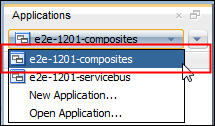
Open Oracle JDeveloper 12c, click the Applications tab, and select e2e-1201-composites.
-
On the Applications tab, right-click ValidatePayment, select Deploy, and then select ValidatePayment.

-
On the Deploy ValidatePayment page, enter, select, or verify the following values on the specified pages, click Next on each page, and then click Finish on the Summary page after you review your selections:
- Deployment Action page: Select Deploy to Application Server.
- Deploy Configuration page: Enter or
verify
1.0for the New revision ID field, and select Overwrite any existing composites with the same revision ID. - Select Server page: Select IntegratedWebLogicServer.
- SOA Servers page: Verify that the default server is running and selected.
The Summary page should look like the following:

-
On the Deployment - Log tab, verify that the deployment was finished.

Opening the Service Bus Sample Application
-
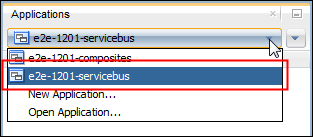
In Oracle JDeveloper 12c, click the Applications tab, and select e2e-1201-servicebus.
-
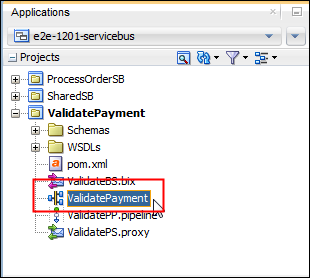
Expand Projects and ValidatePayment, and then double-click ValidatePayment.
Running an Existing SOAP Service
In this section, you test the existing SOAP service.
-
In the Proxy Services swimlane, right-click ValidatePS, and select Run.

JDeveloper deploys the project to Integrated WebLogic Server. The deployment takes awhile if the server isn't running.
-
On the Running: IntegratedWebLogicServer - Log tab, verify that the application is running.

-
On the Oracle Service Bus Console tab, enter the following values for the payload request, remove the other fields, and then click Execute:
- CardNum =
1234123412341234 - ExpireDate =
0316 - AuthorizationAmount =
100

- CardNum =
-
Verify that the response displays the status.

The Response Document body displays the status of the request in Extensible Markup Language (XML) format. The status can be Authorized or Denied, and it's based on the requested authorization amount.
Exposing a SOAP Service as a REST Service
In this section, you expose the existing SOAP service as a REST service.
-
In the Pipelines/Split-Joins swimlane, right-click ValidatePP, and select Expose As REST.
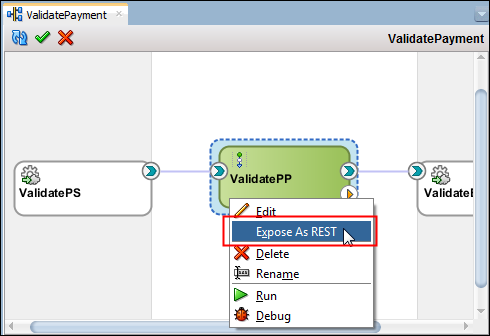
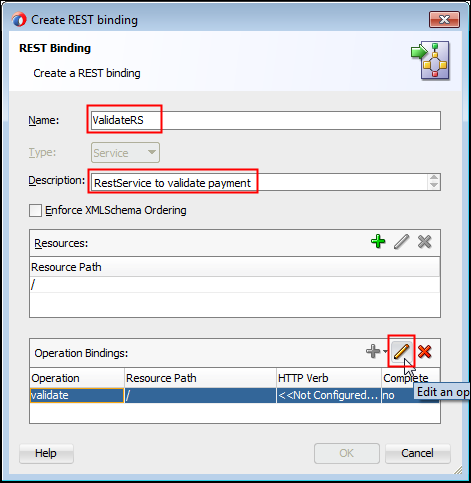
The Create REST binding wizard is displayed.
-
On the Create REST binding page, enter the following values for the REST service, and then click Edit an operation in the Operation Bindings pane:
- Name:
ValidateRS - Description
RestService to
                      validate payment
- Name:
-
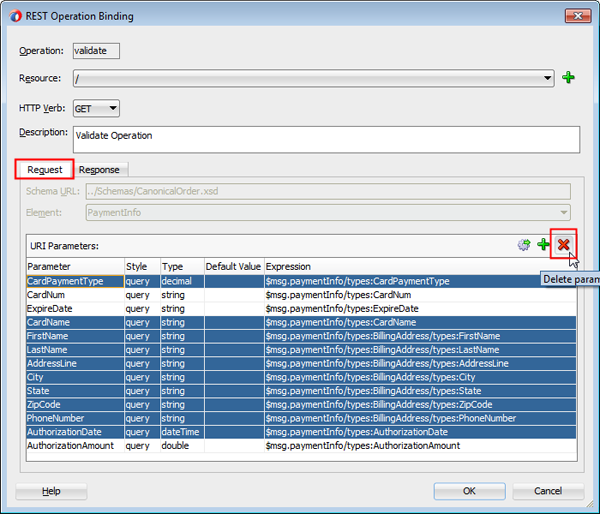
On the REST Operation binding page, select the GET HTTP verb, and enter
Validate
                    Operation for
                      the
description.
-
On the Request tab, select all fields except CardNum, ExpireDate, and AuthorizationAmount, and then click Delete parameter.
-
Select the CardNum parameter and rename it
CardNumber.
-
Click the Response tab, deselect XML, select JSON for Payload, and click OK.

-
Verify your work and click OK.

Running a REST Service
In this section, you test the REST service.
-
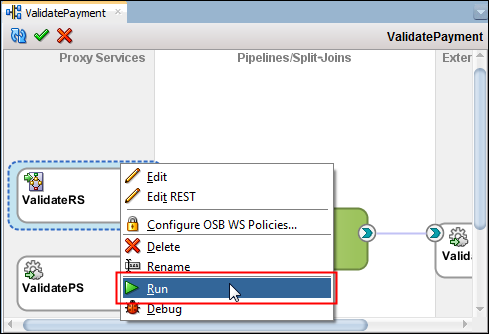
In the Proxy Services swimlane, right-click ValidateRS, and select Run.
JDeveloper deploys the project to Integrated WebLogic Server. The deployment takes awhile if the server isn't running.
-
On the Oracle Service Bus Console tab, enter or select the following values for the Request Document, and then click Execute:
- Accept: application/json
- CardNum:
1234123412341234 - ExpireDate:
0316 - AuthorizationAmount:
999.0

-
Verify that the Response Document shows the status as Authorized.

-
Enter or select the following values for the Request Document, and then click Execute:
- Accept: application/json
- CardNum:
1234123412341234 - ExpireDate:
0316 - AuthorizationAmount:
1000

-
Verify that the Response Document shows the status as Denied.

The Response Document body displays the status of the request in JSON format. The status can be Authorized or Denied, and it's based on the requested authorization amount.
Summary
Oracle Service Bus enables you to reuse the SOAP services that are in use today, and expose them as REST services to support mobile devices.
When you use REST-enabling in Oracle Service Bus, you can set the response format as XML and JSON, so that the mobile devices can consume data as needed.
In this tutorial, you learned to:
- Test and execute a SOAP service by using the Oracle Service Bus Console
- Expose a SOAP service as a REST service
- Test and execute a REST service by using the Oracle Service Bus Console
Resources
- Installing Oracle SOA Suite Quick Start for Developers
- Oracle SOA Suite sample applications
- Running a Sample Application
- REST-enabling SOA video
- To learn more about Oracle Service Bus, refer to additional OBEs in the Oracle Learning Library.
Credits
- Lead Curriculum Developer: Armando Hernandez
- Other Contributors: Ronald Pinkerton, Mary Peek
To navigate this Oracle by Example tutorial, note the following:
- Topic List:
- Click a topic to navigate to that section.
- Expand All Topics:
- Click the button to show or hide the details for the sections. By default, all topics are collapsed.
- Hide All Images:
- Click the button to show or hide the screenshots. By default, all images are displayed.
- Print:
- Click the button to print the content. The content that is currently displayed or hidden is printed.
To navigate to a particular section in this tutorial, select the topic from the list.