Creating and Using a Contexts and Dependency Injection (CDI)
Stereotype
Overview
- JDK 7
- NetBeans 7.2 Java EE version IDE
- GlassFish 3.1.2
- Have downloaded and installed JDK7 from this link
- Have downloaded and installed NetBeans 7.2 Java EE version from this link
- Have installed GlassFish server that was part of the
NetBeans installation
- Have started NetBeans IDE in your system.
- Have prior programming knowledge of JSF and CDI
- Have downloaded and unzipped the
CustomerApp.zipfile. - Have opened the
CustomerAppproject in NetBeans.
Purpose
This tutorial covers the steps to create a Contexts and
Dependency Injection (CDI) stereotype and use it in a CDI
enabled application.
Time to Complete
Approximately 30 minutes.
Introduction
CDI is one of several Java EE 6 features that help to integrate the web tier and the enterprise tier of the Java EE platform. CDI is a set of services that, used together, make it easy for developers to use enterprise beans along with JavaServer Faces technology in web applications. CDI also has many broader uses, allowing developers a great deal of flexibility to integrate various kinds of components in a loosely coupled but typesafe way.
A CDI stereotype allows you to create a annotation that club
together several CDI annotations. For example, if we
needed to create several CDI named beans with a scope of
session, we would have to use two annotations in each of these
beans,
namely @Named and @SessionScoped.
Instead of providing two annotations to each of the beans, you
would create a stereotype, and then annotate the beans with it.
Stereotypes can be particularly useful in large applications where you have a number of beans that perform similar functions.
Scenario
In this tutorial, you will work with a simple CustomerApp
web application that uses JSF technology and CDI named beans.
The application provides screen for entering information for
different types of customers. You will create and use a CDI
stereotype to incorporate a couple of annotations. You will then
apply the stereotype in all the beans instead of specifying the
annotations in all the beans.
Hardware and Software Requirements (Optional)
The following is a list of hardware and software requirements:
Prerequisites
Before starting this tutorial, you should:
Explore, Deploy and Run the CustomerApp
Project in NetBeans
To examine the relevant files of the CustomerApp
project, perform the following steps:
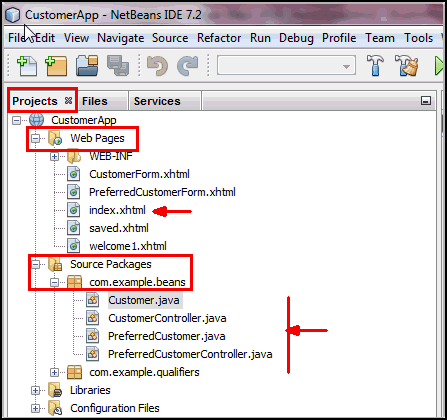
In the NetBeans Projects tab, expand the
CustomerApp project.
Expand the Web Pages node and the Source
Packages > com.example.beans
node.
Under the Web Pages node, you will see
all the JSF pages including the home page, index.xhtml.
Under the Source Packages > com.example.beans
node, you will see the CDI named
beans.
Build the CustomerApp project. Deploy it in
GlassFish and run it.
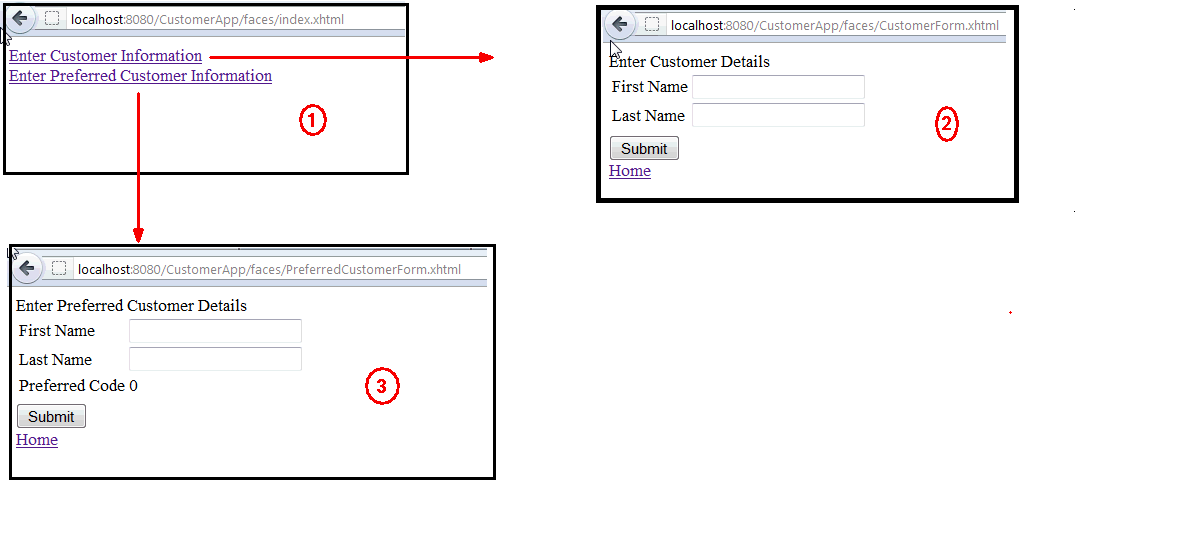
Examine the output in the web browser window.
In the following screenshot, the home page is indicated by the label 1. If you click the first link, you will get a Customer Details form as displayed by the label 2.
If you click the second link in the home page, you will get a Preferred Customer Details form as displayed by the label 3.
You can continue to enter data in the two forms one by one
and click the Submit button to view the saved results.
In the Projects window, go to the Source Packages
>com.example.beans node and click
the four java files to open them in the code editor window.
The four java files are Customer.java, CustomerController.java,
PreferredCustomer.java and PreferredCustomerController.java.
Examine the four files and verify that all the four files
have @Named and @RequestScoped
annotations in them.
Examine CustomerController.java and PreferredCustomerController.java
and verify that both the files have a custom
interceptor binding @Logged besides
the @Named and @RequestScoped
annotations.

Note: The
@Logged custom interceptor binding
type is present at com.example.interceptors
package. Refer to the Creating
and Using Contexts and Dependency Injection (CDI)
Interceptors OBE for the steps to create a interceptor
binding type. Create a Stereotype in CustomerApp
In this step, you will create a Stereotype
that will contain the @RequestScoped, @Named
and @Logged annotations. @Logged is
an interceptor binding type. Complete the following steps:
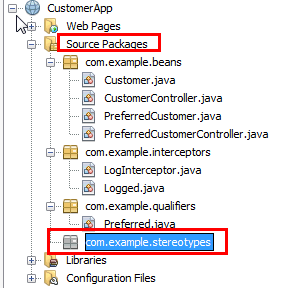
In the Projects window, expand CustomerApop >Source Packages. Right click Source Packages and select New > Java Package.
In the New Java Package Dialog box, enter
the Package Name as com.example.stereotypes
and click Finish.
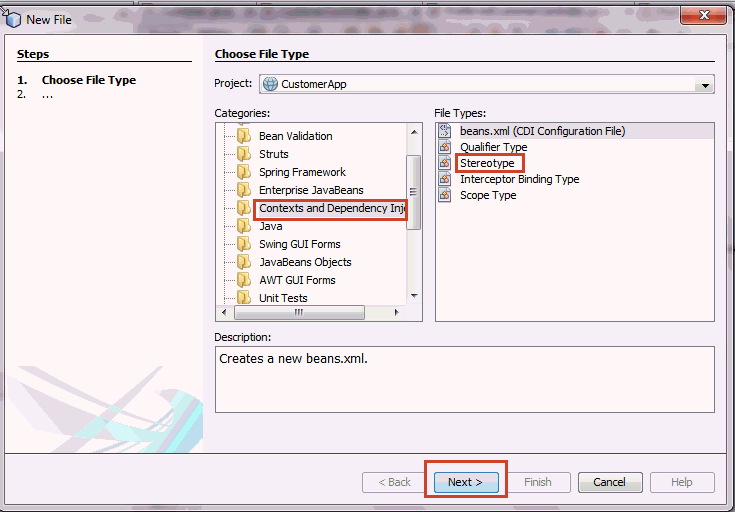
In the Projects window, right click CustomerApp and select New > Other.
In the New File dialog box, select Contexts and Dependency Injection in the Categories section and Stereotype in the File Types section.
Click Next.
In the New Stereotype dialog box, enter
the Class Name as NamedRequestLogged.
Select com.example.stereotypes as the Package.
Click Finish.
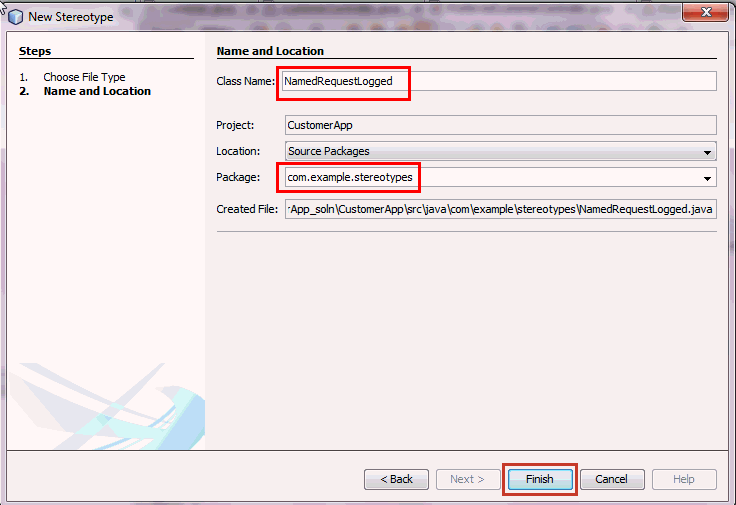
NamedRequestLogged.java opens in the code
editor window. make the following changes in the newly
created stereotype.
Add the @RequestScoped, @Named
and @Logged annotations to the stereotype
declaration.
Modify the @Target value to TYPE.
Add the appropriate import statements and save the file.
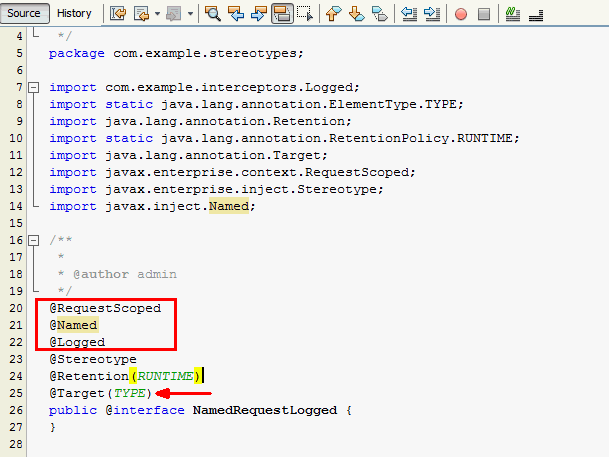
Note:
@Retention indicates how long
annotations with the annotated type are to be retained.
Annotations are to be recorded in the class file by the compiler
and retained by the VM at run time, so they may be read
reflectively.@Target Indicates the kinds of program element to
which an annotation type is applicable. In this example, TYPE
indicates that it is applicable to a class, interface or enum
declarations.Use Stereotypes in CustomerApp
In this step, you will use the NamedRequestLogged
stereotype that you have created in the previous step. Complete
the following steps:
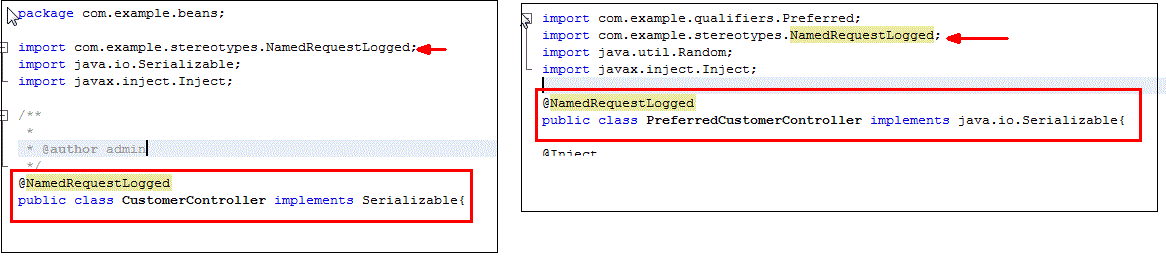
Open the CustomerController.java file in the
code editor window.
Replace the three annotations, namely @Named,
@RequestScoped and @Logged by a
single stereotype @NamedRequestLogged.
Remove the unused imports and add the required import
statement.
Repeat the previous three steps for the PreferredCustomerController.java
file.
Save and close both the files.
Note: Using the @Named in a stereotype
guarantees that a default EL naming of the beans will be
used.
CDI makes available a built-in stereotype
called Model, which can be used with beans that
define the model layer of a model-view-controller
application architecture. This stereotype specifies that a
bean is both @Named and @RequestScoped.
Both Customer.java and PreferredCustomer.java
can use the @Model stereotype.
Open the Customer.java file in the code
editor window.
Replace the two annotations, namely @Named, @RequestScoped
by a single built-in stereotype @Model.
Remove the unused imports and add the required import
statement.
Repeat the previous three steps for the PreferredCustomer.java
file.
Save and close both the files.

Deploy and Test the CustomerApp Application
To deploy and test the CustomerApp application,
complete the following steps:
Build the CustomerApp project. Deploy it in
GlassFish and run it.
Examine the output in the web browser window.
Click Enter Customer Information link at
the home page of CustomerApp application.
Enter First Name and Last Name
in the Customer Details form and click Submit.
You will get a page displaying a message 'New Customer
saved successfully' along with the values of the First Name
and Last Name that you had entered in the previous form.
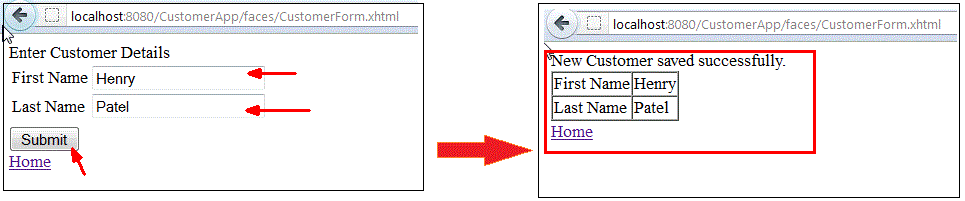
Click the Home link to o to the home page. Click the Enter Preferred Customer Information link in the home page.
Enter First Name and Last Name in the Preferred Customer Details form and click the Submit button.
You will get a page displaying a message 'New Preferred
Customer created successfully' along with the values of the
First Name and Last Name that you had entered in the
previous form. You will also see the value of a Preferred
Code generated and displayed in the form.
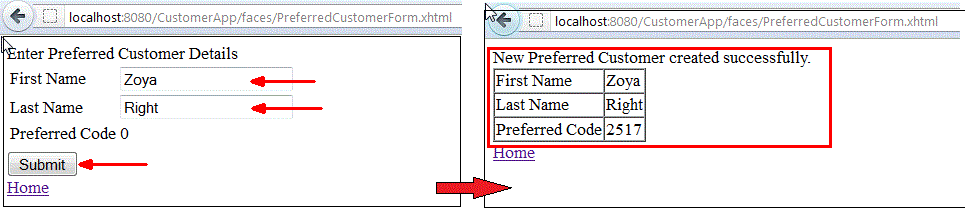
CustomerApp runs successfully after you
have used CDI stereotypes in managed beansSummary
- Create a CDI Stereotype in a JSF application
- Add a interceptor binding to stereotype
- Use the stereotype in a managed bean
- Use a built-in CDI stereotype in a managed bean
- Using
Stereotypes in CDI Applications: Java EE 6 tutorial
- JSR
299 - Contexts and Dependency Injection for the Java EE
platform
- WELD
- JSR-299 Reference Implementation
- To learn more about CDI refer to additional OBEs in the Oracle Learning Library :
- Lead Curriculum Developer: Paromita Dutta
- Reviewers: Tom McGinn, Anjana Shenoy
- QA: Anjulaponni Azhagulekshm
In this tutorial, you have learned how to:
Resources
Credits
To help navigate this Oracle by Example, note the following:
- Hiding Header Buttons:
- Click the Title to hide the buttons in the header. To show the buttons again, simply click the Title again.
- Topic List Button:
- A list of all the topics. Click one of the topics to navigate to that section.
- Expand/Collapse All Topics:
- To show/hide all the detail for all the sections. By default, all topics are collapsed
- Show/Hide All Images:
- To show/hide all the screenshots. By default, all images are displayed.
- Print:
- To print the content. The content currently displayed or hidden will be printed.
To navigate to a particular section in this tutorial, select the topic from the list.