Java SE 8: Using Threads in an HTTP Link Checker
Overview
Purpose
This tutorial shows you how to use Java Platform, Standard Edition 8 (Java SE 8) and NetBeans 8 to create a link checker with the Thread class.
Time to Complete
Approximately 90 minutes
Introduction
HTTP is the foundation for communication of data on the web. The proliferation of network-enabled applications has increased the use of the HTTP protocol beyond user-driven web browsers.- The Thread class is directly associated with an instance of the Thread class. There are two basic strategies for using Thread objects to create a concurrent application. To directly control thread creation and management, simply instantiate Thread each time the application initiates an asynchronous task. To abstract thread management from the rest of your application, pass the application's tasks to an executor.
- The URL class is a pointer to a resource on the web. A resource can be something as simple as a file or a directory, or it can be a reference to a more complicated object, such as a query to a database or to a search engine.
- The HttpURLConnection class helps establish an HTTP connection between the HTTPClient and server.
For small applications, you add a thread defined by its Runnable interface or by the thread itself, as defined by a Thread object. For large applications, you separate thread management and creation from the rest of the application. Objects that encapsulate these functions are known as executors.
- Executor is a simple interface that supports launching new tasks.
- ExecutorService, a subinterface of Executor, adds features that help manage the life cycle both of the individual tasks and of the executor itself.
Scenario
A testing team wants to verify and validate a given set of URLs.
Hardware and Software Requirements
- Install the Java SE 8 JDK.
- Install NetBeans 8.0.
- Extract the Url_file.zipfile.
Creating a Java Application
In this section, you create a Java application that you will use to demonstrate the HTTP link checker application by using concurrency.
-
In NetBeans IDE 8.0, select New Project from the File menu.
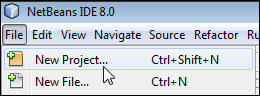
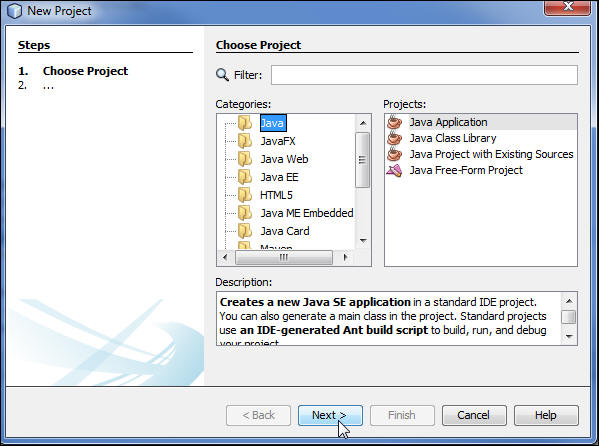
- On the Choose Project page, perform the following steps:
- Select Java from Categories.
- Select Java Application from Projects.
- Click Next.
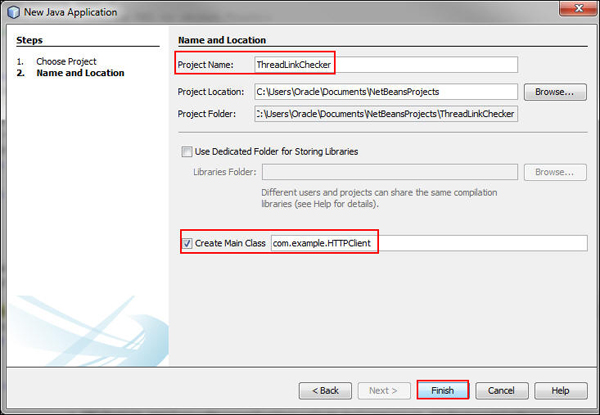
- On the Name and Location page, perform the following steps:
- Enter ThreadLinkChecker as the project name.
- Enter com.example.HTTPClient.
- Click Finish.
The Java SE 8 ThreadLinkChecker project is created in NetBeans. You're now ready to use the HTTPClient.java file to implement the link checker application.
Creating a Java enum Data Type
In this section, you create an enum data type to store the HTTP response code. An enum data type is a special data type that includes a set of predefined constants for a variable. The variable must be equal to a predefined value. You declare the HTTP response code and validate the URLs against them.
In this section, you use URLStatus, which has values like HTTP_OK(200, "OK", "SUCCESS"), NO_CONTENT(204, "No Content", "SUCCESS"), and INTERNAL_SERVER_ERROR(500, "Internal Server Error", "ERROR").
-
Create URLStatus.java and initialize it by using a constructor.
-
Retrieve the HTTP status message.
public static String getStatusMessageForStatusCode(int httpcode) {
String returnStatusMessage = "Status Not Defined";
for (URLStatus object : URLStatus.values()) {
if (object.statusCode == httpcode) {
returnStatusMessage = object.httpMessage;
}
}
return returnStatusMessage;
}
The getStatusMessageForStatusCode()method receives httpcode as the input parameter. The httpcode parameter is verified across all defined enum values. For
httpcode,if an enum is defined, then the HTTP message for that code is returned; otherwise,"Status Not Defined" isreturned. -
Retrieve the result of the URL.
public static String getResultForStatusCode(int code) {
String returnResultMessage = "Result Not Defined";
for (URLStatus object : URLStatus.values()) {
if (object.statusCode == code) {
returnResultMessage = object.result;
}
}
return returnResultMessage;
}
}
The getResultForStatusCode() method receives
codeas the input parameter. Thecodeparameter is verified across all defined enum values. Forcode,if an enum is defined, then the result for that code is returned; otherwise,"Result Not Defined"is returned. -
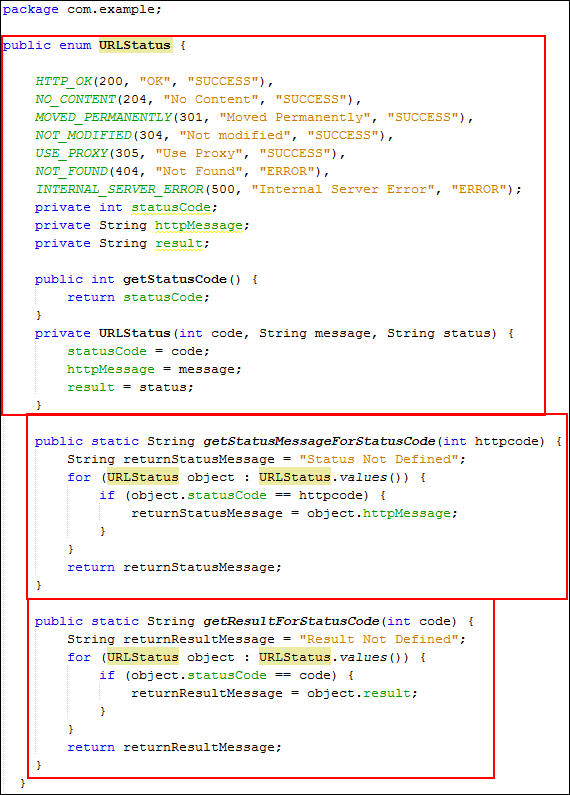
Review the code. Your code should look like the following:
  public enum URLStatus {


                      HTTP_OK(200, "OK", "SUCCESS"),
                  NO_CONTENT(204, "No Content", "SUCCESS"),

                      MOVED_PERMANENTLY(301, "Moved Permanently",
                  "SUCCESS"), NOT_MODIFIED(304, "Not modified", "SUCCESS"),

                      USE_PROXY(305, "Use Proxy", "SUCCESS"),
                  INTERNAL_SERVER_ERROR(500, "Internal Server Error", "ERROR"),

                      NOT_FOUND(404, "Not Found", "ERROR");


                      private int statusCode;

                      private String httpMessage;

                      private String result;

                      public int getStatusCode() {

                          return statusCode;

                      }

                      private URLStatus(int code, String message,
                  String status) {

                          statusCode = code;

                          httpMessage = message;

                          result = status;

                      }
You defined the set of HTTP response code values as constants inside the URLStatus enum type. You initialized the declared enum values by using the constructor.
Note: Here is an explanation of some of the HTTP response codes:
- 200, OK: The client request was received, understood, and processed successfully.
- 301, Moved Permanently: The location was moved, and you're directed to the new location.
- 500, Internal Server Error: An error occurred during execution.
Creating a Singleton Class
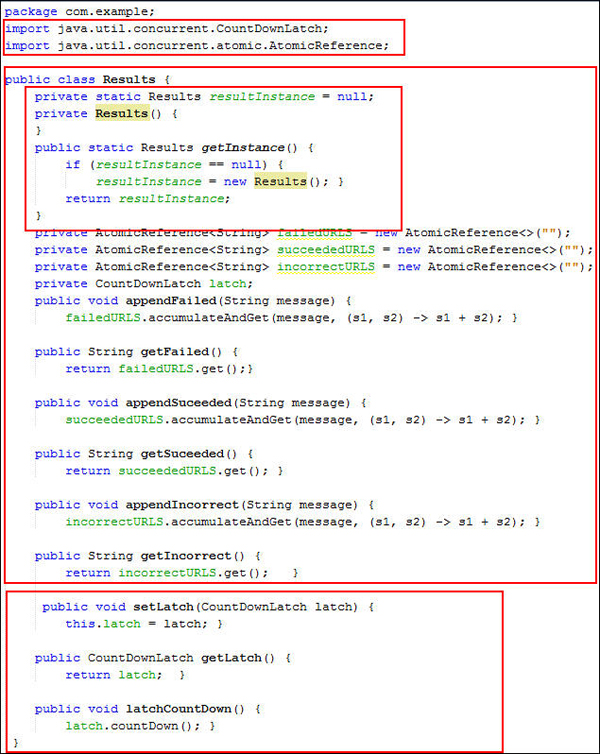
In this section, you create a Java class named Results.java that holds status messages for successful, failed, and incorrect URLs. Here, you create Results.java as a Singleton class to ensure that only a single instance of the class is created. In this application, you use a single instance of Results.java across the threads. In Results.java, you create an object reference for the typed AtomicReference variables that will be updated atomically, depending on the status of the URLs. You also initialize a CountDownLatch class named latch to allow one or more threads to wait for completion of a set of operations being performed in other threads.
You use the AtomicReference and CountDownLatch classes to retrieve the status message of the URL, append the message, and create the setter and getter method for the typed atomic reference objects.
-
Create Results.java and import the following packages:
-
Create typed AtomicReference objects.
-
Initialize the CountDownLatch variable.
private CountDownLatch latch;
public void setLatch(CountDownLatch latch){
Results.latch = latch; }
public CountDownLatch getLatch(){
return latch; }
public void latchCountDown(){
Results.latch.countDown(); }
A CountDownLatch is initialized with the value equal to the number of URLs in the url-list.txt file. Because the countDown() method was invoked, the await() method is blocked until the current count reaches zero. Then, all waiting threads are released, and subsequent invocations of await are returned immediately. The CountDownLatch doesn't require that threads calling countDown wait for the count to reach zero before proceeding. It simply prevents threads from proceeding past an await until all threads are executed.
Note: You can also use the sleep() or wait() method in main() to wait until the threads have validated the URLs. However, you must set a timeout value to wait for all threads to be executed. If a thread is still executing after the timeout, the main thread takes over, the executing thread continues its execution, and main()returns incomplete results.
-
Review the code. Your code should look like the following:
import
                  java.util.concurrent.CountDownLatch;

                  import java.util.concurrent.atomic.AtomicReference;
public class Results {

                      private static Results resultInstance =
                  null;

                      private Results() {  }


                      public static Results getInstance() {

                        if (resultInstance == null) {

                          resultInstance = new
                  Results(); }

                        return resultInstance;

                      }

                      private AtomicReference<String>
                  failedURLS = new AtomicReference<>("");

                      private AtomicReference<String>
                  succeededURLS = new AtomicReference<>("");

                      private AtomicReference<String>
                  incorrectURLS = new AtomicReference<>("");


                      public void appendFailed(String message) {

                      failedURLS.accumulateAndGet(message, (s1,
                  s2) -> s1 + s2); }


                      public String getFailed() {

                      return failedURLS.get(); }

                      public void appendSuceeded(String message)
                  {

                      succeededURLS.accumulateAndGet(message,
                  (s1, s2) -> s1 + s2);  }

                      public String getSuceeded() {

                      return succeededURLS.get(); }


                      public void appendIncorrect(String message)
                  {

                      incorrectURLS.accumulateAndGet(message,
                  (s1, s2) -> s1 + s2); }


                      public String getIncorrect() {

                      return incorrectURLS.get();  }

                  }
In the Singleton class, the static method, getInstance() static method returns the single instance of the class. You use Java generics to create a typed AtomicReference object. The get()method retrieves the status of each URL in the url-list.txt file. The accumulateAndGet() method automatically updates the current value with the results of applying the given function to the current and given values, returning the updated value.
Verifying and Validating URLs
In this section, you verify and validate the URLs that are available in the url-list.txt file. You verify the URL for its correct format by using the verifyUrl method, and then validate the verified URLs by using the validateUrl method to check for broken URLs. Add the url-list.txt file to the source package.
Verifying the URLs
In this section, you use the Java SE 8 regular expression to validate the correctness of the URL format. The HTTPClient.java file has a verifyUrl method, which accepts the URL as the input parameter.
- Import the following packages:
-
Implement the Runnable interface in the HTTPClient.java file.
public class HTTPClient implements Runnable{The Runnable interface is implemented by HTTPClient.java, whose instance is executed by a thread. The class defines a method of no arguments called run.
-
Add the following method to the HTTPClient.java file to verify the URL format:
-
Review the code. Your code should look like the following:

 import
                      java.net.HttpURLConnection;

                      import java.net.URL;

                      import java.util.logging.Level;

                      import java.util.logging.Logger;

                      import java.util.regex.Matcher;

                      import java.util.regex.Pattern;
    private boolean
                      verifyUrl(String url) {

                              String urlRegex =
"^(http|https)://[-a-zA-Z0-9+&@#/%?=~_|,!:.;]*[-a-zA-Z0-9+@#/%=&_|]";
Pattern pattern =
Pattern.compile(urlRegex);
Matcher m =
pattern.matcher(url);
return m.matches();
}
The verifyUrl
method verifies the url parameter passed as
the input parameter by matching it with the regular
expression. If the match is successful, then it returns true;
otherwise, it returns false.
Validating the URLs
In this section, you validate the URLs listed in the url-list.txt file.
-
Modify HTTPClient.java and initialize it by using a constructor.
private final String
                        urlToBevalidated;


                        public HTTPClient(String url) {

                        this.urlToBevalidated = url;

} -
Invoke the verifyUrl method in the validateUrl() method.
public void
                        validateUrl(String url) throws Exception {

                            if (verifyUrl(url)) {

                                try {
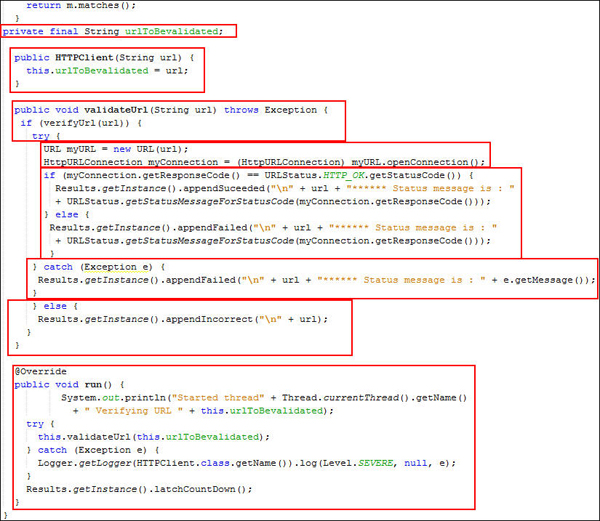
The validateUrl method receives the URL as an input parameter. In the if condition, you verify the URL by passing url as an input parameter to the
verifyUrlmethod. TheverifyUrlmethod returns true for a valid URL format; otherwise, it returns false. If theverifyUrlmethod returns true, then the if condition is true, and the code is executed in thetryblock.
-
Create the HttpURLConnection connection.
-
Validate the URL with the response code.
if (myConnection.getResponseCode() == URLStatus.HTTP_OK.getStatusCode()) {
Results.getInstance().appendSuceeded("\n" + url + "****** Status message is : "
+ URLStatus.getStatusMessageForStatusCode(myConnection.getResponseCode()));
} else {
Results.getInstance().appendFailed("\n" + url + "****** Status message is : "
+ URLStatus.getStatusMessageForStatusCode(myConnection.getResponseCode()));
}
The myConnection instance receives the URL's response code and verifies the status. If the status code is 200 (HTTP_OK), then the URL is classified as succeededURLS; otherwise, it's classified as
failedURLS. -
Close try with the catch block.
} catch (Exception e) {
Results.getInstance().appendFailed("\n" + url + "****** Status message is : " + e.getMessage());
}The catch block is executed when an exception is thrown while
HttpURLConnectionis created or opened. - Verify the incorrect URLs.
}else {
Results.getInstance().appendIncorrect("\n" + url);
}
}
The else block is executed when the
verifyUrlmethod returns false because the URL validation failed. -
Implement the run()method.
@Override
public void run() {
System.out.println("Started thread " + Thread.currentThread().getName() + " Verifying URL " + this.urlToBevalidated);
try {
this.validateUrl(this.urlToBevalidated);
} catch (Exception e) {
Logger.getLogger(HTTPClient.class.getName()).log(Level.SEVERE, null, e);
}
Results.getInstance().latchCountDown();
}
}
The executor.execute method calls the run()method defined in HTTPClient.java.
-
Review the code. Your code should look like the following:
URL myURL = new URL(url);

                      HttpURLConnection myConnection = (HttpURLConnection)
                      myURL.openConnection();
Next, you create a myURL instance and open the connection with the HttpURLConnection class.
Deploying and Running the Application
In this section, you execute the application with the main() method in HTTPClientTest.java.
Creating the main()
Class
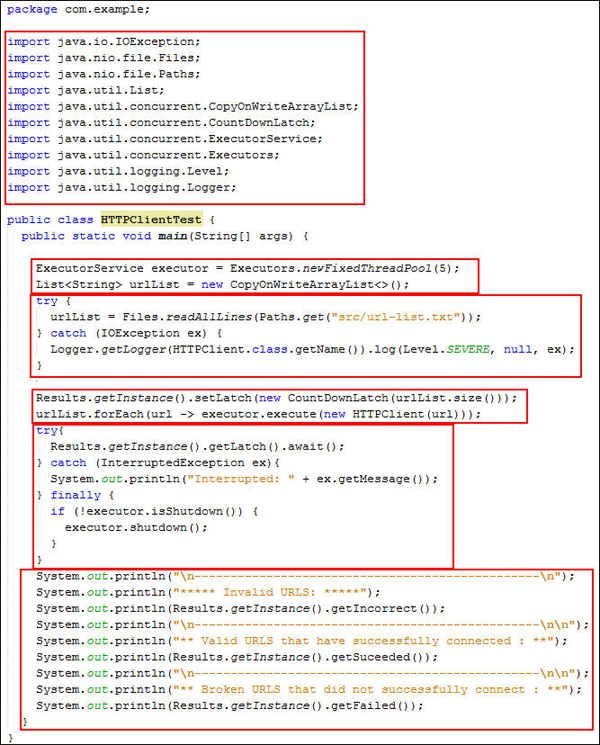
In this section, you create a Java class named HTTPClientTest.java, which includes the main() method where the execution starts.
-
Create HTTPClientTest.java and import the following packages:
-
Add the following code to the main()method:
public class HTTPClientTest {
public static void main(String[] args) {
ExecutorService executor = Executors.newFixedThreadPool(5);
List<String> urlList = new CopyOnWriteArrayList<>();
try {
urlList = Files.readAllLines(Paths.get("src/url-list.txt"));
} catch (IOException ex) {
Logger.getLogger(HTTPClient.class.getName()).log(Level.SEVERE, null, ex);
}
Results.getInstance().setLatch(new CountDownLatch(urlList.size()));
urlList.forEach(url -> executor.execute(new HTTPClient(url)));
try{
Results.getInstance().getLatch().await();
} catch (InterruptedException ex){
System.out.println("Interrupted: " + ex.getMessage());
} finally {
if (!executor.isShutdown()) {
executor.shutdown();
}
}
System.out.println("\n------------------------------------------------\n");
System.out.println("***** Invalid URLS: *****");
System.out.println(Results.getInstance().getIncorrect());
System.out.println("\n------------------------------------------------\n\n");
System.out.println("** Valid URLS that have successfully connected : **");
System.out.println(Results.getInstance().getSuceeded());
System.out.println("\n------------------------------------------------\n\n");
System.out.println("** Broken URLS that did not successfully connect : **");
System.out.println(Results.getInstance().getFailed());
}
}In the main()method, ExecutorService uses the executor instance through which threads in the thread pool execute the URL validation. The Executors class creates a thread pool with five threads.
The CopyOnWriteArrayList()method creates an empty list and copies the URLs stored in the file. The CountDownLatch()method retrieves the size of the urlList and sets that value to the latch variable.
In this application, you create a urlList collection of type string where you store the URLs in url-list.txt. You launch a thread for each URL through the For-Each with lambda expression:
urlList.forEach(url -> executor.execute(new HTTPClient(url)));
A new thread is spawned and validates each URL. If the number of URLs is more than the number of threads in the thread pool, then executor waits until a thread is available to validate the next URL.
The lambda expression uses the Consumer functional interface. This interface has the abstract accept(T t) method, which accepts an object and doesn't return anything.
Alternatively, you could replace the original lambda expression with one assigned to a variable, as follows, and also import the import java.util.function.Consumer; package.
Consumer <string> processItem = (String url) -> executor.execute(new HTTPClient(url));
urlList.forEach(processItem);
The await() method causes the current thread to wait until the latch counts down to zero. If it's interrupted during wait, then it throws InterruptedException; otherwise, it displays the invalid URLs, the valid URLs that connected, the broken URLs that didn't connect, and the status code of all URLs. The shutdown() method allows previously submitted tasks to execute before terminating, and then ExecutorService shuts down. -
Review the code. Your code should look like the following:
import java.io.IOException;

                      import java.nio.file.Files;

                      import java.nio.file.Paths;

                      import java.util.List;

                      import java.util.concurrent.CopyOnWriteArrayList;

                      import java.util.concurrent.CountDownLatch;

                      import java.util.concurrent.ExecutorService;

                      import java.util.concurrent.Executors;

                      import java.util.logging.Level;

                      import java.util.logging.Logger;
Running the Application
In this section, you run the application by passing a set of URLs as input, and then verify and validate the URLs. Depending on the correctness of the URL, they will be classified and displayed in the console.
-
On the Projects tab, right-click HTTPClientTest.java and select Run File.
-
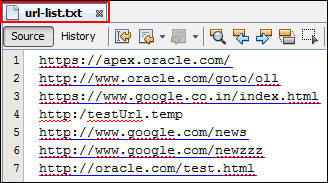
Review the set of URLs displayed in the url-list.txt file.
-
Verify the output.

For the given set of URLs, the application retrieves each URL, verifies it, validates it, and classifies it accordingly.
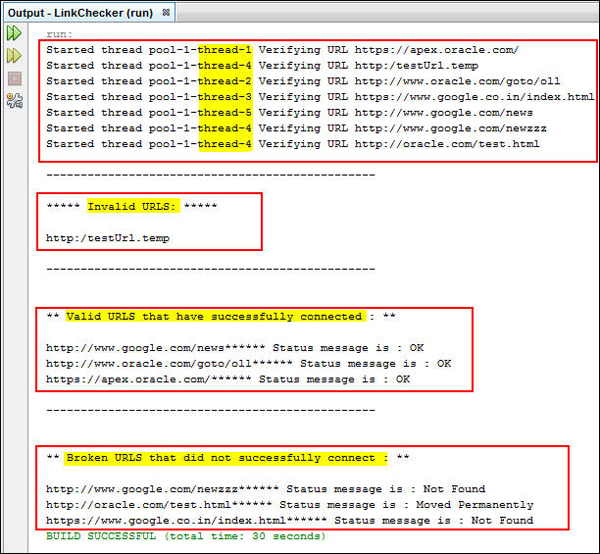
You successfully used the URLs listed in the url-list.txt file and classified them as valid, broken, and incorrect URLs. The status codes of the broken URLs are displayed in the console. You also see the assignment of each URL to a random thread chosen among five threads present in the thread pool.
Note: When you run this application on the Oracle network, some URLs may be blocked, and a connection timeout error is displayed.
Summary
In this tutorial, you learned how to create a Java SE project. You also learned how to use the Thread, URL, and HttpURLConnection classes.
Resources
- To learn more about HttpURLConnection
in Java, see
Java SE docs: HttpURLConnection.
- To learn more about URLs in Java, see Java SE docs: URL.
- To learn more about URLs in Java, see Java SE docs: Concurrency.
- To learn more about Java SE, refer to additional OBEs in the Oracle Learning Library.
Credits
- Curriculum Developer: Shilpa Chetan
To navigate this Oracle by Example tutorial, note the following:
- Topic List:
- Click a topic to navigate to that section.
- Expand All Topics:
- Click the button to show or hide the details for the sections.
By default, all topics are collapsed.
- Hide All Images:
- Click the button to show or hide the screenshots. By default,
all images are displayed.
- Print:
- Click the button to print the content. The content that is
currently displayed or hidden is printed.
To navigate to a particular section in this tutorial, select the topic from the list.