
 Consuming Oracle MySQL Cloud Service RESTful Resources by Using C#
 Before You Begin
This lab shows you how to consume Oracle MySQL Cloud Service administrative RESTful resources by using C#.
Background
With Oracle MySQL Cloud Service, you can deploy MySQL servers to the cloud, with each deployment containing a single MySQL server. You have full access to the features and operations available with MySQL server. To simplify maintenance and management operations, Oracle provides computing power, physical storage, and tooling; and it exposes administrative RESTful resources that you can use to develop applications.
What Do You Need?
- A desktop or laptop computer running Microsoft Windows 7 or later
- Access to an instance of Oracle MySQL Cloud Service
- Microsoft Visual Studio 2010 express for windows desktop or later
- net-mysql-obelab.zip downloaded to your computer
 Gather the Service Parameters from Your MySQL Instance
- Sign in to your Oracle Cloud account and change the temporary password, if you haven't already done so.
- Log in to your Cloud instance.
- Click Dashboard.
- Click Customize Dashboard.
- Select Show for MySQL Cloud Service, and close the dialog box.
- On the Oracle MySQL Cloud Service tile, click the Action menu
 and select View Details.
- On the Service Details page, make a note of the following service parameters:
- Identity Domain Id
- REST Endpoint
- Service Name (Click the Open Service Console button.)
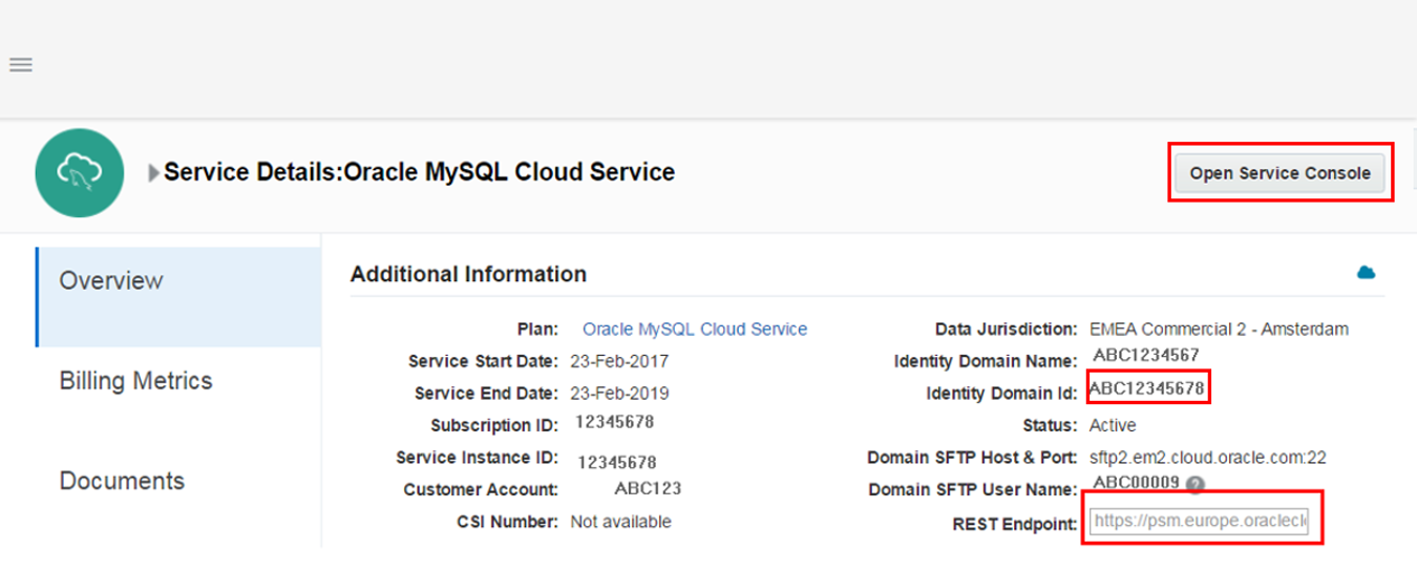
Description of the illustration mysql-service-details.png
 Try the Sample Application
- Extract the sample code from the downloaded
net-mysql-obelab.zipfile. - In Visual Studio, open the configuration file and replace the following keys:
identityDomainvalue key with your Identity Domain IdresourceURIvalue key with the REST endpoint URL
-
Append the following to the REST endpoint URL, where
TestCorpis your Identity Domain Id andMyTestInstanceis your service name:/paas/api/v1.1/instancemgmt/TestCorp/services/MySQLCS/instances/MyTestInstance/accessrules - In Visual Studio, build and run the solution.
The response looks like the following:
 Waiting for response from the server...
{"accessRules":[{"ruleName":"ora_p2admin_ssh","description":"Permit public access to SSH port","status":"enabled","source":"PUBLIC-INTERNET",
                 "destination":"mysql_MASTER","ports":"22","protocol":"tcp","ruleType":"DEFAULT"},
                {"ruleName":"ora_p2admin_mysql","description":"Permit public access to MySQL port","status":"enabled","source":"PUBLIC-INTERNET",
                 "destination":"mysql_MASTER","ports":"3306","protocol":"tcp","ruleType":"DEFAULT"},
                {"ruleName":"ora_trusted_hosts_mysql","description":"DO NOT MODIFY: Permit specific IPs to access MySQL port ","status":"enabled","source":"127.0.0.1\/32",
                 "destination":"mysql_MASTER","ports":"3306","protocol":"tcp","ruleType":"SYSTEM"},
                {"ruleName":"ora_p2admin_em","description":"Permit public access to Enterprise Monitor https port","status":"disabled",
                 "source":"PUBLIC-INTERNET","destination":"mysql_MASTER","ports":"18443","protocol":"tcp","ruleType":"DEFAULT"},
                {"ruleName":"sys_infra2mys_admin_ssh","description":"DO NOT MODIFY: Permit PSM to ssh to admin host","status":"enabled","source":"PAAS-INFRA",
                 "destination":"mysql_ADMIN_HOST","ports":"22","protocol":"tcp","ruleType":"SYSTEM"}],"activities":[]}
Press any key to finish
 Want to Learn More?
- Get Started With Oracle MySQL Cloud Service
- All REST Endpoints in REST API for MySQL Cloud Service