Using Online HTML Help
The Help menu in P6 Professional 8.3 contains two options: Local Help and Online Help. The Online Help feature displays P6 Professional help content in basic HTML format, enabling people with disabilities to use the adaptive features of their browsers.
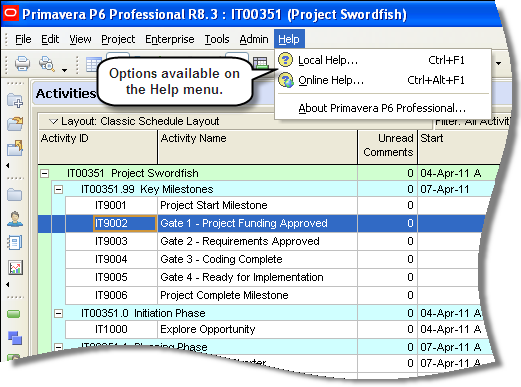
Choose Online Help from the Help menu to launch an URL you specify on the Options tab in the new P6 Professional Online Help section in Admin Preferences. The URL defaults to the location of the 8.3 files on Oracle Technology Network (OTN). If this field is blank, online help is no longer available and local help launches.
Choose Local Help to have the Help menu behave the same as Contents does in P6 Professional R8.2 and earlier. The HTML Help files are installed locally when P6 Professional is installed. Click Local Help to launch the local file. By default, the installation location is \\Oracle\Primavera P6\P6 Professional\Help.
The Always launch Online Help for the F1 shortcut key and context-sensitive help check box in Admin Preferences determines which Help system loads when using the F1 key and launching context-sensitive pages. Select the check box to launch online help from the specified URL location. By default, the check box is not selected, meaning local help is launched when a user uses the F1 key.
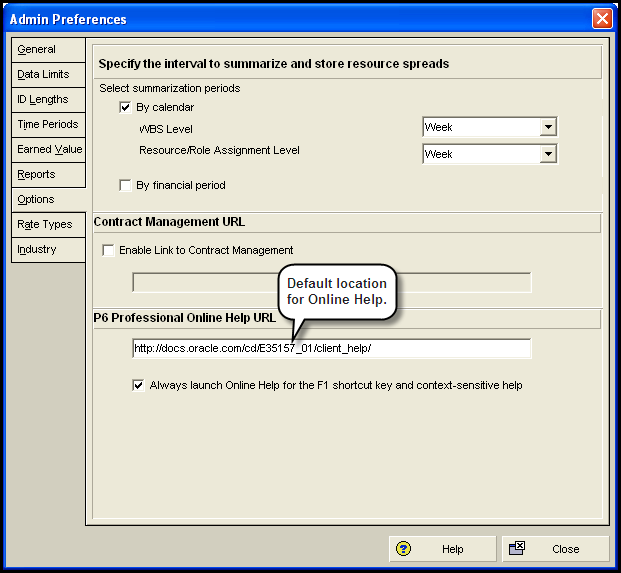
In this topic, you will launch Help using the Online Help feature.
To access this feature:
Click the Options tab in Admin Preferences.
Copyright © 2008, 2014, Oracle and/or its affiliates. All rights reserved.