Send P6 Project Data to Prime for Risk Analysis
P6 8.4 enables you to perform quantitative risk analysis in Primavera Prime to assess the potential impact on a project's cost and schedule. To run a risk analysis in Prime, project data must be imported from P6. Ensure that prerequisites for running a risk analysis are satisfied in P6: establish activity and risk data; create response plan details; enter uncertainty estimates for project activities; and schedule the project. Risk data includes risk thresholds, risk scoring matrices, and mapping risks to activities.
Three new fields are added in P6 8.4 to record uncertainty estimates for activities: Minimum Duration, Maximum Duration, and Most Likely Duration. Data entered in these fields is referenced by Prime's Monte Carlo simulation when running risk analysis. The fields can be updated for task dependent or resource dependent activities only.
After satisfying prerequisites for Prime risk analysis, specify the Prime workspace to which the P6 project will be moved via a new column on the EPS page. After a Prime Workspace project code is assigned, send the data to Prime to create, update, or run a risk analysis on the project. P6 sends data to Prime for all projects on the Activities page. Sending data to Prime runs as a job service in P6.
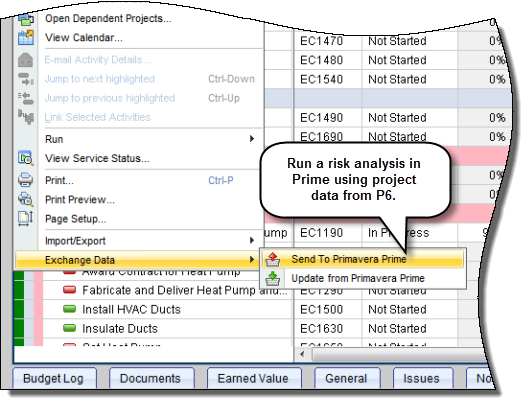
To access this feature:
On the Actions menu on the Activities page, click Exchange Data, Send to Primavera Prime.
Copyright © 2014, Oracle and/or its affiliates. All rights reserved.