Comparing Scenarios
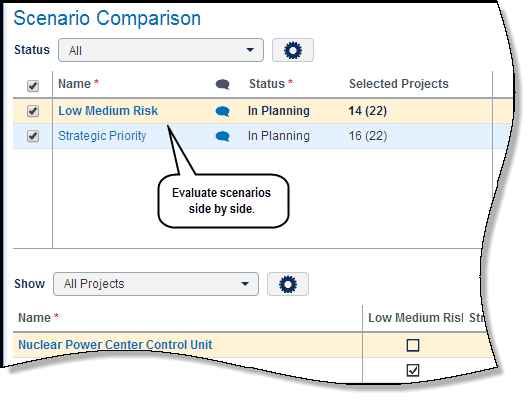
The Scenario Comparison page allows a capital planner to quickly view summary-level information about the scenarios without seeing all the details. Summary-level data includes earned value, budget values, KPIs and target budget. View scenarios side by side to analyze how values change with the selection of projects within each scenario or how KPIs are performing against the target budget.
The capital planner can view how a project's proposed budget is allocated in each scenario, side by side in a bar chart. By selecting the project name link, a popup window appears with a bar chart displaying the proposed budget allocation for the entire planning horizon of the capital portfolio. Move the timescale slider to adjust the bar chart to display only a specific period of time.
Reviewing and Approving Scenarios
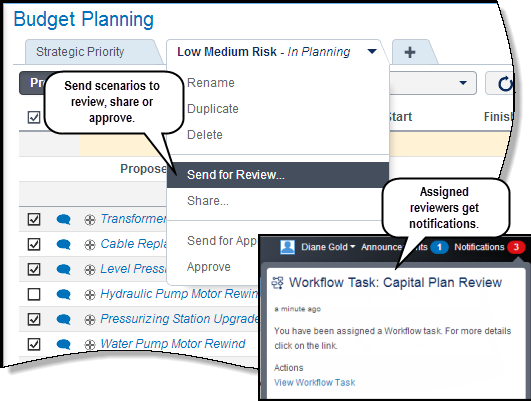
Scenarios can be sent for review or approval by the capital planner from either the Budget Planning page or the Selection Analysis layout page. There are four options for reviewing or approving a scenario:
- Send for Review: Scenario is sent to users assigned as reviewers on the capital plan -- typically a committee of people from different departments in the organization that review proposed scenarios. Reviewers receive notification about the scenario(s), including a link to the Scenario Comparison page. Once on the page, reviewers can analyze data, compare scenarios and give feedback to the capital planner using the Discussions window.
- Share: Scenario is sent to the project owner (typically the project manager) of each project included in the capital plan scenario. This action is usually done when the capital planner has completed what-if and scenario planning and is ready to negotiate project dates and proposed budget allocation with the project owner. Project owners receive notification about the scenario, including a link to the Project Costing page. Project owners use the page to review dates and proposed budget allocations from the capital planner. Project owners have the option to accept the budget or request changes.
- Send for Approval: Scenario is sent to users assigned as approvers on the capital plan. Approvers receive notification about the scenario, including a link to the scenario on the Budget Planning page. If the Budget Planning page does not exist, a link to the Selection Analysis page layout is provided. The approver can review the data in the scenario and select to approve or reject the scenario.
- Approve: If the scenario does not require an approval process, the capital planner can select to approve the scenario without routing it.
When a scenario is approved, proposed budgets become the approved budget values for each project and the approved scenario becomes the capital plan for the planning period.
In this topic you will:
- View the Scenario Comparison page
- Select scenarios to compare and analyze the data
- Send scenarios our for review, share and approval
Copyright © 2008, 2014, Oracle and/or its affiliates. All rights reserved.