Creating Snapshots and Baselines
Snapshots are used to view historical project data from any point in time and compare it to current project data. During the process of planning work packages and distributing scope items, periodic snapshots may be taken before setting a baseline.
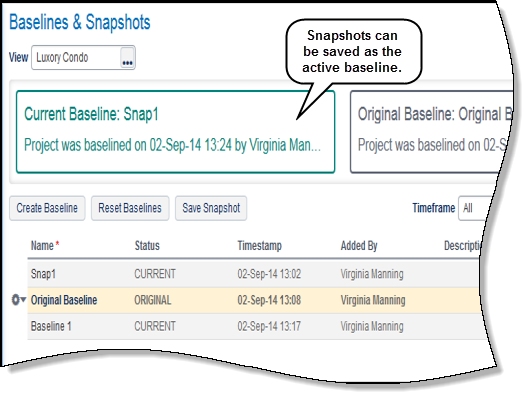
Baselines are the same as snapshots but also are used to calculate data such as variance, percent complete and earned value. A baseline must be created before statusing work packages or scope item assignments. There are two types of baselines:
- Original baseline: The first baseline created for the project is considered the performance measurement baseline, an approved plan for which progress and changes are compared against. After the original baseline is set, planned values are set to read-only. Modifications to these values must go through a change request process. In the rare case that a project manager needs to adjust planned values, the original baseline can be reset to enable editing of planned values. The baseline cannot be reset if there are approved or rejected change requests, or pending change requests or actual values. However, pending change requests are deleted and the actual values set back to zero, the baseline can be reset.
- Current baseline: Baseline used for comparison and calculations against the current project. New baselines or any snapshot can be created and set as the active baseline .
In this topic, you will:
- Create the original baseline
- Create a snapshot and save as the active baseline.
Copyright © 2014, Oracle and/or its affiliates. All rights reserved.