Running a Risk Analysis
Integration between P6 and Prime enables you to perform quantitative risk analysis to assess the potential impact on a project's cost and schedule. To run Prime's Monte Carlo simulation, import a P6 project containing requisite activity and risk data -- risk thresholds, risk scoring matrices, response plans, uncertainty estimates, and risks mapped to activities.
After integrating a P6 project with Prime, select risk analysis options:
- Set number of iterations to run for each scenario.
- Define a seed for random number generator.
- Ignore risks with a status of Proposed.
- Select the scenarios that will run during the risk analysis: Pre-Response, Post-Response, or Both Pre- and Post-Response.
- Include a risk sensitivity analysis.
- Determine the values to be used to calculate optimistic and pessimistic percentiles.
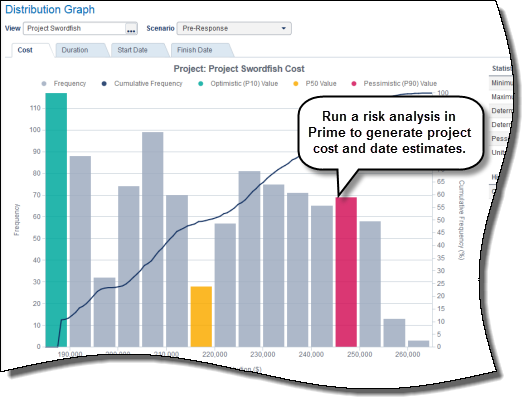
View risk analysis results in distribution graphs or tornado charts. The distribution graph displays statistical estimates, highlights, and analysis options by each scenario for cost, duration, and date distribution. View results at the project or activity level. The tornado chart ranks the potential positive and negative impacts of your project risks in terms of cost and finish date.
After running a risk analysis in Primavera Prime, send data back to P6 to view activity pessimistic start and finish dates for each type of analysis scenario.
Copyright © 2014, Oracle and/or its affiliates. All rights reserved.