P6-Unifier Integration
Summarized P6 data can be exported to Unifier and analyzed in Unifier's Cost Sheet, Cash Flow, and Earned Value modules. Unifier also enables user-defined reports and custom reports based on the integrated data.
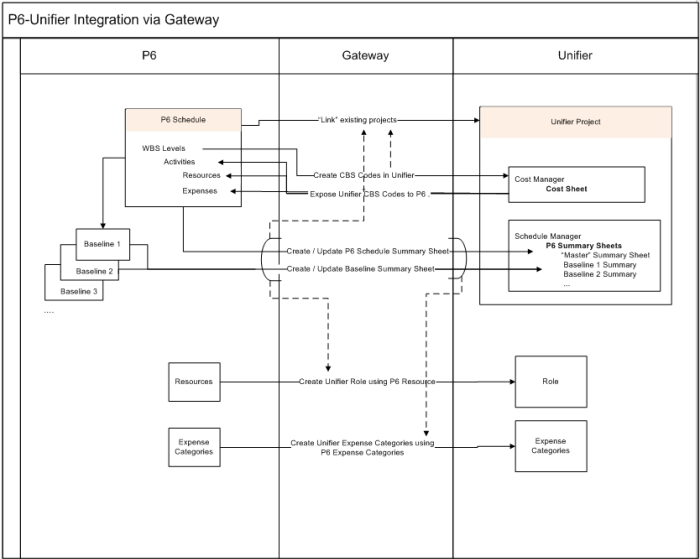
P6/Unifier integration is managed by the Primavera Gateway application. Project ID in P6 is mapped to Unifier's Project Number.
Data exported to Unifier is based on the schedule in P6. Duration-based schedules send just duration data; resource-loaded schedules send duration and unit data; cost-loaded schedules send duration, unit, and cost data. Schedule type is populated in Unifier's project details.
Modules impacted in Unifier:
- Shell Manager: New data element for shell attributes form to support integration based on schedule type.
- Standards & Libraries: New node called P6 Data Sources that lists all P6 data sources when integration occurs.
- Schedule Manager: New node, P6 Summary Sheets. Master and Baseline summary sheets capture summarized schedule and baseline data from P6.
- Cost Sheet: New data elements in cost attributes form support the new CBS codes created by Gateway. Create columns using cost or unit fields (P6 data sources) from P6 summary sheets.
- Resource Manager: New data elements to support P6 resources (Unifier converts to roles) and expense categories (Unifier maps to new data definition dataset values).
- Cash Flow: Create Baseline, Forecast and Spends type curves using data from summary sheets.
- Earned Value: Unifier provides Cost Sheet as source for BCWS and BCWP charts, and a cash flow forecast curve source for the new EAC type curve
Copyright © 2014, Oracle and/or its affiliates. All rights reserved.