Earned Value Enhancements
Use Earned Value functionality to view and compare the project's schedule and cost to baseline values. (Earned value enhancements are only seen in shells enabled for P6-Unifier integration.)
Duration Based Schedule
In a duration-based schedule, the General tab of EV curve properties has Cost Sheet available as a Source option in addition to the Schedule Manager option.
When source is Cost Sheet:
- BCWS and BCWP curves can pull data from P6 summary sheets via cash flow curves.
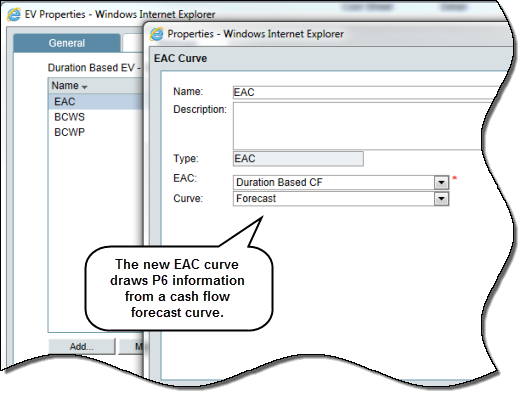
- New EAC curve type is available in which At Completion data from P6 summary sheets is used to draw EAC curves.
BCWS curve properties display:
- Budget pulldown to display cash flow detail curves.
- Curve pulldown to display baseline and custom curves from the selected detail curve.
BCWP curve properties display:
- Progress list with percentage columns from the cost sheet, plus a new P6 Schedule option.
- With P6 Schedule option selected, % Complete per CBS, drawn from the master summary sheet and BAC per CBS, drawn from BCWS curve are used to calculate the Progress spread. This, in turn, is used to draw the BCWP curve.
- Progress Amount (= BAC * % Complete).
- Unifier maintains the progress spread information for each data date per CBS, updating it each time integration occurs.
EAC curve properties display:
- EAC pulldown to display cash flow detail curves.
- Curve pulldown to display forecast and custom curves from the selected detail curve.
- Drawn by scale.
ACWP curve properties display
- Cash Flow pulldown to display cash flow detail curves.
- Curve pulldown to display actual and custom curves from the selected cash flow detail curve.
- Drawn by scale.
Custom curves have not been enhanced in this release.
Resource Loaded / Cost Loaded Schedules
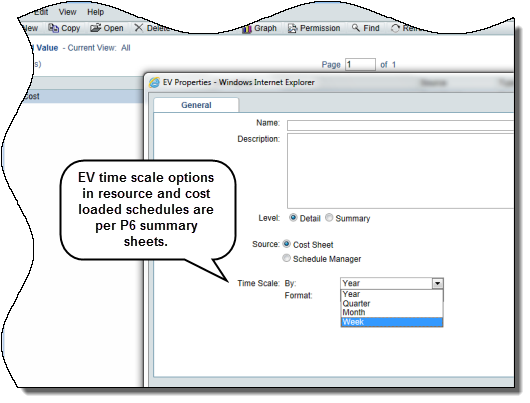
The General tab of EV curve properties has Cost Sheet as a Source option.
Time Scale data set displays Year, Quarter, Month and Week options because data is drawn from P6 summary sheets. Time Scale format depends on the selection.
BCWS curve properties displays:
- Budget pulldown to display P6 summary sheets (required).
- Spread pulldown to display relevant cost spread from the selected summary sheet (required).
- Apply From date picker to designate start of spread; auto-populates with data date from P6 but can be modified.
BCWP curve properties displays
- Progress pulldown to display % columns from cost sheet plus a list of all P6 summary sheets.
- With a P6 summary sheet selected, Spread pulldown to select the Cost whose spread is used to draw the BCWP curve.
- Spread options – Actual Cost, Actual Period Cost
EAC curve properties display
- EAC pulldown to display all P6 summary sheets from that shell.
- Spread pulldown to select the Cost whose spread will render the EAC curve.
- Spread options – At Completion Cost and At Completion Period Cost
ACWP curve properties display above the previous Cost Sheet Column and Cut-off Date fields:
- Cash Flow pulldown to display cash flow detail curves.
- Curve pulldown to display actual and custom curves from the selected detail curve.
Custom curves have not been enhanced in this release.
To access this feature:
In a project's User Mode, navigate to Cost Manager, Earned Value. Create an earned value item with BCWS, BCWP, ACWP and EAC curves.
Copyright © 2014, Oracle and/or its affiliates. All rights reserved.