Selecting a Language in Unifier
Unifier 10.1 enables each user to select a language from the list of 11 supported languages. Number and currency formats are based on selected language or region.
Enhancements described below are seen in Unifier after signing in: (Select a browser language to display Unifier's Sign In page in the selected language.)
User Properties: Language dropdown field that displays the supported languages. This is a required field. Note that Region Format options are not available in User Properties.
User Preferences:
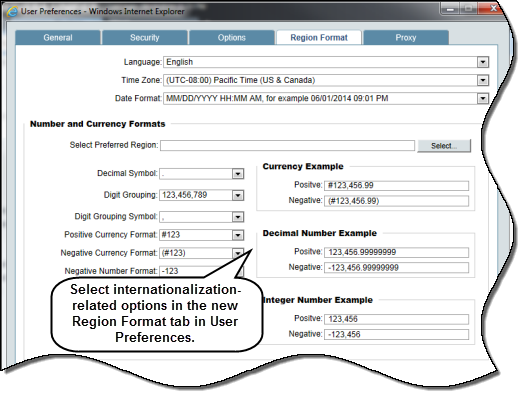
- New tab called Region Format displays options pertaining to internationalization.
- Time Zone and Date Format options have moved from the Options tab to the Region Format tab.
User Preference templates display the same changes as User Preferences.
Date formats: Unifier supports additional date formats as part of internationalization.
- DD.MM.YYYY
- YYYY-MM-DD
- MMM/DD/YYYY
- DD/MMM/YYYY
- YYYY/MMM/DD
- M/D/YYYY
- M/D/YY
- D/M/YYYY
- D/M/YY
- YY/M/D
- YYYY/M/D
- YY/MM/DD
- YYYY/MM/DD
Time Zone formats: GMT is replaced with UTC, which is displayed in e-mail notifications, calendar pickers, etc.
Number formats: Allows users to view numbers in a desired format. In shell dashboard's Edit Block window and cost sheet column definition window, Use 1000 Separator (,) and Negative Number Format fields have been removed.
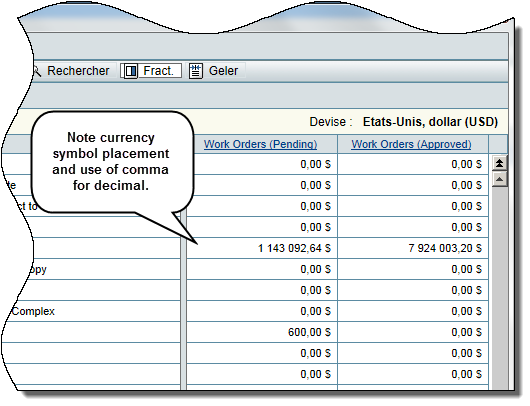
Currency and currency formats: Unifier now supports an additional currency for El Salvador (El Salvador Dollar = SVD), and has added Ecuador currency (code = ECS) in its list of supported currencies. Unifier supports currency symbols for all currency codes where symbols exist. Currency symbols are displayed in currency pickers, shell templates and shell details, dashboards, cost business process upper and detail forms, and in all other forms that display currencies.
Region Format tab - Terminology:
- # symbol: Symbol used to represent the currency symbol.
- Currency symbol placement: Can be placed before or after the digits.
- Decimal Symbol: Character used as the decimal separator.
- Digit Grouping Symbol: Character used as the thousands separator.
- Digit Grouping: Representation of digits with the digit grouping symbol.
- Negative number format: How negative numbers are displayed. The negative sign can be used before or after the number. Alternatively, the number can be displayed within parentheses.
- Positive Currency format: How currency symbol is displayed for positive amounts.
- Negative Currency format: How currency symbol and the negative sign is displayed for negative amounts.
Language and number formatting is set to English for current Unifier users who upgrade to Unifier 10.1.
To access this feature:
- User Preferences: In the logged-in username list in the upper right corner of any Unifier page, select Preferences. Select options in the Region Format tab.
- User Preference Templates: Navigate to Company Workspace (Admin Mode), Standards & Libraries, User Preference Templates. Create/modify a template's Region Format tab. Update user(s).
- User Properties: Navigate to Company Workspace (Admin Mode), User Administration, Company Users. Select a language in the General tab.
Copyright © 2014, Oracle and/or its affiliates. All rights reserved.