WBS/CBS Exchange
P6 activities must be linked to Unifier's CBS codes for a successful integration. The WBS/CBS exchange creates CBS codes in Unifier that map to the WBS hierarchy of the P6 project. The codes are exported from Unifier to create or update CBS codes in P6. The number of CBS segments must match WBS levels and input method (pull-down or text entry).
Impacted areas in Unifier
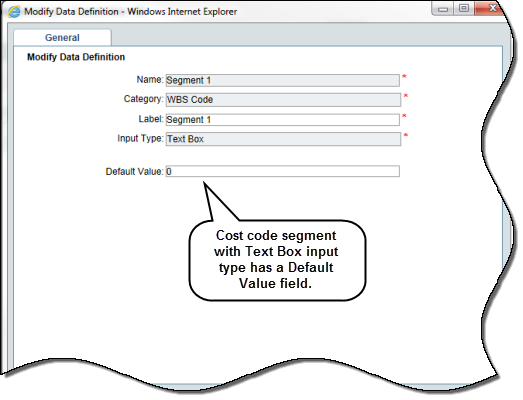
Cost code segments now have a default value.
- Default values are used in P6-Unifier integration. Gateway sends WBS-level data from P6, and Unifier utilizes the default values of segments to create CBS codes within cost sheets.
- During the manual creation of CBS codes in a cost sheet, default value of segments displays within the Cost Code Selection window.
Cost attribute form must have the data elements, Imported from P6 (uuu_cost_imported_from_p6) and Exposed to P6 (uuu_cost_exposed_from_p6).
Stand-alone cost sheet templates, and cost sheet in project, program and company have enhanced sheet and column properties.
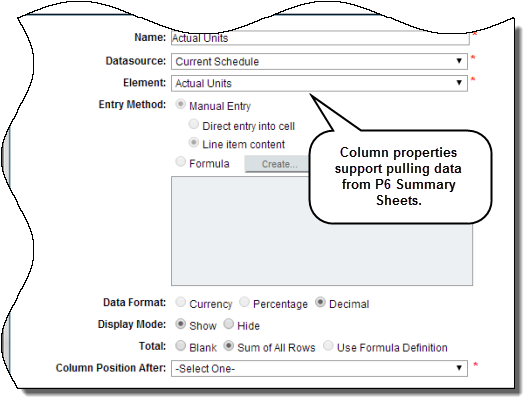
- Sheet properties: New check box in Options tab: P6 Integration > Enable P6 sources. If selected, you can create columns that pull data from summary data sheets.
- Column properties: Published P6 data sources display at the end of Single datasources for columns. New Element field below the Datasource field is required if a P6 data source is selected. Data Format field shows Decimal as a new option. Rollup of data to company/program cost sheet is possible if P6 data sources are used in columns. Current exchange rate is used if project currency is different from base currency.
Copyright © 2014, Oracle and/or its affiliates. All rights reserved.