Cash Flow Enhancements
The following cash flow enhancements are included in Unifier 10.0:
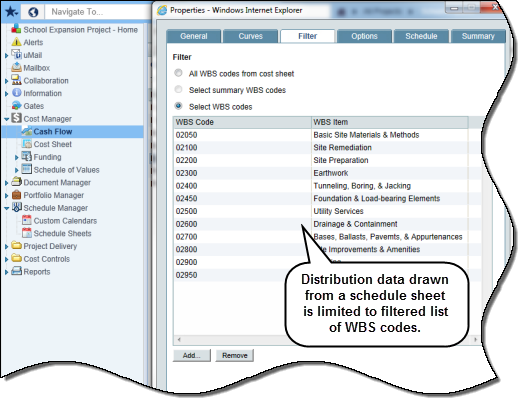
Cash flow filter from schedule sheets
In Unifier 10.0, cash flow curves display data for the filtered list of WBS codes in forecast and baseline curves. The feature is activated when the distribution option is set to Use Data from Schedule Sheet in WBS-level Detail Curves. Prior to release 10.0, WBS filters were ignored for baseline and forecast curves. Instead, results were returned for all WBS codes. This enhancement enables customers to see the forecast for a subset of WBS codes that may represent a part of the project scope, work package, etc.
Cash flow dates from schedule sheets
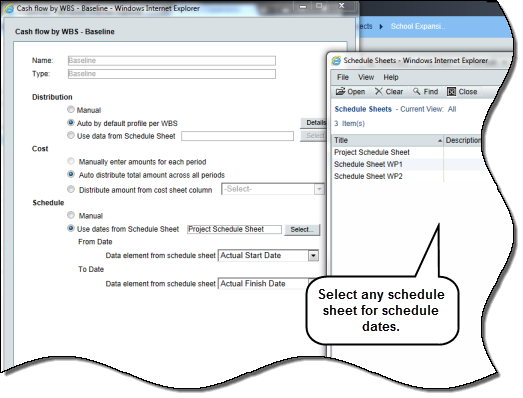
In Unifier 10.0, WBS or Summary WBS level cash flow curves display the start and finish dates for each WBS code based on its activities in baseline, forecast and custom curves. If a WBS code is associated with multiple activities, it displays the earliest start date and latest end date across these activities. Prior to release 10.0, cash flow curves displayed the earliest start date and the latest finish date across all WBS codes in the schedule sheet. Dates per WBS code were ignored.
Unifier 10.0 also allows the selection of any active schedule sheet other than the Master Schedule Sheet. There is a corresponding UI change in the Schedule section of the baseline/forecast curve definition window. This enhancement enables customers to view forecast dates and cost distribution at a more granular WBS code level.
Other areas of impact:
-- Project cash flow templates: If a cash flow template has schedule sheet dates and the schedule sheet exists in the project, then cash flow curves can be created or updated in the project using cash flow templates.-- Project templates: When a project is created using a project template, and the project template has schedule sheet and cash flow options selected, and the cash flow template has schedule sheet data, then upon successful creation, the cash flow curve will display the schedule sheet name and dates as per the template.
Cash flow forecast enhancements
In Unifier 10.0, the system updates both From Date and To Date if they occur earlier than the spends date in WBS, Summary WBS, or Commitment detail levels in which the forecast curve is set to start at the end of a spends-type curve. This applies to the WBS code being charged as well as other codes that share the same From Date. Prior to Unifier 10.0, the system automatically populated all WBS items with a new From Date if they had a From Date earlier than the spends date. To Date was not updated. Validation would fail and alerts were displayed when any WBS code had a From Date and To Date that were earlier than the spends date. This enhancement is especially useful when studying forecast for each project phase. If costs are incurred against WBS codes associated with a past project phase, date validation will pass since both From Date and To Date are changed accordingly.
Summary curve and exchange rates
In Unifier 10.0, if a company uses multiple currencies, Unifier will use exchange rates to convert transaction currencies to project currency before rendering summary curves in which commitment-level curves are combined with curves at other detail levels. If a company uses just one currency or when transaction currency is the same as project currency in a project, Unifier will skip the conversion step and display cash flow data correctly in summary curves. In prior releases, if the exchange rate for transaction currency was defined after the project start date, cash flow data prior to the exchange rate definition date showed as 0 in summary curves.
With the enhancement in exchange rate conversion, summary curves that include at least one commitment-level curve will display data correctly in project currency.
Location: In a project, navigate to Cost Manager, Cash Flow.
Copyright © 2014, Oracle and/or its affiliates. All rights reserved.