

This document will continue to evolve as existing sections change and new information is added. All updates appear in the following table:
| Date |
What's Changed |
Notes |
|---|---|---|
| 31 AUG 2017 |
Initial Document Creation. |
This guide outlines the features in Oracle Adaptive Intelligent Offers Cloud Service and describes any tasks you might need to perform for this service. Each section includes a brief description of the feature, the steps you need to take to enable or begin using the feature, any tips or considerations that you should keep in mind, and the resources available to help you.
Some of the Release 17C features are automatically available to users and some require action from the user, the company administrator, or Oracle.
The table below offers a quick view of the actions required to enable each of the features:
| Action Required to Enable Feature |
||||
|---|---|---|---|---|
| Feature |
Automatically Available |
End User Action Required |
Administrator Action Required |
Oracle Service Request Required |
| Oracle Adaptive Intelligent Offers Cloud Service |
||||
| Product Recommendations and Promotions |
|
|||
| Supervisory Controls |
|
|||
| Insights and Lift Analysis |
|
|||
| Widget and Email Configuration |
|
|||
| Ingestion of First-Party Data |
|
|||
| Privacy Rights |
|
|||
| Role-Based Security |
|
|||

Oracle Adaptive Intelligent Offers Cloud Service
Oracle Adaptive Intelligent Offers provides personalized, dynamic, and continuously adaptive offers across B2C marketing and commerce platforms. It delivers the product recommendations and promotions through e-commerce storefronts and marketing channels.
Product Recommendations and Promotions
The offers engine delivers contextual recommendations that continuously adapt to consumer responses to make your consumers feel known and understood in their interactions across all channels. The engine is fed by a rich stream of data and powered by a combination of different artificial intelligence techniques such as machine learning, neural nets, and natural language processing. Data sources that provide constantly refreshed context to deliver personalized recommendations include:
- 3rd-party data from Oracle Data Cloud
- 1st-party data from your commerce application
- Real-time user actions such as browsing, cart additions, and purchasing
Consumers can receive the offers in emails and other marketing channels, or see them anywhere on your commerce site. The following offer types are supported:
- Single product recommendations
- Multiple product carousels
- Item discount promotions and Buy One Get One promotions
Steps to Enable
No steps are required to enable this feature.
Key Resources
For more information about recommendations, go to Help in the application for the following topics:
- Recommendations and Accepts
- Promotion Types
You can exert supervisory control over which products are offered by setting policies for minimum product price, minimum product inventory, and brand exclusivity rules. You can also manually adjust the frequency of product recommendations and promotions using boosts and constraints, for example to reduce inventory or increase visibility of a new product line. You can boost and constrain at a category, brand, or individual product level. You can also stop offer delivery for certain products or promotions.
Boosting doubles the likelihood of the selected items being shown in recommendations to a consumer, while constraining halves this likelihood.
The following screen captures illustrate this feature and its benefits.
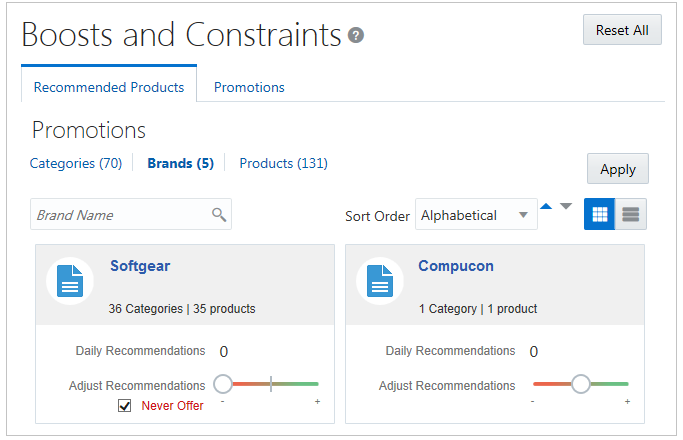
Boosts and Constraints page
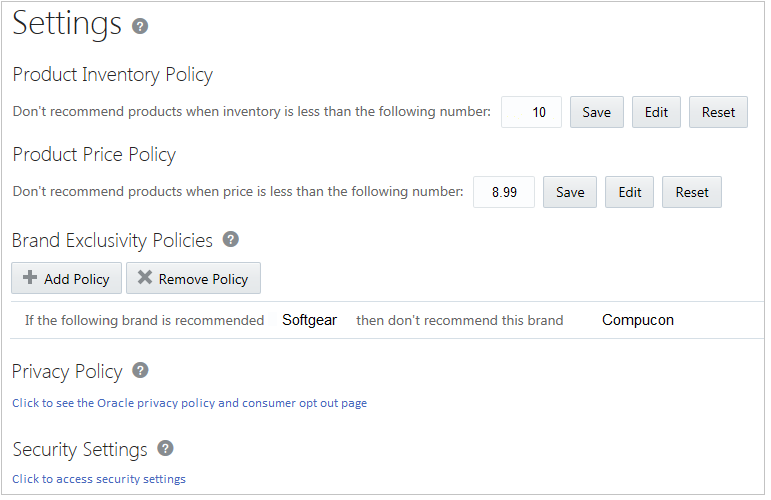
Settings page
Steps to Enable
No steps are required to enable this feature.
Tips and Considerations
Overriding the default recommendations using supervisory controls, including policy settings for inventory and price thresholds and brand exclusivity, must only be done for special circumstances. It's best practice to only apply supervisory control in special circumstances when you know a crucial piece of information that the offers engine doesn't know. For example, if you boost a product based on market research that proves correct, consumers will purchase the product, and the offers engine will learn that the boost was effective and continue to deliver recommendations. However, if your market research was incorrect and consumers aren't purchasing the product, the offers engine will learn and recommend the product less often, despite it being boosted. The boost will technically remain in effect, but the product's base probability of purchase is significantly reduced, so it could be recommended less often than before the boost was applied.
Before making any individual adjustments to boosts and constraints, you may want to first monitor the behavior using lift analysis to compare the offer group and control group so that you can see true responses while using only the algorithms for adaptive intelligent recommendations.
For inventory and price policies, depending on how frequently your data is refreshed from your commerce application, it's possible that a product could be recommended under the inventory limit if there is a lapse causing data to be out of sync. It's best to have a short frequency of data synchronization to avoid any unwanted recommendations from being delivered to consumers.
Key Resources
For more information about using boosts and constraints, go to Help in the application for the following topics:
- About Adjusting Recommendations
- Supervisory Controls: Examples
- How Settings Affect Recommendations
- Managing Brand Exclusivity Rules
Use the Insights page to evaluate offer performance by reviewing summary statistics about who received and responded to offers. Metrics tracked include: who received offers, clicked offers, added recommended products to their carts, purchased recommended products, and used recommended promotions. You can see demographic data from Oracle Data Cloud about people who purchased recommended products or used recommended promotions.
You can also initiate lift analysis to do a controlled evaluation of product recommendations. Lift analysis involves restricting adaptive intelligent recommendations to a proportion of your site visitors. Then you can compare the clicks, cart-additions, and purchases of the offer group with those of the remaining control group.
The following screen captures illustrate the feature and its benefits.
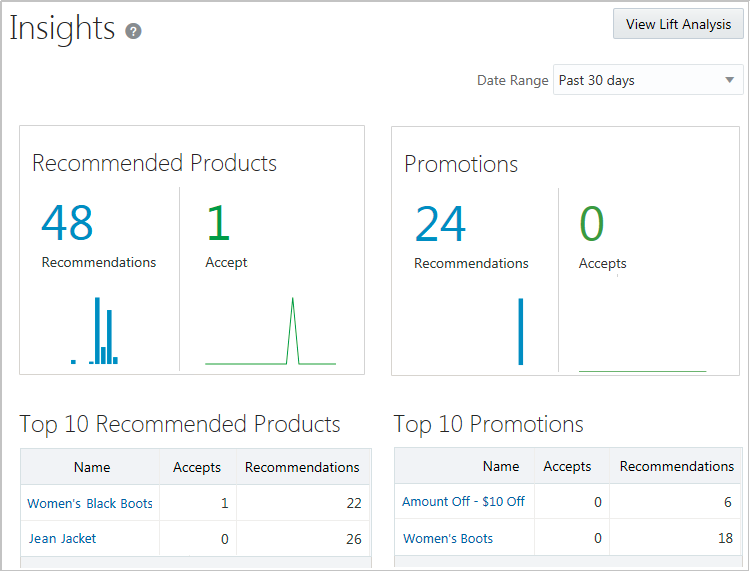
Insights Page showing recommended products and promotions
When you create a lift analysis, you enter a start date and set the percentage of site visitors to be in the offer group.

Start Lift Analysis window
As data is received, you can compare the relative number of clicks, cart-additions, and purchases between the offer group and the control group.
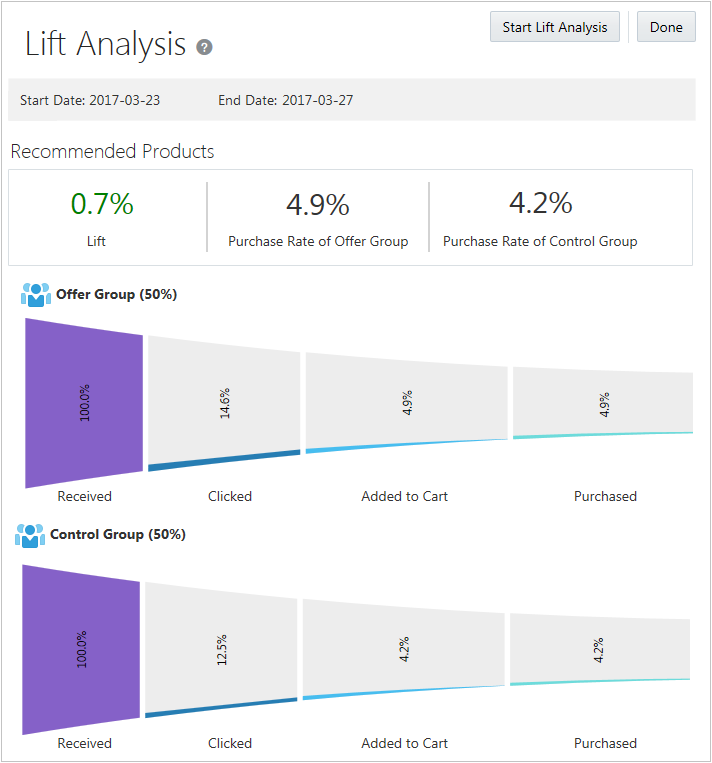
Lift Analysis page with response metrics
Steps to Enable
No steps are required to enable this feature.
Tips and Considerations
Leave the end date blank for an open-ended duration. If you set an end date, you can edit it later to either extend the duration or to end it as of the current date. You can't change the end date to a date in the past.
During the early stages of a lift analysis, the initial results of how many consumers are in the offer group and control group may seem misleading. For example, if you chose 50% for your offer group size, and four consumers visited your site, you might expect that two of them would be in each group. However, the calculation for randomly selecting who is in each group doesn't simply count and divide the number of consumers. Instead, the percentage controls the likelihood of being put into one group or the other. In other words, the consumer has a 50% chance of being put into either group, so you might see four in one group and none in the other. As more consumers visit your site, the consumer-to-group allocation will normalize as you'd expect.
Key Resources
For more information about insights and lift analysis, go to Help in the application for the following topics:
- Using Lift Analysis
- How Boosts and Constraints Affect Lift Analysis
Widget and Email Configuration
On the Connections page, you can download templates for widget configuration. If you’re using Oracle Commerce Cloud, the zip file contains ready-to-go widget templates. Use these templates to display recommendations in hero images or carousels on the main page, product detail pages, checkout pages, or anywhere else on your commerce site. You can modify the widget code if required to apply your house style, or to fit different areas of your pages.
To display recommendations in emails, format and generate a single image incorporating a graphic, price, name, and any other details. You have complete control of the layout, font, alignment, and so on. You can preview the image before exporting it to embed in your emails. Recommendations in emails are updated and served in real time so consumers get the freshest, most up-to-date and relevant content.
The following screen captures illustrate the feature and its benefits.

Widget Templates page for Oracle Commerce Cloud
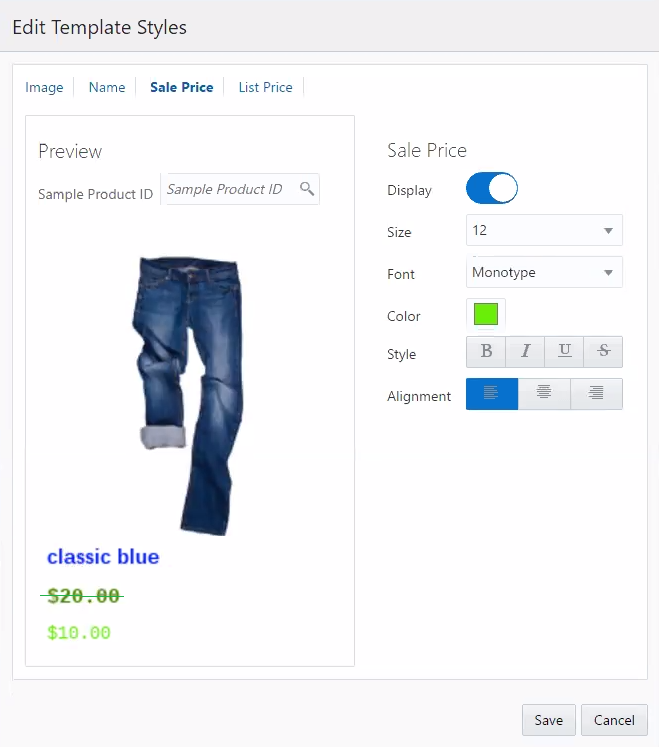
Edit Template Styles window for email widgets
Steps to Enable
The steps required depend on your commerce application and are detailed in the Implementing Adaptive Intelligent Offers guide.
Tips and Considerations
Your email service provider must be able to insert the customers email address as a SHA256 hashed value into the image and link URLs as a text replacement field. Contact your email service provider directly to understand if they meet this minimum requirement.
If you want to make further changes to widgets beyond what is provided, consult your email HTML designer who will be able to edit and change the layout of the generated HTML code or modify the placement of the image and link URLs provided.
Key Resources
For more information about widget templates, go to Help in the application for the following topics:
- About Widget Templates
- Configuring Widgets for Oracle Commerce Cloud
- Configuring Widgets for Oracle Commerce Platform
- Configuring Widgets for Other Commerce Applications
- About Email Templates
- Configuring Email Templates
Connecting to your commerce application enables initial and ongoing data ingestion of products and product categories, brands, promotions, consumer profiles, and orders. Through configured widgets on your storefront, ongoing data ingestion includes real-time click tracking, such as purchases and cart additions.
Depending on your commerce application, the following information applies:
- Oracle Commerce Cloud
Connecting to Oracle Commerce Cloud is a quick, simple process. After connection, automated processes import and synchronize consumer, product, brand, and order data. For clickstream and promotion data, simple setup for widgets is required. - Oracle Commerce Platform
Plug-ins extract data, strip personalized consumer information, and automatically transform data to fit the data model. After connection, the built-in scheduler is standing by to synchronize data. For clickstream data, minimal setup for widgets is required. For promotion data, you can use the REST APIs. - Other Commerce Applications
You can import data and record consumer clickstream information from any application platform that can access the REST API. Integration requires field mapping, coding API requests to upload and synchronize data, and creating scheduling jobs. For clickstream data, you can use the sample widget code to copy into your storefront code.
The following screen captures illustrate the feature and its benefits.
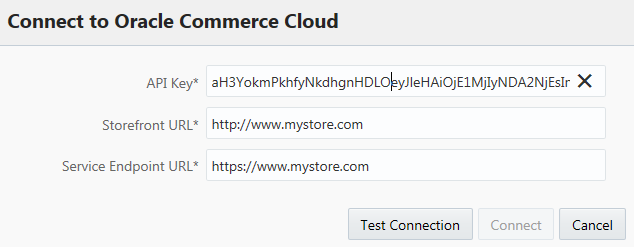
Data Sources page for Oracle Commerce Cloud
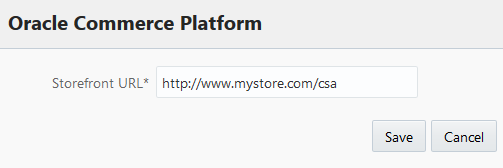
Data Sources page for Oracle Commerce Platform
Steps to Enable
The steps required depend on your commerce application and are detailed in the Implementing Adaptive Intelligent Offers guide.
Key Resources
For more information about data ingestion, go to Help in the application for the following topic:
- Importing Data
All consumer data is anonymized and secured in Oracle Cloud. Consumers can opt out from click tracking or from Oracle Data Cloud anonymous data collection.
Oracle provides tools for consumers to opt out of click-tracking and interest-based advertising. Consumers can view individual cookies using the Oracle Data Cloud Registry tool to remove individual interest segments associated with their computer and browser.
The following screen capture illustrates the feature and its benefits.
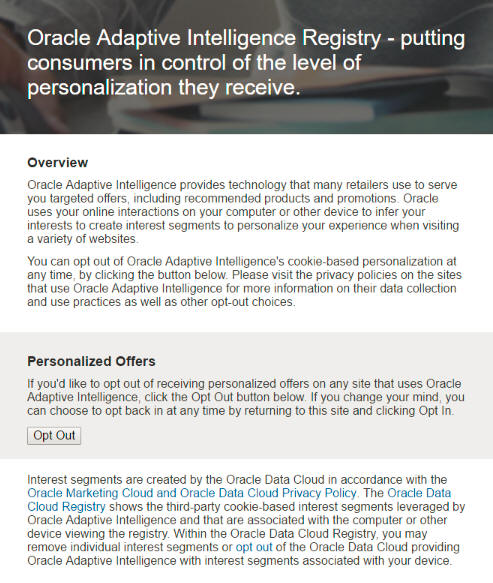
Opt Out page for Oracle Adaptive Intelligence
Steps to Enable
No steps are required to enable this feature.
Key Resources
For more information about privacy, go to Help in the application for the following topic:
- Privacy and Cookies
Use Oracle Identity Cloud Service to assign users to the Merchandiser role or the Operations Manager role. These roles control which pages and features users can access.
- Merchandisers can manage insights and settings.
- Operations managers can manage connections and data loads.
The following screen capture illustrates the feature and its benefits.
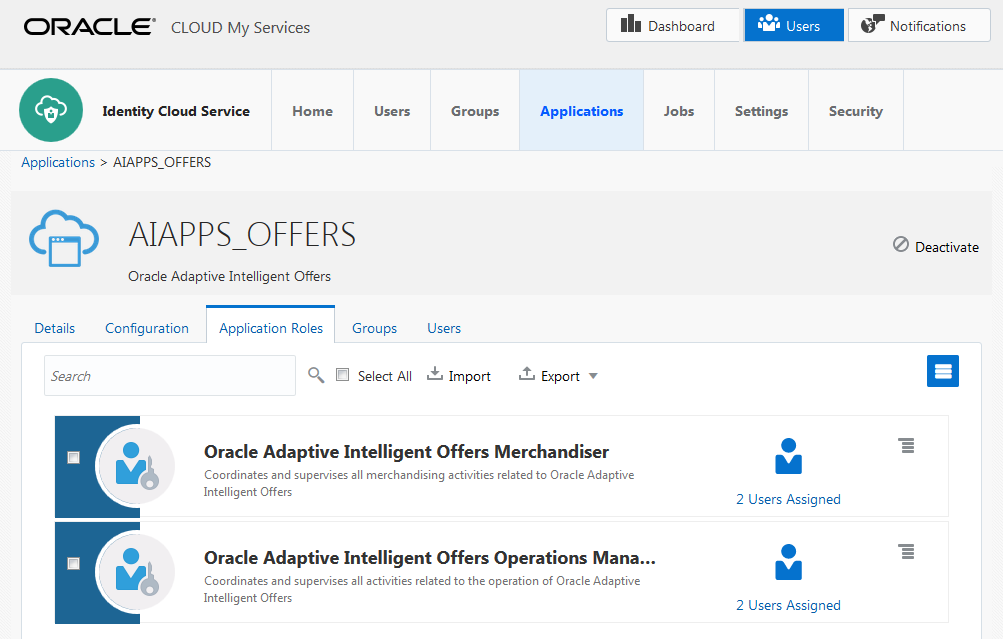
Roles for Oracle Adaptive Intelligent Offers in Oracle Identity Cloud Service
Steps to Enable
No steps are required to enable this feature.
Tips and Considerations
Your service owner manages access to Oracle Identity Cloud Service to assign users to these roles.
Key Resources
For more information about roles, go to Help in the application for the following topic:
- Roles and User Administration
---

Copyright © 2017, Oracle and/or its affiliates. All rights reserved.
This document is provided for information purposes only, and the contents hereof are subject to change without notice. This document is not warranted to be error-free, nor subject to any other warranties or conditions, whether expressed orally or implied in law, including implied warranties and conditions of merchantability or fitness for a particular purpose. We specifically disclaim any liability with respect to this document, and no contractual obligations are formed either directly or indirectly by this document. This document may not be reproduced or transmitted in any form or by any means, electronic or mechanical, for any purpose, without our prior written permission.
Oracle and Java are registered trademarks of Oracle and/or its affiliates. Other names may be trademarks of their respective owners.
Intel and Intel Xeon are trademarks or registered trademarks of Intel Corporation. All SPARC trademarks are used under license and are trademarks or registered trademarks of SPARC International, Inc. AMD, Opteron, the AMD logo, and the AMD Opteron logo are trademarks or registered trademarks of Advanced Micro Devices. UNIX is a registered trademark of The Open Group.
