

This document will continue to evolve as existing sections change and new information is added. All updates appear in the following table:
| Date |
Feature |
Notes |
|---|---|---|
| 04 APR 2018 |
Created initial document. |
This document outlines the features in Oracle Adaptive Intelligent Offers Cloud Service and describes any tasks you might need to perform for this service. Each section includes a brief description of the feature, the steps you need to take to enable or begin using the feature, any tips or considerations that you should keep in mind, and the resources available to help you.
Some of the Update 18.4 features are automatically available to users and some require action from the user, the company administrator, or Oracle.
The table below offers a quick view of the actions required to enable each of the features:
| Action Required to Enable Feature |
||||
|---|---|---|---|---|
| Feature |
Automatically Available |
End User Action Required |
Administrator Action Required |
Oracle Service Request Required |
| Oracle Adaptive Intelligent Offers Cloud Service |
||||
| Multichannel Insights |
|
|||
| Personalized Search for Oracle Commerce Cloud |
|
|||
| Multisite Connection for Oracle Commerce Cloud |
|
|||
| Mulitsite Connection for Oracle Commerce Platform and Other Commerce Applications |
|
|||

Oracle Adaptive Intelligent Offers Cloud Service
Oracle Adaptive Intelligent Offers provides personalized, dynamic, and continuously adaptive offers across B2C marketing and commerce platforms. It delivers the product recommendations and promotions through commerce storefronts and marketing channels.
The Insights page now features a new and improved way of monitoring consumer behavior, tracking recommendations separately from multiple channels. The Overview tab showing the flow of consumer responses from different channels, such as commerce widgets and marketing emails, in a single Sankey diagram. Use the diagram to view the performance of recommendations sent to consumers within a specified data range.
Responses displayed include clicks, add-to-carts, and purchases, and only those occurring within 48 hours after recommendations.
The following screen capture shows the Insights page when multiple channels are set up for adaptive intelligence.
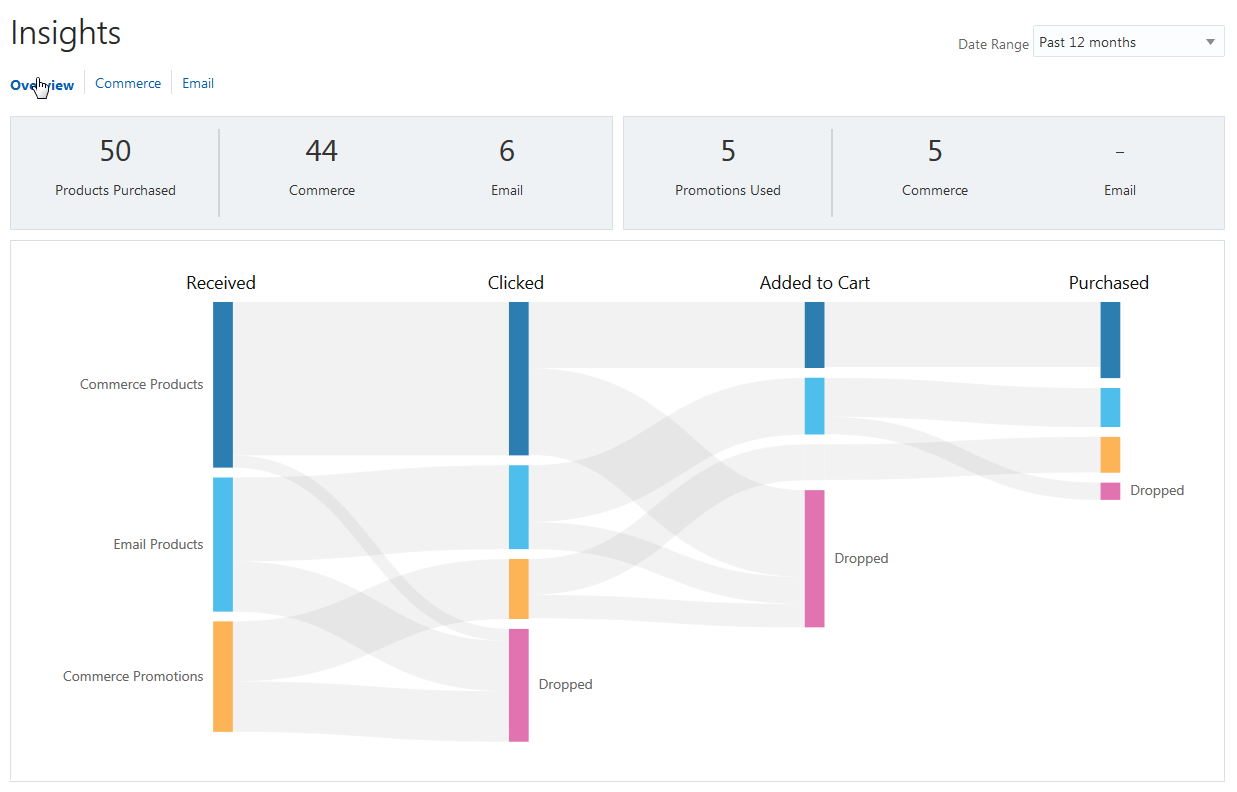
Insights Overview Page
The stage of recommendations for each channel flows from left to right, moving from received to purchased. When a consumer doesn’t move a received recommendation forward to the next stage within 48 hours, it’s considered dropped. Hover over each node to see the number of records for each stage.
Steps to Enable
No steps are required to enable this feature.
Personalized Search for Oracle Commerce Cloud
Use the search integration in Oracle Commerce Cloud to refine search results to promote personalized product recommendations that are relevant to the shopper’s search query. Using the adaptive intelligent decision science, any records that are included in both the adaptive intelligent recommendations and the search results are added to the top of results lists in Oracle Commerce Cloud.
The following screen capture shows the Oracle Integrations page in Oracle Commerce Cloud where you select the search option for Adaptive Intelligent Apps.
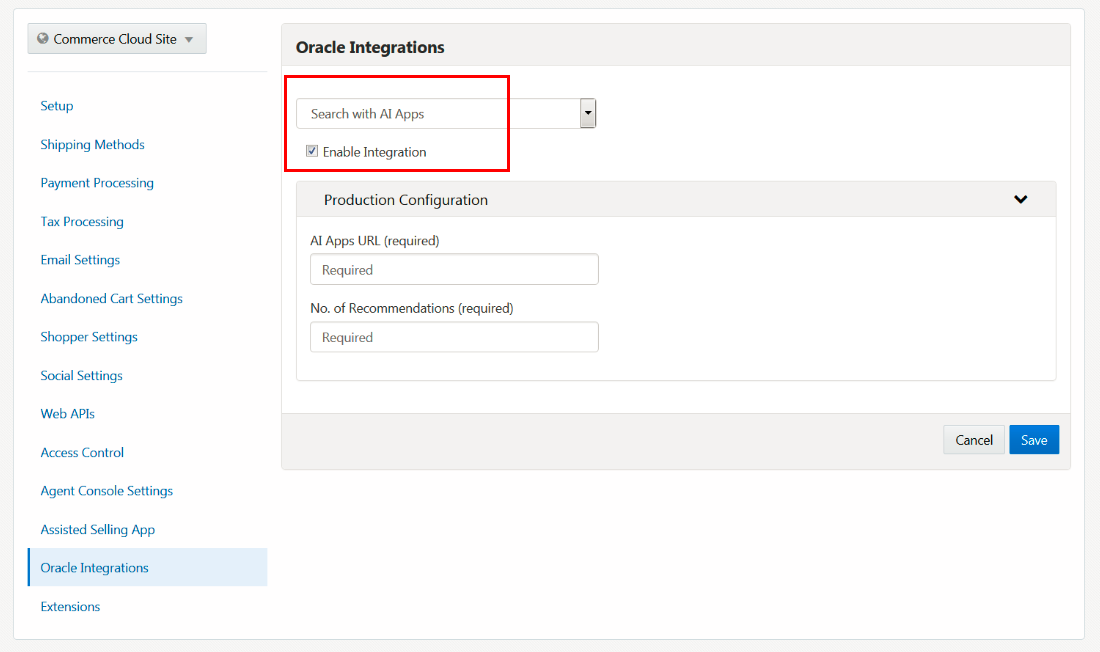
Oracle Integrations Page in Commerce Cloud
Steps to Enable
No steps are required to enable this feature in Oracle Adaptive Intelligent Offers.
To enable this feature in Oracle Commerce Cloud:
- From the administration dashboard, select Oracle Integrations.
- Select and enable the AI Apps integration.
- Under Product Configuration, enter the URL for your instance of Oracle Adaptive Intelligent Offers and the number of recommendations you want returned.
- Publish your changes.
If you have multiple commerce storefronts, you have the option of enabling one or more sites for adaptive intelligent recommendations. This phase of this enhancement uses a single data model that supports site-specific catalogs and recommendations. You can use any of your widgets on all the sites that you enable.
The following screen capture shows the Connections page where you connect to Oracle Commerce Cloud sites.
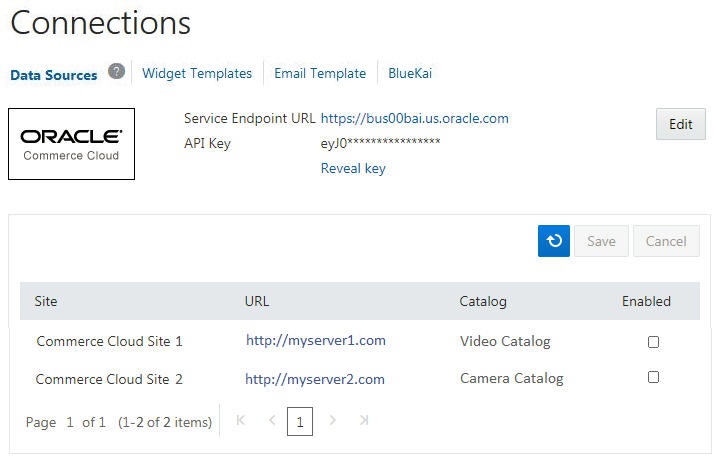
Connections Page
The background jobs automatically check for new sites every 15 minutes. As more sites go live, you can check if any new sites were added by clicking the Refresh button on the Connections page.
For Oracle Commerce Platform and other commerce applications, there are no changes to the Connections page in this release, but support for this feature is provided through the REST API.
Steps to Enable
If use Oracle Commerce Cloud as your commerce application, no steps are required to enable this feature.
If you use Oracle Commerce Platform or a different commerce application, you must perform the initial data load and then enable your sites for adaptive intelligence using the REST API.
Tips and Considerations
- Enabling a site is permanent. You cannot disable a site you have already enabled.
- If you are using the REST API for recommendations or clickstream tracking and will be enabling multiple sites, you must ensure that your service calls use the POST methods with a specified site ID. For example, use /offers/widget/cs/{siteId} instead of /offers/widget/cs.
- If you have already downloaded the widget templates for your custom widgets, you must re-download the templates and replace those you already configured. Single-site widgets are not backward compatible with multiple sites.
---

Copyright © 2018, Oracle and/or its affiliates. All rights reserved.
This document is provided for information purposes only, and the contents hereof are subject to change without notice. This document is not warranted to be error-free, nor subject to any other warranties or conditions, whether expressed orally or implied in law, including implied warranties and conditions of merchantability or fitness for a particular purpose. We specifically disclaim any liability with respect to this document, and no contractual obligations are formed either directly or indirectly by this document. This document may not be reproduced or transmitted in any form or by any means, electronic or mechanical, for any purpose, without our prior written permission.
Oracle and Java are registered trademarks of Oracle and/or its affiliates. Other names may be trademarks of their respective owners.
Intel and Intel Xeon are trademarks or registered trademarks of Intel Corporation. All SPARC trademarks are used under license and are trademarks or registered trademarks of SPARC International, Inc. AMD, Opteron, the AMD logo, and the AMD Opteron logo are trademarks or registered trademarks of Advanced Micro Devices. UNIX is a registered trademark of The Open Group.
