

This document will continue to evolve as existing sections change and new information is added. All updates appear in the following table:
| Date | Update Version | Notes |
|---|---|---|
| 02 NOV 2018 | Update 18.11 | Delivered new features in update 18.11. |
| 05 OCT 2018 | Update 18.10 | Delivered new features in update 18.10. |
| 07 SEP 2018 | Update 18.9 | Delivered new features in update 18.9. |
| 03 AUG 2018 | Update 18.8 | Delivered new features in update 18.8. |
| 16 JUL 2018 | Update 18.7 | Revised update 18.7. |
| 04 MAY 2018 | Update 18.5 | Delivered new features in update 18.5. |
| 04 APR 2018 | Update 18.4 | Delivered new features in update 18.4. |
This document will continue to evolve as existing sections change and new information is added. All updates appear in the following table:
| Date | Feature | Notes |
|---|---|---|
| 02 NOV 2018 | Created initial document. |
This document outlines the features in Oracle Adaptive Intelligent Apps for Customer Experience and describes any tasks you might need to perform for this service. Each section includes a brief description of the feature, the steps you need to take to enable or begin using the feature, any tips or considerations that you should keep in mind, and the resources available to help you.
GIVE US FEEDBACK
We welcome your comments and suggestions to improve the content. Please send us your feedback at oracle_aiapps_doc_feedback_grp@oracle.com.
| Action Required to Enable Feature |
||||
|---|---|---|---|---|
| Feature |
Automatically Available |
End User Action Required |
Administrator Action Required |
Oracle Service Request Required |
Custom Title and Exclusion Filters in Recommendation Widgets |
 |
|||
|
||||
Oracle Adaptive Intelligent Apps for Customer Experience provides personalized, dynamic, and continuously adaptive offers across B2C commerce and marketing platforms. It delivers the product recommendations and promotions through commerce storefronts and marketing channels.Oracle Adaptive Intelligent Apps for Customer Experience provides personalized, dynamic, and continuously adaptive offers across B2C commerce and marketing platforms. It delivers the product recommendations and promotions through commerce storefronts and marketing channels.
Custom Title and Exclusion Filters in Recommendation Widgets
Set a custom widget title and use exclusion filters for adaptive intelligent recommendations offered on your commerce sites. You can now substitute the default title (Recommended for you) with your own text. You can also choose to exclude products from recommendations based on special criteria, such as new or on-sale products, specific products, collections, or brands, or a combination.
For Oracle Commerce Cloud, you can use the predefined widget templates within the application without having to alter any widget code. For third-party commerce applications, configure filters in your widget code.
ORACLE COMMERCE CLOUD
The following screen capture shows the option to set the title for a widget in Oracle Commerce Cloud.
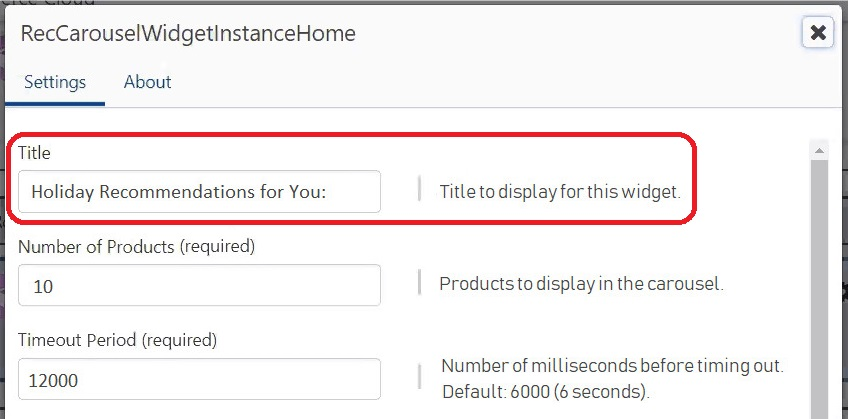
Title Setting in Oracle Commerce Cloud
The following screen capture shows the options to set exclusions for a widget in Oracle Commerce Cloud.
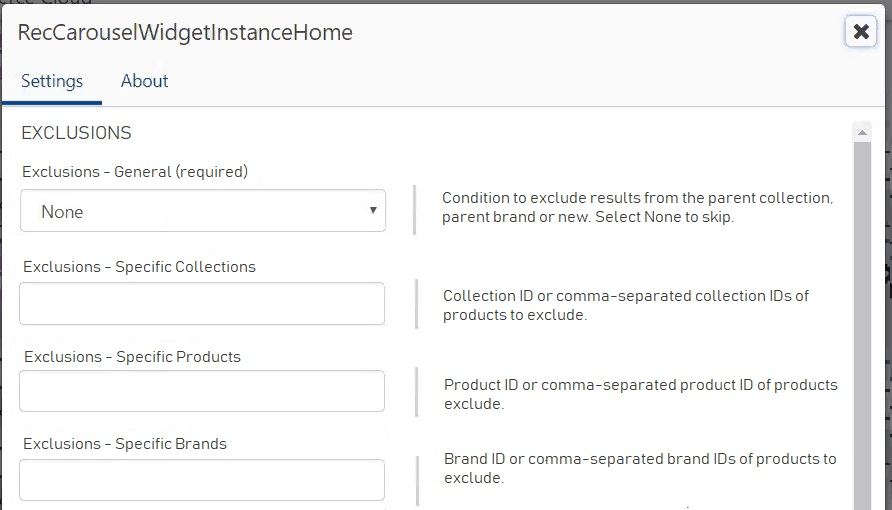
Exclusions in Oracle Commerce Cloud
To use these new settings in an Oracle Commerce Cloud widget:
- In the Title field, enter the text you want displayed for the widget.
- In the EXCLUSIONS section, select one of these general exclusions, or select None (a selection is required).
- Parent Collection (exclude products in the collection being viewed or searched)
- Parent Brand (exclude products of the brand being viewed or searched)
- On Sale
- New - Past Month
- New - Past Week
- New - Past Day
- To exclude one or more specific products, enter the product ID or comma-separated product IDs.
- To exclude products in one or more specific brands or collections, enter the ID or comma-separated IDs into the respective field.
OTHER COMMERCE APPLICATIONS
To use filters in a widget for a third-party commerce application, add your code directly before the get command. To overwrite the default title, edit the HTML value for the <h2> tag in your widget code.
Steps to Enable
No steps are required to enable this feature.
Tips And Considerations
- The machine-learning algorithms work best when no restrictions are applied so that there’s sufficient opportunity to learn and react to preferences and behavior. Because restrictions and filters you use will affect recommendations, it’s best practice to use them only in special circumstances.
- Depending on how you set up your recommendation widgets, be careful that you don’t specify conditions that cancel each other out or affect recommendations in a way you didn’t expect.
- Filtering occurs after recommendations are generated through machine-learning. Therefore, if you have any exclusions that include items already boosted, they’ll be hidden in recommendations using the widget where exclusions were applied.
Key Resources
Oracle Adaptive Intelligent Apps for Customer Experience provides guidance for salespeople to increase their win rates with data-driven pipeline management and recommendations for the next best sales action. Salespeople benefit from advanced machine-learning techniques to optimize customer engagement.
Supervisory Controls for Recommended Actions Threshold
You can now set the recommended action threshold to show only those recommendations that are predicted to have the specified impact on your salesperson’s opportunity.
For example, you’ve set the threshold to 30%. Suppose a recommended action has an impact of 30 percent or more on the opportunity win probability. In this scenario, the recommendation is shown to salespeople because the impact is more than the threshold you’ve set. Salespeople can then focus on only those actions that are predicted to have a significant impact on the opportunity win rate.
The following screen capture shows the recommended action threshold settings within supervisory controls.
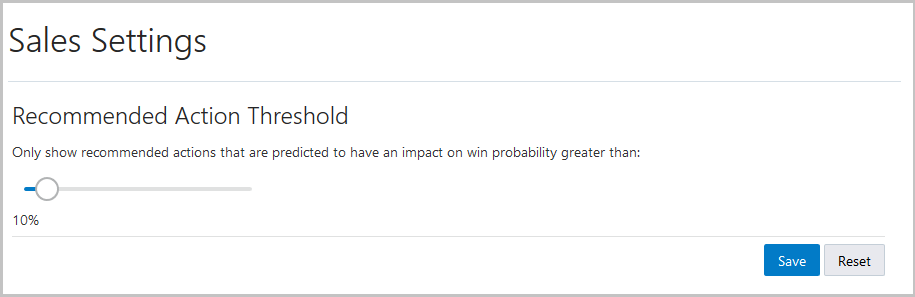
Recommended Action Threshold Setting
Steps to Enable
No steps are required to enable this feature.
Key Resources
This document will continue to evolve as existing sections change and new information is added. All updates appear in the following table:
| Date | Feature | Notes |
|---|---|---|
| 05 OCT 2018 | Created initial document. |
This document outlines the features in Oracle Adaptive Intelligent Apps for Customer Experience and describes any tasks you might need to perform for this service. Each section includes a brief description of the feature, the steps you need to take to enable or begin using the feature, any tips or considerations that you should keep in mind, and the resources available to help you.
| Action Required to Enable Feature |
||||
|---|---|---|---|---|
| Feature |
Automatically Available |
End User Action Required |
Administrator Action Required |
Oracle Service Request Required |
|
||||
Data File Ingestion Details for Third-Party Commerce Applications |
|
|||
Oracle Adaptive Intelligent Apps for Customer Experience provides personalized, dynamic, and continuously adaptive offers across B2C commerce and marketing platforms. It delivers the product recommendations and promotions through commerce storefronts and marketing channels.Oracle Adaptive Intelligent Apps for Customer Experience provides personalized, dynamic, and continuously adaptive offers across B2C commerce and marketing platforms. It delivers the product recommendations and promotions through commerce storefronts and marketing channels.
Enhanced Filters in Recommendation Widgets
You can specify a broader selection of criteria to restrict the recommendations offered on your commerce sites. For example, you can limit the recommendations to new or on sale products only, or to products of specific collections or brands, or a combination.
Use the predefined widget templates for Oracle Commerce Cloud or configure restriction filters in your widget code for third-party commerce applications. The following changes enable you to manage restrictions using more complex filtering:
- For Oracle Commerce Cloud, three fields were added to widget settings pages, replacing the previous Filter field
- For third-party applications, the filter function now offers syntax that's more complex.
ORACLE COMMERCE CLOUD
The following screen capture shows the options to set restrictions for a widget in Oracle Commerce Cloud.
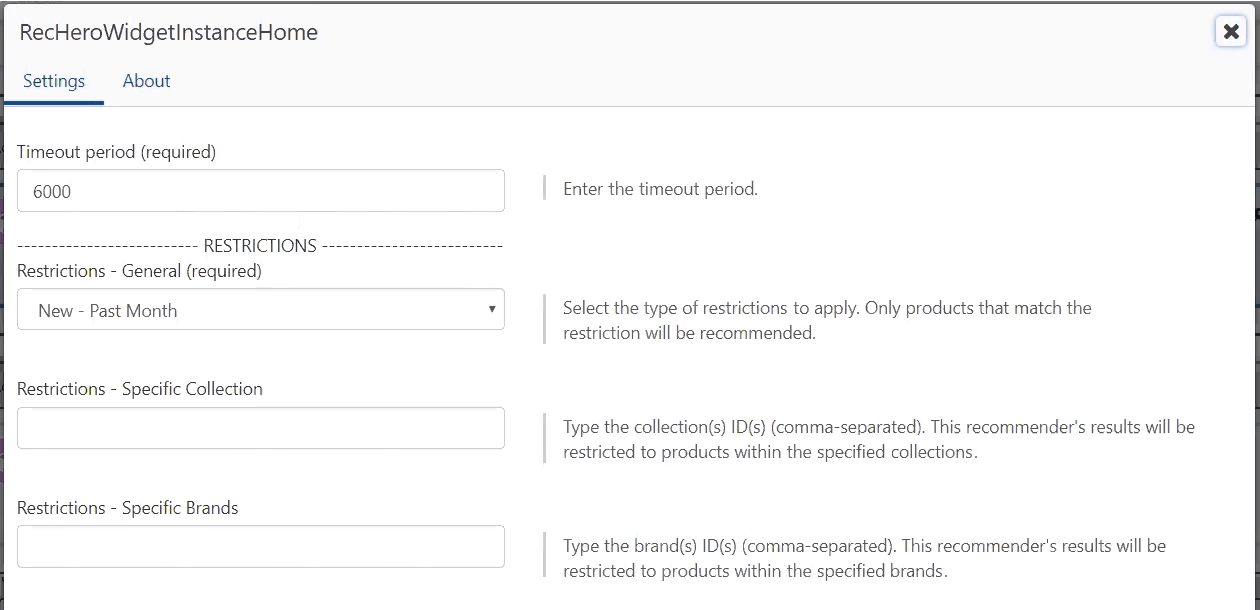
Recommendation Widget Restrictions in Oracle Commerce Cloud
To use restrictions in an Oracle Commerce Cloud widget:
- Select one of these general restrictions, or select None (a selection is required).
- Parent Collection (products only in the collection being viewed or searched)
- Parent Brand (products only of the brand being viewed or searched)
- On Sale
- New - Past Month
- New - Past Week
- New - Past Day
- To show products of one or more specific brands only, enter the brand ID or comma-separated brand IDs.
- To show products in one or more specific collections only, enter the collection ID or comma-separated collection IDs.
OTHER COMMERCE APPLICATIONS
The following code snippet shows an example of adding a filter that will recommend only products that are in the product category PC1.
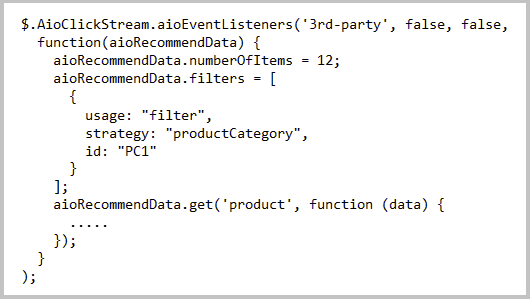
Filter Snippet in Widget Code
To use filters in a widget for a third-party commerce application, add your code directly before the get command.
Steps to Enable
If you are using Oracle Commerce Cloud and you already have widgets configured for adaptive intelligence, you must make the following modifications. For each widget extension where you use adaptive intelligence:
- On the Commerce Widgets page, enter the extension ID and download the latest widget code.
- Upload the ZIP file to installed extensions in Oracle Commerce Cloud.
- Copy over your modifications using the editor in Oracle Commerce Cloud.
- Change the settings to use the desired restrictions.
There are no steps to enable this feature for other commerce applications.
Tips And Considerations
- The machine-learning algorithms work best when no restrictions are applied so that there’s sufficient opportunity to learn and react to preferences and behavior. Because restrictions and filters you use will affect recommendations, it’s best practice to use them only in special circumstances.
- Depending on how you set up your recommendation widgets, be careful that you don’t specify conditions that cancel each other out or affect recommendations in a way you didn’t expect. For example, if you want to show only products in Brand123, but you also selected the Parent Brand restriction, a shopper won’t see any adaptive intelligent recommendations unless the page is already showing Brand123 products.
Key Resources
Data File Ingestion Details for Third-Party Commerce Applications
You can now view more details about historical activity on the Past Loads tab and manage the file ingestion queue. The Past Loads tab lists all files that started loading along with their details, such as status and the number of records ingested. The Files in Queue tab shows new options to disable the ingestion queue and delete unprocessed files.
To view historical data load activity:
- On the Data Sources page for your connected commerce application, click View Status > Data Ingestion Status.
- Click the object type whose past data load activity you want to view.
- Select the date range to view, either Past 24 Hours or Past 1 Week.
- Click the Past Loads tab.
The following screen capture shows an example of the Past Loads tab for load activity for consumer orders.
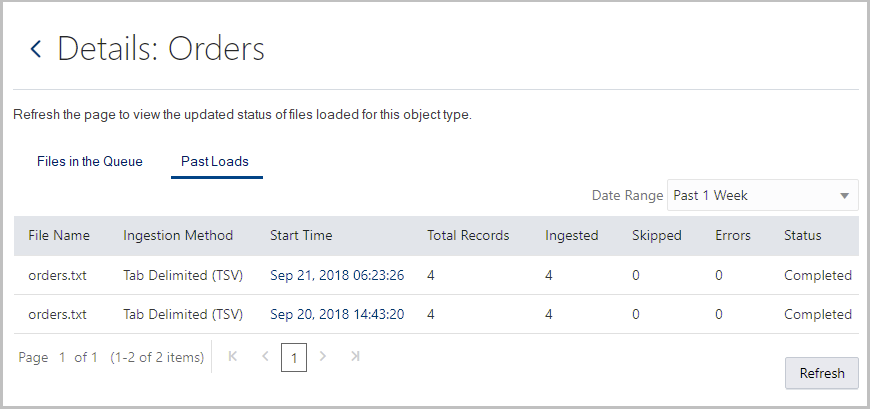
Past Loads Tab
To pause the ingestion queue or delete files not yet loaded:
- On the Data Sources page for your connected commerce application, click View Status > Data Ingestion Status.
- Click the object type whose ingestion queue you want to view.
- To disable the ingestion queue, click the Disable toggle.
- To delete a file, click the Delete icon in the row of the file not yet processed.
The following screen capture shows an example of the Files in the Queue tab for load activity for consumer orders.
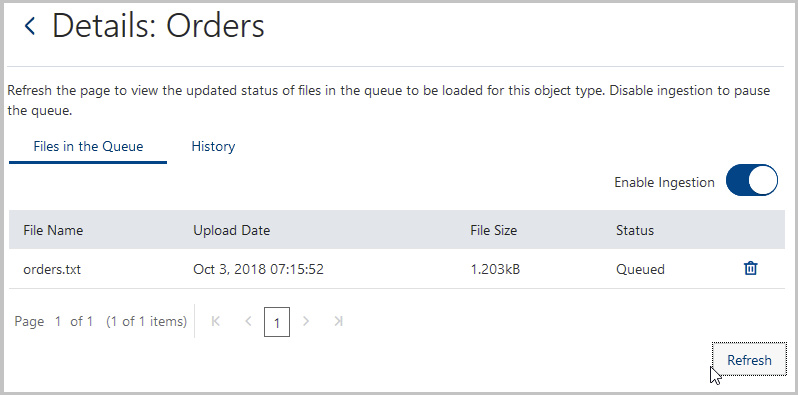
Files in the Queue Tab
Steps to Enable
No steps are required to enable this feature.
This document will continue to evolve as existing sections change and new information is added. All updates appear in the following table:
| Date | Feature | Notes |
|---|---|---|
| 07 SEP 2018 | Created initial document. |
This document outlines the features in Oracle Adaptive Intelligent Apps for Customer Experience and describes any tasks you might need to perform for this service. Each section includes a brief description of the feature, the steps you need to take to enable or begin using the feature, any tips or considerations that you should keep in mind, and the resources available to help you.
| Action Required to Enable Feature |
||||
|---|---|---|---|---|
| Feature |
Automatically Available |
End User Action Required |
Administrator Action Required |
Oracle Service Request Required |
|
||||
|
||||
|
||||
|
||||
|
||||
|
||||
Oracle Adaptive Intelligent Apps for Customer Experience automatically predicts the best-performing combination of send-time and path for each customer. These predictions are based on interaction history, profiles, and content metadata to optimize marketing orchestration for a defined business metric.
Enhanced Navigation to Data Reports
The View Status button on the Data Sources page now functions as a menu with two options:
- Data Ingestion Status: Goes to a page to view current and latest ingestion details of data files for object types, such as orders and consumers.
- Clickstream Status: Goes to a page to view details about the latest clickstream events over the past seven days for a selected site.
The following screen capture shows the new View Status menu button.
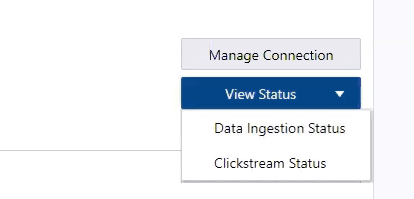
View Status Menu Button
Steps to Enable
No steps are required to enable this feature.
View clickstream status to monitor the status of events over the last seven days for a specified site. You can view data for various events, such as the number of times users viewed products or logged on to a commerce site.
To view clickstream data:
- On the Data Sources page for your connected commerce application, click View Status > Clickstream Status.
- Select the site for the clickstream data you want to view.
- Click Refresh to view the latest clickstream data. Note: The clickstream data is polled into reports every fifteen minutes. If you don’t see the updates you’re looking for, try again later.
The following screen capture shows the Clickstream Status page.
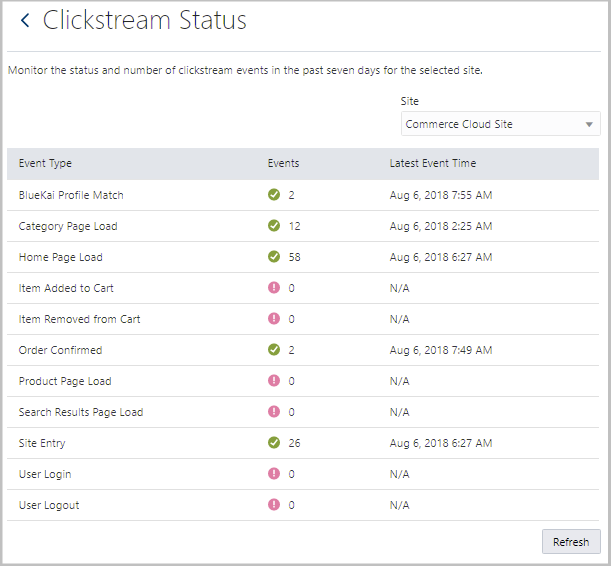
Clickstream Status Page
Steps to Enable
No steps are required to enable this feature.
Key Resources
Real-Time Data Ingestion Reporting
Monitor the status in real time of the data files being ingested for specified objects, such as products, orders, and consumers. Refresh the Data Ingestion Status page to get the most recent status.
The following screen capture shows the most recent load activity for a file containing consumer data.
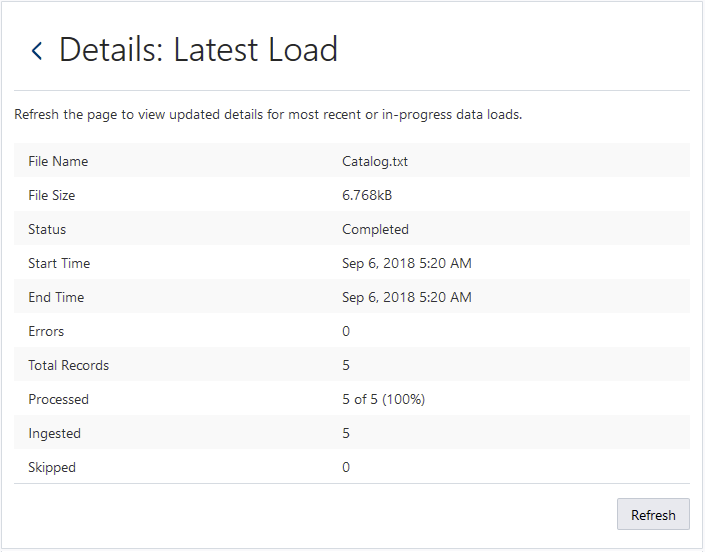
Data Ingestion Report by Latest Load Time
To view the latest load details for a specific object type:
- On the Data Sources page for your connected commerce application, click View Status > Data Ingestion Status.
- Click the link in the Start Time column for the object type you want.
Steps to Enable
No steps are required to enable this feature.
Key Resources
Data Protection Rules Enhancement
The REST API and data loaders now support more attributes related to consumer data protection. These attributes enable data protection rules to ensure that a shopper’s data is collected only when both of the following conditions are true:
- Consent information about Oracle Adaptive Intelligent Apps for CX was disclosed to shoppers
- The shopper has explicitly granted consent after the disclosure timestamp
The following table lists the new attributes and their resources:
| REST Endpoint | Attribute | Description |
|---|---|---|
| /v1/consumers |
shopperConsent |
The shopper consent status value. Valid enumeration values are GRANTED, NOT_GRANTED, or NOT_REQUIRED (for tenants who have no consent requirement for their sites). |
| /v1/consumers |
shopperConsentTimestamp |
The Unix timestamp (in milliseconds) that the consumer granted or revoked consent. Must be provided only when shopperConsent is GRANTED. |
| /v1/sites |
consentTimeThreshold |
The Unix timestamp (in milliseconds) that information about Oracle Adaptive Intelligent Apps for CX was disclosed to shoppers. |
Steps to Enable
No steps are required to enable this feature.
Tips And Considerations
To set the consent time threshold across your sites, use a PUT call similar to the following cURL example. Note that the siteID value of “1” represents the default tenant site, which applies for all sites in multisite deployments.
curl -X PUT --header 'Content-Type: application/json' --header 'Accept: application/json' -d '{ \ "siteId": "1", \ "consentTimeThreshold": 1532677789000 \ }' 'https://my-aicx.oraclecloud.com:9002/offers/rest/v1/sites'
To use the REST API to set consent status and timestamp for a consumer, use a POST call similar to the following cURL example:
curl -X POST --header 'Content-Type: application/json' --header 'Accept: application/json' -d '{ \ "consumers": [ \ { \ "consumerId": "12345678", \ "shopperConsent": "GRANTED", \ "shopperConsentTimestamp": 1532677789000 \ } \ ] \ }' 'https://my-aicx.oraclecloud.com:9002/offers/rest/v1/consumers'
To use the file loader to include consumer consent data, ensure to include the following columns as the last two attributes in your Oracle Commerce Cloud or TSV format consumer data files:
- shopperConsent
- shopperConsentTimestamp (Standard ISO 8601 format. Supply a value only when shopperConsent value is GRANTED.)
Oracle Adaptive Intelligent Apps for Customer Experience provides guidance for salespeople to increase their win rates with data-driven pipeline management and recommendations for the next best sales action. Salespeople benefit from advanced machine-learning techniques to optimize customer engagement.
Automatic Removal of Consumer Data When Consent is Removed
If your consumers have given explicit consent to use their data in machine learning, you can ingest their data to make adaptive intelligent recommendations. When consumers remove consent, their data should be deleted in Oracle Engagement Cloud. The data is deleted from Oracle Adaptive Intelligent Apps when the contact record is next ingested.
Steps to Enable
No steps are required to enable this feature.
Key Resources
The Insights page now features a new report, Engagement. Use the engagement report to review how salespeople are engaging with the recommended actions that adaptive intelligent models generate for their opportunities.
View the graph to understand how recommended actions are trending within a specified date range. If salespeople have marked most recommendations as good, it indicates positive engagement. If the level of feedback is very low, verify that salespeople are able to view the recommendations.
The following screen capture shows the engagement report displaying the feedback options in counts.

Insights Engagement Report
Steps to Enable
No steps are required to enable this feature.
Key Resources
This document will continue to evolve as existing sections change and new information is added. All updates appear in the following table:
| Date | Feature | Notes |
|---|---|---|
| 03 AUG 2018 | Created initial document. |
This document outlines the features in Oracle Adaptive Intelligent Apps for Customer Experience and describes any tasks you might need to perform for this service. Each section includes a brief description of the feature, the steps you need to take to enable or begin using the feature, any tips or considerations that you should keep in mind, and the resources available to help you.
| Action Required to Enable Feature |
||||
|---|---|---|---|---|
| Feature |
Automatically Available |
End User Action Required |
Administrator Action Required |
Oracle Service Request Required |
|
||||
|
||||
|
||||
Oracle Adaptive Intelligent Apps for Customer Experience provides personalized, dynamic, and continuously adaptive offers across B2C commerce and marketing platforms. It delivers the product recommendations and promotions through commerce storefronts and marketing channels.
Enhanced Deletion of Consumer Data
A new method in the REST API enables the streamlined process of deleting consumer data. The process creates a queue of consumer IDs, and deletes any personal data for those consumers as part of the next scheduled job. In addition, the process anonymizes all past history of clickstream events and orders. If the shopper returns to the storefront later, the rules for data collection would be the same as a new user.
To use this feature to add consumers to the deletion queue, you can:
- Call the REST endpoint for individual consumers, for example using cURL or the Swagger interface.
- Add a call to the REST endpoint in your code to add consumers to the deletion queue automatically, for example, if they opt out of cookie tracking.
Steps to Enable
No steps are required to enable this feature.
Key Resources
Oracle Adaptive Intelligent Apps for Customer Experience automatically predicts the best-performing combination of send-time and path for each customer. These predictions are based on interaction history, profiles, and content metadata to optimize marketing orchestration for a defined business metric.
If your consumers have given explicit consent to use their data for marketing purposes, you can ingest their data to make adaptive intelligent recommendations. When consumers remove consent, all data will be removed from Oracle Adaptive Intelligent Apps when the contact record is next ingested.
If you use a single consent option for your marketing application and machine learning together, the consent also applies to data that you ingest from your marketing application.
Steps to Enable
No steps are required to enable this feature.
Key Resources
A new REST API enables the process of deleting consumer data that you’ve collected to use in machine learning for marketing purposes. Use REST endpoints to add one or more consumer IDs of consumers whose data you want to delete.
To use this feature to delete consumers’ data, you can do one of the following:
- Manually use the API REST endpoint via Swagger or any other API tool
- Automatically call the API from a CRM system through an automation workflow
The consumer data is deleted as soon as the REST endpoint is called.
Steps to Enable
No steps are required to enable this feature.
Key Resources
This document will continue to evolve as existing sections change and new information is added. All updates appear in the following table:
| Date | Feature | Notes |
|---|---|---|
| 16 JUL 2018 | Best Sales Actions | Updated document. Added new feature delivered in 18.7. |
| 06 JUL 2018 | Created initial document. |
This document outlines the features in Oracle Adaptive Intelligent Apps for Customer Experience and describes any tasks you might need to perform for this service. Each section includes a brief description of the feature, the steps you need to take to enable or begin using the feature, any tips or considerations that you should keep in mind, and the resources available to help you.
| Action Required to Enable Feature |
||||
|---|---|---|---|---|
| Feature |
Automatically Available |
End User Action Required |
Administrator Action Required |
Oracle Service Request Required |
|
||||
|
||||
|
||||
|
||||
|
||||
|
||||
|
||||
|
||||
|
||||
|
||||
|
||||
|
||||
|
||||
Common Technology and User Experience
Unified User Interface for Customer Experience (CX)
Experience the seamless grouping of commerce, sales, and marketing features through the unified user interface. What was formerly Oracle Adaptive Intelligent Offers is now part of a single merged UI, Oracle Adaptive Intelligent Apps for Customer Experience.
Manage your data connections, insights, and supervisory controls across commerce, sales, and marketing from the unified Home page. The following screen capture shows the unified Home page.
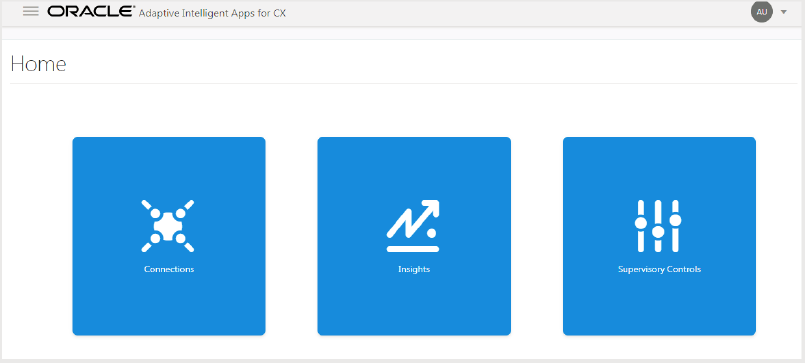
Home Page
The following screen capture shows the unified Data Sources page.

Data Sources Page
Steps to Enable
No steps are required to enable this feature.
Unified Roles in Oracle Identity Cloud Service
Use Oracle Identity Cloud Service to assign users to the following roles that were renamed to support unifying the features for Oracle Adaptive Intelligent Apps for CX:
- Oracle Adaptive Intelligent CX User (formerly named Oracle Adaptive Intelligent Merchandizer)
- Oracle Adaptive Intelligent CX Operations Manager (formerly named Oracle Adaptive Intelligent Offers Operations Manager)
Steps to Enable
No steps are required to enable this feature.
Easily navigate to the features you want using the new application menu. Click to expand menu items and then click the individual features you want to go to.
You can now find the following features under Supervisory Controls:
- Boosts and Constraints for commerce products and promotions
- Policies for product inventory, price, and brand exclusivity
The following screen capture shows the new application menu.

Application Menu
Steps to Enable
No steps are required to enable this feature.
Online Help and Oracle Help Center
Access user assistance and other resources directly on the Oracle Help Center. The Help links in the application open topics directly in the guides that reside in the Oracle Help Center instead of a separate Help system. This approach provides a single help site for users that’s responsive on mobile devices, searchable by internet search engines, and available outside of your intranet.
Viewing Help topics in the Oracle Help Center also provides built-in features such as:
- Searching within and across guides
- Printing a single topic or guide
- Downloading a PDF version of the guide
The following screen capture shows a Help icon and the Oracle Help Center topic that is the target for the Help link.

Help Link and Topic Target on the Oracle Help Center
Steps to Enable
No steps are required to enable this feature.
Third-Party Data Connection Enhancements
Use the add connection wizard to facilitate simpler data ingestion from external systems. Select the ingestion method for each object you specify. You can select one or a combination of ingestion methods.
The following screen capture shows the Add Other Commerce Application Connection dialog box where you can select the ingestion method for each object type.
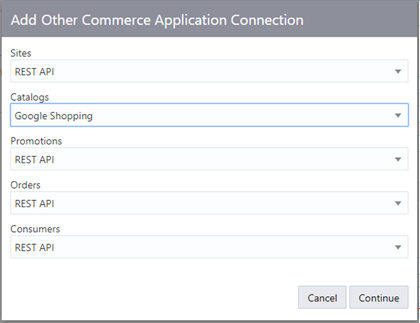
Add Connection Dialog Box for Other Commerce Applications
Steps to Enable
No steps are required to enable this feature.
Key Resources
For more information about importing third-party data, refer to the following topics:
Monitor the status of data being pulled into the application directly from your commerce system or manually from data files. View the number of objects ingested by object type as shown in the following screen capture.
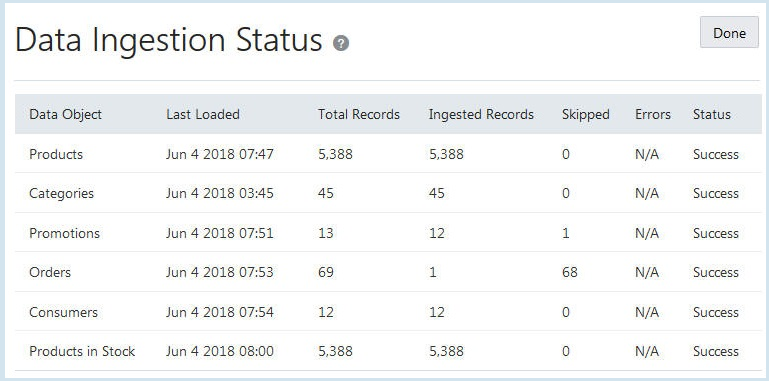
Data Ingestion Status Page for Commerce Cloud Data
Steps to Enable
No steps are required to enable this feature.
Key Resources
For more information, refer to Viewing Data Ingestion Status.
Category Filter for Oracle Responsys Email Campaigns
Filter the recommendations that email widgets display to meet specific business use cases. The CATEGORIES_FILTER dynamic variable in Oracle Responsys provides the ability to limit product recommendations to a specified category or categories of interest
Setting this filter limits recommendations for the email campaign to the specified category or categories. For example when the filter is set for the Women’s Jackets category, the product recommendations in the email would display only products in that category. When no category filter is set, the email would potentially display product recommendations in other categories.
Steps to Enable
This feature is enabled by default, but to use it, filtering must be configured in Oracle Responsys. To use category filtering for an email campaign, on the Data Sources page, create a dynamic variable as shown in the following screen capture.

Dynamic Variables in Oracle Responsys
Key Resources
For more information, refer to Configuring Oracle Responsys.
Oracle Adaptive Intelligent Apps for Customer Experience automatically predicts the best-performing combination of send-time and path for each customer. These predictions are based on interaction history, profiles, and content metadata to optimize marketing orchestration for a defined business metric.
The adaptive intelligent switch in Oracle Responsys programs can replace a traditional rules-based data switch normally used to route audiences to different paths or experiences in a marketing orchestration. It can also replace a random allocation switch normally used for testing. The adaptive intelligent switch uses consumer marketing behavior and profile data to predict the best performing path for each individual. It combines this data with the best time to send the consumer along that path.
The marketer builds the paths out from the adaptive intelligent switch and configures the switch by setting the timeout and path. The adaptive intelligent models do the decision making.
The following screen capture shows a program in Oracle Responsys that uses an adaptive intelligent switch:

Adaptive Intelligent Switch on Program Designer in Oracle Responsys
Steps to Enable
To enable this feature, file a service request with Oracle Support to enable the Adaptive Intelligent Connectivity feature in Oracle Responsys.
You can exert supervisory controls on program switches based on your organizational requirements. You can adjust the likelihood of consumers being routed on different paths of a program switch by boosting or constraining the paths. You can also choose to disable a path if you don’t want to route customers through that path at all.
You can review the throughput of program switches and paths in the past, and the predicted throughput in the near future.
The following screen capture shows the program summary page in Oracle Adaptive Intelligent Apps for CX that lists all the programs along with their status:
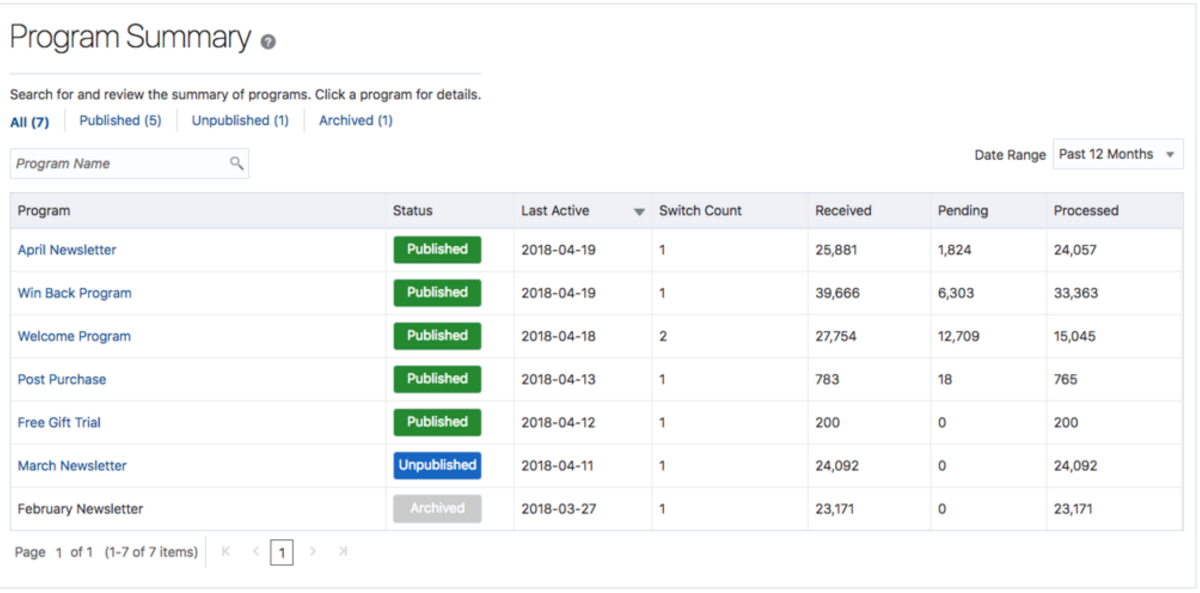
Program Summary Page
The following screen capture shows the program detail page with the switches and paths associated with the program:
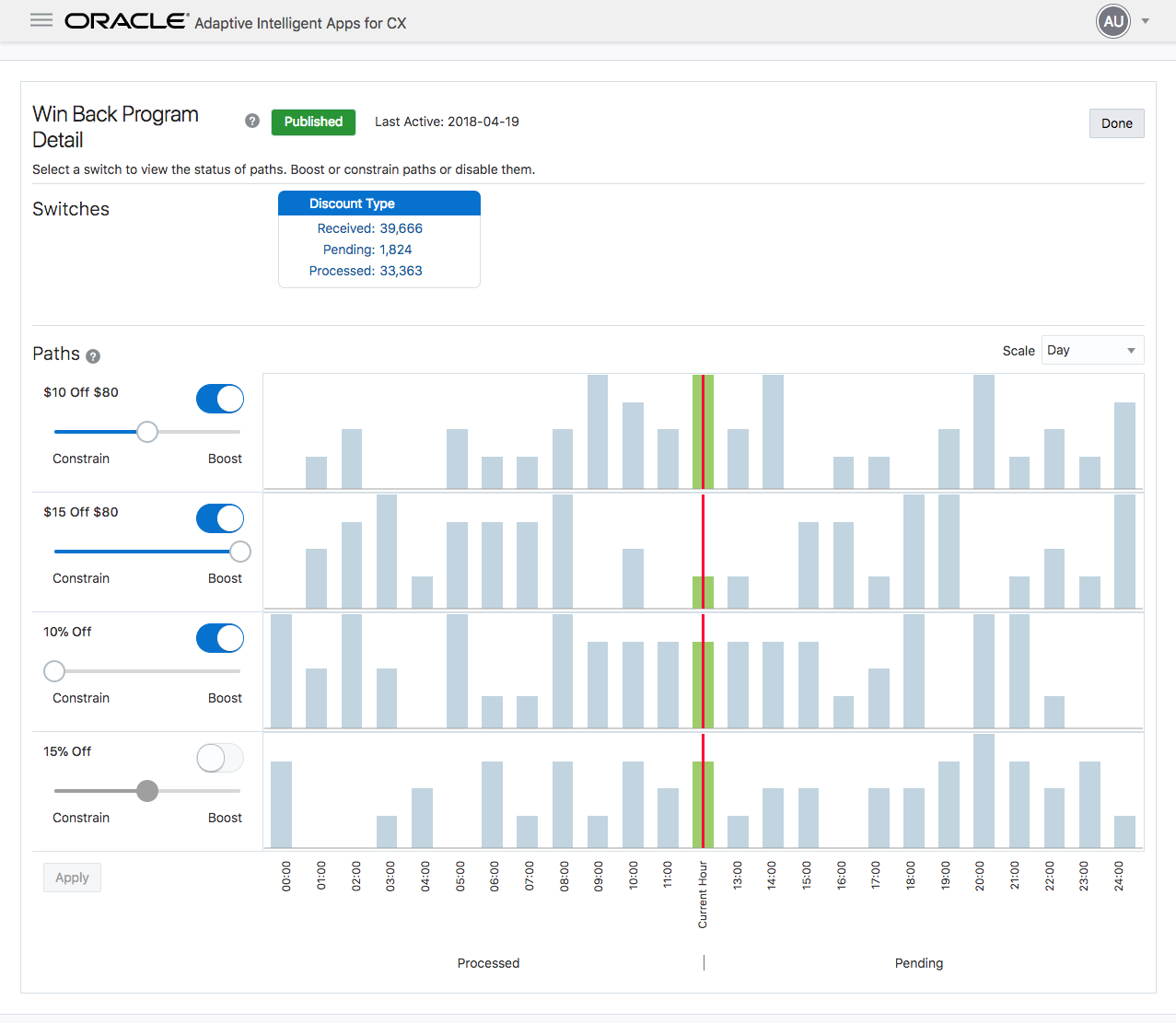
Program Detail Page
Steps to Enable
No steps are required to enable this feature.
Tips And Considerations
Overriding the default settings using supervisory controls must be done for special circumstances only. When you are aware of a change in your organization, such as a new product or mobile app releases, technical issues with a channel, and so on, you can choose to exert supervisory controls.
Key Resources
For more information about program supervisory controls, see Supervisory Controls for Marketing.
Ingestion of Oracle Responsys Data
Connecting to Oracle Responsys is a quick, simple process. The integration enables initial and ongoing data ingestion. The ongoing data ingestion includes real-time status of programs, switches, and paths in Oracle Responsys as well as customer profile and marketing behavior events.
The following screen capture shows the connection dialog box with fields for Oracle Responsys connection information.
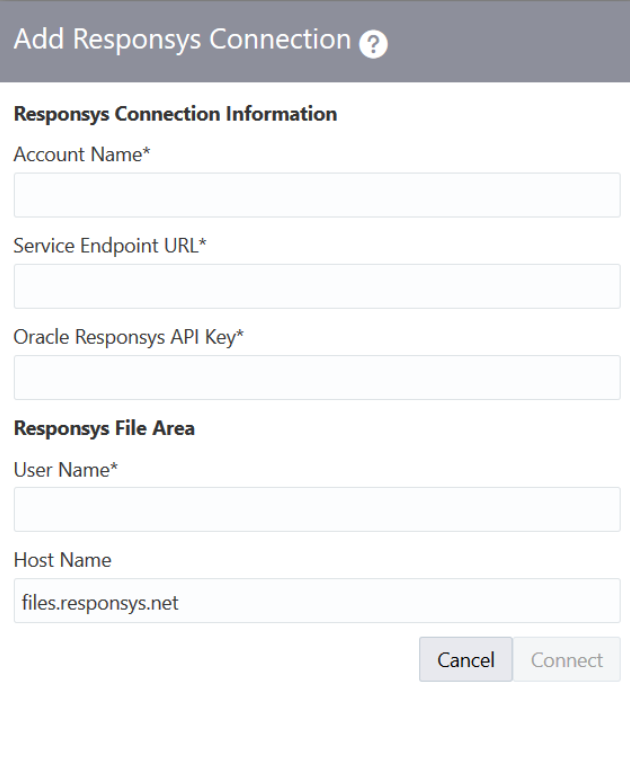
Add Connection Dialog Box for Oracle Responsys
Steps to Enable
The steps required to enable the ingestion are detailed in Importing Data from Oracle Responsys.
Oracle Adaptive Intelligent Apps for Customer Experience provides guidance for sales representatives to increase their win rates with data-driven pipeline management and recommendations for the next-best sales action. Sales representatives benefit from advanced machine-learning techniques to optimize customer engagement.
Use the feature to provide intelligent guidance on the best sales action to improve your sales representatives’ chances of winning an opportunity. Alert your sales representatives of a significant difference between the adaptive intelligent prediction and the current business forecast for an opportunity’s win probability. Your sales representatives can view opportunities with warning icons on the Opportunities page along with the recommended action, and take the best sales action.
The following screen capture shows the adaptive intelligent win percentage warning icon on the Opportunities page.
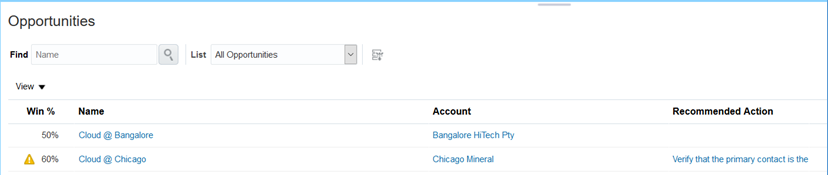
Opportunities Page with Win Percentage Warning Icon
The following screen capture shows the recommendation for an opportunity.
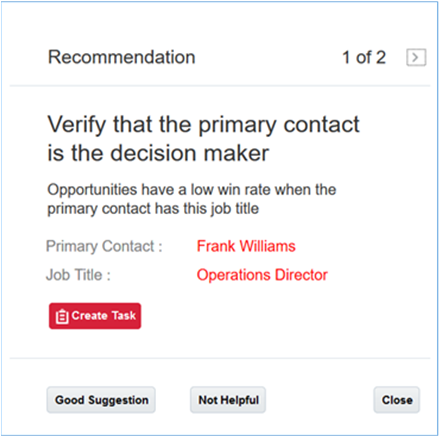
Recommendation Dialog Box for an Opportunity
Steps to Enable
The steps required to enable the recommendations for next best sales action are detailed in the topic Configuring Oracle Sales Cloud for Adaptive Intelligent Apps for CX in the Getting Started with Adaptive Intelligent Sales guide.
Key Resources
- For more information about best sales actions, see Welcome to Adaptive Intelligent Sales.
Use the Insights page to evaluate the performance of adaptive intelligent models. Review the number of opportunities in the connected instance of Oracle Sales Cloud. Confirm that recommendations are being displayed on Oracle Sales Cloud opportunities by reviewing the Recommended Actions graph.
The following screen capture shows the Insights page with the open opportunities and closed opportunities in the last 30 days, along with the graph for recommended actions.
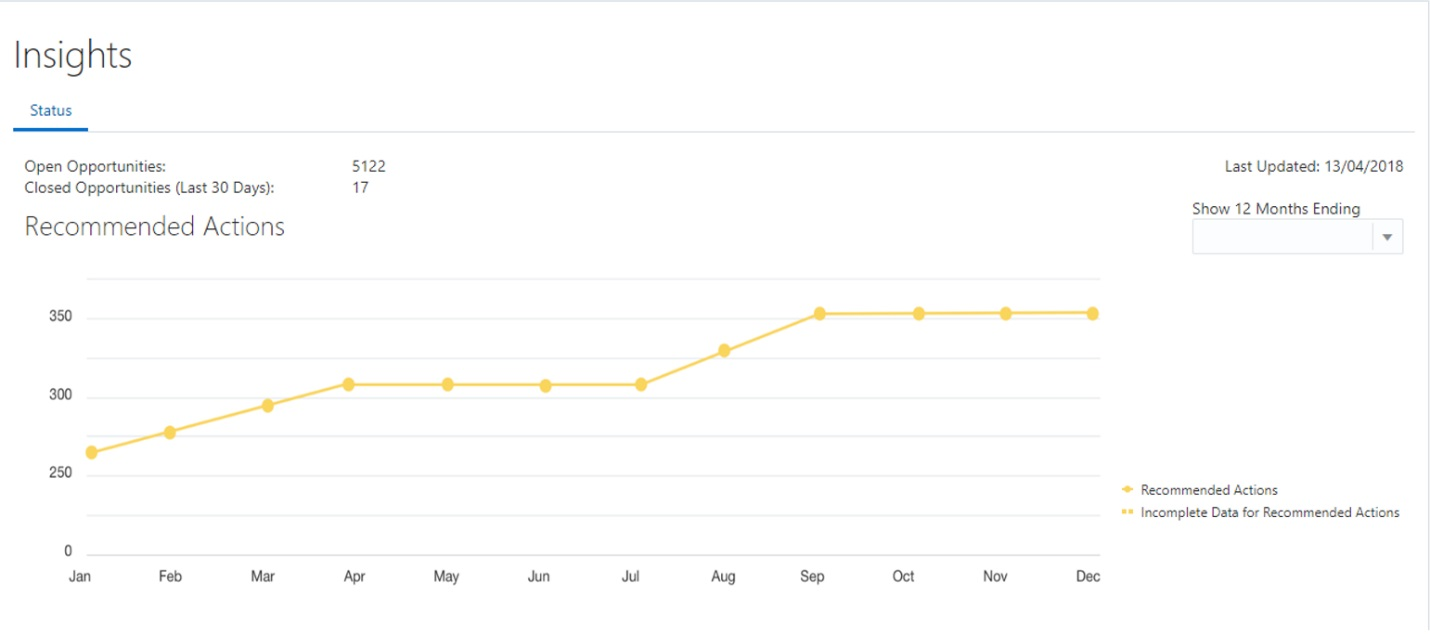
Insights Page
Steps to Enable
No steps are required to enable this feature.
Key Resources
For more information about insights, see Sales Insights Overview.
Ingestion of Oracle Sales Cloud Data
Connecting to Oracle Sales Cloud is quick and easy. The integration enables initial and ongoing data ingestion of opportunities. The ongoing data ingestion includes real-time status of number of open and closed opportunities.
The following screen capture shows the connection dialog box with fields for Oracle Sales Cloud connection information.
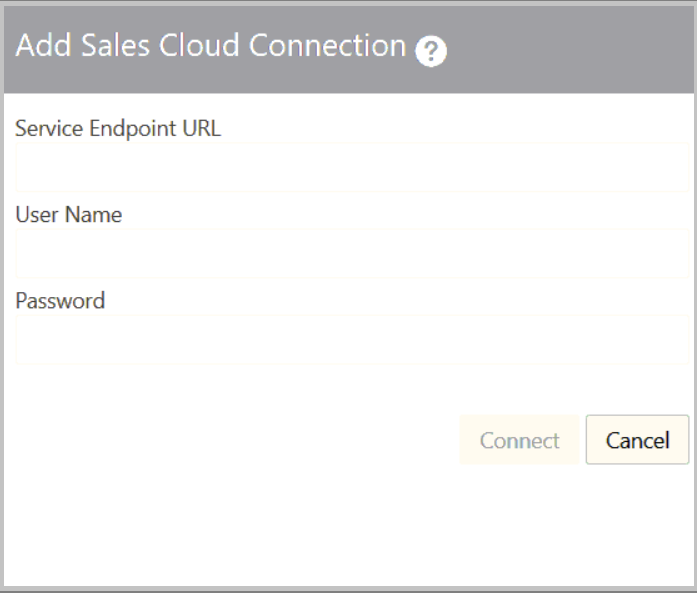
Add Connection Dialog Box for Oracle Sales Cloud
Steps to Enable
The steps required to enable the ingestion are detailed in Importing Data from Oracle Sales Cloud.
Key Resources
For more information on ingesting data from Oracle Sales Cloud, see Importing Data from Oracle Sales Cloud.
This document will continue to evolve as existing sections change and new information is added. All updates appear in the following table:
| Date | Feature | Notes |
|---|---|---|
| 04 MAY 2018 | Created initial document. |
This document outlines the features in Oracle Adaptive Intelligent Offers Cloud Service and describes any tasks you might need to perform for this service. Each section includes a brief description of the feature, the steps you need to take to enable or begin using the feature, any tips or considerations that you should keep in mind, and the resources available to help you.
| Action Required to Enable Feature |
||||
|---|---|---|---|---|
| Feature |
Automatically Available |
End User Action Required |
Administrator Action Required |
Oracle Service Request Required |
|
||||
|
||||
|
||||
Oracle Adaptive Intelligent Offers provides personalized, dynamic, and continuously adaptive offers across B2C marketing and commerce platforms. It delivers the product recommendations and promotions through commerce storefronts and marketing channels.
If there are special jurisdictions required for a storefront, an operations manager can indicate that shopper consent is required for each specified storefront. When a storefront requires shopper consent, no adaptive intelligent recommendations will be sent or shown to consumers, nor any data collected, until notification of consent is received.
The following screen capture shows the Data Sources page after a connection is established to Oracle Commerce Cloud. For connections to other commerce applications, use the REST API for setting the shopper consent requirement.
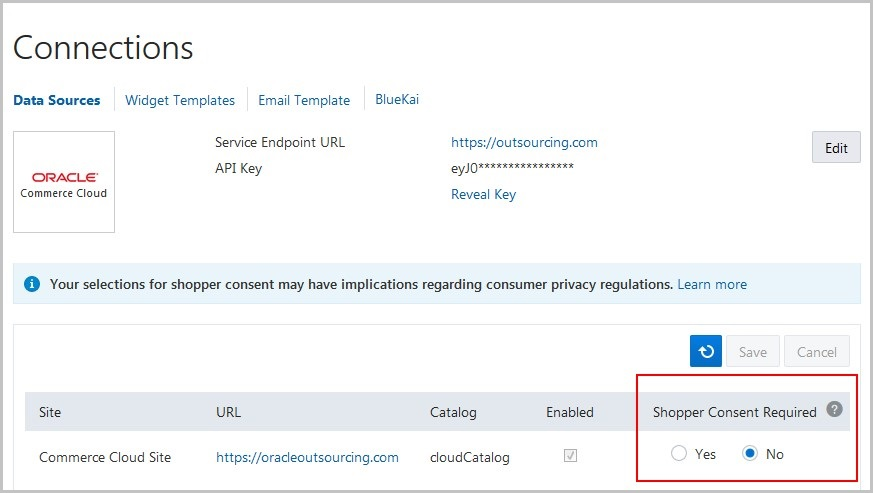
Data Sources Page Showing the Shopper Consent Required Options
Steps to Enable
No steps are required to enable this feature.
Key Resources
For more information about shopper consent, go to Help in the application for the following topics:
- Privacy, Cookies, and Shopper Consent
- Data Protection
Connected Audiences for Oracle BlueKai
If you use Oracle BlueKai, you can activate individual products to send data to BlueKai about consumers who responded to product offers. After you configure rules for adaptive intelligence, your campaigns will include consumer data for the activated products.
The following screen capture shows a product details page after a connection is established to Oracle BlueKai.
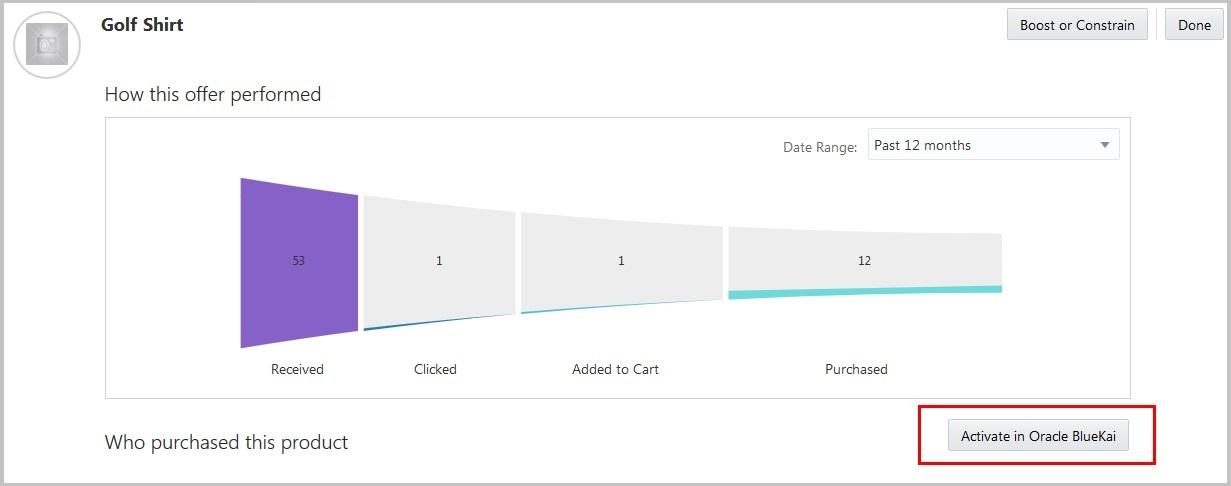
Product Details Page Showing the Activate Button
Steps to Enable
Before you can enable this feature, you must file a service request with Oracle BlueKai to enable your connection. Then you can configure campaigns in BlueKai using the adaptive intelligence classifications for those products.
Tips And Considerations
Activating a product for its data to be sent to BlueKai cannot be reverted, but will have no impact if the data is unused in BlueKai campaigns.
Key Resources
For more information about setting up connected audiences for Oracle BlueKai, go to Help in the application for the following topic:
- Connecting Audiences for Oracle BlueKai
Collections Filter for Oracle Commerce Cloud Widgets
You can now filter the recommendations that commerce widgets display to meet specific business use cases. The Category filter is the first available filter, which provides the ability to limit product recommendations within a parent collection. Setting this filter limits recommendations to the parent collection when a widget is placed on a product detail page or on a collection’s landing page on the storefront.
For example when the Category filter is set, and a shopper views the product details for Women’s Jacket A, the widget would display product recommendations for other products, but only those within the Women’s Jackets collection. Similarly, if a shopper views the landing page for the Women’s Jackets collection, the widget would display only product recommendations within that collection. When the Category filter isn’t set, the widget would potentially display product recommendations from other collections.
Steps to Enable
This feature is enabled by default, but to use it, filtering must be selected in Oracle Commerce Cloud. To use filtering in your widgets:
- In Oracle Commerce Cloud, click Design in the navigation menu.
- For each widget that you want to filter for the parent collection, in the Extensions section, select the widget and then click the Widget Settings icon.
- In the Filter list, select Category.
Tips And Considerations
If you have already downloaded the widget templates for your custom widgets, you must re-download the templates and replace those you already configured.
This document will continue to evolve as existing sections change and new information is added. All updates appear in the following table:
| Date | Feature | Notes |
|---|---|---|
| 04 APR 2018 | Created initial document. |
This document outlines the features in Oracle Adaptive Intelligent Offers Cloud Service and describes any tasks you might need to perform for this service. Each section includes a brief description of the feature, the steps you need to take to enable or begin using the feature, any tips or considerations that you should keep in mind, and the resources available to help you.
| Action Required to Enable Feature |
||||
|---|---|---|---|---|
| Feature |
Automatically Available |
End User Action Required |
Administrator Action Required |
Oracle Service Request Required |
|
||||
|
||||
|
||||
The Insights page now features a new and improved way of monitoring consumer behavior, tracking recommendations separately from multiple channels. The Overview tab showing the flow of consumer responses from different channels, such as commerce widgets and marketing emails, in a single Sankey diagram. Use the diagram to view the performance of recommendations sent to consumers within a specified data range.
Responses displayed include clicks, add-to-carts, and purchases, and only those occurring within 48 hours after recommendations.
The following screen capture shows the Insights page when multiple channels are set up for adaptive intelligence.
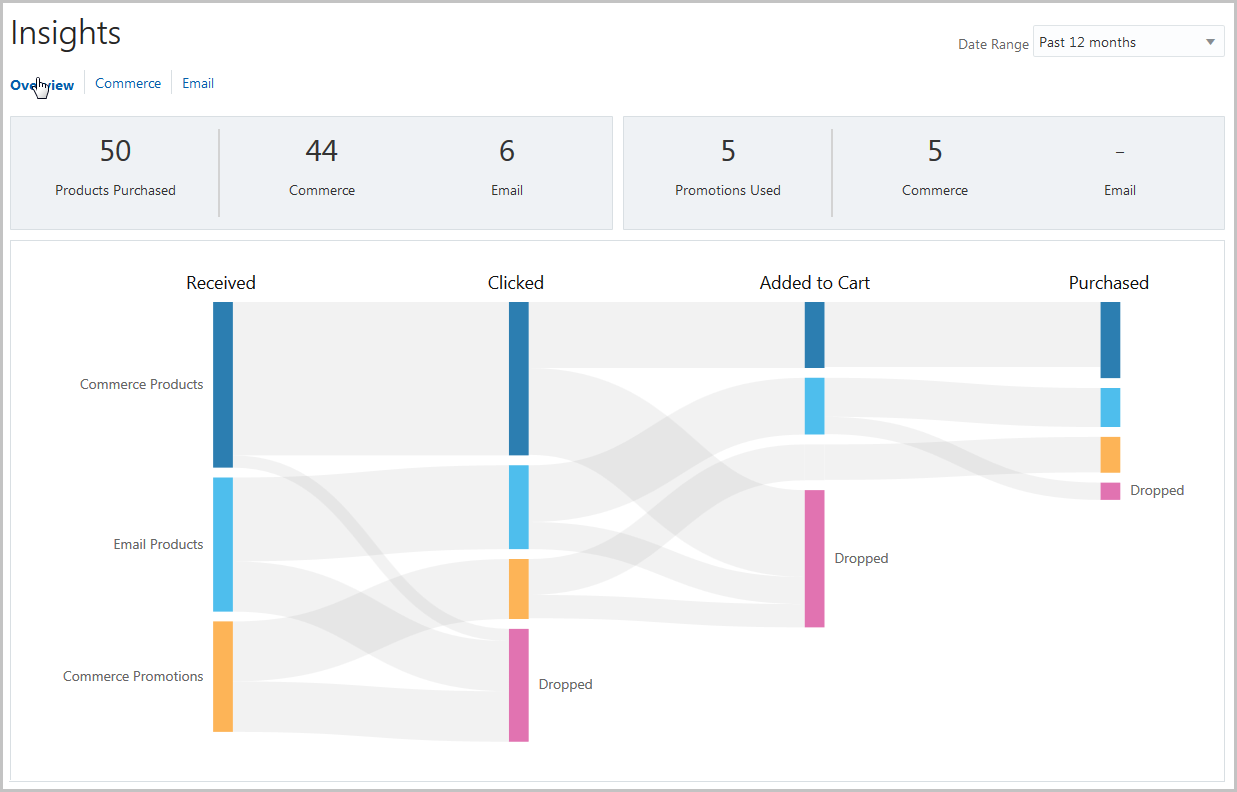
Insights Overview Page
The stage of recommendations for each channel flows from left to right, moving from received to purchased. When a consumer doesn’t move a received recommendation forward to the next stage within 48 hours, it’s considered dropped. Hover over each node to see the number of records for each stage.
Steps to Enable
No steps are required to enable this feature.
If you have multiple commerce storefronts, you have the option of enabling one or more sites for adaptive intelligent recommendations. This phase of this enhancement uses a single data model that supports site-specific catalogs and recommendations. You can use any of your widgets on all the sites that you enable.
The following screen capture shows the Connections page where you connect to Oracle Commerce Cloud sites.

Data Sources Page Showing Multisite Connections
The background jobs automatically check for new sites every 15 minutes. As more sites go live, you can check if any new sites were added by clicking the Refresh button on the Connections page.
For Oracle Commerce Platform and other commerce applications, there are no changes to the Connections page in this release, but support for this feature is provided through the REST API.
Steps to Enable
If use Oracle Commerce Cloud as your commerce application, no steps are required to enable this feature.
If you use Oracle Commerce Platform or a different commerce application, you must perform the initial data load and then enable your sites for adaptive intelligence using the REST API.
Tips And Considerations
- Enabling a site is permanent. You cannot disable a site you have already enabled.
- If you are using the REST API for recommendations or clickstream tracking and will be enabling multiple sites, you must ensure that your service calls use the POST methods with a specified site ID. For example, use/offers/widget/cs/{siteId} instead of /offers/widget/cs.
- If you have already downloaded the widget templates for your custom widgets, you must re-download the templates and replace those you already configured. Single-site widgets are not backward compatible with multiple sites.
Personalized Search for Oracle Commerce Cloud
Use the search integration in Oracle Commerce Cloud to refine search results to promote personalized product recommendations that are relevant to the shopper’s search query. Using the adaptive intelligent decision science, any records that are included in both the adaptive intelligent recommendations and the search results are added to the top of results lists in Oracle Commerce Cloud.
The following screen capture shows the Oracle Integrations page in Oracle Commerce Cloud where you select the search option for Adaptive Intelligent Apps.

Oracle Integrations Page in Commerce Cloud
Steps to Enable
No steps are required to enable this feature in Oracle Adaptive Intelligent Offers.
To enable this feature in Oracle Commerce Cloud:
- From the administration dashboard, select Oracle Integrations.
- Select and enable the AI Apps integration.
- Under Product Configuration, enter the URL for your instance of Oracle Adaptive Intelligent Offers and the number of recommendations you want returned.
- Publish your changes.
---

Copyright © 2018, Oracle and/or its affiliates. All rights reserved.
This document is provided for information purposes only, and the contents hereof are subject to change without notice.This document is not warranted to be error-free, nor subject to any other warranties or conditions, whether expressed orally or implied in law, including implied warranties and conditions of merchantability or fitness for a particular purpose. We specifically disclaim any liability with respect to this document, and no contractual obligations are formed either directly or indirectly by this document. This document may not be reproduced or transmitted in any form or by any means, electronic or mechanical, for any purpose, without our prior written permission.
Oracle and Java are registered trademarks of Oracle and/or its affiliates. Other names may be trademarks of their respective owners.
Intel and Intel Xeon are trademarks or registered trademarks of Intel Corporation.All SPARC trademarks are used under license and are trademarks or registered trademarks of SPARC International, Inc. AMD, Opteron, the AMD logo, and the AMD Opteron logo are trademarks or registered trademarks of Advanced Micro Devices. UNIX is a registered trademark of The Open Group.
