

This document will continue to evolve as existing sections change and new information is added. All updates appear in the following table:
| Date | Update Version | Notes |
|---|---|---|
| 07 SEP 2018 | Update 18.9 | Delivered new features in update 18.9. |
This document will continue to evolve as existing sections change and new information is added. All updates appear in the following table:
| Date | Feature | Notes |
|---|---|---|
| 07 SEP 2018 | Created initial document. |
This document outlines the features in Oracle Adaptive Intelligent Apps for Enterprise Resource Planning and describes any tasks you might need to perform for this service. Each section includes a brief description of the feature, the steps you need to take to enable or begin using the feature, any tips or considerations that you should keep in mind, and the resources available to help you.
| Action Required to Enable Feature |
||||
|---|---|---|---|---|
| Feature |
Automatically Available |
End User Action Required |
Administrator Action Required |
Oracle Service Request Required |
 |
||||
|
||||
|
||||
|
||||
|
||||
|
||||
Common Technology and User Experience
Use Oracle Identity Cloud Service to assign users to the User role or the Operations Manager role. These roles control which pages and features users can access.
- Users can analyze supplier opportunities and enroll suppliers into early payment programs
- Operations managers can additionally manage connections and define the allowable APR range for discounts
Steps to Enable
No steps are required to enable this feature.
Tips And Considerations
Your account administrator manages access to Oracle Identity Cloud Service to assign users to these roles.
Key Resources
All supplier address is secured in Oracle Cloud. No tracking technologies, such as cookies and device fingerprinting, are used.
Your system logs are stored in your regulatory region. They are accessible for service optimization only.
Steps to Enable
No steps are required to enable this feature.
Oracle Adaptive Intelligent Apps for Enterprise Resource Planning (ERP) is a suite of artificial intelligence and data-driven features. The features help finance and procurement professionals improve availability of working capital and expand visibility into supplier operations.
Ingestion of Supplier and Financials Data
Access supplier data from Oracle Procurement Cloud for adaptive intelligence to ensure that suppliers can be used for discount purposes. Data includes historical, new, and incremental changes to suppliers, supplier sites, and related supplier details.
Access transactional data from Oracle Financials Cloud to track the overall financial performance including discounts associated with early payments of the suppliers and related supplier sites.
The following screen capture shows the Connections page.
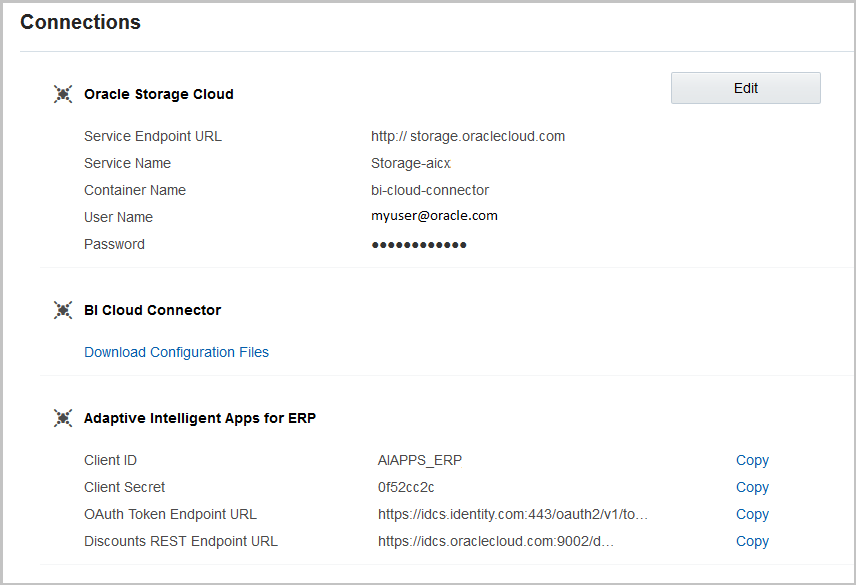
Connections Page
Steps to Enable
Steps required to set up and connect are described in Getting Started with Adaptive Intelligent Financials.
Key Resources
Users with the Operations Manager role can set and modify the allowable range of the APR percentage used when recommending early payment discounts to enrolled suppliers. This range is used by the adaptive intelligent model to calculate discounts and controls the APR range on the Supplier Details page to help users analyze supplier opportunities.
The following screen capture shows the Discounts Threshold Percentage setting.

Settings Page for Discounts Threshold Percentage
Steps to Enable
No steps are required to enable this feature.
To set the APR range:
- Sign in as a user with the Oracle Adaptive Intelligent ERP Operations Manager role.
- Click Settings.
- Enter the minimum APR percentage.
- Enter the maximum APR percentage.
- Click Save.
Tips And Considerations
As an Oracle Financial Cloud user, the APR that's recommended using the adaptive intelligent model should reflect the business goals of your buying organization. These goals, for example, can include your expected return rate on working capital as a floor and can also provide control over a ceiling rate to constrain the recommendations.
The Discounts Threshold Percentage range should reflect your organization's minimum expected return and maximum discount allowed to establish your business goals through decision science for APR recommendations. By default, the range is set as 0% to 200%. It should be a priority to establish a range that is appropriate for your organization. As a guideline, a typical industry benchmark for APR ranges would be 8% as a minimum value and 50% as a maximum value, delivering discount ranges from .2% to 12.5% based on days paid early.
Learn about your suppliers by viewing all the data collected about them, including past history of payments, pending invoices, and potential discounts offered. Use this data to refine supplier selection for payments programs, view performance, and predict how potential discounts affect your overall business.
The following screen capture shows the Early Payment Program Status page.
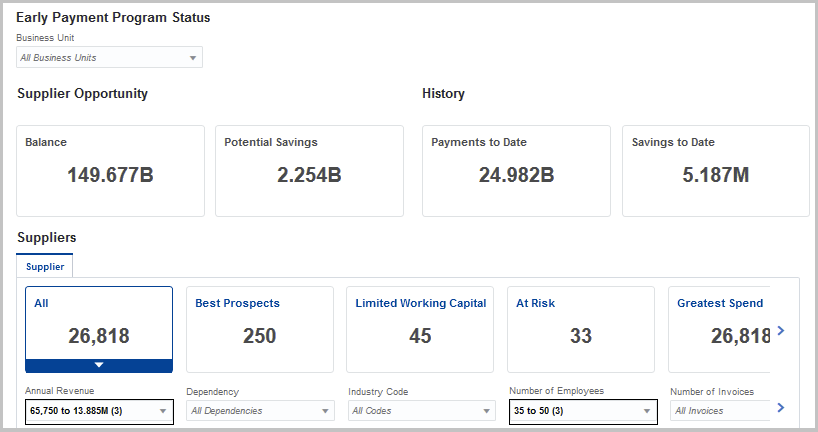
Early Payment Program Status Page
Steps to Enable
No steps are required to enable this feature, but you must complete all the setup steps. See: Quick Start
Key Resources
Enroll suppliers in the early payment program to make them eligible for discount recommendations in manual invoice payments initiated from Oracle Financials Cloud. After enrolling the supplier, you can create an individual payment that uses adaptive intelligence to derive discount amounts. Enrolling a supplier in the program also ensures that the APR recommendation extended to suppliers is agreed to and accepted.
The following screen capture shows a supplier's detail page where you can view prospective recommendations and enroll into the early payment program.
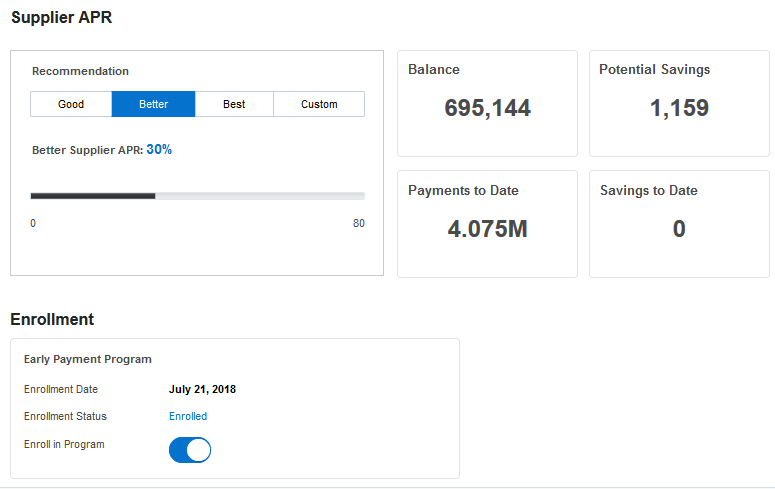
Supplier Early Payment Program Enrollment Option
Steps to Enable
No steps are required to enable this feature, but you must complete all the setup steps. See: Quick Start
Key Resources
---

Copyright © 2018, Oracle and/or its affiliates. All rights reserved.
This document is provided for information purposes only, and the contents hereof are subject to change without notice.This document is not warranted to be error-free, nor subject to any other warranties or conditions, whether expressed orally or implied in law, including implied warranties and conditions of merchantability or fitness for a particular purpose. We specifically disclaim any liability with respect to this document, and no contractual obligations are formed either directly or indirectly by this document. This document may not be reproduced or transmitted in any form or by any means, electronic or mechanical, for any purpose, without our prior written permission.
Oracle and Java are registered trademarks of Oracle and/or its affiliates. Other names may be trademarks of their respective owners.
Intel and Intel Xeon are trademarks or registered trademarks of Intel Corporation.All SPARC trademarks are used under license and are trademarks or registered trademarks of SPARC International, Inc. AMD, Opteron, the AMD logo, and the AMD Opteron logo are trademarks or registered trademarks of Advanced Micro Devices. UNIX is a registered trademark of The Open Group.
