
This document will continue to evolve as existing sections change and new information is added. All updates appear in the following table:
| Date | Feature | Notes |
|---|---|---|
| 22 JAN 2019 | Created initial document. |
This document outlines the features in Oracle Adaptive Intelligent Apps for Customer Experience and describes any tasks you might need to perform for this service. Each section includes a brief description of the feature, the steps you need to take to enable or begin using the feature, any tips or considerations that you should keep in mind, and the resources available to help you.
Give Us Feedback
We welcome your comments and suggestions to improve the content. Please send us your feedback at oracle_aiapps_doc_feedback_grp@oracle.com.
Column Definitions:
Report = New or modified, Oracle-delivered, ready to run reports.
UI or Process-Based: Small Scale = These UI or process-based features are typically comprised of minor field, validation, or program changes. Therefore, the potential impact to users is minimal.
UI or Process-Based: Larger Scale* = These UI or process-based features have more complex designs. Therefore, the potential impact to users is higher.
Features Delivered Disabled = Action is needed BEFORE these features can be used by END USERS. These features are delivered disabled and you choose if and when to enable them. For example, a) new or expanded BI subject areas need to first be incorporated into reports, b) Integration is required to utilize new web services, or c) features must be assigned to user roles before they can be accessed.
| Ready for Use by End Users Reports plus Small Scale UI or Process-Based new features will have minimal user impact after an update. Therefore, customer acceptance testing should focus on the Larger Scale UI or Process-Based* new features. |
Customer Must Take Action before Use by End Users Not disruptive as action is required to make these features ready to use. As you selectively choose to leverage, you set your test and roll out timing. |
|||||
|---|---|---|---|---|---|---|
| Feature |
Report |
UI or |
UI or |
|
||
Oracle Adaptive Intelligent Apps for Customer Experience provides personalized, dynamic, and continuously adaptive offers across B2C commerce and marketing platforms. It delivers the product recommendations and promotions through commerce storefronts and marketing channels.
Widget Templates for Recently Viewed Items
Create Recently Viewed carousel widgets on your commerce site using predefined widget templates. For Oracle Commerce Cloud, use the predefined widget templates. For third-party commerce applications, copy and paste the provided code snippets into your widget code.
ORACLE COMMERCE CLOUD
This screen capture shows the recently viewed widget templates to download for Oracle Commerce Cloud.
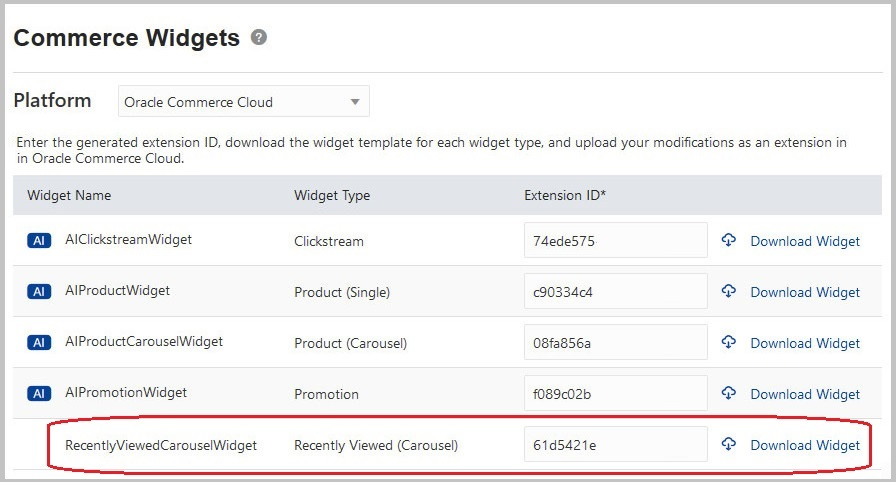
Commerce Widgets Page for Oracle Commerce Cloud
OTHER COMMERCE APPLICATIONS
To create a recently viewed widget for a third-party commerce application, copy the code and use the sample snippets as desired. This screen capture shows the recently viewed widget code to copy for other commerce applications.
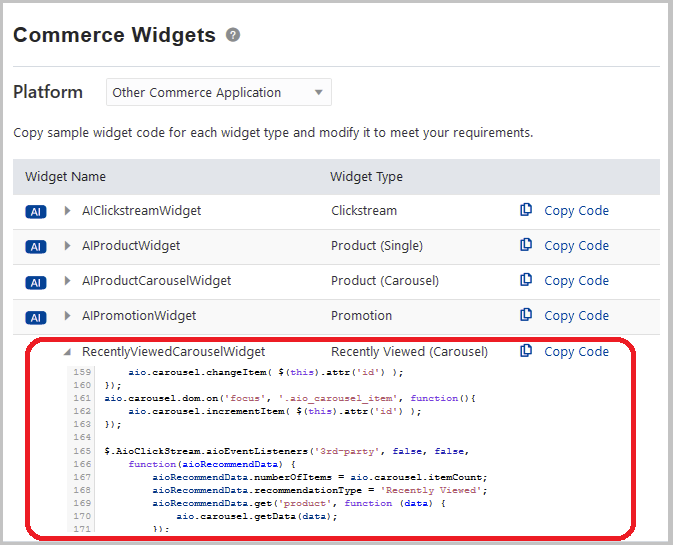
Commerce Widgets Page For Other Commerce Applications
Steps to Enable
You don't need to do anything to enable this feature.
Tips And Considerations
- If you’re using the REST API, refer to the Change History for this update to see how which resources and methods were changed or added for this feature.
Key Resources
Clickstream Tracking for Content Clicks and Page Loads
Track additional event types for content clicks and page loads in Clickstream Status report. Use the new event types in your custom widget code.
- The Any Page Load event is triggered when a consumer arrives on any page with a page ID. This is in addition to the product, category, and home page events.
- The Content Click event is triggered when a consumer clicks a link inside any content area on the commerce site.
This screen capture shows the new event counts on the Clickstream Status report.
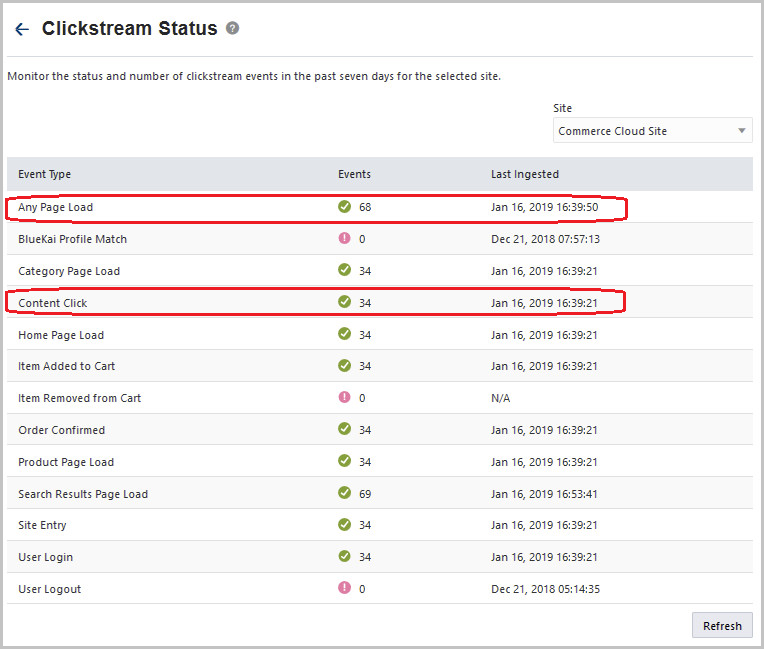
Clickstream Status with Content Click and Page Load Events
Steps to Enable
You don't need to do anything to enable this feature.
Tips And Considerations
- If you’re using the REST API, refer to the Change History for this update to see how which resources and methods were changed or added to support this feature.
Key Resources
Oracle Adaptive Intelligent Apps for Customer Experience provides guidance for salespeople to increase their win rates with data-driven pipeline management and recommendations for the next best sales action. Salespeople benefit from advanced machine-learning techniques to optimize customer engagement.
Data Volume Control for Quicker Ingestion Processing
You can now control the volume of data being ingested from Oracle Engagement Cloud by setting the Data Import Start Date field. By setting a start date, you can exclude old data that may not be useful for machine learning. Excluding old data reduces the data volume and speeds up the ingestion.
The following screen capture shows the Data Import Start Date field in the Add Engagement Cloud Connection dialog box.
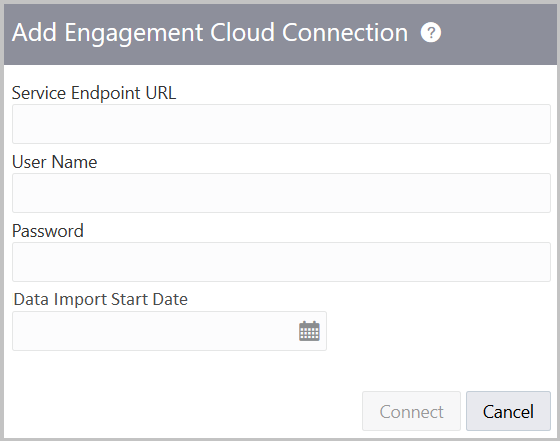
Add Engagement Cloud Connection Dialog Box
Steps to Enable
You don't need to do anything to enable this feature.
Key Resources
Deal Acceleration to Meet Quarter-End Sales Targets
Use deal acceleration and help your salespeople identify opportunities that they can close early to meet their quarter-end sales target when there’s a forecasted shortfall. Set your organization’s financial year end date using supervisory controls. The adaptive intelligence models use this date when they predict which deals your salespeople can close early.
This screenshot shows the Sales Settings page where you set the financial year end date.
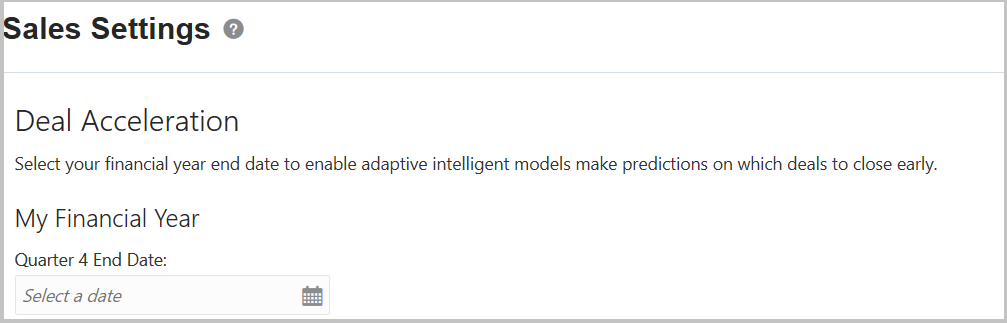
Sales Settings Deal Acceleration Section to Set Financial Year End Date
Steps to Enable
You don't need to do anything to enable this feature.
Tips And Considerations
- Ensure to set your organization’s financial year end date on the Settings page. The REST API for opportunities win probability predictions works only if you have set this up. Setting this up also saves time as the Oracle Virtual Assistant doesn’t have to ask salespeople about their quarter-end dates during a chat interaction.
***IMPORTANT THIS SECTION USED TO BE STEPS TO ENABLE****
For deal acceleration to work, you must configure the REST API for opportunities win probability predictions with your chatbot. Adaptive intelligence models will then fetch updated win probability predictions based on the salespeople's queries.
Key Resources
Monitor the status of data in the application. View the status of data flattening, ingestion, and processing, as shown in this screen capture.
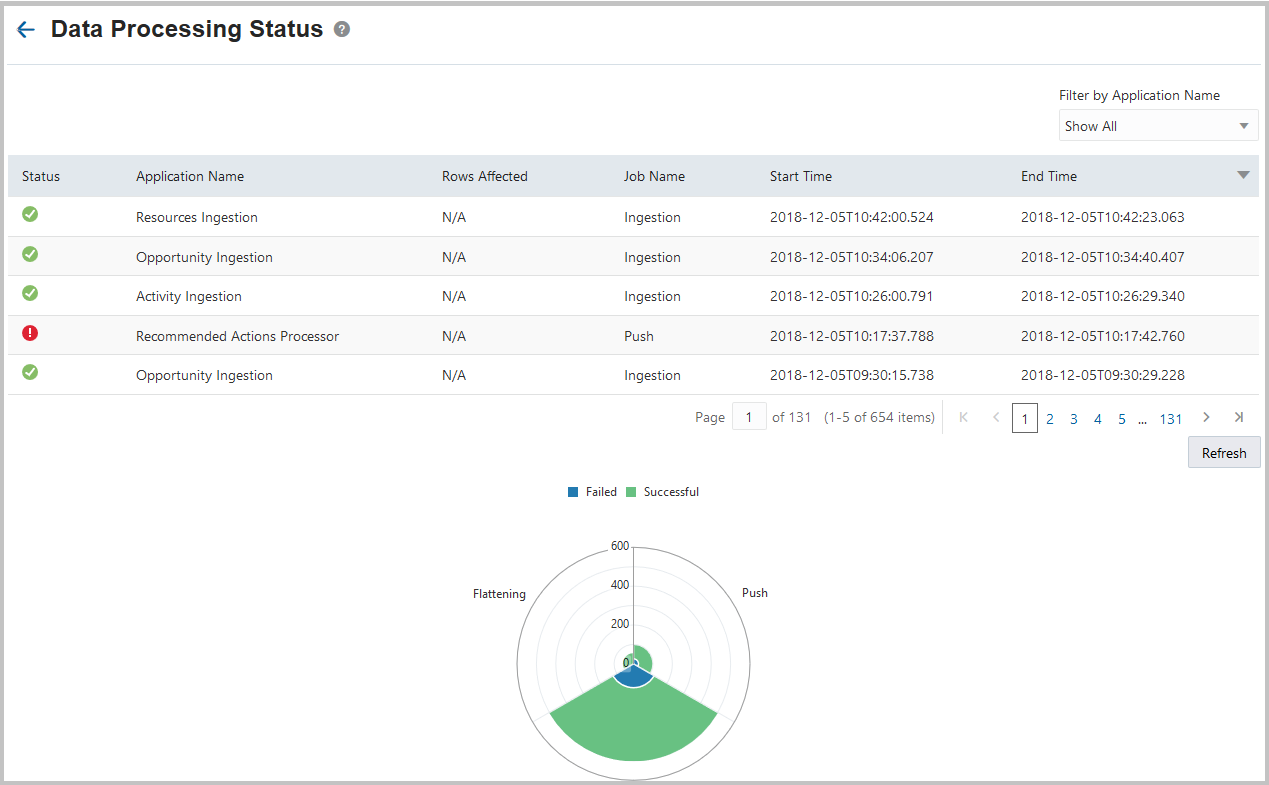
Data Processing Status Page
Steps to Enable
You don't need to do anything to enable this feature.
Key Resources